sdRohan sdRohan

Start11 1.2 Release Feedback Thread

Start11 1.2 Release Feedback Thread

With the Start 1.2 release, we are creating this thread so that users can report any observed issues.  

Obtaining Start11 1.2

Object Desktop members can get the release from within Object Desktop Manager 

Individual purchases (as well as Object Desktop Members) can also be obtained from your account page: https://store.stardock.com/myaccount/products

For guest check-out purchase (no account), from this link: http://www.stardock.com/support/productkeyretrieval

Reporting an issue

Please include the following for anything found:

  • Exact Windows version \ build (winver.exe)
  • Detailed steps to recreate the issue seen
  • Screenshots and videos are very helpful.  Videos can be uploaded to a cloud drive services (GoogleDrive, DropBox, OneDrive, YouTube) and links included in your post.  Images can be directly added.
  • If there are specific apps that the app does not work (well) with, please note what apps and their exact versions.  If any app is not common, a link to a trial version would be appreciated.

Thank you for your interest and any time you put into making Start11 a better product.

Sean Drohan
Stardock Support Manager

285,813 views 197 replies
Reply #102 Top

Yo!


Another bug (?) have found with drag to open functionality, it does work with select set of apps only it seems, specifically, it does not work for Telegram desktop app and Google Chrome in my case, and most probably for some other apps as well. Please check the video I made about it: https://disk.yandex.ru/i/HZNGBZLK_iunSg


Also, drap to open does not work when you try to drag the graphical file saved in Google Chrome to File Explorer - Explorer does not open, while in Windows 10 before it was working like a charm.


Hopefully you'll fix it in the next release :)

Reply #103 Top

And yet another bug :) Was just watching the video in Chrome, after which taskbar and Start menu went completely broken - see screenshot: http://joxi.ru/E2p9wd4SvG8ZjA

The only fix was to restart Explorer. Seems like quite a lot of bugs still present in version 1.2 unfortunately :(

Reply #104 Top

Still major problems with the taskbar. Most of the time it doesn't auto un-hide. When it does there is a significant delay between the mouse over and the appearance of the taskbar. The taskbar is useless when set to appear at the top of the screen.


Reply #105 Top

Quoting zme-ul, reply 66

version 1.2 added Sign-in Options to the Shutdown menu, how do I get rid of it? - haven't found a option in the settings for it, or I'm missing something

Start 11 / ver 1.2 / Windows 10 style


End of zme-ul's quote

Quoting Neil, reply 73

I assume you would rather it did not exist?
End of Neil's quote

I also would like to remove this new "Sign-in options". I don't need it. Maybe you could implement a setting for this? Thanks in advance. :)

Reply #106 Top

Quoting Neil, reply 99


Quoting Markkhk,

Windows 11 Insider Preview 22593.1 (ni_release)


Are you using the new special touch mode taskbar when no keyboard attached? (Setting in Windows taskbar settings)

If so that is a beta/dev channel feature and I am afraid we do not offer official support for those. We will note the issue for further investigation but cannot promise when a resolution will be available.

End of Neil's quote

It seems to be auto hide toolbar that is causing it.  If the toolbar is  hidden swiping up displays the standard W11 start.  Need to tap windows button to display Stardock menu.

Reply #107 Top

Quoting Markkhk, reply 106

It seems to be auto hide toolbar that is causing it.  If the toolbar is  hidden swiping up displays the standard W11 start.  Need to tap windows button to display Stardock menu
End of Markkhk's quote

I can confirm that auto hide does not work on the dev/beta build. Auto hide will need to be turned off to run the beta build properly.

22H2 should release next month unless Microsoft delays. Fixes should come then.

+1 Loading…
Reply #108 Top

Quoting PhoenixRising1, reply 107


Quoting Markkhk,

It seems to be auto hide toolbar that is causing it.  If the toolbar is  hidden swiping up displays the standard W11 start.  Need to tap windows button to display Stardock menu


I can confirm that auto hide does not work on the dev/beta build. Auto hide will need to be turned off to run the beta build properly.

22H2 should release next month unless Microsoft delays. Fixes should come then.

End of PhoenixRising1's quote

Where did you get the idea it was coming next month?

The version is 22H2.  That's second half of 2022 so July onwards would be an expected release window with August/September/October being the most likely window.

Reply #109 Top

Quoting Neil, reply 108

The version is 22H2.  That's second half of 2022 so July onwards would be an expected release window with August/September/October being the most likely window.
End of Neil's quote

Apologies it does appear I did miss read an article

It is stating that 22H2 would be finished by May but then states that the release window is the end of June - September. But other sources is now stating that we should think about fall for the release.

It has been a bit of a learning experience trying to figure out Microsofts strategy in regards to their annual releases.

Reply #110 Top

Quoting PhoenixRising1, reply 109


Quoting Neil Banfield,

The version is 22H2.  That's second half of 2022 so July onwards would be an expected release window with August/September/October being the most likely window.


Apologies it does appear I did miss read an article

It is stating that 22H2 would be finished by May but then states that the release window is the end of June - September. But other sources is now stating that we should think about fall for the release.

I think it is a bit of a learning experience this time around as we figure out how Windows 11 plans to operate. At least it is for myself.

End of PhoenixRising1's quote

I suspect finished means feature finished.  There are still some big things missing from the builds.

It would need to move to release preview channel at some point, perhaps thats Juneish

Reply #111 Top

Start11 Translations

Wanted to make you all aware that with the release of 1.2 (and 1.21 beta), we are considering it 'ready' for translation work.  With that, we are looking for user submissions.  The following thread details how this works:

https://forums.stardock.com/507795/start11-community-translations

The thread details:

  • Where language files are stored
  • How to work with them for translations
  • How to submit them for review

The following is the status of the core languages we support:

Completed

  • en = English (should be used as a base template)
  • en-us = English US 
  • es = Spanish-Spain
    Credit: fjmatad 
  • fr = French (complete)
    Credit: DominiqueFaure

Still needed

  • ru = Russian
  • pr-br = Portuguese- Brazil 
  • kr = Korean 
  • de = German
  • zh-cn = Simplified Chinesse
  • zh-tw = Traditional Chinese

As stated in the translation thread, other languages will be vetted \ accepted \ included, they will just not be considered 'supported'.

If any client wished to take on the task of any of the core languages that are incomplete, please review that thread and post there accordingly.  As I have done for all included submissions, we will compensate (with product - current or future) the client if the submission is used.

Thanks again.

Sean Drohan
Stardock Product Lifecycle Manager

+1 Loading…
Reply #112 Top

Hello Since the update to Start 1.2, the options are a mixture of German (desired language) and English. Please localize the program properly.


Greetings 

Reply #113 Top

Quoting Neil, reply 110

I suspect finished means feature finished. There are still some big things missing from the builds.

It would need to move to release preview channel at some point, perhaps thats Juneish
End of Neil's quote

I think you are correct.

Microsoft did call 22H2 their Fall update in their latest news feed so it seems clear that it will be released after summer at this point. My general opinion is that 22H2 was moved to the Beta channel a couple months early in an attempt to increase the amount of user's testing it. Beta does still feel like DEV right now.

Reply #114 Top

Feature request:

Under Start Menu > Configuration > Quick access shortcuts > Shortcuts list > Add... > Standard locations, the options for Documents, Music, Pictures, and Videos currently point to the respective libraries.

Can you provide an option to instead point directly to the folders in the current user profile (e.g. C:\Users\username\Music instead of Libraries\Music)?

This could be provided one of two ways:

  1. Provide a single radio button that selects between user profile folders and library locations.
  2. Add separate entries in the "Standard locations" list for the user profile folders and library locations.

Reasoning: Regardless of how you have folder views configured, Windows insists on showing a library-specific view when you're viewing a library folder. Even if it's the same logical location, I want the link to open the actual folder in my user profile so it uses my default view configuration.

Note: I'm aware that I can replicate this behavior by adding custom locations - but it doesn't show the proper icons if icon display is enabled.

Reply #115 Top

I like this. Allow me to second it.

Reply #116 Top

I have Hibernate selected for the start button action, but it still shuts down instead and shows the shut down icon.

Also the "show icon on the shutdown button" doesn't seem to do anything. Very vaguely described.


Reply #117 Top

Quoting gnznroses, reply 116

I have Hibernate selected for the start button action, but it still shuts down instead and shows the shut down icon.

Also the "show icon on the shutdown button" doesn't seem to do anything. Very vaguely described.

 
End of gnznroses's quote

Which menu style are you using?

Reply #119 Top

Quoting gnznroses, reply 118

Modern, compact grid

 
End of gnznroses's quote

If you are using compact mode then you cannot change the shutdown button action as there is no default action as the button is too narrow to have two halves.

Clicking it should open up a menu rather than perform any default action.

Reply #120 Top

In addition to my report about drag to open not working correctly for some programs. After some testing I've realized that this functionality is broken if the program to which you are trying to drop the file to open is already open. I.e. if you are trying to open the graphical file in Photoshop by dragging it to its representation in taskbar and Photoshop is minimized (its window is not open) - it will work, and it will work with any program I have tested which is in minimized mode. BUT - if the said Photoshop is open, i.e. its window is on desktop but under some other windows, like Chrome, and therefore it is not an active window - then this functionality by dragging file to its taskbar representation won't work. Please fix it, as it is extremely annoying :)

Reply #121 Top

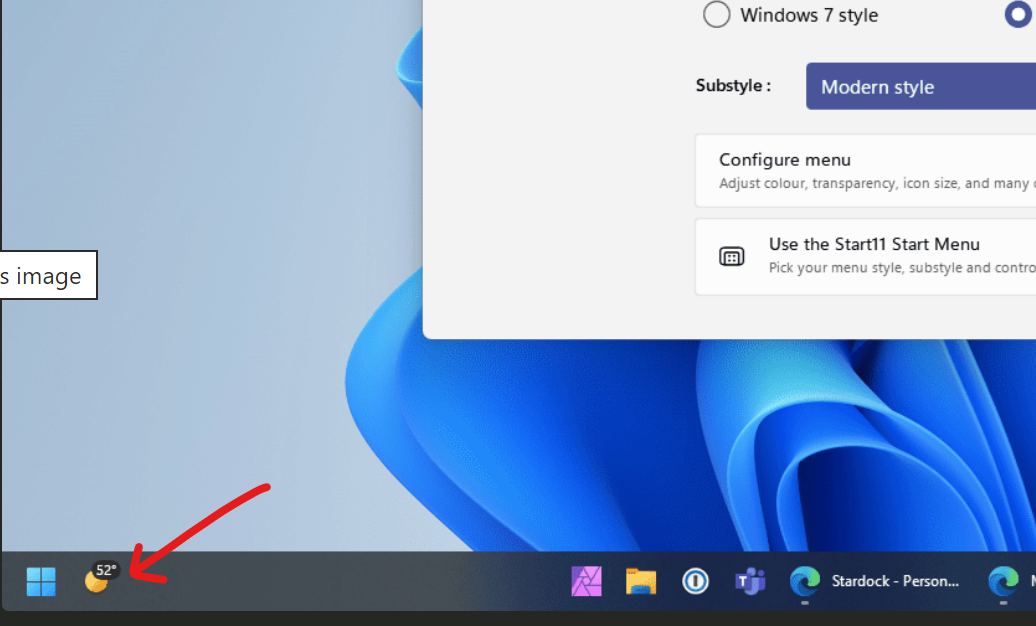
Hi I'm new user of Start 11.  I am running version 1.2 and the it reports it is "up to date".  The screenshots you use to advertise Start 11 clearly show a weather icon with a temperature display.


However mine has weather but does not show the temperature.  If I click the button the side panel opens and of course the weather shows the temperature, however I liked having it on the task bar like I did before installing Start 11.  How can I enable it?


Thanks,


Andy

Reply #122 Top

Quoting a01, reply 121

Hi I'm new user of Start 11.  I am running version 1.2 and the it reports it is "up to date".  The screenshots you use to advertise Start 11 clearly show a weather icon with a temperature display.


However mine has weather but does not show the temperature.  If I click the button the side panel opens and of course the weather shows the temperature, however I liked having it on the task bar like I did before installing Start 11.  How can I enable it?


Thanks,


Andy
End of a01's quote

I am afraid that icon is provided by Windows, we do not control what it shows and it will show the same with or without Start11 installed.

If you are not getting a temperature display then it may be the Microsoft weather feed isn't providing it at your location at the moment for some reason.

Reply #123 Top

Quoting serega_m, reply 120

In addition to my report about drag to open not working correctly for some programs. After some testing I've realized that this functionality is broken if the program to which you are trying to drop the file to open is already open. I.e. if you are trying to open the graphical file in Photoshop by dragging it to its representation in taskbar and Photoshop is minimized (its window is not open) - it will work, and it will work with any program I have tested which is in minimized mode. BUT - if the said Photoshop is open, i.e. its window is on desktop but under some other windows, like Chrome, and therefore it is not an active window - then this functionality by dragging file to its taskbar representation won't work. Please fix it, as it is extremely annoying :)
End of serega_m's quote

THIS!!

Please fix it! I am buying this app only for the drag & drop feature to through attachments into Outlook and yet it's not working unless the window is minimized! Please, please consider this one.

Reply #124 Top

That's strange because before installing Start 11, it did show the temperature although admittedly it was next to the icon in text.

Reply #125 Top

Quoting a01, reply 124

That's strange because before installing Start 11, it did show the temperature although admittedly it was next to the icon in text.
End of a01's quote

It sounds like your start button was centred before and the weather widget on the left of the taskbar.  This will display differently as it is wider.