sdRohan sdRohan

Start11 1.2 Release Feedback Thread

Start11 1.2 Release Feedback Thread

With the Start 1.2 release, we are creating this thread so that users can report any observed issues.  

Obtaining Start11 1.2

Object Desktop members can get the release from within Object Desktop Manager 

Individual purchases (as well as Object Desktop Members) can also be obtained from your account page: https://store.stardock.com/myaccount/products

For guest check-out purchase (no account), from this link: http://www.stardock.com/support/productkeyretrieval

Reporting an issue

Please include the following for anything found:

  • Exact Windows version \ build (winver.exe)
  • Detailed steps to recreate the issue seen
  • Screenshots and videos are very helpful.  Videos can be uploaded to a cloud drive services (GoogleDrive, DropBox, OneDrive, YouTube) and links included in your post.  Images can be directly added.
  • If there are specific apps that the app does not work (well) with, please note what apps and their exact versions.  If any app is not common, a link to a trial version would be appreciated.

Thank you for your interest and any time you put into making Start11 a better product.

Sean Drohan
Stardock Support Manager

285,887 views 197 replies
Reply #151 Top

I posted this in the 1.21 beta feedback thread. Just hoping to gain some traction on the issue observed when changing from a high scaling setting to a lower one, usually observed when docking a mobile device with a high res display to monitors with a lower res display such as when I dock my Surface Pro at my desk with dual 1080p monitors.

Reply #152 Top
Quoting Neil, reply 119


Quoting gnznroses,

Modern, compact grid


If you are using compact mode then you cannot change the shutdown button action as there is no default action as the button is too narrow to have two halves.

Clicking it should open up a menu rather than perform any default action.

End of Neil's quote


It could have a click action while still showing a menu on hover. But, I have two problems:

1. I have to try several times to get the menu to appear on hover. I could swear clicking it did shutdown but I haven't tried again since I keep my programs open all the time.

2. When you access the menu with the keyboard, the currently selected option is highlighted a barely different color than the others. It doesn't use the same highlight/hover color as other menu items


Reply #153 Top

Quoting Neil, reply 150


Quoting jtenglish,


Quoting Neil Banfield,


Quoting jtenglish,


Sometimes I get the standard Win 11 start menu.

Sometimes when clicking the start button, I get the standard Windows 11 menu not Start 11.   If I click the start button several more times, I eventually get the Start 11 menu.   It's intermittent (several times a day) and most of the time it works as expected.  No discernable pattern.

I'm on 1.2 latest but had this same issue pre 1.2
Windows 11 22000.556

I uninstalled and reinstalled it several times but the problem persists.


How many monitors do you have and does this computer have touch or pen input?


Two external monitors.   The laptop has pen & touch but I'm not using.  Laptop lid is shut


Do use elevated apps?

End of Neil's quote
Do you mean apps that run as Admin?  If so, then Microsoft Power Toys.   Also, I believe the Win11 menu only appears when I click the icon with the mouse.  Clicking the icon several times (3 or 4) eventually brings the Start11 menu.   Using the Windows key seems to always give the Start11 menu.

Reply #155 Top

Quoting sebastianyyz6647, reply 154

I have a problem, when I resize the taskbar in two rows, after I put it on top and automatically hide it, the taskbar returns to one row 
End of sebastianyyz6647's quote

Autohide taskbars must follow the following rules.

On Windows 11 release they can be top or bottom but MUST be one row and Start11 will revert to one row if autohide is enabled.

On Windows 11 dev/beta insider builds they must be bottom only and one row.

Reply #157 Top

I'm still having problems with the start button not responding for several seconds after left-clicking on it.  Last night it wouldn't respond for almost 30 seconds.  This is the second laptop I've had this problem with.  Both laptops are Lenovo with AMD chips.  Running Windows 11 on both.  I reverted back to version 1.1 for now.

Reply #158 Top

I upgraded from Start11 v1.1 to v1.2 last weekend.  After the upgrade, Start11 stopped displaying  any icons on the taskbar.  Below is  what I am seeing.

So far, I have tried  the following to try and resolve the issue:

  1. Reinstalled the update and rebooted - Fail
  2. Uninstalled Start11 v1.2 (kept the data files), rebooted, reinstalled Start11 v1.2, rebooted - Fail
  3. Uninstalled Start11 v1.2 (deleted the data files), rebooted, reinstalled Start11 v1.2, rebooted - Fail

What is really strange is that if I click on the Restart Explorer button (see below)  the icons will all appear on the taskbar for about five (5) seconds and then disappear again.

Below are my device specifications:

  • Processor 11th Gen Intel(R) Core(TM) i7-1195G7 @ 2.90GHz   1.80 GHz
  • Installed RAM 12.0 GB (11.8 GB usable)
  • System type 64-bit operating system, x64-based processor


Below are my Windows specifications:

  • Edition Windows 11 Home
  • Version 21H2
  • Installed on ‎01/‎30/‎22
  • OS build 22000.613
  • Experience Windows Feature Experience Pack 1000.22000.613.0


My questions are:

  1. Is this a known issue??  I have been reading the boards and there are allot of similar issues reported, but none that exactly fits mine?
  2. If this is a known issue, has  it been added to your backlog yet, and if so, has it been assigned to a sprint yet?  What is the target release for the fix?
  3. If this is not a known issue, what other information can I provide to help you recreate it?  
  4. Any recommended work arounds  until the issue can be resolved?  (It doesn't have to be perfect.  But if I cannot get the taskbar icons to display at all, I will need to uninstall Start11.

Oh, I do have one ore squirrel question.  I noticed while I was doing the uninstall/installs that I have two (2) licenses for Start11.  Not sure how that happened. I only need one.  What should I do?

Thank you in advance.  I really do like your product when it is working. 


R/Michael


Reply #159 Top

This is an annoyance more than a bug but still...it's not likely "as intended" behavior...

On a two-monitor setup, when clicking on the taskbar icon to open the start menu for the first time in a session, the regular Windows 11 start menu pops up. Clicking on the icon a second time brings up the Start11 menu. Every time after the first during that session, the Start11 comes up normally. Additional points:

  • It only happens on the secondary monitor
  • It only happens when clicking with the mouse. Pressing the Windows key open the Start11 menu as expected.
  • Start11 version is 1.2
Reply #160 Top

Quoting StrFltCmd1, reply 158

I upgraded from Start11 v1.1 to v1.2 last weekend.  After the upgrade, Start11 stopped displaying  any icons on the taskbar.  Below is  what I am seeing.

Reduced 38%
Original 745 x 52


So far, I have tried  the following to try and resolve the issue:


    1. Reinstalled the update and rebooted - Fail


    1. Uninstalled Start11 v1.2 (kept the data files), rebooted, reinstalled Start11 v1.2, rebooted - Fail


    1. Uninstalled Start11 v1.2 (deleted the data files), rebooted, reinstalled Start11 v1.2, rebooted - Fail


What is really strange is that if I click on the Restart Explorer button (see below)  the icons will all appear on the taskbar for about five (5) seconds and then disappear again.

Reduced 32%
Original 881 x 324


Below are my device specifications:


    • Processor 11th Gen Intel(R) Core(TM) i7-1195G7 @ 2.90GHz   1.80 GHz


    • Installed RAM 12.0 GB (11.8 GB usable)


    • System type 64-bit operating system, x64-based processor


Below are my Windows specifications:


    • Edition Windows 11 Home


    • Version 21H2


    • Installed on ‎01/‎30/‎22


    • OS build 22000.613


    • Experience Windows Feature Experience Pack 1000.22000.613.0


My questions are:


    1. Is this a known issue??  I have been reading the boards and there are allot of similar issues reported, but none that exactly fits mine?


    1. If this is a known issue, has  it been added to your backlog yet, and if so, has it been assigned to a sprint yet?  What is the target release for the fix?


    1. If this is not a known issue, what other information can I provide to help you recreate it?  


    1. Any recommended work arounds  until the issue can be resolved?  (It doesn't have to be perfect.  But if I cannot get the taskbar icons to display at all, I will need to uninstall Start11.


Oh, I do have one ore squirrel question.  I noticed while I was doing the uninstall/installs that I have two (2) licenses for Start11.  Not sure how that happened. I only need one.  What should I do?

Thank you in advance.  I really do like your product when it is working. 


R/Michael


End of StrFltCmd1's quote

Do you have more than one monitor and the primary is to the right of a secondary?

And do you have Windows set to only show the taskbar on the primary monitor or are using a tool like DisplayFusion?

If so you need to install the 1.21 beta?

Reply #162 Top

Quoting Neil, reply 160

or are using a tool like DisplayFusion?
End of Neil's quote

Quoting StrFltCmd1, reply 161

Yes, to both of your questions.  
End of StrFltCmd1's quote

Please disable DisplayFusion for tests.

Quoting StrFltCmd1, reply 161

Can you send me a link to the 1.21 beta?
End of StrFltCmd1's quote

https://forums.stardock.com/511466/start11-121-beta-feedback-thread

Sean Drohan
Stardock Product Lifecycle Manager

Reply #163 Top

Quoting serega_m, reply 147

As about Explorer.exe USER and GDI - I would love to provide you this info but I do not understand where to look at. I see no "USER" or "GDI" columns in Details of Task Manager - care to elaborate more or show a screenshot where to look at?
End of serega_m's quote

Reply #164 Top

Quoting sdRohan, reply 163


Quoting serega_m,

As about Explorer.exe USER and GDI - I would love to provide you this info but I do not understand where to look at. I see no "USER" or "GDI" columns in Details of Task Manager - care to elaborate more or show a screenshot where to look at?


End of sdRohan's quote


Got it! Here is the screenshot with those parameters. On Joxi service: http://joxi.ru/EA4ZOkPTXvYyBm

On OneDrive: https://1drv.ms/u/s!AuKeBZj0fTjZg7IsQSGPBaaTYQqVJw?e=ttlQbS


Tell me if you see something abnormal, as this weird behaviour with regular corruption of taskbar, start menu and even desktop icons is regular on my system and I can only fix it by restarting explorer :)

Reply #165 Top

Quoting serega_m, reply 164


Quoting sdRohan,


Quoting serega_m,


As about Explorer.exe USER and GDI - I would love to provide you this info but I do not understand where to look at. I see no "USER" or "GDI" columns in Details of Task Manager - care to elaborate more or show a screenshot where to look at?


Got it! Here is the screenshot with those parameters. On Joxi service: http://joxi.ru/EA4ZOkPTXvYyBm

On OneDrive: https://1drv.ms/u/s!AuKeBZj0fTjZg7IsQSGPBaaTYQqVJw?e=ttlQbS


Tell me if you see something abnormal, as this weird behaviour with regular corruption of taskbar, start menu and even desktop icons is regular on my system and I can only fix it by restarting explorer :)

End of serega_m's quote

Can you then do that again after a few hours so we can compare the numbers please.

Thanks

Reply #166 Top

Quoting Neil, reply 165


Quoting serega_m,


Quoting sdRohan,


Quoting serega_m,


As about Explorer.exe USER and GDI - I would love to provide you this info but I do not understand where to look at. I see no "USER" or "GDI" columns in Details of Task Manager - care to elaborate more or show a screenshot where to look at?


Got it! Here is the screenshot with those parameters. On Joxi service: http://joxi.ru/EA4ZOkPTXvYyBm

On OneDrive: https://1drv.ms/u/s!AuKeBZj0fTjZg7IsQSGPBaaTYQqVJw?e=ttlQbS


Tell me if you see something abnormal, as this weird behaviour with regular corruption of taskbar, start menu and even desktop icons is regular on my system and I can only fix it by restarting explorer :)


Can you then do that again after a few hours so we can compare the numbers please.

Thanks

End of Neil's quote


Ok, my PC went to crash-reboot when I wanted to make a second screen, so here is the second attempt :) This is the screen I made on 21:05:


Joxi - http://joxi.ru/8An9w6eSNoMy92

OneDrive - https://1drv.ms/u/s!AuKeBZj0fTjZg7Ire_j6eTBiZN9jWg?e=PSc9zw


and this is the second screen I made on 0:07, roughly after 3 hours of video editing and doing other stuff:


Joxi - http://joxi.ru/J2baG18IqgnKMm

OneDrive - https://1drv.ms/u/s!AuKeBZj0fTjZg7Ire_j6eTBiZN9jWg?e=Tyt0DF


Shortly after that Start11 restarted itself several times when I was sending YandexDisk links to the videos I made through Explorer->Show More Options context menu - there is some crazy shit going on :)

Reply #167 Top

Quoting serega_m, reply 166


Quoting Neil Banfield,


Quoting serega_m,


Quoting sdRohan,


Quoting serega_m,


As about Explorer.exe USER and GDI - I would love to provide you this info but I do not understand where to look at. I see no "USER" or "GDI" columns in Details of Task Manager - care to elaborate more or show a screenshot where to look at?


Reduced 86%
Original 694 x 499


Got it! Here is the screenshot with those parameters. On Joxi service: http://joxi.ru/EA4ZOkPTXvYyBm

On OneDrive: https://1drv.ms/u/s!AuKeBZj0fTjZg7IsQSGPBaaTYQqVJw?e=ttlQbS


Tell me if you see something abnormal, as this weird behaviour with regular corruption of taskbar, start menu and even desktop icons is regular on my system and I can only fix it by restarting explorer :)


Can you then do that again after a few hours so we can compare the numbers please.

Thanks


Ok, my PC went to crash-reboot when I wanted to make a second screen, so here is the second attempt :) This is the screen I made on 21:05:


Joxi - http://joxi.ru/8An9w6eSNoMy92

OneDrive - https://1drv.ms/u/s!AuKeBZj0fTjZg7Ire_j6eTBiZN9jWg?e=PSc9zw


and this is the second screen I made on 0:07, roughly after 3 hours of video editing and doing other stuff:


Joxi - http://joxi.ru/J2baG18IqgnKMm

OneDrive - https://1drv.ms/u/s!AuKeBZj0fTjZg7Ire_j6eTBiZN9jWg?e=Tyt0DF


Shortly after that Start11 restarted itself several times when I was sending YandexDisk links to the videos I made through Explorer->Show More Options context menu - there is some crazy shit going on :)

End of serega_m's quote

Start11 should have no impact at all on your right clicks.  Are you sure there isn't something else conflicting as explorer crashing doesn't automatically mean Start11 is the cause.

If you open event log (Winkey + R, type eventvwr in the box that appears you will open event viewer.  In that you can view logged events listed in time and date order.  On the tree pick Windows Logs and then Application.  Then you are looking for entries with level "Error" where "source" is application.

They contain things like "Faulting application name: Explorer.EXE, version: 10.0.19041.1645, time stamp: 0x7c06cc0e"

If you can find one with application name "explorer.exe" can you post the text here so we can see what the module the crash is happening is please.

Reply #168 Top

Quoting Neil, reply 167

Start11 should have no impact at all on your right clicks.  Are you sure there isn't something else conflicting as explorer crashing doesn't automatically mean Start11 is the cause.

If you open event log (Winkey + R, type eventvwr in the box that appears you will open event viewer.  In that you can view logged events listed in time and date order.  On the tree pick Windows Logs and then Application.  Then you are looking for entries with level "Error" where "source" is application.

They contain things like "Faulting application name: Explorer.EXE, version: 10.0.19041.1645, time stamp: 0x7c06cc0e"

If you can find one with application name "explorer.exe" can you post the text here so we can see what the module the crash is happening is please.
End of Neil's quote


Here it is:


On Joxi: http://joxi.ru/52aZMk7TlgzXgA

On OneDrive: https://1drv.ms/u/s!AuKeBZj0fTjZg7IvzsY8g7tKBdL6wA?e=5qONjB


Seems like Yandex is the cause, but why I have no idea, cause other files when sharing causes no explorer restart, but those video files do. Crazy :>

Reply #169 Top

Quoting serega_m, reply 168


Quoting Neil Banfield,

Start11 should have no impact at all on your right clicks.  Are you sure there isn't something else conflicting as explorer crashing doesn't automatically mean Start11 is the cause.

If you open event log (Winkey + R, type eventvwr in the box that appears you will open event viewer.  In that you can view logged events listed in time and date order.  On the tree pick Windows Logs and then Application.  Then you are looking for entries with level "Error" where "source" is application.

They contain things like "Faulting application name: Explorer.EXE, version: 10.0.19041.1645, time stamp: 0x7c06cc0e"

If you can find one with application name "explorer.exe" can you post the text here so we can see what the module the crash is happening is please.


Here it is:


On Joxi: http://joxi.ru/52aZMk7TlgzXgA

On OneDrive: https://1drv.ms/u/s!AuKeBZj0fTjZg7IvzsY8g7tKBdL6wA?e=5qONjB


Seems like Yandex is the cause, but why I have no idea, cause other files when sharing causes no explorer restart, but those video files do. Crazy :>

End of serega_m's quote

That certainly strongly suggests yandex is the issue yes.  You may want to check if they have an update for Windows 11.

Reply #170 Top

Quoting Neil, reply 146


Quoting Ryderjj1989,

I am enjoying the enhancements brought by this version, especially with ungrouping buttons. However, I'm gonna post a list of things I think could or should be improved. I am on 22000.x builds of Win11, NOT dev/beta.
      1. Enhanced taskbar moves the Start Button to the left and you can't change this. Because of this, the widgets/weather icon is just an icon. There is no text, temperature, weather conditions, etc. In my opinion, the Start button should be able to stay centered and all the taskbar buttons to the right of it, keeping them all centered.
      1. Rarely I will click the Start Button and the native Win11 Start Menu opens. If I try again, it works fine. Not a huge deal but something that can probably be improved.
      1. This is a big one I've noticed: Shift+Restart does NOT work when using Start11. It hasn't worked in previous versions and doesn't work here. Windows just restarts instead of going to the Recovery Environment. You can easily tell if its going to if it says "Please wait" or "Restarting" when you do Shift+Restart on the Start11 menu. "Please Wait = Recovery Environment". In order for this to work properly, I have to open the native Win11 menu and Shift+Restart from there.
      1. Something to plan for ahead of time: MS is removing the ability to rearrange tray icons unless you individually turn off a bunch of icons then turn them back on in the order you want them (from Settings). This is very tedious. If a future version of Start11's taskbar can allow this functionality again, it will make a lot of people happy.
      1. Lastly, another thing that I personally, and maybe others, would love to see for this enhanced taskbar is seconds in the system clock. With Win11, this registry option that used to work in Win10 stopped working. "ShowSecondsInSystemClock". It would be great if Start11 can bring that back.

Number 1 is a limitation currently due to changes in Dev/Beta builds of Win11.  We didn't want to offer a feature and then take it away so until we have a solution for that we have to enforce the left alignment.

On number 2, do you use elevated apps at all?  Would this be happening when one is foreground?

On number 3, This has been addressed for the next update.  I am unsure how it went missed all this time but thank you for reporting it.

On number 4, Exactly why Microsoft are doing this I don't know.  It may be this reappears in the future as it seems like lack of time to reimplement rather than any other reason.

I cannot promise anything with number 5 as it is a rather niche need.
End of Neil's quote
 
 
1. MS added the temperature on top of the icon itself. Can't see conditions, but at least can see the temperature now which is a nice middle-ground.
 
2. I do use elevated apps but it does not appear to happen then. It is very random from what I can tell and I can't figure out how to reproduce it. If I do, I'll let you know.
 
3. Thanks! Surprised it was missed this whole time too but wanted to mention it.
 
4. Yeah I hope it's not something that stays. It makes a simple process more tedious by turning icons off/on to arrange them.
 
5. I don't know how niche it was. I know if you go and do a search for this setting in Windows 11, there's going to be quite a few people that are surprised/saddened that it doesn't work anymore. I miss having it myself and don't know why MS removed it. They seem to do a lot of things that don't make a lot of sense and don't give any reason. It would be nice if Start11's Enhanced Taskbar could bring this back without having to use other 3rd party programs to do the same thing (ElevenClock).
 
Edit: I don't know why my reply is showing as being quoted when it's AFTER the closing quote tag. Come on forums lol.
Reply #171 Top

When in the Start 11 config screens, if I click where I should be able to turn enhanced taskbar off, nothing happens. "Enhanced" stays on.

What I ended up doing was to uninstall Start 11, including deleting my previous settings. Then I reinstalled Start 11. Everything works OK now, including the Start button, but now I appear to be rolled back to version 1.0. And when I click on "check for updates", I get a message telling me that my version of Start 11 is up to date. What might have happened there?

Reply #173 Top

I just installed Start11 1.2 with the Modern Style menu selected.  I am unable to find an option to allow re-ordering of (non-Metro) items in the All Programs list - the list is always presented alphabetically.  For example, I like to have a folder named Office listed before a folder called Communications.  And within the Office folder, I like to have the Word shortcut listed first, followed by Excel, etc.  I can click/hold on a folder or shortcut and it appears I will be able to move it, but am unable to place anything in a new order.  I am able to do this with Open-Shell, and of course in Windows 7.

Additionally, I stumbled on a HideMetroApps registry value to hide showing the Metro Apps folder in the All Programs (left) list, but am confused why this option is not presented in Start11's configuration UI (or did I just miss it)?

Not being able to re-order the All Programs list is a huge drawback for me.

Reply #174 Top

Quoting Earl319, reply 173

I just installed Start11 1.2 with the Modern Style menu selected.  I am unable to find an option to allow re-ordering of (non-Metro) items in the All Programs list - the list is always presented alphabetically.  For example, I like to have a folder named Office listed before a folder called Communications.  And within the Office folder, I like to have the Word shortcut listed first, followed by Excel, etc.  I can click/hold on a folder or shortcut and it appears I will be able to move it, but am unable to place anything in a new order.  I am able to do this with Open-Shell, and of course in Windows 7.

Additionally, I stumbled on a HideMetroApps registry value to hide showing the Metro Apps folder in the All Programs (left) list, but am confused why this option is not presented in Start11's configuration UI (or did I just miss it)?

Not being able to re-order the All Programs list is a huge drawback for me.
End of Earl319's quote

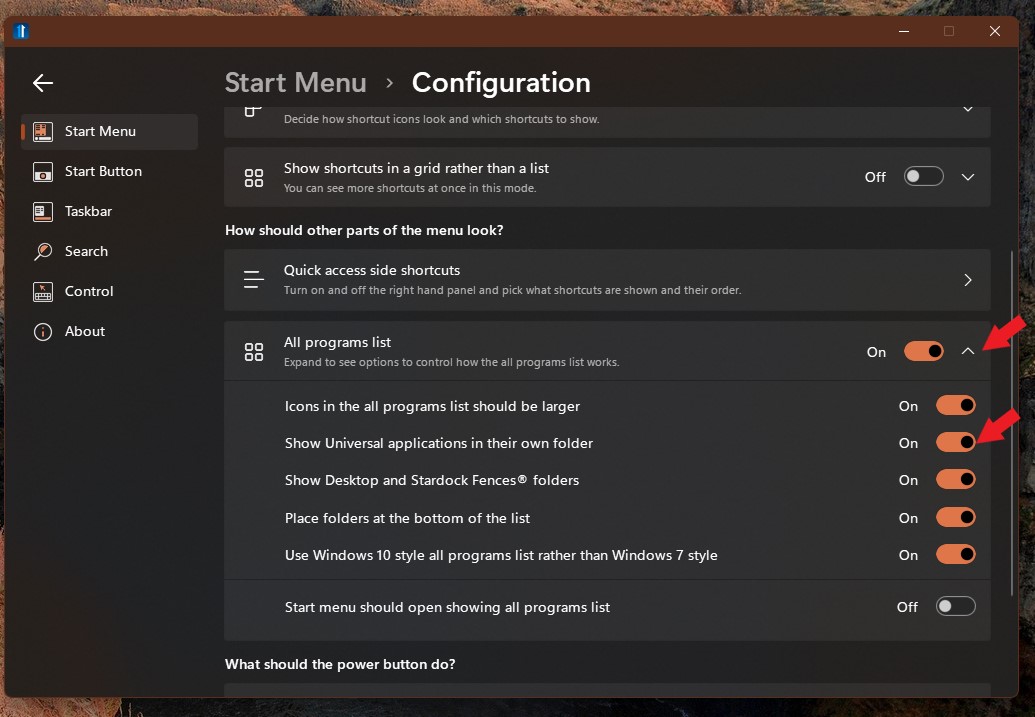
From what I know the All Programs list always only sort by alphabet. As for Universal Application there is no hide but you can set it to all inside one Folder : Refer to screenshot below.

Thank you,

Basj,
Stardock Community Assistant

Reply #175 Top

Thanks Basj!  Just for awareness, here's a screen shot of Open-Shell on Windows 10 (10.0.19044) showing that the All Programs list (folder or shortcuts) does not need to always be alphabetized.  Also, the Universal Applications folder can be hidden from Start11's All Programs list by adding this registry value/data (this should be an option in its settings app):

[HKEY_CURRENT_USER\SOFTWARE\Stardock\Start8\Start8.ini\Start8]
"HideMetroApps"="1"

Non-alphabetized All Programs list