
sdRohan sdRohan

Fences 4 1.0 Release Issue Report Thread

Fences 4 1.0 Release Issue Report Thread

With the Fences 4 1.0 release, we are creating this thread so that users can report any observed issues.  

Obtaining Fences 4

Object Desktop members can get the release from within Object Desktop Manager 

Individual purchases (as well as Object Desktop Members) can also be obtained from your account page: https://store.stardock.com/myaccount/products

For guest check-out purchase (no account), from this link: http://www.stardock.com/support/productkeyretrieval

Reporting an issue

Please include the following for anything found:

  • Exact Windows version \ build (winver.exe)
  • Detailed steps to recreate the issue seen
  • Screenshots and videos are very helpful.  Videos can be uploaded to a cloud drive services (GoogleDrive, DropBox, OneDrive, YouTube) and links included in your post.  Images can be directly added.
  • If there are specific apps that the app does not work (well) with, please note what apps and their exact versions.  If any app is not common, a link to a trial version would be appreciated.

Thank you for your interest and any time you put into making Fences a better product.

Sean Drohan
Stardock Support Manager

332,635 views 101 replies +1 Loading…
Reply #26 Top

Quoting sdRohan, reply 121

I cannot reproduce what you are seeing:

https://cdn.stardock.us/support/uploads/2022-02-07_10-19-35.mp4

How are each of your monitors connected (HDMI, Displayport, Docking Station, etc)?

Sean Drohan
Stardock Support Manager
End of sdRohan's quote

Primary monitor: LG 32UL500-W 32" (3840 x 2160)
Primary connection type: DisplayPort

Secondary monitor: HP 22er 21.5" (1920 x 1080)
Secondary connection type: HDMI

Microsoft Windows Version 21H2 (OS Build 22000.434)

Fences v4

Reply #27 Top

Quoting BrookeRaraAvis, reply 124


Quoting sdRohan,

I cannot reproduce what you are seeing:

https://cdn.stardock.us/support/uploads/2022-02-07_10-19-35.mp4

How are each of your monitors connected (HDMI, Displayport, Docking Station, etc)?

Sean Drohan
Stardock Support Manager


Primary monitor: LG 32UL500-W 32" (3840 x 2160)
Primary connection type: DisplayPort

Secondary monitor: HP 22er 21.5" (1920 x 1080)
Secondary connection type: HDMI

Microsoft Windows Version 21H2 (OS Build 22000.434)

Fences v4

End of BrookeRaraAvis's quote

Are you using DisplayFusion or other monitor management software (NVidia surround would be another).

Sean Drohan
Stardock Support Manager

Reply #28 Top
Quoting sdRohan, reply 125

Are you using DisplayFusion or other monitor management software (NVidia surround would be another).

Sean Drohan
Stardock Support Manager

End of sdRohan's quote

I do not use DisplayFusion & do not use NVIDIA surround. I do use the NVIDIA Studio Driver Version: 511.65 if that makes a difference. I also use PowerToys FancyZones, but deactivated FancyZones and the issue persists.

Reply #29 Top

Quoting BrookeRaraAvis, reply 126


Quoting sdRohan,


Are you using DisplayFusion or other monitor management software (NVidia surround would be another).

Sean Drohan
Stardock Support Manager

I do not use DisplayFusion & do not use NVIDIA surround. I do use the NVIDIA Studio Driver Version: 511.65 if that makes a difference. I also use PowerToys FancyZones, but deactivated FancyZones and the issue persists.

End of BrookeRaraAvis's quote

And if you cleanboot under a new Win admin account?

https://forums.stardock.com/486084/fences-support-faq#cleanboot

Sean Drohan
Stardock Support Manager

Reply #30 Top

Quoting sdRohan, reply 127
And if you cleanboot under a new Win admin account?

https://forums.stardock.com/486084/fences-support-faq#cleanboot

Sean Drohan
Stardock Support Manager
End of sdRohan's quote

Done. :yes:  

  • created new Windows Administrator account named "Stardock", tried same task (alt drag & drop) — issue persists
  • performed clean reboot after disabling services & startup programs (except for Fences) under "Stardock" administrator account, tried same task (alt drag & drop) — issue persists

Fences v4 behaves exactly the same way as shown previously in screen recording even after loading Windows in clean slate.


Reply #31 Top

Hi, I bought Fences 4 recently and noticed an annoying bug overall with translucent background, in Fences 3 (trial) I had not that bug or at least I had not with just 2 monitors.

Then when I added the third monitor (in a L configuration the new one is up over the primary monitor and there is another one on the right of the primary), this bug showed up, the background is not translucent at all in my current monitor configuration as shown in this image: (https://imgur.com/a/LIm7LRy), where all the fences are in monitor 1.

But after one and half day trying to change something I discovered that this depends on monitor config and if I move the monitors in the config like this: (https://imgur.com/a/9FLGEH1), as is shown and I hope it's visible, the translucent background works just fine, how can I fix this without actually moving monitor configuration? (because they are arranged just like the first image shows irl.

I have actually Fences 4.0.0.3 and Windows 11

Reply #32 Top

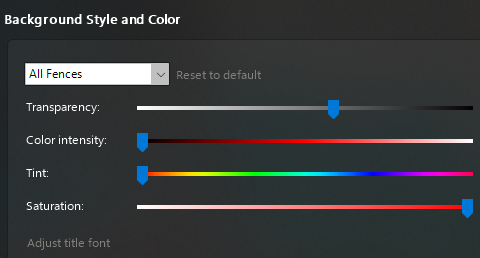
Fences have different (Lighter) background translucence opacity on the right 1/3 than on the left 2/3. (See screenshot #1).

One fence has a different background translucence opacity than all the others, but it is even - has no variation.\(See screenshot #2).

Settings for all Fences are the same, so there should be no variation caused by different settings for a particular fence. (See screenshot #3).

Reply #33 Top

Quoting pw81449, reply 135

Fences have different (Lighter) background translucence opacity on the right 1/3 than on the left 2/3. (See screenshot #1).

One fence has a different background translucence opacity than all the others, but it is even - has no variation.\(See screenshot #2).

Settings for all Fences are the same, so there should be no variation caused by different settings for a particular fence. (See screenshot #3).
End of pw81449's quote

Hello,
Sorry to hear you are having issues. You monitor/s resolution and scaling please.

Thanks
Basj,
Stardock Community Assistant.

Reply #35 Top

Quoting pw81449, reply 137

2560x1440

100%
End of pw81449's quote

Please try purge and reinstall steps as mentioned here: [link]. Just make sure to redownload the latest version from your account. Reboot after the purged. Reinstall, and Reboot again after the installation. Retest it. Report back here.

Thank you,

Basj,
Stardock Community Assistant

Reply #36 Top

I did all of that. No change. Problem remains.

Reply #39 Top

Quoting cbosworth, reply 11

The update moved all my labels to the bottom of my fences. So I tried to move them down a bit, but the only way to get the label to switch back to the top of the portal is to move them an entire icon row lower, so all my fences would sit really low on the page... I don't like the label on the bottom. I suppose I could just remove the label all together, bit I liked them the way they were. Might just go back to 3 and re-do my screen layout. Sigh. 
End of cbosworth's quote

I'm having this same problem. I want the labels to stay at the top. I was happy with Fences 3, but I just updated to Fences 4 because I updated to Windows 11 and I wanted to make sure I was running the best version for compatibility.

Reply #40 Top

After numerous attempts to correct the many problems with this new release, all to no avail, I just want a refund. This software was obviously not well tested before release. I paid for this and I don't like being an alpha tester. Yes, I said "alpha" tester. This release isn't even ready for beta testing. I could live with some of the annoyances but when this thing closes the fences and goes into a continuous loop of error messages that can't be stopped without rebooting the computer that eats up time. Selling my time is how I make my living. How much would Stardock like to buy?

+2 Loading…
Reply #41 Top

Hello all...

I am combing through this thread currently to reduce it to specific issues with this version of Fences.  What will be pruned are things like:

  • Feature requests
  • Language requests
  • Installer \ Object Destkop accessibility
  • Issues that work for most but not a very few (some exceptions will be made)
  • Issues that were reported but resolved later (reboot, reinstall, settings change) in thread

What is left I will be posting results of some internal testing with a report that an internal ticket was created or asking for more information.

Thanks for all the feedback and support thus far.

Sean Drohan
Stardock Support Manager

Reply #42 Top

Quoting luishserpa, reply 8

Hi.

Upgrade to version 4 and I notice something.

The translucent Fances background only works on the 1st screen. On the other 2 screens it doesn't apply this option.

My windows version is Win10 21H1 (19043.1397)

Any solution or this is a known bug?

Best, 

Serpa
End of luishserpa's quote

Quoting mattfresha, reply 15

Found a weird multi-monitor bug where using the translucent Fence background option on a HD screen (1920x 1080) monitor as a 2nd monitor and a 4kTV as my main monitor. I'm on Win 11, NVIDIA GeForce GTX 970

My setup is the HD is monitor 2 but it's on my left (it's a graphics design tablet so why it's not main screen). 

The layout is so that 4K screen is main 1 display, HD 2nd screen is at bottom left extended ( something like 2 1 layout).
Fences displays the translucent effect on the HD screen no problem (glass effect blurring the desktop image), but on the 4k screen the left side is ok top to bottom (so 1920 wide x 2160 left half of screen), while on the right side it's transparent but not blurred. Seems that Fences is using the width of the left most monitor and taking that as the main blur X dimension region on the 4k screen (so not the right hand half of the screen). When I change priority round so 4k screen is desktop 2, and HD as desktop 1, this resolves the issue (until I swap back priority), but then it doesn't because I want taskbars on both displays. Also when I log in to my machine the 4k screen is the one I turn to first, and use the 2nd screen more on occasion that all the time.
Just to make you aware of this

End of mattfresha's quote

I was able to reproduce this somewhat... What was noticed is that a Fence would not be affected by the translucent affect if it was on the main monitor but another fence, on another monitor would. However, if I made the other monitor the ‘Main’ one, both worked…

https://cdn.stardock.us/support/uploads/2022-03-22_12-51-05.mp4

Is this something you can reproduce - that switching what is the main had you with other results?

In any case, I have placed an internal ticket to have it looked at.

Internal Ref: FEN-127

Thanks for the feedback

Sean Drohan
Stardock Support Manager

Reply #43 Top
Quoting BrookeRaraAvis, reply 21

Reporting an issue

    • Microsoft Windows Version 21H2 (OS Build 22000.434)
    • use hotkey "Show Fences (press & hold)" Win + Space
    • peek shows all (ghosted? I don't know what else to call it) fences from all 8 of my desktops stacked on top of one another
    • peek should only show current desktop fences
    • screenshot peeking from Google Chrome browser window
    • screen resolution 3840×2160 if that makes difference scaling @ 150% (recommended)

P.S. that's stardock.com loaded in the browser & you can see ghost fences on top of it

Reduced 44%
Screenshot - Stacked & Ghosted Fences from 8 Desktops on Peek
Original 1889 x 1080
 
End of BrookeRaraAvis's quote
Quoting Kynao, reply 22
Same issue here
End of Kynao's quote
Quoting Das123, reply 23

My usage of Fences is I have multiple monitors and have a number of desktops that I slide between using the middle mouse button or alt-arrows.

I'm finding Fences 4 is reverting to old issues I had years ago which were fixed eventually in version 3 (background color changing to black and requiring a jiggle of the screen to reset). And now I'm getting the residue elements (border shapes etc) from the other desktops that are sitting over the top of the active fences desktop. These block any interaction with the current fences desktop elements (can't middle mouse drag to change desktops or activate icons).

It doesn't happen all the time and I haven't been able to capture this yet - but it is frustrating.

In my Startup task managed Fences is listed twice. Could this be the problem? Should I remove one of these listings?
End of Das123's quote
 
These all appear to describe the same issue(s).  Could anyone one of you provide video of this in action - a shared like to a could drive service to it reply here.  If you can demonstrate the issue, as well as what conditions its fine under (different scaling, etc), all the better.
 
Thanks for the feedback.
 
Sean Drohan
Stardock Support Manager
Reply #44 Top

Quoting BrookeRaraAvis, reply 24

It seems that if I drag & drop (holding alt) somewhere onto the top of the desktop area (among other existing portals), nothing happens — no portal is created at all. If I drag it to the very bottom of the desktop area, a folder portal is created, but not in the spot I dragged it to. Instead the folder portal shows up on the left side of the desktop? It's definitely buggy. 

Reduced 84%
Alt Drag Drop Folder to Create Portal Not Working
Original 995 x 536

This .gif captured nothing happening when I drag and drop (holding alt) onto the top of the desktop area — no folder portal created at all, not even in wrong spot. 

***UPDATE***

Figured it out! It was happening when display was extended to 2nd monitor. So, this only happens when using 2 monitors. Everything works exactly as expected when using only single primary monitor. I figured this out when I deactivated 2nd monitor & all those portals I thought weren't showing up, magically popped into view. So, I had a screen full of portals from all those attempts while testing. Thought nothing was happening, then switched to using only 1 monitor & discovered stacks of identical portals on each of the desktops I was testing on.

End of BrookeRaraAvis's quote

This is much like the one I reproduced earlier:

https://forums.stardock.com/508778/get;3843442

With one monitor as the main, I can reproduce it - with the other, I cannot:

https://cdn.stardock.us/support/uploads/2022-03-22_14-55-17.mp4

In any event, I have placed an internal ticket to have it looked at.

Internal ref: FEN-130

Thank you for the feedback.

Sean Drohan
Stardock Support Manager

Reply #45 Top

Praying to god that you guys plan to work on this further, cause I'm coming across so many problems I didn't have with Fences 3.

Running Win 10 Pro, 19044.1586 21H2.

- With "Roll-Up Fences" enabled, moving an open fences to the top or bottom of the desktop automatically rolls it up. Please add a toggle for this specific behavior.

- Fences at the top or bottom of the desktop have this "bounce"/"raise up" effect when moused over. This makes it impossible to align fences, because that newly added height from the raised effect gets subtracted when it "retracts".

Mouse on:

Mouse off:

Because of this, I can't get rid of these gaps.

- Fences at the top will move their banners to the bottom of the fences. No way of toggling this off. You can see this in my prior screenshot.

I'm honestly surprised at how many bugs and lack of polish F4 has compared to F3. I've been a paid Fences 3 user since June 2016, and just decided to upgrade today. I might have to downgrade seeing all these bugs.

+1 Loading…
Reply #46 Top

Quoting chowdhurysakin, reply 45

- With "Roll-Up Fences" enabled, moving an open fences to the top or bottom of the desktop automatically rolls it up. Please add a toggle for this specific behavior.

- Fences at the top or bottom of the desktop have this "bounce"/"raise up" effect when moused over. This makes it impossible to align fences, because that newly added height from the raised effect gets subtracted when it "retracts".
End of chowdhurysakin's quote

You are listing these as feature requests, yes?

Sean Drohan
Stardock Support Manager

Reply #47 Top

Below is an issue I've had with every version of Fences and it drives me nuts. I have a laptop and a 2nd screen above the laptop. I've set my fences on the second screen but after a couple of days they migrate back to the laptop screen. Is there some way to fix this?

option 1: Fence portals are recorded per screen and if that screen is not plugged in then the fences are not rendered. 

option 2: fence portals migrate to main screen if the second screen is not plugged in but the moment the second screen is plugged in they move back to where they were before.

option 1 would be better as I could then set up different fences on both screens and if the second screen is disconnected then we don't get a mess of overlapping fence portals


Reply #48 Top

- With "Roll-Up Fences" enabled, moving an open fences to the top or bottom of the desktop automatically rolls it up. Please add a toggle for this specific behavior.

- Fences at the top or bottom of the desktop have this "bounce"/"raise up" effect when moused over. This makes it impossible to align fences, because that newly added height from the raised effect gets subtracted when it "retracts".

I'm with you re rollups and bounces of the fences. Makes it really hard to match up Fences

.

Reply #49 Top

Hi sdRohan

Here's my video of the problem

https://drive.google.com/file/d/1ss4JHVKS_MxC8-L2_-aNzVPE9_dHQSMH/view?usp=sharing

Now you see my full desktop setup on Windows 11. The 4k screen is on the right and is my primary monitor. The smaller HD screen is monitor 2, and on the left.

You can see that on the 4k screen exactly half (left half) is using the translucent effect, but on the right it's being ignored. I'm wondering if Fences is using the screen resolution from the left most and not realising that the primary screen is on the right, so uses the left most screen as the 'master' resolution reference? Seems weird to do half way vertically split the 4k screen since that is the 'master' screen. And yes if I swapped main screens over (HD = main, 4k = secondary extended) and leave the layout the same then the translucent effect works as it should. 

What I'm saying is regardless of layout, the Fences translucency should work everywhere regardless but something is 'forcing' the 4K to trans background on the left half only.

Reply #50 Top

I upgraded from version 3.x to version 4.0.0.3 and now I can't add shortcuts to my fences.

If I drag a shortcut over one of the fences, it gets placed on the desktop behind the fence.

+1 Loading…