Fences 4 1.0 Release Issue Report Thread

With the Fences 4 1.0 release, we are creating this thread so that users can report any observed issues.  

Obtaining Fences 4

Object Desktop members can get the release from within Object Desktop Manager 

Individual purchases (as well as Object Desktop Members) can also be obtained from your account page: https://store.stardock.com/myaccount/products

For guest check-out purchase (no account), from this link: http://www.stardock.com/support/productkeyretrieval

Reporting an issue

Please include the following for anything found:

  • Exact Windows version \ build (winver.exe)
  • Detailed steps to recreate the issue seen
  • Screenshots and videos are very helpful.  Videos can be uploaded to a cloud drive services (GoogleDrive, DropBox, OneDrive, YouTube) and links included in your post.  Images can be directly added.
  • If there are specific apps that the app does not work (well) with, please note what apps and their exact versions.  If any app is not common, a link to a trial version would be appreciated.

Thank you for your interest and any time you put into making Fences a better product.

Sean Drohan
Stardock Support Manager

332,443 views 101 replies +1 Loading…
Reply #1 Top

Fences 4 1.0 Changlog

  • Updated Fences 3.9.8.56 to Fences 1.0
Reply #2 Top

Known issues

  • TBD
Reply #4 Top

After creating a folder portal and start to use it, Fences crashes and there is no way to get it to work again. I can't restore a snapshot either, since I can't enable the configuration screen.

Edit: Managed to get to the restore snapshot screen after another purge, but restoring any snapshot just keep Fences crashing.

Reply #5 Top

Quoting JanOscar, reply 28

After creating a folder portal and start to use it, Fences crashes and there is no way to get it to work again. I can't restore a snapshot either, since I can't enable the configuration screen.


Edit: Managed to get to the restore snapshot screen after another purge, but restoring any snapshot just keep Fences crashing.

Hey Jan, thanks for the report.

If when you are able to get into the Fences UI, enable 'Advanced Crash Reporting' here:

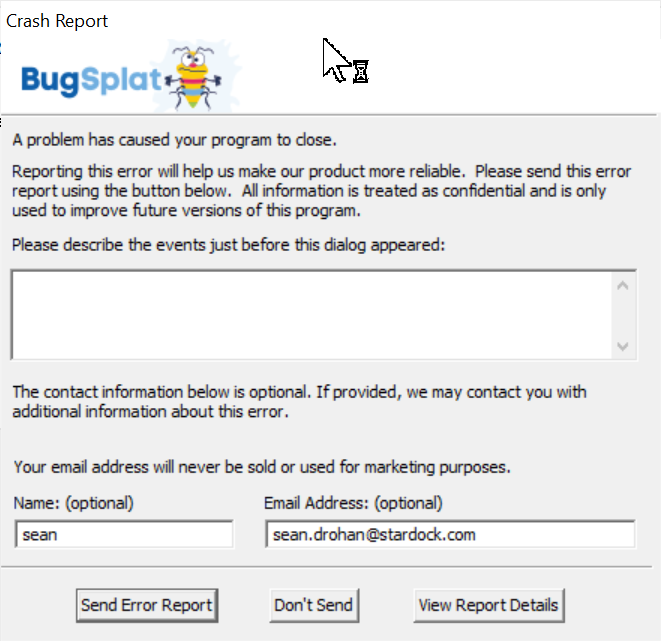
Then recreate the conditions for the crash and have it do so.  You should get a BugSplat UI:

Please fill it out and let us know when you have, please.

Again, thanks for the feedback and effort.

Sean Drohan
Stardock Support Manager

Reply #6 Top

Unfortunately, I do not get a BugSplat UI, but I found out that it only happens to one of my internal disks, a Seagate 4TB : Link The contents of that disk is mainly music (mp3/flac/wave/aac/m4a media files).

I had the configuration screen open while testing and it did not crash, so I was able to restore pre-install snapshot and test many times. No BugSplat UI whatsoever.

My downloaded (just now) version of Fences is 4.0.0.3 on Windows Home 21H2 19044.1387

Reply #7 Top

Hi.

Upgrade to version 4 and I notice something.

The translucent Fances background only works on the 1st screen. On the other 2 screens it doesn't apply this option.

My windows version is Win10 21H1 (19043.1397)

Any solution or this is a known bug?

Best, 

Serpa

Reply #8 Top

I installed Fences 4 on a computer running Windows 10 Pro Version 21H1.  From the beginning hotkeys have been disabled (e.g., I can't use WIN + Spacebar to Peek).  After trying hotkey combinations for a while, I get the following error message pop-up:

"The keyboard extension for Fences does not appear to be loaded..."

Looking in Task Scheduler, I see that for "StardockFencesHotkeySupport" the last logged event is "Success."

I tried restarting Windows and that didn't work.  I tried reinstalling and that didn't work either.

Reply #9 Top

Hello,

My windows release => Link 

My Fences release => Link 

I defined for my example 2 desktop pages and defined fences in both

My screen without fences => Link 

Same screen with hotkeys Win + CTRL + Space => Link

One the upper left side, we see 2 transparent zones, they correspond to the 2 fences of the other desktop page, this behaviour is disturbing, confusing, unelegant, i really hope it's a bug and it simply hide screen content we would like to see.

Regards

Reply #11 Top

Quoting Kynao, reply 48

Hello,

My windows release => Link 

My Fences release => Link 

I defined for my example 2 desktop pages and defined fences in both 

My screen without fences => Link 

Same screen with hotkeys Win + CTRL + Space => Link

One the upper left side, we see 2 transparent zones, they correspond to the 2 fences of the other desktop page, this behaviour is disturbing, confusing, unelegant, i really hope it's a bug and it simply hide screen content we would like to see. 

Regards

Quoting arville27, reply 49

I'm experiencing the same issue as Kynao

This is my current setup
- Windows & Fences Version

- Bug - Google Drive

Unless I am not doing something you are, I cant seem to reproduce this:

https://cdn.stardock.us/support/uploads/2021-12-13_10-29-11.mp4

Let me know how best to see it and thanks for the report.

Sean Drohan
Stardock Support Manager

Reply #12 Top

Quoting sdRohan, reply 54


Unless I am not doing something you are, I cant seem to reproduce this:

https://cdn.stardock.us/support/uploads/2021-12-13_10-29-11.mp4

Let me know how best to see it and thanks for the report.

Sean Drohan
Stardock Support Manager
 

Hi,

Thanks for testing that.

How is going your same test under windows 10 ?

Reply #13 Top

I have a few bugs to report, they all involve having multiple pages created in Fences 4

1. The starting page is random when the pc starts up. It has alternated 3 times now between the leftmost fence page and the middle page. I have 3 pages in total. I have a certain setup I want at as my main page.

2. Sometimes there is a residual animation effect that sticks during changing pages with the last drawer / fence that was opened and is present until the drawer fence is hovered over in a correct way. This residual effect is only seen while changing pages.

3. I can not change pages at all while using windows peek


Reply #14 Top

In Windows 11 this is the location of configure Fences. But windows 10 configure Fences outside. But the dash it's still there. This makes the context menu ugly

Reply #15 Top

Found a weird multi-monitor bug where using the translucent Fence background option on a HD screen (1920x 1080) monitor as a 2nd monitor and a 4kTV as my main monitor. I'm on Win 11, NVIDIA GeForce GTX 970

My setup is the HD is monitor 2 but it's on my left (it's a graphics design tablet so why it's not main screen). 

The layout is so that 4K screen is main 1 display, HD 2nd screen is at bottom left extended ( something like 2 1 layout).
Fences displays the translucent effect on the HD screen no problem (glass effect blurring the desktop image), but on the 4k screen the left side is ok top to bottom (so 1920 wide x 2160 left half of screen), while on the right side it's transparent but not blurred. Seems that Fences is using the width of the left most monitor and taking that as the main blur X dimension region on the 4k screen (so not the right hand half of the screen). When I change priority round so 4k screen is desktop 2, and HD as desktop 1, this resolves the issue (until I swap back priority), but then it doesn't because I want taskbars on both displays. Also when I log in to my machine the 4k screen is the one I turn to first, and use the 2nd screen more on occasion that all the time.

Just to make you aware of this

Reply #16 Top

Has anyone gotten "Peak" to work so that a Fence will move in front of an open window (on Windows 11)?

I'm running Fences 4.0.0.3 on Windows 11 Home; ver 10.0.22000 Build 22000. I've tried Win-Space, Win-Cntl-Space, Win-D, and Win-Shift-D.

Only Win-D works the way I understand it should. I tried the hotkeys with both Fences rolled up and not rolled up.

The Fence is still behind the open window(s)

Reply #17 Top

Fences 4.0.0.3 - Windows 11 Pro build 22000.376

Aside from the issue that I have had for many years, across many versions of Fences and Windows, that no one will acknowledge no matter how many times I post about it, where I randomly can not drag and drop icons between different Fences without first dropping the icon on the general desktop/outside any fence...

I am now having a different drag and drop issue that has only just started(or I have only now just noticed). Randomly, if I try and drag something on the desktop onto the Recycling bin icon, instead of the item going in the bin, it is instead launching the application whose icon is in the same position as the Recycling bin on a different Fences page.

Specifically, my Recycling bin is in the 4th spot to the right of the top left of the screen. On the second page I have Fences with all of my games, and Tetris Effect is in that 4th spot to the right from the top left. So trying to drag and drop a file onto the Recycling bin while on the main page, will instead launch Tetris Effect. If I move a different program icon to where Tetris is, then trying to drop on the Bin will launch that program instead. I tried it a few times, and it kept happening. I came to the forums to type this post, tried it again and it was still doing it. Then, while typing this, I went to do it one more time, to see if I noticed anything else happening so I could include any other details, and now it's not doing it, and I can drop icons onto the bin and they get removed as they should.

Reply #18 Top

Quoting crocos13, reply 83

I have a problem refreshing the screen and icons after rolling fences. Windows 11 x64 Home

expanded:


collapsed:


This effect occurs at 3840x2400 resolution, for 1980x1200 resolution it works fine


Reply #19 Top

Quoting crocos13, reply 89

This effect occurs at 3840x2400 resolution, for 1980x1200 resolution it works fine

Hello,
Sorry to hear you are having issues. And the 3840x2400 is on a 4K monitor, yes? And it is set at what scaling? 100%,125%,150% etc.

Thanks
Basj,
Stardock Community Assistant.

Reply #20 Top

Quoting basj, reply 90


Quoting crocos13,

This effect occurs at 3840x2400 resolution, for 1980x1200 resolution it works fine


Hello,
Sorry to hear you are having issues. And the 3840x2400 is on a 4K monitor, yes? And it is set at what scaling? 100%,125%,150% etc.

Thanks
Basj,
Stardock Community Assistant.

Yes, this is 4K monitor in laptop, scaling set 250%(recommended). For scaling 150% and 200% is ok

Reply #21 Top

Reporting an issue

  • Microsoft Windows Version 21H2 (OS Build 22000.434)
  • use hotkey "Show Fences (press & hold)" Win + Space
  • peek shows all (ghosted? I don't know what else to call it) fences from all 8 of my desktops stacked on top of one another
  • peek should only show current desktop fences
  • screenshot peeking from Google Chrome browser window
  • screen resolution 3840×2160 if that makes difference scaling @ 150% (recommended)

P.S. that's stardock.com loaded in the browser & you can see ghost fences on top of it

Screenshot - Stacked & Ghosted Fences from 8 Desktops on Peek

Reply #22 Top

Quoting BrookeRaraAvis, reply 92

Reporting an issue


P.S. that's stardock.com loaded in the browser & you can see ghost fences on top of it

Reduced 44%
Screenshot - Stacked & Ghosted Fences from 8 Desktops on Peek
Original 1889 x 1080


Same issue here

Reply #23 Top

My usage of Fences is I have multiple monitors and have a number of desktops that I slide between using the middle mouse button or alt-arrows.

I'm finding Fences 4 is reverting to old issues I had years ago which were fixed eventually in version 3 (background color changing to black and requiring a jiggle of the screen to reset). And now I'm getting the residue elements (border shapes etc) from the other desktops that are sitting over the top of the active fences desktop. These block any interaction with the current fences desktop elements (can't middle mouse drag to change desktops or activate icons).

It doesn't happen all the time and I haven't been able to capture this yet - but it is frustrating.

In my Startup task managed Fences is listed twice. Could this be the problem? Should I remove one of these listings?

Reply #24 Top

It seems that if I drag & drop (holding alt) somewhere onto the top of the desktop area (among other existing portals), nothing happens — no portal is created at all. If I drag it to the very bottom of the desktop area, a folder portal is created, but not in the spot I dragged it to. Instead the folder portal shows up on the left side of the desktop? It's definitely buggy.

 Alt Drag Drop Folder to Create Portal Not Working

This .gif captured nothing happening when I drag and drop (holding alt) onto the top of the desktop area — no folder portal created at all, not even in wrong spot.


***UPDATE***

Figured it out! It was happening when display was extended to 2nd monitor. So, this only happens when using 2 monitors. Everything works exactly as expected when using only single primary monitor. I figured this out when I deactivated 2nd monitor & all those portals I thought weren't showing up, magically popped into view. So, I had a screen full of portals from all those attempts while testing. Thought nothing was happening, then switched to using only 1 monitor & discovered stacks of identical portals on each of the desktops I was testing on.

Reply #25 Top

I've been running Fences 4 since beta on my main PC, I just turned on my notebook for the first time in a while and upgraded Fences to 4 after uninstalling the previous version.  Somehow after upgrading I'm getting icons from each machine on the other in the designated "new icons go here" folders on each.  Zero clue what's going on or how the two machines got connected via Fences.  I'm running OD so it's the same account used for both but beyond that I don't know how this might have happened or what's going on.