Editing Skin FOnts In Skin Studio Help

HI.


Thanks for help in advance.

I hate to admit how much time I have spent trying to understand how to change font styles in Skin Studio.

It just seems to make no sense....boggled.

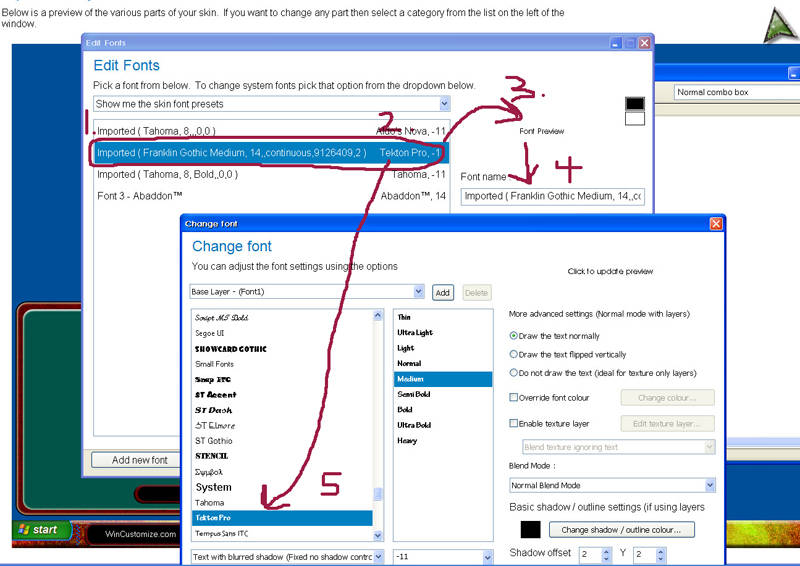
Well, here is a screenie w/ an example of the problem.


1.and 2. I change a font style to "Tekton Pro" from Franklin Gothic

3. Note that the "Font Preview" displays neither Tekton or Franklin Gothic

4. Font name continues to read as Franklin Gothic

5. But -when entering "Change Font" the the font selected is Tekton Pro.

When changes are applied to a skin I am working on, the selected font does not display.

Really confusing to this mutant. Any clarification or tutorial resource would be appreciated.
 

2,127 views 4 replies
Reply #1 Top

Me too. It was much easier to edit EVERYTHING in SkinStudio 5.

Reply #2 Top

Looks like everything on there is correct except the font preview (not sure if that ever changed, never paid any attention to it) and the label you have in #4.

To fix the label in #4, just change it in the box there manually to say whatever you like. Once you do that, it will change what it says in #2.;)

Reply #3 Top

Xiandi is correct too.


the "Font name" on that first window is a label only, an name you add to the font to help you to point the skins sections,

like, "Font name: buttons pressed" so you can easily set all your buttons to that font instead of look for the real font name only,

the label will be helpful because if you have like Arial  for normal states, Arial with shadow for hover state, in the sections the fonts will all be called Arial without a label.

Reply #4 Top

You might want to check in Windowblinds (not Skin Studio), if under the Fonts tab (on the bottom), that you don't have any font over-riding the skin-defined fonts.  I spent almost a week tearing my hair out on why my fonts wouldn't change, only to discover someone THAT thing was turned on.
