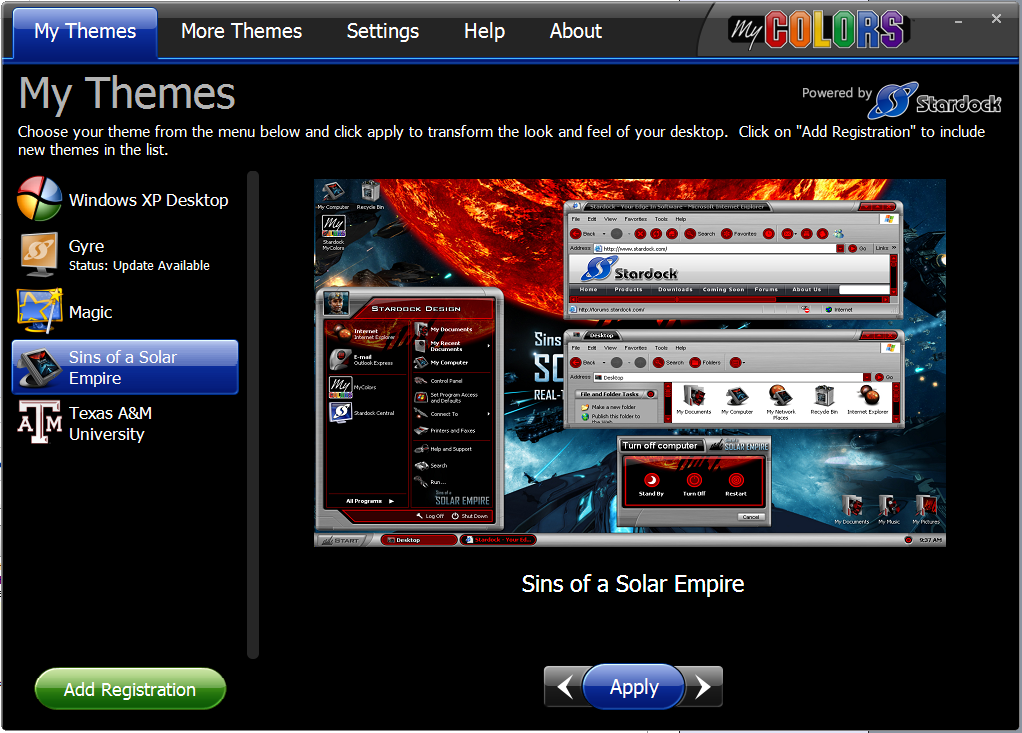
MyColors is garb, I am so mad

sd please pay attention to this, maybe I will get results

Some of you may know a few months back I purchased 2 MyColors themes (corvette & another one which escapes me right now) The MyColors thememanger is garbage (it was then) and new one is even worse, and doesn't work right, it doesn't download, hangs and goes no where. I had found a resolve to that. Use the FREE ThemeManager. It works perfectly.

Fast forward to yesterday.

So MyColors was revamped and I figured possibly improved, I found out I was wrong. Yesterday I bought 4 themes and was forced to dl the supposed new MyColors ThemeManager which is far worse than the last one.

It ruined my PC so bad I had to restore and lost many files.

I have sent SD 2 emails and opened a ticket. No reply yet and I expect after spending $80 I would get one first thing this morning. It is now noontime.

SD,

Please send me a link to download the themes I purchased yesterday.
 
Your new MyColors ThemeManager does NOT work, it hangs and does not download themes and has screwed up my PC. I had to run backup and lost files because of this. So much for your mycolors 2.0 update. It's no good.
 
I need either links to the 4 themes (zip or rar) or a download link for the themes of, University of Florida, University of Miami, Boston Bruins Desktop, and the Florida Panthers.
 
The SD 'free' theme manger works great, not your mycolors manager garbage, I cannot import them through mycolors.
 
It is not my PC either, I have fairly new hp with duo and plenty of ram.
 
Please resolve this asap.

89,329 views 117 replies
Reply #1 Top
Denise: The support queue is answered in the order queries come in. 
Reply #2 Top
ok I see, sorry, I am just spitting mad right now. They must have allot of tech support probelmsgoing. I will wait my turn.
Reply #3 Top
Does SD corporate take the time to monitor this site, or do all they care about is raking in sales?

I just got a support ticket reply resending me the same stupid mycolors ThemeManager to import the themes with as before. It doesn't work.

My reply:

NO, you are resending me MyColors thememanager to import them with. IT DOESN'T work, for me, do you understand?

I need each theme already unpacked in a zip or rar folder (or in one big zip file with separate folders for each theme inside) and sent to me so I can use the FREE thememanager 2007 to import them with. The FREE thememanager works.
Reply #4 Top
I believe the MyColor suites no longer work with the old TM. I believe they are now encrypted (saw something related in another post) You will need to work with support to fix your MyColor issues.

Perhaps support misunderstood your problem; perhaps you were unclear.

These forums are for community support and the support team and developers pop in as they can.  Please reply to your last email from support and paste this URL in it so they will know to reference it.
Reply #5 Top
;)
I FEEL Your Pain. I purchased My Colors SINS OF A SOLAR EMPIRE DESKTOP On 2\16\08. I got the
same Results. I'm sure Stardock will Straighten out the Problem('s) with The my colors software. I to wish they would go back to the Older version or eliminate it all together. In
the mean time try to hang in there,like I am ;)
Reply #6 Top
OK here is the latest - sorry people.

Today I received an answer asking me to uninstall the current mycolors themmanager and install the new one which is a smaller file size, 91MB. GUESS what? Just as bad, it will NOT import any themes and hangs. I had to uninstall it and send SD a reply as follows:
-----
The issue has NOT been corrected. I did a fresh install of mycolors thememanager and it hangs and will NOT import ANY of my themes and screws up my PC. Unistalling it is a virtual nightmare.

Will you PLEASE follow my instructions and send me my 4 paid for themes zipped so I can just unzip them and install them via FREE theme manager which works.

If you cannot do this within the next 24 hours I will be seeking a credit for this purchase as I cannot download the themes using your awful mycolors manager product.

What does it take to get you people to understand?
-----
Now tell me forum people can SD understand plain English. If they would just send me the themes zipped I can import them using FREE thememanager.
Reply #7 Top
also there is NOTHING in the actual theme itself that's encrypted (though they would like to give the impression there is, as mycolors asks for a serial number,..... NO encryption) This is how they want to deliver the theme to us, thus asking for the SN.

All they have to do is give us a download link for the zipped theme and it can easily be unzipped and imported via FREE thememanager.

FREE thememanager works FREE thememanager works FREE thememanager works FREE thememanager works FREE thememanager works FREE thememanager works FREE thememanager works!! GET IT sd?
Reply #8 Top
also there is NOTHING in the actual theme itself that's encrypted (though they would like to give the impression there is, as mycolors asks for a serial number,..... NO encryption) This is how they want to deliver the theme to us, thus asking for the SN.
End of quote


Yes there is, take a look at all the images (open the .MyColors up with winrar/winzip) and you'll see what he means.

Oh and.. chill out buddy, you think your the only one pissed off with something? I'm having to put up with losing 1gb of ram to use x86 so I can use a theme I purchased.
Reply #9 Top
These forums are for community support and the support team and developers pop in as they can. Please reply to your last email from support and paste this URL in it so they will know to reference it.
End of quote

I'm not quite sure why you are expressing your frustration here in the 'community' forum. If you are not satisfied with Stardock support then I would suggest you contact sales@stardock.com and request a refund.

Community members do not have the files to send to you. I (we) hope that you find a satisfactory resolution to this problem.
Reply #10 Top
I'm not quite sure why you are expressing your frustration here in the 'community' forum. If you are not satisfied with Stardock support then I would suggest you contact sales@stardock.com and request a refund.Community members do not have the files to send to you. I (we) hope that you find a satisfactory resolution to this problem.
End of quote
Wise words.  :)
Reply #11 Top

This forum post is in Stardock Support->ThinkDesk which makes it much harder to monitor for MyColors.

I'll forward your issues to the right people.

MyColors, however, ONLY runs MyColors themes.  You can't "import" suites from Theme Manager or whatever into it.

Another thing to bear in mind when you say "it's not my PC, I have a new one" that implies that everyone would have the problem you have which clearly isn't the case. 

I'll see what we can do.  Thanks for your patience.

Reply #12 Top
First I'm not a buddy, implying I'm male, I'm not.

Second, ast. is right about the images (pixalated) which is easily bypassed/fixed then imported via free theme manager (I can't open mycolors at all by the way) and hankers is right, I shouldn't be expressing my anger here, I am just so frustrated. I should be calling sd, which I will do.
Reply #13 Top

OK here is the latest - sorry people.Today I received an answer asking me to uninstall the current mycolors themmanager and install the new one which is a smaller file size, 91MB. GUESS what? Just as bad, it will NOT import any themes and hangs. I had to uninstall it and send SD a reply as follows:-----The issue has NOT been corrected. I did a fresh install of mycolors thememanager and it hangs and will NOT import ANY of my themes and screws up my PC. Unistalling it is a virtual nightmare.Will you PLEASE follow my instructions and send me my 4 paid for themes zipped so I can just unzip them and install them via FREE theme manager which works.If you cannot do this within the next 24 hours I will be seeking a credit for this purchase as I cannot download the themes using your awful mycolors manager product.What does it take to get you people to understand?
End of quote

I think there's a misunderstanding here:

Theme Manager, the free program, applies .suite files. 

MyColors is a specialized program that applies .MyColors files. It doesn't work with .suite files.

What you need to do is this:

1) Install MyColors

2) Click the "add registration" button and paste in the serial #s you have received for those themes you have. If you don't have those serial #s handy you can go here: https://www.stardock.com/support/ and type in yoru email address and it will email you those serial #s.

That's it.


Reply #14 Top
Second, ast. is right about the images (pixalated) which is easily bypassed/fixed then imported via free theme manager (I can't open mycolors at all by the way) and hankers is right, I shouldn't be expressing my anger here, I am just so frustrated. I should be calling sd, which I will do.
End of quote


Mind explaining how you've fixed the image problem? I have no idea what your doing, and I would really enjoy using this theme with the 1gb of memory that x86 fails to use.
Reply #15 Top

You shouldn't be using ThemeManager (the non-MyColors one) for MyColors themes.

MyColors themes are encrypted (just not in the way people are thinking, the files are there but the images are encrypted).

Once you apply a MyColors theme once, the various files are extracted to the sub-component directories (WindowBlinds, IconPackager, etc).

From then on, you can use those skins within WindowBlinds as long as you are running WindowBlinds 6.02 or later.

Reply #16 Top
Thats all fine and dandy, but until a 64 bit version comes out its useless to me....
Now im stuck on 32 bit with less memory, but hey, i can still enjoy the theme! :NOTSURE: 
Reply #17 Top
Once you apply a MyColors theme once, the various files are extracted to the sub-component directories (WindowBlinds, IconPackager, etc).
End of quote


but what if someone wanted to take advantage of the nice My Colors items but did not want to use My Colors?
No offense, but I HATE theme manager. The packaged items that are not available as solo components can be extracted with a simple .zip rename. This makes those themes useful.
Would it be too much to ask that you come up with a similar solution for My Colors? Perhaps a special utility available only to those that own Object Desktop?
Reply #18 Top
Would it be too much to ask that you come up with a similar solution for My Colors? Perhaps a special utility available only to those that own Object Desktop?
End of quote


I would love that, I really dislike being on x86... :(
Reply #19 Top
Would it be too much to ask that you come up with a similar solution for My Colors? Perhaps a special utility available only to those that own Object Desktop?
End of quote
That tool is MyColors  :)

According to Brad, once to download and apply the *.mycolor you can do what you want with the files.  :)  (Unless you are 64 bit (:()

I think this goes back to some of teh discussions about the changing role of content for Stardock.  As they spend more money making it they have to protect it better.  MyColors does that (I guess).
Reply #20 Top
I have problems with MyColors. I've been sent 3 different codes for 1 theme and MC told me they were all wrong. Finally after numerous times MC accepted them and now when I click the download button it says "Error downloading". So I have 4 themes that I can't download. I emailed Stardock the first time they sent me serial numbers that I already had. The second time they sent me a serial for 1. The third time I gave a better explanation and a screenshot of what was happening and I haven't heard anything since Saturday. So if I don't here from them I'll ask for a refund.

I agree there should be an option on the download for a .zip file. I'm not one for theme managers I rather open each app and apply my own skins.
Reply #21 Top

but what if someone wanted to take advantage of the nice My Colors items but did not want to use My Colors?No offense, but I HATE theme manager. The packaged items that are not available as solo components can be extracted with a simple .zip rename. This makes those themes useful.Would it be too much to ask that you come up with a similar solution for My Colors? Perhaps a special utility available only to those that own Object Desktop?
End of quote

Once MyColors has applied the theme, the main components are placed in the proper directories (WindowBlinds and IconPackager).

BTW, we're talking about MyColors theme manager which is pretty darn nice. What don't you like about it?

I've written a brief article about the new MyColors theme manager:

http://draginol.joeuser.com/article/300551/MyColors_Theme_Manager

image

BTW, Asty, yes, we get it that you don't like that MyColors doesn't work on 64-bit Vista.  We get it. You've mentioned it like 1000 times. Don't yell at us. Complain to Microsoft for having such a stupid 64-bit implementation.  We'll support 64-bit as soon as we can.


Reply #22 Top

AlMonty, I bet the one you're having trouble with is the Flyers desktop. I just looked and you have one of the old serial #'s.

That's basically the problem with the transition between the old system and the new one. There are bumps in the road to be sure.

I just inserted a new registration for the Phil Flyers desktop. Go to https://www.stardock.com/support and type in your email address and it should email you your serial. Serial #s need to have dashes in them in MyColors. I tried it myself with your email address and it worked.

Reply #23 Top
Complain to Microsoft for having such a stupid 64-bit implementation. We'll support 64-bit as soon as we can.
End of quote


WHAT? .... What an epic comment. X-( 
Reply #24 Top
I agree there should be an option on the download for a .zip file. I'm not one for theme managers I rather open each app and apply my own skins.
End of quote

I'm not sure that people are understanding the concept of MyColors themes - they are not analogous to previous .suite files that the old Theme Manager could handle, nor are they a simple 'collection of skins' for individual apps.

MyColors is a new and completely separate product that employs some of the technology from WB, IP, etc. MyColors themes can only be used with the MyColors application. If you can't get the MyColors application to work after going through the tech support process, you should request a refund for the themes you purchased - there will be no way to use them otherwise. However, I would try to be patient - this is a new product & there will inevitably be systems that have issues that need to be sorted out.

EDIT - Brad jumped in while I was editing this, so 'see above.'

Reply #25 Top
BTW, we're talking about MyColors theme manager which is pretty darn nice. What don't you like about it?
End of quote


Brad, I was referring to the .suite files employed by the old Theme Manager.
So, if I have the normal OD apps installed, I can still install MyColors to say, extract a .wba file from it??
I shall read the article you mentioned to see if I..."get it".