unusable

I installed it and so far no activity, no connections showing. Refresh does nothing. Far below the quality I expect from the wonderful Start11 experience. I'd post some screenshots but no way to do that. Ugg. Did anyone test this???

645 views 6 replies
Reply #1 Top

Hello,
Sorry to hear you are having issues. First, please try, uninstall Connection Explorer, reboot immediately (important), download latest version available in your account product download page: https://store.stardock.com/myaccount/products. Install it, reboot immediately again. Retest it and report back.

If the issue still appear, we need more details.

  1. Your Windows full version and OS Build number. Please use Winver.exe to get these.
  2. Your Connection Explorer version installed.
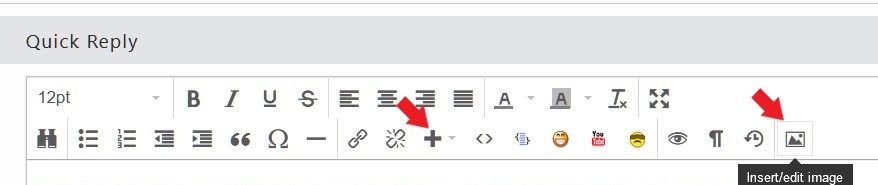
  3. Screenshot will help us understand the issue better.

You can add screenshots by using any one of these buttons.

Thank you,
Basj,
Stardock Community Assistant.

Reply #2 Top

Hi, That seemed to fix it. Question, I have Fing, and it is alerting me to some UPnP connections from my machine on two UDP ports. I was hoping Connection Explorer could help figure out what app is doing this. I have UPnP turned off in my router so I assume that these aren't valid connections. I have Tailscale could it be that?  Thanks!

Reply #3 Top

Hello,
I have forwarded your problem/question to Stardock Support Team for their assistance. Please keep an eye on this thread for any updates. We appreciate your feedback and patience. Thank you.

Basj,
Stardock Community Assistant

Reply #4 Top

Ugg.  Did anyone test this???
End of quote

Like with all our products, for a very long time, donrubin


Hi, That seemed to fix it.
End of quote

1st rule of support, ty @basj.


Hi, That seemed to fix it. Question, I have Fing, and it is alerting me to some UPnP connections from my machine on two UDP ports. I was hoping Connection Explorer could help figure out what app is doing this. I have UPnP turned off in my router so I assume that these aren't valid connections. I have Tailscale could it be that?  Thanks!
End of quote

Yes, Tailscale is a very plausible source. It tries NAT-PMP, PCP, and UPnP-IGD to ask the router for a port mapping so
peers can connect directly — even if your router has UPnP disabled, Tailscale still sends the discovery packets (SSDP
on UDP 1900, NAT-PMP/PCP on UDP 5351). The router just ignores them.

A couple of things to check:

What ports is Fing flagging?
- UDP 1900 → SSDP/UPnP discovery (Tailscale, Windows Network Discovery, Plex, Spotify Connect, Chromecast apps all do
this)
- UDP 5351 / 5350 → NAT-PMP/PCP (Tailscale, some torrent clients)
- UDP 3702 → WS-Discovery (Windows itself)

To confirm it's Tailscale on Windows, open PowerShell as admin and run:
Get-NetUDPEndpoint | Where-Object { $_.LocalPort -in 1900,5350,5351 } | Select-Object LocalPort, OwningProcess
Get-Process -Id <PID>
That'll tell you exactly which process owns the socket. If it's tailscaled.exe, mystery solved.

You can also disable Tailscale's port-mapping attempts if you want the noise to stop — but they're harmless; with
router UPnP off they just go unanswered and Tailscale falls back to DERP relays or STUN.

Sean Drohan
Stardock Product Lifecycle Manager


+2 Loading…
Reply #6 Top

Sean I have been out of the country and just got back to this. Using the above powershell commands it seems the process using 1900 is svchost not tailscale as we suspected. Also there are lots of high udp ports 26980. 57645 ... going to various devices on my local subnets. Is this something I should be concerned about? Thanks