sdRohan sdRohan

Start11 1.46 Release Issue Report Thread

Start11 1.46 Release Issue Report Thread

With the Start11 1.46 release, we are creating this thread so that users can report any observed issues.  

Obtaining the product

Object Desktop members can get the release from within Object Desktop Manager 

Individual purchases (as well as Object Desktop Members) can also be obtained from your account page: https://store.stardock.com/myaccount/products

For guest check-out purchase (no account), from this link: http://www.stardock.com/support/productkeyretrieval

Reporting an issue

Please include the following for anything found:

  • Exact Windows version \ build (winver.exe)

  • Detailed steps to recreate the issue seen

  • Screenshots and videos are very helpful.  Videos can be uploaded to a cloud drive service (GoogleDrive, DropBox, OneDrive, YouTube), with a shared link included in your post.  Images can be copied and pasted directly into a post.

  • If there are specific apps that the app does not work (well) with, please note what apps and their exact versions.  If any app is not common, a link to a trial version would be appreciated.

Thank you for your interest and any time you put into making Start11 a better product.

31,452 views 79 replies
Reply #26 Top

All,

Before we left for break, we wanted to release a small update (beta) for Start11 with 1.47.  It will likely grow once we return:

https://forums.stardock.com/521165/start11-147-beta-feedback-thread

As always, thanks for you time, feedback, and support.

Sean Drohan
Stardock Product Lifecycle Manager

Reply #27 Top

Just FYI.  I have a Dell XPS 13 9315, 12th gen, Windows 22H2, Build 22621.1848.  In late April, I started having issues with spontaneous re-boots.  To make a long story short, after cleaning up / reinstalling just about everything, I was free of the reboot issues -- that is, until I reinstalled Start 11.  As soon as my computer "re-awakened" today from sleep with Start 11 installed, it went to blue-screen with CPU error 21.  I had to try re-boot 3 times before I was successfully able to get back to Windows -- after which I uninstalled Start 11.

Something's not right, because I don't have a heavily-burdened system -- Photoshop and Libre Office and Fences.  I feel that I have made an association between Start 11 and my laptop re-boot problems.  So it remains off my laptop for now, until I feel "risky" again I guess.

Reply #28 Top

Quoting crea8ive49, reply 27

I feel that I have made an association between Start 11 and my laptop re-boot problems.
End of crea8ive49's quote

Maybe it is, maybe it isn't. Have you tried opening a Support ticket to try and work through the problem with Support people?

https://stardock.atlassian.net/servicedesk/customer/portal/4?/default_import/Tickets/Submit

Reply #29 Top

Quoting meddler95, reply 16


Quoting sdRohan,


Quoting meddler95,


Autohide taskbar is on


And if you turn that 'feature' off, log out \ in of Windows, does it still happen?

Sean Drohan
Stardock Product Lifecycle Manager


Hi Sean,

It looks like autohide is the culprit. When autohide is turned off the taskbars are fine. Is there any plans to fix this as I prefer to use autohide for my taskbars.

Cheers

Chris

End of meddler95's quote


For feedback, v1.47 Beta fixed the autohide taskbar issue. Thank you very much.

Cheers,

Chris

Reply #30 Top

Quoting crea8ive49, reply 27

Just FYI.  I have a Dell XPS 13 9315, 12th gen, Windows 22H2, Build 22621.1848.  In late April, I started having issues with spontaneous re-boots.  To make a long story short, after cleaning up / reinstalling just about everything, I was free of the reboot issues -- that is, until I reinstalled Start 11.  As soon as my computer "re-awakened" today from sleep with Start 11 installed, it went to blue-screen with CPU error 21.  I had to try re-boot 3 times before I was successfully able to get back to Windows -- after which I uninstalled Start 11.

Something's not right, because I don't have a heavily-burdened system -- Photoshop and Libre Office and Fences.  I feel that I have made an association between Start 11 and my laptop re-boot problems.  So it remains off my laptop for now, until I feel "risky" again I guess.
End of crea8ive49's quote

A BSOD will not be being caused by Start11 directly.  Especially if you had to reboot multiple times to get into Windows and thus Start11 wouldn't even be running during the boot up process.

The BSOD screen should have indicated the cause and if it mentioned the cpu I would be concerned you have a hardware fault.  I would strongly recommend backing up your data if you have not recently.

Reply #31 Top

Right clicking a preview window when multiple windows are open of an application and grouped together hides the menu behind the preview windows and makes it not selectable and usable. see attached gif image


[video]https://www.youtube.com/shorts/N3mL2FYA8iY[/video]

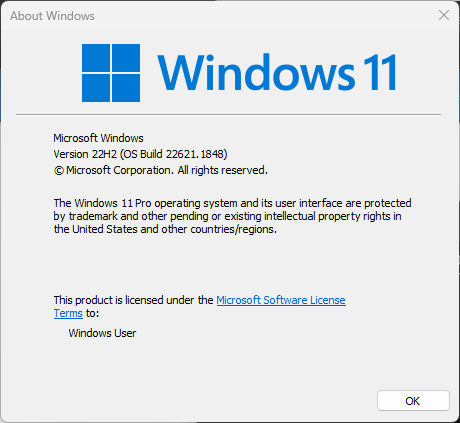
winver.Exe output

Reply #32 Top

I updated version 1.46. But I found that when I click the wifi icon in the taskbar, the wifi interface crashes as soon as the mouse wheel is scrolled. This is not a problem with my mouse, because the wifi interface still crashes when I do that operation with my laptop touchpad. Strangely enough, when I drag the scrollbar with the mouse, the wifi interface does not crash.

I use both start11 and startallback. However, when I uninstalled start11 and kept only startallback, the wifi interface crashing problem disappeared, so I think it's start11's problem.

If the developers can see this post, I hope you can update the new version soon.

Reply #33 Top

By the way, when I downloaded it before, the software version was 1.41, so I uninstalled start11 and reinstalled version 1.41 and did not continue to upgrade, and the wifi interface crash did not exist.

Reply #34 Top

Hi Stardock Team,

I am having a problem with the windows Action Center on the latest version of Start 11. 

Device: HP Envy 2-in-1 (convertible) laptop. 
Windows 11: 22H2

The problem only occurs when using the touchscreen. It's fine with Trackpad or mouse

When I open the Action Center (on the taskbar)... none of the toggle buttons work (Wifi, Bluetooth, Airplane Mode, Rotation Lock, etc). I tap on them and they don't toggle on or off. The same is true for the battery, edit and gear icons on this same interface. Oddly, the brightness and volume sliders still DO work 

I uninstalled and reinstalled a older copy of Start 11... and the problem went away. So it appears this is a new issue. 

Thanks


Reply #35 Top

Quoting fishlet, reply 34

Hi Stardock Team,

I am having a problem with the windows Action Center on the latest version of Start 11. 

Device: HP Envy 2-in-1 (convertible) laptop. 
Windows 11: 22H2

The problem only occurs when using the touchscreen. It's fine with Trackpad or mouse

When I open the Action Center (on the taskbar)... none of the toggle buttons work (Wifi, Bluetooth, Airplane Mode, Rotation Lock, etc). I tap on them and they don't toggle on or off. The same is true for the battery, edit and gear icons on this same interface. Oddly, the brightness and volume sliders still DO work 

I uninstalled and reinstalled a older copy of Start 11... and the problem went away. So it appears this is a new issue. 

Thanks

 
End of fishlet's quote

How strange.  We will investigate this.  Is this new in 1.46 or the 1.47 beta?

Reply #37 Top

Quoting mrWoozie, reply 36

Since the update shortcuts using Windows key are always opening Start Menu.
End of mrWoozie's quote

Can you update to the beta 1.47 build as that should be addressed.

Reply #38 Top

Hi,

I have Windows 11, 22H2, Build 22621.1928, and found two problems with Start 11, v.1.46.

1. On the taskbar buttons, when a mouse pointer is hoovered over a jump list, it is supposed to show the path for a file. However, since the update, paths are briefly shown and disappear.

2. I was able to scroll through the months on the calendar on the taskbar (right end), however, it does not work since the update.

Thanks.

Reply #39 Top

1.46 no longer auto-starts for me on login. I have to manually run the start11_64.exe to get it to load - putting a shortcut in the start-up folder doesn't work either. The service runs on startup though. I have uninstalled/reinstalled, but to no avail. Running on Windows Server 2022.

Reply #40 Top

Quoting SceneGG, reply 39

1.46 no longer auto-starts for me on login. I have to manually run the start11_64.exe to get it to load - putting a shortcut in the start-up folder doesn't work either. The service runs on startup though. I have uninstalled/reinstalled, but to no avail. Running on Windows Server 2022.
End of SceneGG's quote

Are you logging in as a limited user account or local admin?

Also where is Start11 installed as the newer version requires the machine to permit UIAccess elevation and this comes with strict limitations

https://learn.microsoft.com/en-us/windows/security/threat-protection/security-policy-settings/user-account-control-only-elevate-uiaccess-applications-that-are-installed-in-secure-locations

As you are on server it may be your default OS settings are blocking this hence the failure to launch.

Reply #41 Top

Local admin, and all previous versions never had this issue. UAC is off.

Edit: It's also happening in 1.47 beta.

Reply #42 Top

Quoting SceneGG, reply 41

Local admin, and all previous versions never had this issue. UAC is off.

Edit: It's also happening in 1.47 beta.
End of SceneGG's quote

Have you perhaps touched that setting for UIAccess?

There was a change in how Start11 starts to handle the winkey change in later versions of Windows and so may have exposed this.  We are making a change to detect when it doesn't start and start a different way where possible.

Reply #43 Top

UIAccess is set to the default setting of disabled, and has never been changed

Reply #44 Top

I have the same problem on both PCs: with multiple VPN profiles, the mouse wheel slider in the VPN quick menu on the bar does not work. When using the mouse wheel, the menu closes and cannot be scrolled.

Same problem with beta version 1.47 - I rolled back to version 1.45.

Reply #45 Top

Quoting WhiteCrow_CZ, reply 44

I have the same problem on both PCs: with multiple VPN profiles, the mouse wheel slider in the VPN quick menu on the bar does not work. When using the mouse wheel, the menu closes and cannot be scrolled.

Same problem with beta version 1.47 - I rolled back to version 1.45.
End of WhiteCrow_CZ's quote

We believe we have sorted the problem for an update next week.  Sorry for the inconvenience.

Reply #46 Top

Quoting SceneGG, reply 43

UIAccess is set to the default setting of disabled, and has never been changed
End of SceneGG's quote

If you set it to enabled does it then work?

I suspect server has a different default to consumer versions.

Reply #47 Top

Hello, I have an interesting problem, that the search results remain blank after some use. The search itselfs seems to function just fine, because when I hit enter, I will get to the first entry. 

I can only solve this by restarting the pc. It seems to be a display problem, either a memory leak by too many searches (5 or so), or it has to do with the mouse hovering over the search results and then giving some animation problem. 

I have the version 1.46 and windows 11 , 22h2, build 22621.1928


Best regards, 

Reply #48 Top

Hi Neil will next weeks release also address the tray icon bug?

Reply #50 Top

Inconsistent behavior of the start button:

I had almost the same problem (see below) as msaulters who posted here on 06/27.
I followed the recommendation of Neil Banfield:
Uninstall Start11, reboot (important), reinstall 1.46.

When I reinstalled I was asked for product key, it was obviously lost during uninstall,
although I did not checked the option "remove settings".
Mea culpa, I did not make a note of the key. So, I installed the 30-day free version.

Unfortunately without success, the issue is still there:
When pressing the Windows key, I always get the Windows menu, although Start11 menu is set.
When I get Start11 menu (after clicking the Win Icon in the taskbar), I get it with my previous settings.
And I don't have a licensed software now. :(

Win 11 Home - 22621.1702