
sdRohan sdRohan

Start11 RC1 Issue Report Thread

Start11 RC1 Issue Report Thread

With the Start11 RC1 release, we are creating this thread so that users can report any observed issues.  

Obtaining Start11 RC1

Object Desktop members can get the release from within Object Desktop Manager 

Individual purchases (as well as Object Desktop Members) can also be obtained from your account page: https://store.stardock.com/myaccount/products

For guest check-out purchase (no account), from this link: http://www.stardock.com/support/productkeyretrieval

Reporting an issue

Please include the following for anything found:

  • Exact Windows version \ build (winver.exe)
  • Detailed steps to recreate the issue seen
  • Screenshots and videos are very helpful.  Videos can be uploaded to a cloud drive services (GoogleDrive, DropBox, OneDrive, YouTube) and links included in your post.  Images can be directly added.
  • If there are specific apps that Groupy does not work (well) with, please note what apps and their exact versions.  If any app is not common, a link to a trial version would be appreciated.

Thank you for your interest and any time you put into making Start11 a better product.

Sean Drohan
Stardock Support Manager
393,338 views 178 replies
Reply #27 Top

Windows 11 22000.194 Start11

Secondary monitor task bar height incorrect.

When taskbar is set to small the primary monitor uses a half normal height taskbar with small icons but the secondary monitor keeps a full height task bar with small icons.

Can there be a clock on the secondary taskbar?


Edit

This was fixed by reinstalling Nvidia drivers.

Reply #28 Top

I'm trying out Start11 on a Surface Pro 7 that I use with touch only mainly to bring back the Windows 10 Start Menu. However, there are many issues with this product when using touch.  

A video is posted below that will show:

-Cannot scroll through the main Start11 configuration window with touch. Only by dragging the scrollbar will content scroll.

-Cannot open the replacement taskbar menu with touch. Holding touch on the area will show the native Windows 11 taskbar context menu.

-Cannot open the Win+X menu with touch. Holding touch on the Start button just opens the Start Menu and not the context menu.

-Cannot scroll the All Apps section on the left with touch.

Reply #29 Top

Quoting slinky333, reply 28

I'm trying out Start11 on a Surface Pro 7 that I use with touch only mainly to bring back the Windows 10 Start Menu. However, there are many issues with this product when using touch.  

A video is posted below that will show:

-Cannot scroll through the main Start11 configuration window with touch. Only by dragging the scrollbar will content scroll.

-Cannot open the replacement taskbar menu with touch. Holding touch on the area will show the native Windows 11 taskbar context menu.

-Cannot open the Win+X menu with touch. Holding touch on the Start button just opens the Start Menu and not the context menu.

-Cannot scroll the All Apps section on the left with touch.


End of slinky333's quote

Thank you for reporting this, we will investigate further as it should support touch.

Reply #30 Top

Quoting LexBoosT, reply 26

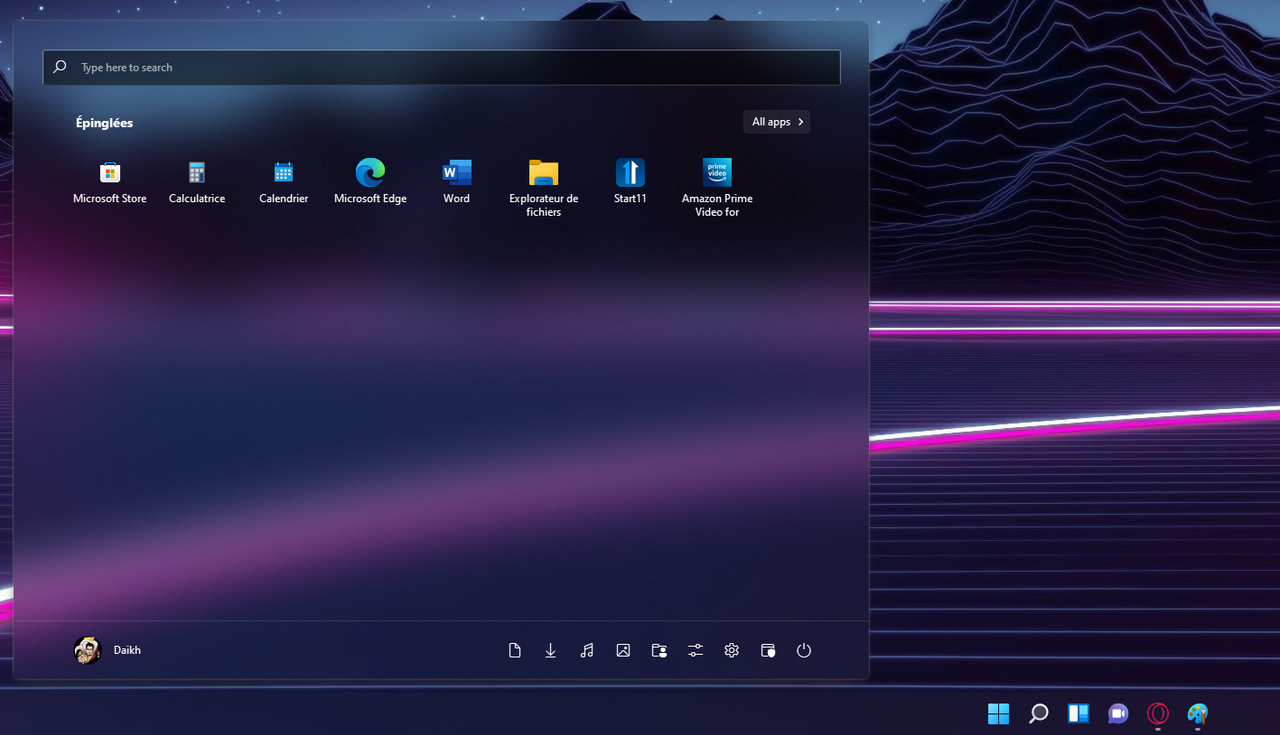
Hello, i've a problem with the menu. the menu is not centered. Thank you


Reduced 65%
Original 1280 x 735


End of LexBoosT's quote

How many monitors do you have?

If you have more than one then what scaling factors are they and also where are they positioned relative to each other?

Reply #31 Top

taskbar empty, explorer restarting on taskbar click, only 3 or 4 icons on the right if set start menu icon left<>middle

had to boot secure  & uninstall rc1

screen capture

+1 Loading…
Reply #32 Top

Quoting Neil, reply 30


Quoting LexBoosT,

Hello, i've a problem with the menu. the menu is not centered. Thank you


Reduced 65%


Original 1280 x 735


How many monitors do you have?

If you have more than one then what scaling factors are they and also where are they positioned relative to each other?

End of Neil's quote


Have 3 screens the start menu is in first screen. ( 3 @ 100% scaling factor) If i disable screen 2 and 3 have the same problem.

Reply #33 Top

I am having exact same issue as fjgrayaz.  After install, reboot, blank taskbar, system very sluggish, explorer is 20 to 50% utilization, click on taskbar causes explorer to restart.  I have to uninstall Start11 to even use the system.  Beta worked fine, RC1 does not work at all.  Same 194 build.  I would include screenshots but I can't hardly do anything while start11 is running.  :(

Reply #34 Top

Quoting LexBoosT, reply 32


How many monitors do you have?

If you have more than one then what scaling factors are they and also where are they positioned relative to each other?


Have 3 screens the start menu is in first screen. ( 3 @ 100% scaling factor) If i disable screen 2 and 3 have the same problem.

Reduced 89%
Original 935 x 321


End of LexBoosT's quote

If you sign out and in after having disabled the other monitors does it make a difference?

Reply #35 Top

Quoting dcaugie, reply 33

I am having exact same issue as fjgrazyaz.  After install, reboot, blank taskbar, system very sluggish, explorer is 20 to 50% utilization, click on taskbar causes explorer to restart.  I have to uninstall Start11 to even use the system.  Beta worked fine, RC1 does not work at all.  Same 194 build.
End of dcaugie's quote

Thank you for the report, we will investigate as clearly thats not normal.

Do you have anything else installed which might interact with explorer either from Stardock or other places?

+1 Loading…
Reply #36 Top

Nothing installed that would come to mind.  I originally updated the start11 beta to RC1, that didn't work.  I uninstalled it completely and then reinstalled RC1, that also did not work.  Again, the beta worked great, so not sure what would change to cause RC1 to hang explorer?

Reply #37 Top

Quoting dcaugie, reply 33

I am having exact same issue as fjgrazyaz.  After install, reboot, blank taskbar, system very sluggish, explorer is 20 to 50% utilization, click on taskbar causes explorer to restart.  I have to uninstall Start11 to even use the system.  Beta worked fine, RC1 does not work at all.  Same 194 build.
End of dcaugie's quote

Quoting fjgrayaz, reply 31

taskbar empty, explorer restarting on taskbar click, only 3 or 4 icons on the right if set start menu icon left<>middle

had to boot secure  & uninstall rc1

screen capture
End of fjgrayaz's quote

I have moved you both here - created a new thread where I have asked some questions.  Please review it and continue to post there.

https://forums.stardock.com/507372/rc1-taskbar-empty-explorer-issues

Thanks for the feedback and help.

Sean Drohan
Stardock Support Manager

Reply #38 Top

22000.194

Using Grid Modern Style. Any way to draw the Universal Applications/Control Panel/Windows Tools pop-up menus in the Windows 11 Style (Rounded corners, theme color)?


Reply #39 Top

Running W11 Pro, 22000.194.

Default W11 start menu shows correct user name. I'm logged in with a Windows account, so it shows my first and last name:


Start 11 with W11 style, shows the name of the original user that Windows (10) was once set up with (Eigenaar is Dutch for Owner, so it was a generic user name):


Start 11 Modern style for example does show the correct user name, as in the first screen shot.

Reply #40 Top

Pretty happy so far, the win10 style is missing the ability that windows 10 had to hide the entire left hand list and only have icons, similar to how the win11 style is but with windows 10 groups and sizes

happy startmenuing guys

Reply #41 Top

W11 style, the reordering of icons does not seem to work/stick. I can order them like so:

But the start menu does not reflect this order. When I go back into the Start 11 settings, I find the following order:

Which is the order the start menu actually keeps showing. I can change the order around again, but does not work as expected.

Reply #42 Top

Quoting Mike, reply 39

Running W11 Pro, 22000.194.

Default W11 start menu shows correct user name. I'm logged in with a Windows account, so it shows my first and last name:


Start 11 with W11 style, shows the name of the original user that Windows (10) was once set up with (Eigenaar is Dutch for Owner, so it was a generic user name):


Start 11 Modern style for example does show the correct user name, as in the first screen shot.
End of Mike's quote

Thanks for reporting this, we will look to resolve this for the release.

Reply #43 Top

Quoting Neil, reply 23


Quoting gooface,

I noticed when you don't use a custom start menu button (when you align the start menu to the left) there is a blank space on the left side of the start menu that if you click it it opens the win11 start menu... very annoying... doesn't give you this space when you use a custom icon.... I'm on the RTM build of win11 (.194) and it shows on my 1440p display and 1200p display, the icon moves to the right a little when you disable the custom button and the space it creates makes this issue happen. (and even half the time when you use the standard win11 icon when you click directly on the start menu button it still opens the standard windows 11 start menu)

Space on the left side of the button and general non responsive with standard win11 icon:


No space and always opens right with custom icon:

Reduced 82%
Original 376 x 407


Please fix this asap... really breaks the start menu and I don't want a custom icon on my taskbar for the start menu...(and I have to use the custom icon for now because of how broken the non custom one is...)


Also the universal application list on the win7 style menu opens up once semi cutoff behind (or infront) the start menu at times, and now refuses to open when I click it (the default option for this where it comes out as a list) I noticed this doesn't happen if I hover over universal applications and only happens when its clicked on... Only way to get the list to show up again if I click on it is to close and reopen the start menu and make sure I dont click and just hover...

Working but cutting off (when hovering):

Reduced 88%
Original 351 x 493


Broken after clicked on:


I love the visual changes you guys made to this but you broke some major features along the way....


Clicking on those links wasn't supported before I think, they have always been mouseover only so clicking actually did nothing for you.  Changes were made to handle mouse opening things and it seems there was an unintended consequence.  This will be addressed in a future update.  Thanks for letting us know.

With regards to the start button, it looks like there is a 1-2 pixel gap on the left of the start button which activates the Win11 menu BUT does not animate the start button as it isn't clicking on it.  This is bypassing Start11 as it works on the button.

We can address this in a future update.

End of Neil's quote


Is there a chance you could release a custom icon that matches the original windows 11 design as a workaround for now before you guys release the next update?


Thanks for responding to my feedback. 

Reply #44 Top

Moderator message: Moved to following thread:

https://forums.stardock.com/507372/page/1/#3820682


Quoting electronicmail, reply 44

Reply #44 October 7, 2021 5:43:18 PM from Stardock Forums
Due to issues that I suspect are related to upgrades of Start v10 on windows 10. Then doing an in-place upgrade to windows 11. I have been using Start11 since its first public beta version, then the 0.55-j26 update, then the 0.9 update. I found corruption with Start11 v0.9. I un-installed v0.9 and did a complete search and removal of any data relating to start11 and Start10 (yes, files and folders were found in the main Stardock folder) and I did a registry clean, on all my machines.  This corruption included bogus entries on the right side of the menu (using modern style). Start11, the two initial Beta versions of Start11 worked without issue.  

I'm running windows11 v22000.194. Along with Stardock Fences, Stardock Groupy, Stardock Curtains, Rainmeter, and are now trying to use the v0.9 of Start11. All products have worked fine until the update to Start11 v0.9.

Having done as noted above. A laptop and PC (single screen) work fine. My main PC with x3 4K monitors running at 125% scaling has had issue only with Start11 v0.9. I can FINALLY only use it in single screen mode (single taskbar). But trying to use it across multiple screens in a vertical 1x3 configuration. When running it in multi-screen taskbar mode, it courses Explorer to go into a high CPU usage. The taskbar becomes blank, with the odd icon and the system requires me to kill the service and apps for Start11. Once done the system is stable. With windows11 taskbar working. Four times clean, install and still the same issue, but only with more than one screen.

Of note, I have never had any real issue with Stardock products. This is the first-time I have had issues, which have required a method to fix or not fix what is happening. Something changed in how Start11 v0.9 is handling multi-screen configurations, I'm so glad I have a shortcut for Task Manger on the desktop. And when you're looking at the "why", don't forget the reference corruption that it had.  that could just be un-install/ upgrades that ended up dirty and left the data files and references that v0.9 picked up.

 I'm looking forward to a fix for the issues, and future updates. 
End of electronicmail's quote

Reply #45 Top

While working another PC (windows 11 2200.194, single screen). I have just removed the earlier version of Start11, and found S10 and S8 data folders, when cleaning AppData/Roaming/Stardock and AppData/Local/ Stardock). Program Files (x86)/ Stardock also had data folder/ files. I forgot to note that in the above post. Also, this third PC was a clean install of windows 11.

Reply #47 Top

Electonicmail: Curtains should be removed on Windows11 as it does not support that OS.

Not sure if that will help but worth removing anyway.

Reply #48 Top

Sometimes when I click on the start button, I am getting apps opening by themselves without clicking on them.
This didn't happen in previous versions.


I am not using a custom start button. Could that be the cause of the above happening?
I'll test using the default custom start button.

Edit: It still happens with a custom start button.
I can sometimes reproduce it by clicking on the start button and then running my mouse from the bottom of the menu to the top and off the top end. No clicking. Just run your mouse up from the bottom. The start menu will close and a random application will open. I am using the Modern Style menu.


And as someone has already posted, if you click too far to the left of the start button when not using a custom start button, it opens the Windows 11 start menu. There is quite a lot of space there.

Reply #49 Top

Also as a request/feature/question.

where is the settings/config file location for this application if I want to delete the custom settings I changed and set it back to default settings/options? (could this be a button implemented in the app to reset all settings to default?) I tried deleting many files and it seems to have save some settings that I set before.

Reply #50 Top

I'm using Windows 10 with dual monitor.

Taskbar buttons are always left aligned even with "Position the taskbar buttons in the centre of the taskbar"  enabled.

With Curtains, Start11 transparency effects only work if Curtains style is set to "Windows 10 by Microsoft". Not a big deal for me.

Otherwise, looks good so far.