Seamless mode refuses drag/drop

This would be a subtitle if I could think of one

I have set up multiplicity successfully for KVM operation. There is a problem though, with seamless mode, and I'm not sure why. I have my second monitor showing a fullscreen of the secondary. It is running Windows 10 Pro. I can copy and paste from this machine to my primary without issue.

But when I have explorer windows open on my primary (Windows 7) and secondary, and try to drag a file from primary to secondary, I get a "no" icon (the common circle with slash through it) when trying to drop on the secondary.

Any idea on what's going on?

6,162 views 10 replies
Reply #1 Top

Hello,

I have forwarded your report to the Stardock support team for their review and recommendations.

Please keep an eye on this thread for any updates.

We really do appreciate your feedback, thanks.


AzDude
Stardock Community Assistant

Reply #2 Top


But when I have explorer windows open on my primary (Windows 7) and secondary, and try to drag a file from primary to secondary, I get a "no" icon (the common circle with slash through it) when trying to drop on the secondary.

Any idea on what's going on?
End of quote

Is MP, on each PC, installed in:

C:\Program Files (x86)

or

C:\Program Files

If not, it needs to be.

Sean Drohan
Stardock Support Manager

Reply #3 Top

Sean,

I'm not sure what you are asking. Are you asking if I installed MP? If you are, yes, of course it installed properly and I am able to use KVM mode just fine (I can cut copy and paste between computers), and and I have moved the remote access window onto my second display. With the remote access window on my secondary display, the mouse moves seamlessly between the local and the remote computers on the primary machine, but although drag state looks normal, drop on another computer is not working.

Hope this is clearer,

Matt 


Reply #4 Top

Quoting Matt, reply 3

Sean,

I'm not sure what you are asking. Are you asking if I installed MP? If you are, yes, of course it installed properly and I am able to use KVM mode just fine (I can cut copy and paste between computers), and and I have moved the remote access window onto my second display. With the remote access window on my secondary display, the mouse moves seamlessly between the local and the remote computers on the primary machine, but although drag state looks normal, drop on another computer is not working.

Hope this is clearer,

Matt 
End of Matt's quote

Looking past D&D for a moment, does copy \ paste work?

Sean Drohan
Stardock Support Manager

Reply #6 Top

Just a quick check here as whilst you mention seamless you also mention moving the remote access window.

Are you trying to drag to or from the KVM window?

If so you cannot drag & drop to a machine in KVM mode.  Drag & drop is for seamless mode only (so the secondary computers have their own display, you are only sharing keyboard and mouse).

Reply #7 Top

Quoting Neil, reply 6

Are you trying to drag to or from the KVM window?
End of Neil's quote

So, Neil, kvm has no drag/drop capability. On primary, monitor 1 explorer is the source. On monitor 2, the secondary is in fullscreen mode. Unless I am mistaken, this is seamless mode, as my mouse moves smoothly between monitors, operates secondary on monitor 2, and the drop operation being refused implies that I am doing a seamless operation.

If that's not seamless mode, then perhaps that is the problem. It certainly looks like seamless mode. There's no hotkey to change into seamless mode.

Quoting Neil, reply 6

you are only sharing keyboard and mouse
End of Neil's quote

Well that is worthless. Remote keyboard and mouse only (KM) when you have the technology implemented to remotely access video as well is a downgrade. No I know I am sharing all three and my mouse moves smoothly to the second monitor as laid out in the seamless mode interface configuration screen. The software is capturing my file drag operation and it sees the request to drop because it is putting up the "no" icon.

This must be either a bug, a feature that was never implemented, or possibly an OS inter-version issue. Bottom line is it doesn't work, and I've combed the setup options. It's not a configuration issue either.


Matt

Reply #8 Top

Quoting Matt, reply 7

So, Neil, kvm has no drag/drop capability. On primary, monitor 1 explorer is the source. On monitor 2, the secondary is in fullscreen mode. Unless I am mistaken, this is seamless mode, as my mouse moves smoothly between monitors, operates secondary on monitor 2, and the drop operation being refused implies that I am doing a seamless operation.
End of Matt's quote

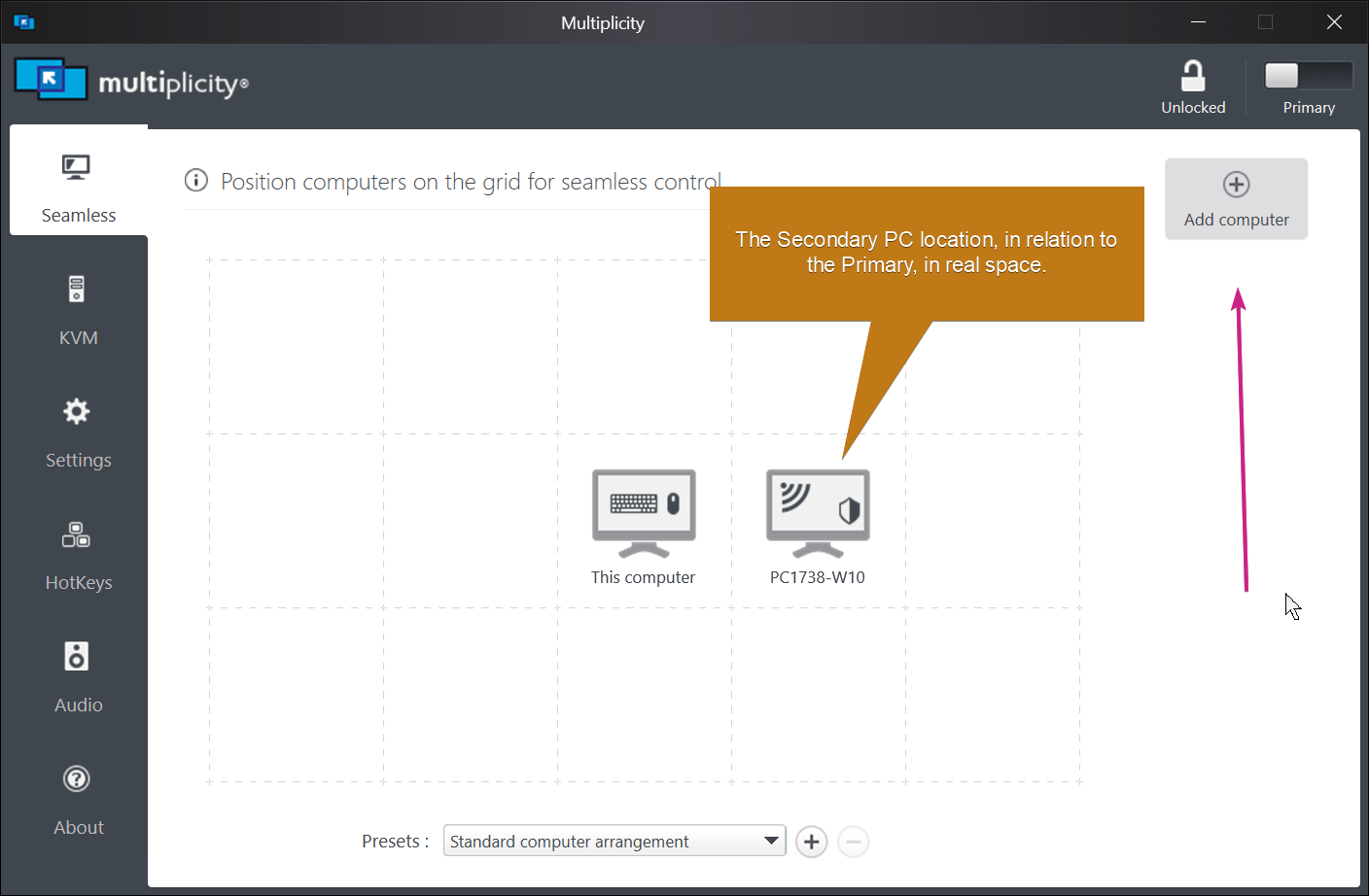
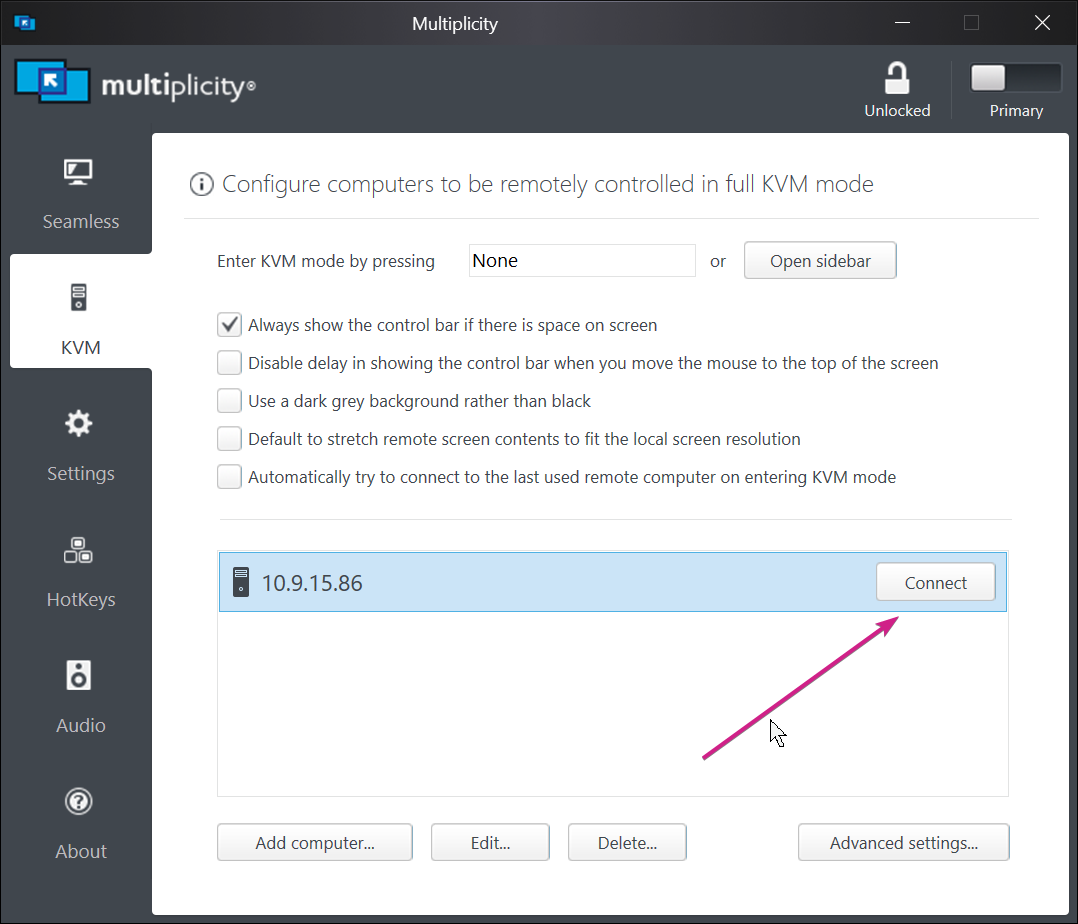
If you are connecting to it with:

Or form the Sidebar \ hotkey, that is not Seamless, that is a KVM remote connection.

'Seamless' is used when you can see the actual physical monitors (on the same desk) of all PCs.  Its used in the exact same way multiple monitors are when connected to a single PC - the cursor moves 'Seamlessly' between them.

There is a more detailed answer here:

 https://forums.stardock.com/486104/multiplicity-support-faq#seamlesskvm

Hope that helps.

Sean Drohan
Stardock Support Manager

Reply #9 Top

Yep Sean, that clears it up.

Since you are in charge, I'd wish you would pass on this text to the developers:

So the UI design guy chooses to put an otherwise unlabeled button that says "Connect" as the entry method into seamless mode on a UI page that is called "KVM", even though there is another UI page that is called "Seamless" which has no method of entry at all? Have I got that right?

Also, please add drag/drop to the KVM mode. You would then be mirroring seamless mode features 100%, and can claim that, and of course, that's a handy little feature.


Thanks,


Matt 

Reply #10 Top

Quoting Matt, reply 9

Seamless" which has no method of entry at all? Have I got that right?
End of Matt's quote

The 'method' for Seamless is the initial connection and is then always on:

Sean Drohan
Stardock Support Manager