requires a right click on my mouse to show Fences and other icons

On start up of my PC my task bar appears together with my desktop slideshow left it for at least 10 mins BUT it requires a right click on my mouse before it shows my fences dropdown boxes and other icons.......  I have uninstalled fences completely and on boot all my icons appear with no problem.  This is NOT a recent problem been occurring since I purchased back in 2017.  Now running Windows 10 with 2004 update.

I have also run the stardock tool software and have the zip file.

It's no problem as I can just right click but feel The fences roll ups should appear on start up  Any help would be appreciated 

Regards

Bill
 

9,412 views 10 replies
Reply #1 Top

Hello,
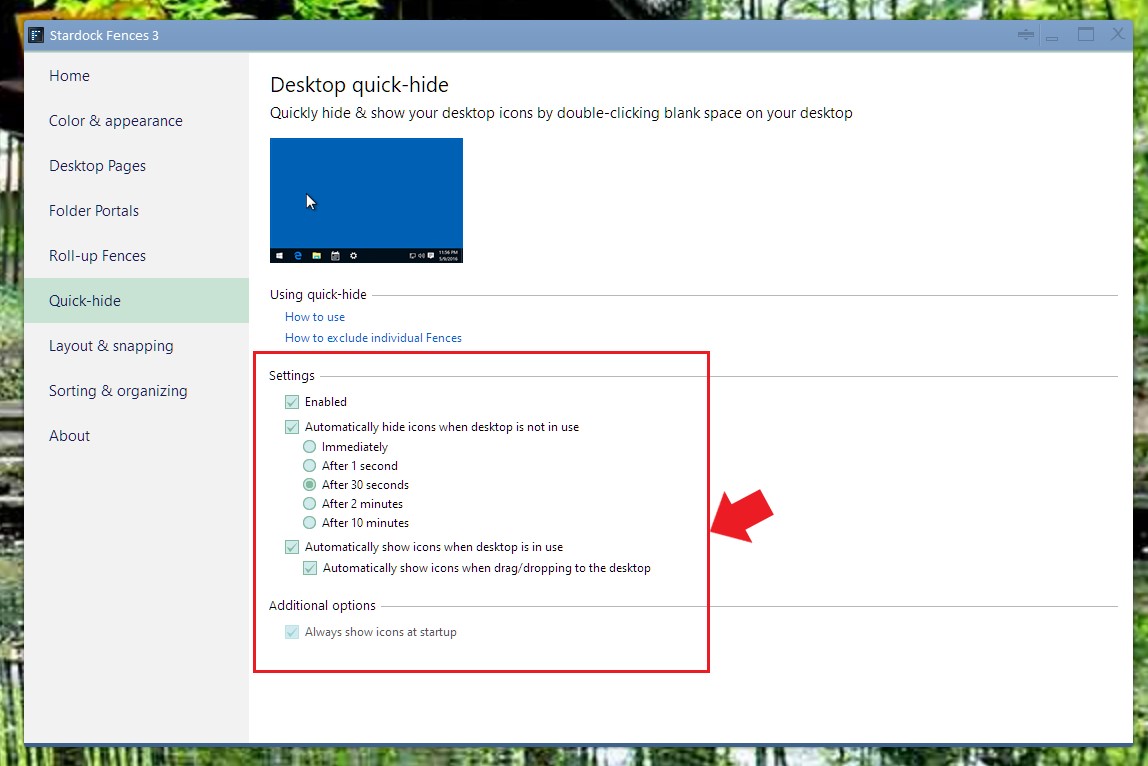
Sorry to hear you are having issues. Need to know what is your setting on your Fences Quick hide.


Basj,
Stardock Community Assistant.

Reply #3 Top

I am having the same issue. Except now, not even the right click works. I have to call up Windows Explorer before the fences will show up on Windows 10.

Reply #4 Top

Quoting laeee, reply 3

I am having the same issue. Except now, not even the right click works. I have to call up Windows Explorer before the fences will show up on Windows 10.
End of laeee's quote

Hello,
Sorry to hear you are having issues. Need to know more information on your system.

  1. Windows version, please use Winver.exe for full version numbers.
  2. Fences version.


Basj,
Stardock Community Assistant.

Reply #5 Top

1. Windows 10 Pro, 64 bit, Version 20H2, build 19042.746

2. Fences version 3.0.9.14


I have uninstalled, reinstalled with the same issue. I have run Task Manager, and both Fences are enabled.

For awhile, I was able to use the "right click" trick to get the Fences to display after a boot, but now that does not work. I have to call up Windows Explorer to get the Fences to come up.

Settings:

Reply #6 Top

Please try purge and reinstall steps as mentioned here: https://forums.stardock.com/486084/fences-support-faq#reinstalling Just make sure to redownload the latest version from your account. Reboot after the purged. Reinstall, and Reboot again after the installation. Retest it. Report back here.

Thank you,

Basj,
Stardock Community Assistant

Reply #7 Top

OK, followed all the steps. After all steps completed, rebooted. Blank screen. This time just a click on the RIGHT mouse button brought the fences back.

Reply #8 Top

Quoting laeee, reply 7

OK, followed all the steps. After all steps completed, rebooted. Blank screen. This time just a click on the RIGHT mouse button brought the fences back.
End of laeee's quote

Is the issue solved for you? As for me, that look like what I would want my desktop to look on boot up. Empty, with just wallpaper and taskbar. The Fences and Desktop icons appear only when I click on the desktop.

Thank you,

Basj,
Stardock Community Assistant

Reply #9 Top

I prefer to have all of my fences come up when the PC is booted. I don't like having to click or call up Explorer to get them to show up. I guess I will just live with it. We all have our individual preferences.

Reply #10 Top

If you wish that, try to enable desktop icons by, right click on desktop-> View -> Select/Turn on Show Desktop icons.

Thank you,

Basj,
Stardock Community Assistant
