Multiplicity 3.5 issue report thread

With the release of Multiplicity 3.5, we are creating this thread so that users can report any observed issues.  

Obtaining Multiplicity 3.5:

Object Desktop members can get the beta from within Object Desktop Manager.

Individual purchases (as well as Object Desktop Members) can also be obtained from your account page:

https://store.stardock.com/myaccount/products

For guest check-out purchase (no account), from this link:

http://www.stardock.com/support/productkeyretrieval

Note: Please remember that this version needs to be installed on the Primary as well as all Secondary PCs in your group.

Reporting an issue:

Please include the following for anything found:

  • Exact Windows version \ build (winver.exe)
  • Detailed steps to recreate the issue seen
  • Screenshots and videos are very helpful.  Videos can be uploaded to a cloud drive services (GoogleDrive, DropBox, OneDrive, YouTube) and links included in your post.  Images can be directly added.
  • If there are specific apps that the app does not work (well) with, please note what apps and their exact versions.  If any app is not common, a link to a trial version would be appreciated.

Thank you,
Sean Drohan
Stardock Support Manager

53,764 views 60 replies
Reply #1 Top

Changelog for Multiplicity 3.5

  • Adds a flush DNS entry to the right-click menu (for when your computer has changed IP and the OS doesn't know as it has cached it)
  • Adds a message about disabling the cloud clipboard sharing in the OS if detected once
  • Adds text about the VirtualBox network adapter breaking WakeOnLan
  • Tweaks how it handles cursors if PCs are under heavy load
  • Modifies how it polls for certain events which might make it more friendly to machines with huge numbers of CPU cores rather than potentially keeping them awake
  • Swaps the mouse buttons, if you have swap mouse buttons enabled, so it doesn't double swap.
  • Should address the issue with cursor shrinking in mixed dpi setups
  • Fixed issue with Drag and Drop that could have it not work consistently if Primary had a higher DPI scale than the destination Secondary
  • Fixed an issue where the Primary setting 'Prevent secondary computers auto sleeping whilst using this computer' would not work.
Reply #2 Top

With the release of 3.55, we are closing this thread.

Thanks to all for the feedback.

Sean Drohan
Stardock Support Manager

Reply #3 Top

Hello.

I have KVM Pro version.

After update from 3.44 version to 3.5  I can not to use steamless anymore.

Got message on primary computer about controlling on other station but mouse still on primary computer.

Here primary comp. Win7 x64 and two secondary's  Win10 x64.

After reinstalling old 3.44 version and reboot -  control is back.


Reply #4 Top

Hello,

Sorry to hear you are having trouble.

Quoting 4z5cp, reply 3

Hello.

I have KVM Pro version.

After update from 3.44 version to 3.5  I can not to use steamless anymore.

Got message on primary computer about controlling on other station but mouse still on primary computer.

Here primary comp. Win7 x64 and two secondary's  Win10 x64.

After reinstalling old 3.44 version and reboot -  control is back. 

End of 4z5cp's quote

Did you install 3.5 on each PC and reboot after?

On the Primary, does a connection check pass?

On the Secondary, when you Seamless transition to it, can you interact with the desktop (right-click for example) but just not see the cursor?

Sean Drohan
Stardock Support Manager

Reply #5 Top

I have Multipplicy Pro 3.5 Build 00096.kvmpro, installed on 6 computers (5 Windows 10 Pro, 2004; 1 Server 2016).  One of the WIn 10 machines is primary; all others are secondary.   The program works perfectly on 4 of the 5 secondary machines.

The 5th machine is another story.  I can connect to it and I can send it a Ctrl+Alr+Del, to which the machine responds (I know this because I can see its screen).  However, there is nothing displayed on the primary computer, the screen remains blank.  I have removed Multiplicity from the computer, removed it from the list of computers on the primary computer, and then installed the software and added it back into the list of computers on the primary machine.   All this has made no difference at all.

To extent it matter, I can use both RDP and Quick Assist to remotely access the machine.

The computer in question is an HP Z-Book 15 G3, i7-6700HQ, 16 GB RAM and 369 GB of free disk space.  All drivers are up to date per HP's softpaq manager.

I had this same problem with the previous release of Multiplicity (3.44) and hoped it would be resolved with 3.5.  No such luck.

Thank you.


Reply #6 Top

I forgot to mention that, even though I have a blank screen on the primary computer, not only does it respond to a Ctrl+Alt+Del, it responds to any other keystrokes such as entering a password following the three-key salute.

Reply #7 Top
Quoting sdRohan, reply 4


Did you install 3.5 on each PC and reboot after?

Sean Drohan
Stardock Support Manager

End of sdRohan's quote


Yes, I did install on all computers


On the Primary, does a connection check pass?

Yes I did connection check and Multiplicity able to connect to other second computers.

On the Secondary, when you Seamless transition to it, can you interact with the desktop (right-click for example) but just not see the cursor?

Only ones for few seconds I can see cursor of the mouse on the secondary desktop and cursor back to the primary computer.

If I change position of secondary comp. on the seamless grid I can to see cursor of mouse on the secondary comp. for few seconds again.

I can not interact with desktop of secondary computers.


Reply #8 Top

Quoting Mike_Hansen_Consulting, reply 5

The 5th machine is another story.  I can connect to it and I can send it a Ctrl+Alr+Del, to which the machine responds (I know this because I can see its screen).  However, there is nothing displayed on the primary computer, the screen remains blank.
End of Mike_Hansen_Consulting's quote

No doubt because it has two video cards, one being an onboard Intel one, yes?

Do you have external monitors connected to it?  If you remove them, does it then work?

Sean Drohan
Stardock Support Manager
Reply #9 Top
Quoting 4z5cp, reply 7

Quoting sdRohan,


Did you install 3.5 on each PC and reboot after?

Yes, I did install on all computers

On the Primary, does a connection check pass?

Yes I did connection check and Multiplicity able to connect to other second computers.

On the Secondary, when you Seamless transition to it, can you interact with the desktop (right-click for example) but just not see the cursor?

Only ones for few seconds I can see cursor of the mouse on the secondary desktop and cursor back to the primary computer.

If I change position of secondary comp. on the seamless grid I can to see cursor of mouse on the secondary comp. for few seconds again.

I can not interact with desktop of secondary computers.

End of 4z5cp's quote

Just to be clear, we are only talking about Seamless connections, not remote KVM connections yes?  The PCs you are trying to interact with are all on the same desk, yes?

As a test, if you plug in a mouse on the Secondary, can you then see the cursor when you Seamlessly transition to it?

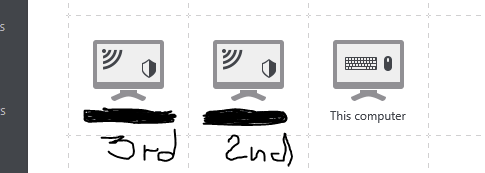
If so, and you then unplug it, does this setting on the Secondary have you able to then see the mouse?

If all fails, I want to try a burn and reinstall on each:

https://forums.stardock.com/486104/multiplicity-support-faq#reinstalling

Please keep the default settings when you try again.

Sean Drohan
Stardock Support Manager

Reply #10 Top

Hey guys, does this recent update apply to all Multiplicity, or just the basic one with ObjDesktop?


I mean, is there an update for the pro versions?


-- RND --

Reply #11 Top
Quoting PuterDudeJim1, reply 10

Hey guys, does this recent update apply to all Multiplicity, or just the basic one with ObjDesktop?

I mean, is there an update for the pro versions?

-- RND --

End of PuterDudeJim1's quote

It's for all Multiplicity 3 versions, not older 2.x, 1.x.

Sean Drohan
Stardock Support Manager

Reply #12 Top

Yes, it has two onboard/built-in video cards, an Intel HD Graphics 530 and an Nvidia Quadro M1000M.   No external monitors now or ever.

I've read the machine has two video "cards" because it used one (the Intel?)  when there's a light graphics load and switches to the other (the Nvidia) for more demanding graphics loads.   Apparently, this is a power-saving feature.

It does not matter, however, what the screen is doing. 

Thank you!

Reply #13 Top

That did the trick.  I disabled the Intel video "card" in the BIOS and Multiplicity works properly now.  That said, I wish I did not have to do that because the machine had surprisingly good battery life with both of them installed.

Is there any way to get Multiplicity to work with both video adapters enabled?

Reply #14 Top

I want to have you try a new file.

On the Secondary, open 'Services' and shut down Multiplicity:

DL this file:
https://cdn.stardock.us/support/uploads/MultiPLV64.zip

Unzip and replace the one here - again, only on the Secondary in question:
\Program Files (x86)\Stardock\Multiplicity

Start the MP service again.

Try to connect from the Primary.

Let me know, please.

Sean Drohan
Stardock Support Manager

Reply #15 Top

Quoting sdRohan, reply 11


Quoting PuterDudeJim1,


Hey guys, does this recent update apply to all Multiplicity, or just the basic one with ObjDesktop?

I mean, is there an update for the pro versions?

-- RND --


It's for all Multiplicity 3 versions, not older 2.x, 1.x.

Sean Drohan
Stardock Support Manager

End of sdRohan's quote
So if I visit my downloads, there's updates for KVM and KVM Pro versions? I have both.

Reply #16 Top

Scratch that, I see there is.

Reply #17 Top

Quoting sdRohan, reply 9


Quoting 4z5cp,


Quoting sdRohan,


Did you install 3.5 on each PC and reboot after?

Yes, I did install on all computers

On the Primary, does a connection check pass?

Yes I did connection check and Multiplicity able to connect to other second computers.

On the Secondary, when you Seamless transition to it, can you interact with the desktop (right-click for example) but just not see the cursor?

Only ones for few seconds I can see cursor of the mouse on the secondary desktop and cursor back to the primary computer.

If I change position of secondary comp. on the seamless grid I can to see cursor of mouse on the secondary comp. for few seconds again.

I can not interact with desktop of secondary computers.


Just to be clear, we are only talking about Seamless connections, not remote KVM connections yes?  The PCs you are trying to interact with are all on the same desk, yes?

As a test, if you plug in a mouse on the Secondary, can you then see the cursor when you Seamlessly transition to it?

If so, and you then unplug it, does this setting on the Secondary have you able to then see the mouse?


If all fails, I want to try a burn and reinstall on each:

https://forums.stardock.com/486104/multiplicity-support-faq#reinstalling

Please keep the default settings when you try again.

Sean Drohan
Stardock Support Manager

End of sdRohan's quote


Hi.

Yes, , we are talking about Seamless connections (KVM works as should)

What do you mean "The PCs you are trying to interact with are all on the same desk"?

I have primary desktop comp. with two monitors, second HP Zbook 15 with 2 connected external monitors and build in LCD and third HP Zbook 15 notebook with external monitor and build-in LCD.

I can not to reinstall program now(can not to stop 2nd and 3rd comps), but will try later.
Old version is works and I happy with it.

Reply #18 Top

Quoting sdRohan, reply 1

- Should address the issue with cursor shrinking in mixed dpi setups
- Fixed issue with Drag and Drop that could have it not work consistently if Primary had a higher DPI scale than the destination Secondary
End of sdRohan's quote

<3 <3  <3  <3  <3  <3  

Reply #19 Top

I have a Zbook G3.  It has two graphics "cards", an Intel that is part of the CPU and a separate Nvidia card.   To get this program to work reliably on it, I had to disable the onboard graphics option (a BIOS setting).   This probably will impact your battery life.  From what I've read of laptops with two graphics "cards", the machine uses the low power one (the Intel?) top conserve power but switches to the more powerful one (the Nvidia?) when the extra performance is needed.

Reply #20 Top

Quoting Mike_Hansen_Consulting, reply 19

I have a Zbook G3.  It has two graphics "cards", an Intel that is part of the CPU and a separate Nvidia card.   To get this program to work reliably on it, I had to disable the onboard graphics option (a BIOS setting).   This probably will impact your battery life.  From what I've read of laptops with two graphics "cards", the machine uses the low power one (the Intel?) top conserve power but switches to the more powerful one (the Nvidia?) when the extra performance is needed.
End of Mike_Hansen_Consulting's quote

Please see:

https://forums.stardock.com/501180/get;3785992

Sean Drohan
Stardock Support Manager

Reply #21 Top

it seems like they didn't fix the issue with sound disappear from the secondary with audio sharing 

only fix is click on disable audio sharing and enable again been over a year now 

reinstalled both computers I usually do once a year didn't fix that

Reply #22 Top

See my thread on "KVM Mode Fails" - seems there is problem in 3.5 with KVM, at least on the free trial. Back-levelling to 3.44 made it all work.

Cheers,

Barry.


Reply #23 Top

Quoting sdRohan, reply 20

Quoting Mike_Hansen_Consulting,reply 19
I have a Zbook G3.  It has two graphics "cards", an Intel that is part of the CPU and a separate Nvidia card.   To get this program to work reliably on it, I had to disable the onboard graphics option (a BIOS setting).   This probably will impact your battery life.  From what I've read of laptops with two graphics "cards", the machine uses the low power one (the Intel?) top conserve power but switches to the more powerful one (the Nvidia?) when the extra performance is needed.
Please see:

https://forums.stardock.com/501180/get;3785992

Sean Drohan
Stardock Support Manager
End of sdRohan's quote

No help at all. As before, I get no display from the Zbook on my primary computer, but the Zbook does respond to commands from the primary, e.g. Ctrl+Alt+Del and logs in when I type may password "blind" on the primacy computer.

Reply #24 Top

Quoting Mike_Hansen_Consulting, reply 23

No help at all. As before, I get no display from the Zbook on my primary computer, but the Zbook does respond to commands from the primary, e.g. Ctrl+Alt+Del and logs in when I type may password "blind" on the primacy computer.
End of Mike_Hansen_Consulting's quote

We need to get this issue out of this thread an into one of the other that are dealing with it specifically. 

Hence forth, the issue will be handled here as we have crashlogs posted to them from two different clients:

https://forums.stardock.com/501231/

CMs, if any more post here regarding this issue, poin them there

Sean Drohan
Stardock Support Manager

Reply #25 Top

Hello,

I've the same problem as you with KVM PRO 3.5. Mouse on remote PC in seamless mode works only 2 sec then come back on the primary, but seamless control windows stay operational. I come back to version 3.44 who works without problem.

+1 Loading…