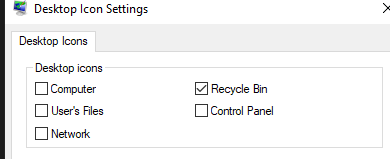
icone corbeille windows 10 disparue

Hello ,


Following the installation of Fence from a friend with an ACER laptop, the trash icon literally disappeared from the desktop? .... for it is well checked in the menu 'personalization? ..... that Should i do and do you have any idea? ... thank you very much! ...: sun: (translated by google) ...


10,267 views 6 replies
Reply #1 Top

Do you use multiple monitors? It is possible it go hidden away somewhere but by default Fences does not remove your trash icon.

Tip: Try double clicking on empty space somewhere on your desktop.

Reply #2 Top

Thank you for answering me, ... yes I already did that, but impossible to find it? ..... maybe we should uninstall Fence and reinstall it then? ...:|  

Reply #3 Top

Try this.

1: Right click on your desktop and click on personalize. Then go to themes and click on Desktop Icon Settings.

2: Try flicking the recycle bin on and off and see if it appears somewhere.

Reply #4 Top

Hello, yes, that's what I did, but without success! ..... on the other hand if I check one of the other options, this one appear? ... I would think of the system file 'recycle bin 'who was corrupt? ... in your opinion? ...|-)