I cannot Create,Move,click on the fances

Hello

I using Win10 and just got fences 3 baceuse on win7 fences2 was great.

My problem is that after installation i cannot create,move,or sometimes see any  of fences just arranged icons but i can click on  the old invisible icons on my desktop that are hidden.

When you rectangle select in windows there is no small context menu to create any fences

I cannot move or resize any default fences on screen.


I did the purge fences twice, reinstalled it many times and non of it solved it.

I searched the forum for the solution but didn't find any that works for me.

Sir Google too didn't give me a solution to.

Any advice or solution ?


13,971 views 13 replies
Reply #1 Top

Hello,

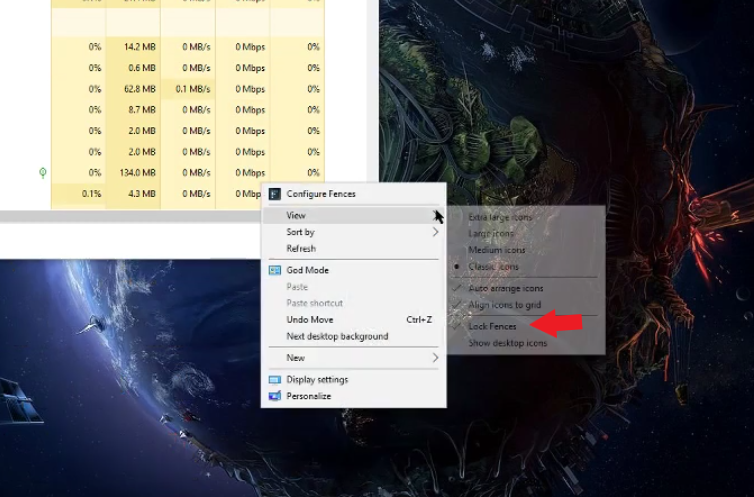
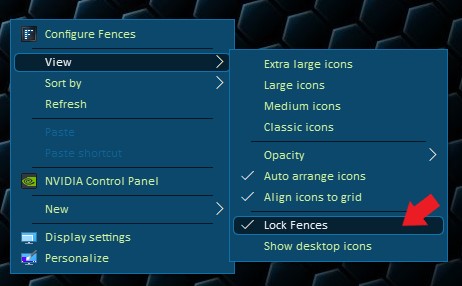
Sorry to hear you are having issues. Have you try to unlock the Fences?

Basj,

Stardock Community Assistant.

Reply #2 Top

Yes i did and it didn't help

Do any Windows settings can cause this issue ?

@ED

After restarting Explorer Fences are showing just for a second then disappear.

Quick Hide isn't enabled

Reply #3 Top

Can you try the cleanboot steps suggested here : https://forums.stardock.com/486084/fences-support-faq#cleanboot

This is to see if some application is having a conflict with Fences.

Try it and report back.

Thank you,


Basj,

Stardock Community Assistant

Reply #4 Top

It didn't help.

I can see all the fences now but i cannot move them or create any i even cannot close them pressing on X.

Reply #5 Top

As far as I know, that only true when you lock fences. You sure you have unlock it? A video capture on your problem might give us more information on your problem. Try to make a video grab of the problem and post it here.

Thank you,


Basj,

Stardock Community Assistant

Reply #7 Top

Hmm,

I was waiting to see if you locked or not your fences. But you pass through that part very fast.

Manage to get a screen grab of it. It shows that you have your fences locked. Please unlock it.

Thank you,


Basj,

Stardock Community Assistant

Reply #8 Top

I did it with this option check and un-check many times before and it didn't do anything.

But when you mark a rectangle on the screen there should be an option to create a fence or a folder.

Anyway it wont be an issue with app i assume it works for others, i will try to change some setting in my system and i will see.

If i will fix this i will post a solution here for others.


Reply #9 Top

szymonm987,  I have the same problem since June 2018 (but on Win 7 x64) and still have no solution to that. 

So, in case you manage to get the solution, please, post it here!

Tnx and good luck!

Reply #10 Top

I thought I would add my two cents here. I've had this problem with Fences Pro 3 (version 3.0.9.11) since I installed Windows 10. I don't know how to fix this issue permanently, but have found a quick temp fix. Maybe the Devs will be able to use this info to resolve the issue? When I try to move or delete an icon in a fence, I get a popup error. Sometimes it mentioned rundll32 being the problem. So I go to Task Manager/Details and End the rundll32 Task. Then I am able to do what ever I want with Fences.

I've done every other possible thing I could think of including lock/unlock, and nothing else helped at all. Only the rundll32 thing worked.

Check that out and see if you have the same results.

Reply #11 Top

I have fences v3.09.11 installed on a Windows 10, 64 bit, Build 17134.590.

Unable to resize my fences.

When I right click the the desktop, no option to unlock fences.

Not sure how to get the fence unlock disabled.

Reply #12 Top

Quoting rwruck, reply 11

I have fences v3.09.11 installed on a Windows 10, 64 bit, Build 17134.590.

Unable to resize my fences.

When I right click the the desktop, no option to unlock fences.
End of rwruck's quote

Hello,

Sorry to hear you are having issues. Try the purge and reinstall steps : https://forums.stardock.com/486084/fences-support-faq#reinstalling

Make sure to re-download the latest installer from your account. And reboot after the reinstall.

Basj,

Stardock Community Assistant.

Reply #13 Top

I downloaded version 3.09 of Fences setup EXE and ran the EXE as administrator.  Rebooted my Windows 10 and my unlock issue is resolved.

Thanks!