Two issues: Refresh desktop holds & New desktop icons show behind other icons

1. Refresh desktop holds 2. New desktop icons show behind other icons

Hi,

I started my trial of Fences today with hope that I'd buy the full version, if I like it.
But it gives me two serious bugs:

1. When I refresh my desktop (F5 or select Refresh from context menu), my desktop icons disappear, nothing responds for 20-30 seconds, if you click on anything, explorer crashes, and then I get my icons back refreshed but Fences crashed and turned off.


2. When creating/saving/downloading a new file to the desktop, the file jumps behind another icon, making me move one icon to get to the other behind it. Looks like an icon organizing issue.


These two are major problems could impact my decision of buying Fences, if not fixed.
Please assist... Thank you!

-Sergey.

33,445 views 24 replies
Reply #1 Top

Hello,

Sorry to hear you are having issues. Need more information.

1) What is Windows version installed? i.e Windows 10 V1809?

2) What Fences version installed? i.e Fences V3.0.9.11?

3) Do you have dual or more monitors attached? If you do please specify monitor resolution and scaling applied 100%? 150%? etc etc.

4) Do you have Websense, Forcepoint or something similar in the system.

Thank you.

Basj,

Stardock Community Assistant.

Reply #2 Top

Hi Basj, thanks for the quick reply!

1. Windows 10 v1709 (Build 16299.125)
2. Fences v3.0.9.11
3. I have 2 monitors attached, both 1920x1080, Scale 100%, One is a regular monitor, the other is Wacom Cintiq for on-screen drawing.
4. I don't have that, the closest I have is TotalAV antivirus.

Thanks!
-Sergey.

Reply #3 Top

Thanks for the information. Another question. Is the problem appear on both monitor or only one one of the monitor?

Thank you,


Basj,

Stardock Community Assistant

Reply #5 Top

Okay.. try the purge and reinstall steps : https://forums.stardock.com/486084/fences-support-faq#reinstalling

download the latest version from your account and reinstall that one. Please make sure to reboot before and after the installation.

Retest and report back here.

Thank you,


Basj,

Stardock Community Assistant

Reply #6 Top

Did that. Doesn't help.

The forum limited my response writing due to being a new user.
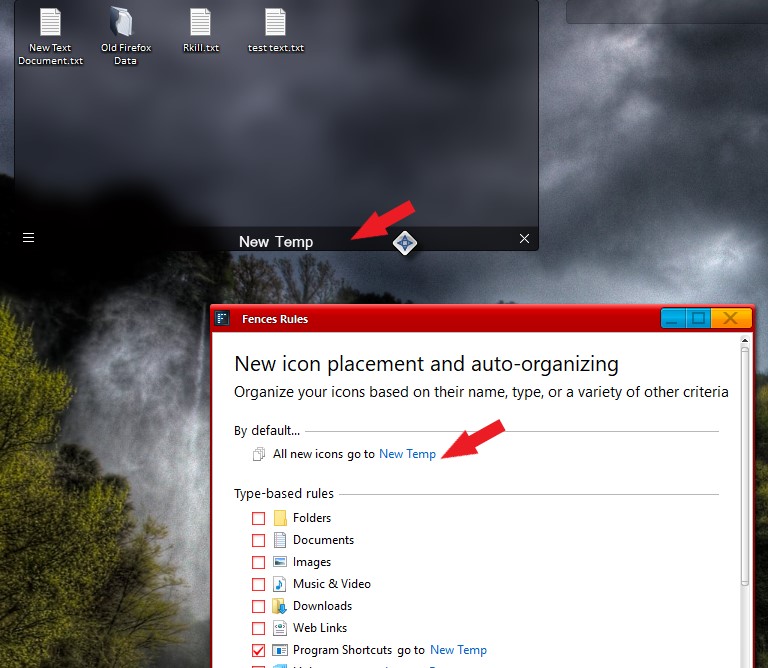
Right now I using a BIG workaround by putting a fence at the top of my desktop and telling Fences to put all the new icons there, that way they don't pop behind my other icons. As for the Refresh holds, what can I say... I'm refreshing my desktop less.

With that said, I'd like to see a real solution to this soon. I'm uninterested to continue solving these problems of your software, over this forum for much longer. Either it doesn't create issues for my computer, or I'm not gonna buy it.
To be honest, for this kind of idea, I'd be interested to pay much more than $10, but if it's going to bring issues to my computer, that hadn't been there before, then it's a deal breaker.

Thanks for your help and I hope there is a solution!

Reply #7 Top

I'm having a very similar issue -- except 3 monitors, different resolutions. Downloaded icons end up randomly on two of the three monitors (primary and right flank). No rhyme or reason as to why. And often they end up overlapped like your screenshots show.

I noticed something weird while troubleshooting: if I uncheck "Enable Fences" in the settings, the vertical spacing between all my desktop icons shifts slightly. So all except the top row will move somewhat up or down. When Fences is enabled, there is not enough room for where the bottom-most row of icons should be. It's really screwy. Note: I've disabled literally all other settings in Fences in an attempt to fix this frustrating problem. Anyway, I hope that info helps.

Windows 10
Fences 3.0.9
Primary Monitor: 2560x1440 (native) - scaling set at 100% (i.e. no scaling)
2nd and 3rd monitors: 1280x1024 (native)
Using DisplayFusion Pro 9.4.3, but turned it off to troubleshoot

Reply #8 Top

Hello,

I solved this problem by sending all new icons to a "temp fences". You can set Fences to do so by set it rules as below. This will make sure all your new icons will be inside a fence area and it will not get overlapped. You can than always moved that new icons to proper fences as you wish.

Thank you,


Basj,

Stardock Community Assistant

Reply #9 Top

Quoting berengard, reply 6

As for the Refresh holds, what can I say... I'm refreshing my desktop less.

With that said, I'd like to see a real solution to this soon.
End of berengard's quote

I have to agree strongly with berengard. I bought object desktop suite, installed WindowBlinds, Fences, Start 10, and the only thing that isn't buggy is Start10. I uninstalled WindowBlinds, and still contending with issues involving desktop refresh. Either logging into a new desktop session or F5 refresh yields a frustrating 20-30 second desktop blankness with no icons and a higher CPU utilization with Desktop Window Manager process (dwm.exe) until it sorts out the refresh.

Details of my environment:

1. Windows 10 v1809 (Build 17763.557)
2. Fences v3.0.9.11, Start 10 v1.7
3. 2 monitors attached, both 1920x1080, scale 100%. Both ViewSonic vx2452 monitors. Video controller: Intel HD Graphics (Lenovo M92p)

Reply #10 Top

Quoting mbrownmail, reply 9

I have to agree strongly with berengard. I bought object desktop suite, installed WindowBlinds, Fences, Start 10, and the only thing that isn't buggy is Start10. I uninstalled WindowBlinds, and still contending with issues involving desktop refresh. Either logging into a new desktop session or F5 refresh yields a frustrating 20-30 second desktop blankness with no icons and a higher CPU utilization with Desktop Window Manager process (dwm.exe) until it sorts out the refresh.

Details of my environment:

1. Windows 10 v1809 (Build 17763.557)
2. Fences v3.0.9.11, Start 10 v1.7
3. 2 monitors attached, both 1920x1080, scale 100%. Both ViewSonic vx2452 monitors. Video controller: Intel HD Graphics (Lenovo M92p)
End of mbrownmail's quote

Need to know if your pc have Forcepoint / Websence installed?

Thank you,


Basj,

Stardock Community Assistant

Reply #11 Top

Basj:  No Forecepoint or Websense installed. Just Symantec Endpoint Protection with network threat protection turned on.

Reply #12 Top

Quoting mbrownmail, reply 11

Basj:  No Forecepoint or Websense installed. Just Symantec Endpoint Protection with network threat protection turned on.
End of mbrownmail's quote

Please try the purge and reinstall steps : https://forums.stardock.com/486084/fences-support-faq#reinstalling

Just make sure to re-download from your account and reinstall it. Reboot after the installation and test again. Report back here.

Thank you,


Basj,

Stardock Community Assistant

Reply #13 Top

Hi Basj:

Ran the purge .bat as indicated and rebooted after installation. 'F5' desktop refresh after I established 6 fences after the install: 24 seconds to refresh desktop until icons re-appear again. :(  

Reply #14 Top

Need to clarify something. You said, 24 seconds to refresh desktop, everytime "F5" is press or boot up until Fences with icons appear?

Thank you,


Basj,

Stardock Community Assistant

Reply #15 Top

Basj:

Once desktop loads, anytime I press "F5" there is the 20+ second lag for icons to appear. Additionally, after boot and after authenticating to Windows and desktop is undergoing its loading, there is delay for the desktop to load as well. I have uninstalled Fences and all is back to normal. This is my work PC, and though I'd hoped Fences would improve desktop organization, I simply cannot afford my Win10 desktop to be buggy.

The only way I see playing around with this any further if there's a way if Fences has provisions to produce a meaningful debug log that it can be reviewed.

Reply #16 Top

Quoting mbrownmail, reply 11

Basj: No Forecepoint or Websense installed. Just Symantec Endpoint Protection with network threat protection turned on.
End of mbrownmail's quote

Is it possible to test run without that Symantec installed?

Thank you,


Basj,

Stardock Community Assistant

Reply #17 Top

Quoting basj, reply 16

Is it possible to test run without that Symantec installed?
End of basj's quote

I'll give it a shot and let you know the outcome w/ Symantec client disabled.


Reply #18 Top

Hijacking this thread a year late to say that the dreaded refresh issue has been a standard Fences feature for me over the years, since v2 on Win 7, v2 on Win 10, and now v3 on Win 10 - I really hoped v3 would fix the issue but it didn't.

When I click refresh or press F5, the fences are still visible but all desktop icons disappear (folder portal icons are still visible) and the desktop freezes for 20 seconds. If I click on the desktop then it turns white and after another 20 seconds Explorer crashes and restarts, but I lose all open Explorer windows, and some of my tray icons don't reappear.

The only workaround is to not click on anything and wait out the 20 seconds. At least that way I don't lose my flow with Explorer windows disappearing.

Because of where I sit in my office, 30+ friends and work colleagues have seen me using the software over time so I pointed them toward the trial version - when they install it I always get them to test the refresh and 100% of the time they had the same behaviour. I believe two times they said they could live with it because they don't use refresh and they paid for a licence, but the other 28+ said it was a showstopper and uninstalled it.

I believe it's possible that most people just don't notice it because they don't refresh the desktop. Unfortunately there is a second issue I have where folder portals don't update with file changes, so I have to refresh them. Pressing F5 while a folder portal is 'active' causes just that portal fence to update. Sometimes I forget to click the portal first meaning the desktop is 'active' and every time this kicks off the freezing problem.

Obviously I won't know how it works internally but the same behaviour happens at startup. After login, Fences take 20 seconds to appear and trying to use the desktop during this time will make Explorer crash. This makes me think this is just how Fences starts up, and if I try to refresh the desktop later then it causes Fences to crash and restart, and what we are seeing is just its normal startup behaviour.

TBH it happens so often for me and others I know on so many computers that I don't see how Stardock could be unaware of the issue. It has been an issue on literally every single computer I tested - I have had 11+ computers over five years, other people I know also change their computers frequently. There is no way you can't be aware of it!

I only recently started reading this forum but I spot a pattern, most posts seem to be - Customer posts an issue, Stardock respond with 'try a purge an reinstall', Customer says nope it didn't work, Stardock dont respond, and the thread dies.

Please patch this in v3, or give us a workaround, or fix it in v4, or at least acknowledge if it can't / won't be fixed.

Thanks.

Reply #19 Top

Hello emelloy,

I have two system of Windows 10 v2004 on Fences 3.0.9.11. But I can't reproduce your issue. On both system, when I press "F5" keyboard button all the fences icons blink once and that it. Its gone for less than a second and come back.

Here what I saw on my system :

Need to know more on your system.

1) Windows 10 version. Please use Winver.exe for full Windows version numbers.

2) Fences versions.

3) Please make a video capturing the issue and post or link it here so we can understand it better.

Thank you,

Basj,
Stardock Community Assistant

Reply #20 Top

Hi Basj, thank you for your response.

I uploaded a video ...

Version numbers are in the video. On this laptop I reinstalled the OS three days ago and there are very few other programs running, and the only customisation tool is Start10. I saw references in this thread to Forcepoint, and I never use that.

The Lenovo recovery image was Windows 1909 and it was the same on that. I updated to 2004 after the reinstall and that's the same. I've seen the same behaviour since Windows 7 x64, and all versions of Windows 10 since 1509.

Thanks.


Reply #21 Top

Thanks for the video. Since I can't reproduce it, I have forward your problem/question to Stardock Support Team for their assistance. Please keep an eye on this thread for any updates. We appreciate your feedback and patience.

Basj,
Stardock Community Assistant

Reply #22 Top

Hi Basj, thank you for forwarding the info to your support team.

I think I've figured out what's going on. Fences doesn't seem to like shortcuts to network locations, even if the location is valid.

On my desktop there is that 'Share [Media]' shortcut which is a UNC path. The path is accessible but for some reason it causes the problems in the video. In case it was a bad shortcut I deleted and recreated it, confirmed that it is accessible, and went through the same steps in my video. It still causes the Fences delay and the Explorer crash and restart.

If I disable Fences there is no problem refreshing the desktop when the shortcut is there. If I delete the shortcut there is no problem refreshing the desktop when Fences is enabled. Because of this behaviour it seems to be a Fences issue rather than a Windows issue.

I also tested it on another computer where I have many UNC shortcuts - moved them to another folder and refresh works perfectly.

So I would be grateful if you could forward this info to your support / dev teams ... what are the chances of getting a fix for v3?

Thanks.

Reply #23 Top

Great that you figure out the main issue here. There is a guide to work around on network folder as mentioned here : https://forums.stardock.com/486084/fences-support-faq#folderportalsempty

Please try that and report back.

Thank you,

Basj,
Stardock Community Assistant

Reply #24 Top

Hi.

It was only one icon in my case so I just deleted it.

The workaround says it's for network shortcuts that aren't available, in my case the share has always been available. Since I identified the issue I have tested it on a couple of other computers and it seems Fences just doesn't like network shortcuts at all, whether available or not. Maybe that workaround list should be updated to advise this.

I get that there would be a delay when unavailable, but it should only be when trying to open the link? There isn't any delay on the Windows desktop when fences is disabled. This workaround shouldn't be a long-term answer. Is it being treated as a bug and with plans to fix it?

I'm asking because folder portals have their own set of features (issues :)) that I won't go into here.

That workaround guide is three years old, and I've had the issue for about five years. I'm surprised it hasn't been fixed by now. I wonder how many other people have just uninstalled the trial because they didn't see the workaround.