IP Issue

Changing individual icons

Hi folks.  Got a small issue here.  When I try to change an individual icon by right clicking on it and going to properties, I get the following pop up...
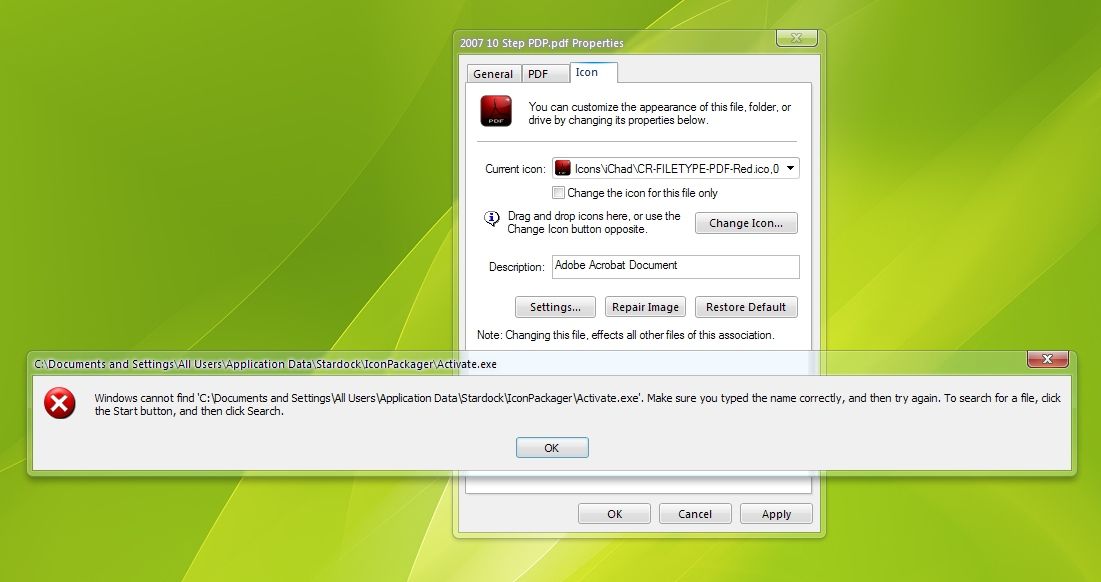


I'm running IconPackager 4.00.163 (x86) on Windows XP home SP3

Thanks for any help...
10,440 views 12 replies
Reply #1 Top
IconPackager 4.00.163
End of quote


You might want to update to 4.00.165 and see if that fixes it. I know from some of the IRC traffic there was a problem with activation for one of the updates.
Reply #2 Top
What up brother RPG? Go here to this forum where we all had a similar issue with IPv4. You can read up on how my issue got fixed on the second page, then give the fix a try.

Good Luck!

Cp

 :CONGRAT: 
Reply #3 Top
Lantec, I did that just after I posted this, and it didn't help. Also I tried to get to that path manually, and it didn't exist on my computer... C:Documents and Settings\All Users\Application Data\Stardock\Icon Packager\Activate.exe

I only got as far as the All Users folder... the Application Data folder wasn't there...

cplair, could you give me a link to the forum post you speak of? And by the way, congrats to you and your Lakers. Kobe was Jordanesque last night. We'll meet you at the finals. Hopefully we can finish out the Pistons tonight.
Reply #4 Top
I only got as far as the All Users folder... the Application Data folder wasn't there...
End of quote


Forget that. I'm an idiot. It was hidden. However, upon unhiding it, I still only got into the Iconpackager folder. The "activate.exe" isn't there.
Reply #5 Top
cplair, could you give me a link to the forum post you speak of?
End of quote


Oh damn! Did everything but the link!

WWW Link

Here you go bro!

Hopefully we can finish out the Pistons tonight.
End of quote


Me and my Lakers will be watching the remainder of this series with great interest! :LOL:  :LOL:

FYI: Here's the fix that worked for me bro!

Go into Impulse and click the "?" in the upper right corner, select "Open XML's Folder" (Public), then delete everything inside that folder. After that, uninstall Icon Packager from Impulse then reinstall from Impulse.

Impulse failed to uninstall IP for me, so I uninstalled from SDC, then used Impulse to reinstall.

Reply #6 Top
Thanks cp. I'll try that. oh, and by the way...

BEAT LA! BEAT LA!
Reply #7 Top
I wouldn't jump in on any of this but LA did beat my Pistons... so I hope Colby catches fire or something.

Anyway if you still get that same error with the new build RPG I would like to know your system settings and the like to try it out here. Please let me know if the clean install works for you.
Reply #8 Top
Well, I did the following...

Opened Impulse, clicked the ? and deleted everything in the XML folder...
Unistalled IconPackager through Stardock Central (Impulse wouldn't do it)...
Installed IconPackager through Impulse...

Still the same problem. I can change individual icons through IconPackager, but not by right clicking on a file and choosing the icon tab. Still get the same deal as in my original post.

Seabass, not sure exactly what system info you need from me, but I'm running Windows XP Home with Service Pack 3, and IconPackager 4.00.165 installed through Impulse. Let me know what other information you'd like to have...
Reply #9 Top
BEAT LA! BEAT LA!
End of quote


 X-( Muahahahahahahahaha! X-( 

Still the same problem
End of quote


Damn dude, sorry the fix didn't work for you. Contact Stardock Support and they'll walk you through what needs to be done.

Good luck brother!

FYI: Boston SUCKS! Boston SUCKS! Muahahahahahaha! (You'll hear a lot of this during the finals)

 :LOL:  :LOL:  :LOL: 
Reply #10 Top
Well, it's not a HUGE deal anymore, since I can still change the icons through the IP interface... so... I guess I'll just wait for the next version and see if that fixes things. :)
Reply #11 Top
No that was everything I needed. I have passed some of the info onto the developers. We hope to have a work around but if there isn't something possible it would be included in an update.
Reply #12 Top
thanks Seabass! Looking forward to the update.