Snipboard Beta Feedback
With the Snipboard Beta today, we are creating this thread so that users can report any observed issues.
Thank you for your interest and any time you put into making Snipboard a better product.
With the Snipboard Beta today, we are creating this thread so that users can report any observed issues.
Object Desktop members can get the release from within Object Desktop Manager
Individual purchases (as well as Object Desktop Members) can also be obtained from your account page: https://store.stardock.com/myaccount/products
For guest check-out purchase (no account), from this link: http://www.stardock.com/support/productkeyretrieval
Please include the following for anything found:
Exact Windows version \ build (winver.exe)
Detailed steps to recreate the issue seen
Screenshots and videos are very helpful. Videos can be uploaded to a cloud drive service (GoogleDrive, DropBox, OneDrive, YouTube), with a shared link included in your post. Images can be copied and pasted directly into a post.
If there are specific apps that the app does not work (well) with, please note what apps and their exact versions. If any app is not common, a link to a trial version would be appreciated.
Thank you for your interest and any time you put into making Snipboard a better product.
09/23/2026
UI: 0.7
File Version: 0.70.0.0
Object Desktop
Please see the press release:
Press release link
Known issues
While we appreciate all feedback, please remember that we offer no official support for beta \ preview \ developer channel versions of Windows. If you report issues while in any of those early release channels, you should not expect them to be addressed unless it still exists in a retail version of Windows.
A few things to report.
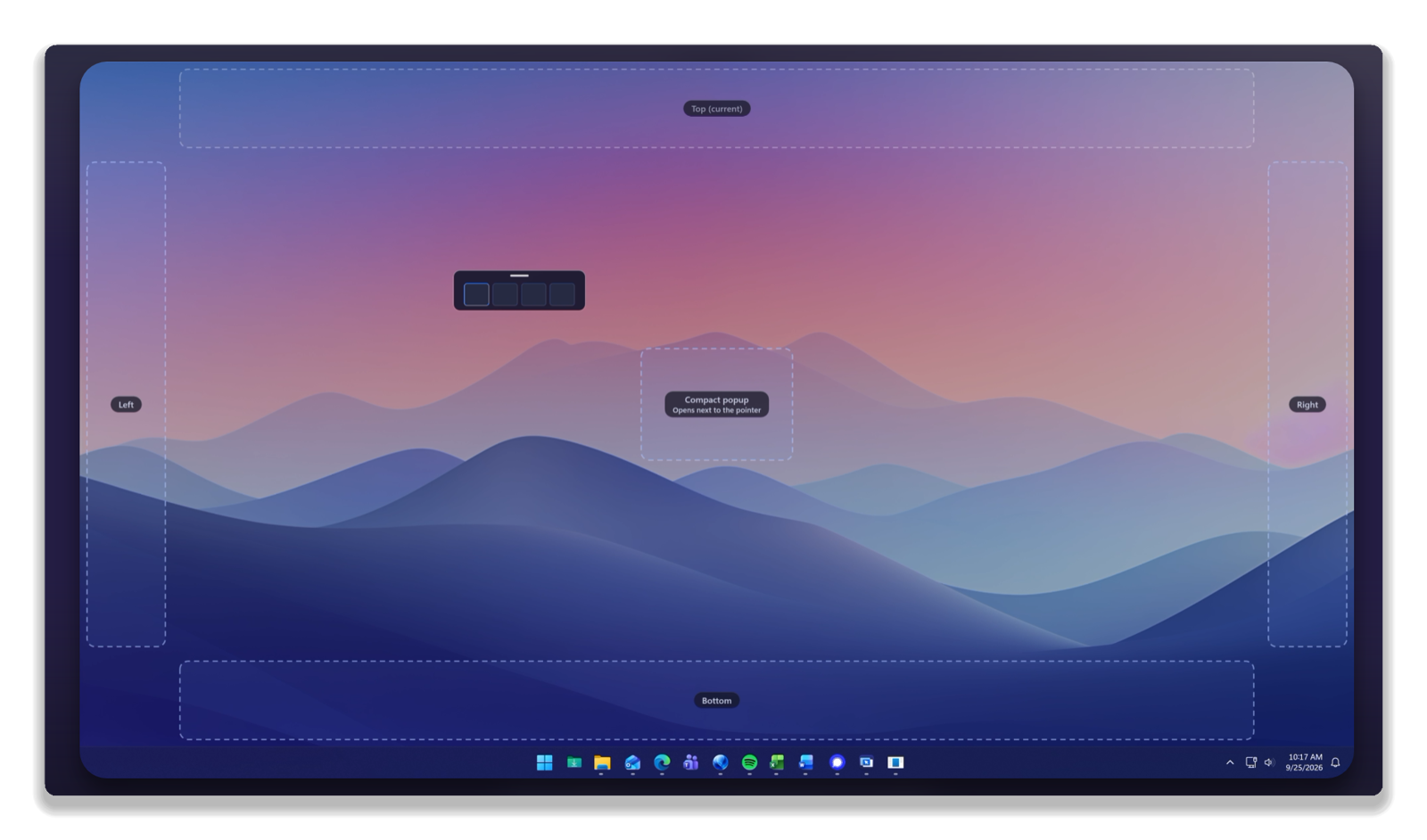
1) Layout > Interface > Compact popup doesn't always appear on top of the focused app.
2) Doesn't seem to be a way to make bar sticky until a selection is clicked with the mouse
3) Standard Card style doesn't seem to work
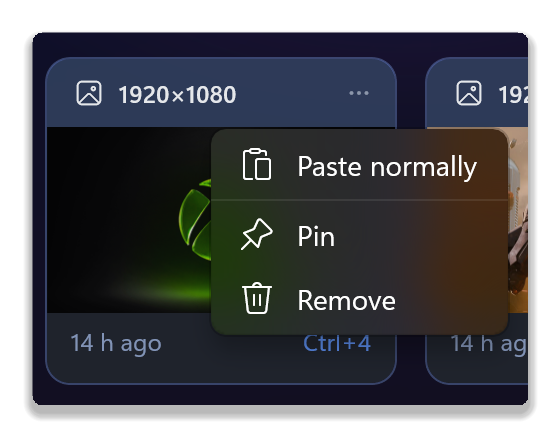
4) Paste options on the card under the three dots (...) doesn't seem to work
5) Not sure how Behavior > Paste automatically after selecting is supposed to work when turned off
Windows 11 Pro - 26200.9550; Snipboard 0.70.0.0
Hi Pelaird, and thank you much for your report.
Some thoughts on these:
#1: This is working reliably in my testing (Win11 25H2 26200.9448), though it's possible there's some specific conditions where it occurs. I'll be keeping an eye on that, though if you're able to isolate anything specific to try, that could help investigate what's happening.
Also possible, it might be the sort of thing that gets resolved from reboot or explorer restart, etc. If anything seems to resolve the issue, that could also be quite helpful.
#2: Same as #1 above. Some clarification of "make bar sticky" might also help, though I expect you mean that the bar is going away unexpectedly. It should normally stay in place when Windows + V is pressed, as it's doing for me.
#3: When you change between "Standard" and "Modern" does anything at all change? It does seem this may depend on what other themes/colors you have currently selected. A description of what's happening versus what you expect to change should help us to log the behavior for review.
#4: To clarify, do you mean these options? 
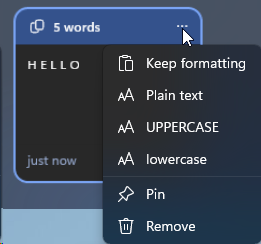
They seem to be working for me, though I'm not sure what you've tried copying/pasting exactly.
#5: If you're in an app, for example Notepad, and you open the Snipboard bar, clicking one of the cards should automatically paste that back into Notepad. If that behavior setting is turned off, it won't automatically "send" the Ctrl+V, until you do so yourself.
Thanks again for this feedback, your experience with the app will certainly help as we move through beta.
Best regards,
Adam McGuinness
Stardock Support Specialist
Thanks again for this feedback, your experience with the app will certainly help as we move through beta.
All the issues were caused by holding the Win key after releasing the V key, which requires pressing the V key multiple times to tab to the card to be pasted. If I release the Win key immediately the bar is sticky and allows selection of the cards with the mouse as well as using the three dots (...) option menu to paste UPPERCASE, lower case, etc.
The timing of the key presses is a little tricky. Maybe allow the Win key to be pressed a little longer.
A few things to report.
1) Layout > Interface > Compact popup doesn't always appear on top of the focused app.
I found this to happen when I do not close Snipboard with esc key but focus another app. Snipboard also is not focused the next time.
Win 11 Pro 25H2 26200.9457
Snipboard 0.70.0
Hi, Just tried snipboard:
The full bar desktop transparency doesn't seem to work (I'm using Fences 6 to group icons etc). The snipboard bar obscures the desktop completely, regardless of opacity settings, using the desktop background colour. The pop-up small bar seems to be more transparent - At 25% opacity the pop-up shows some very blurred colours where the icons are, the full width allows nothing to show.
Windows 11
Haven't had a chance to try sync etc yet - will let you know!
Mike
Is there a way to open the Snipboard settings other than the gear icon on the board and the System Tray. I have searched all the usual places with no luck. It must not be an executable, but part of the Snipboard app.
not sure if this is possible and not advertised, but can you do annotation with the pictures and text overlays? if yes, its not advertised. would be awesome.. and, can we use a url to share with people like tech support who dont allow people to upload images?
Product design suggestion.
Opening the Paste Bar at a fixed location at the cursor is good, but the Paste Bar should then be movable. I have been using other products (Old Yankee clipper, and newer Ditto. The features of Snipboard are very nice, but the Paste Bar really needs to be movable and left on screen until closed by the user.
Hi, Just tried snipboard:
The full bar desktop transparency doesn't seem to work (I'm using Fences 6 to group icons etc). The snipboard bar obscures the desktop completely, regardless of opacity settings, using the desktop background colour. The pop-up small bar seems to be more transparent - At 25% opacity the pop-up shows some very blurred colours where the icons are, the full width allows nothing to show.
Can you post a screenshot of what you mean with this? I can make the transparency slider work here but not sure how Fences 6 plays into this.
Product design suggestion.
Opening the Paste Bar at a fixed location at the cursor is good, but the Paste Bar should then be movable. I have been using other products (Old Yankee clipper, and newer Ditto. The features of Snipboard are very nice, but the Paste Bar really needs to be movable and left on screen until closed by the user.
You want to be able to move the bar while it's open? You can change it's location in the settings currently but could add an option somewhere on the bar to move it to another side of the screen possibly.
If I restart Explorer, the System tray control (icon) disappears and the only way I can find to get it back is to restart the computer. I can still get to the settings from the gear icon (settings) on the paste bar, but the System tray is easier.
Great idea. But make the TEMPORARY function available ad hoc per item (as well as providing a global on/off switch). The trouble with the Windows Clipboard is with copying and pasting passwords. A temporary, ad hoc function for Snipboard would let you copy and paste a password without adding it to Snipboard history. You could even add an option to encrypt any Snipboard entry on copy and decrypt it only when the user pastes it into a target application. And maybe an ad hoc option to clear the encrypted clipboard entry (or any entry) on paste.
More security might be helpful for other copy/paste items such as software registration codes, too.
It would be nice to have an even more compact Snipboard display option, more like the Windows Clipboard history, if we want that at times. Snipboard occupies a lot of screen real estate. Maybe something like a Stardock Tiles Autohide tab would be helpful at times.
EDIT_UPDATE: I see in the context menu for the SysTray icon that there's an option to turn Temporary mode on or off. I am thinking of a more accessible switch, such as a mouse context switch or a keyboard shortcut that would invoke Temporary mode as you copy an item. Going back and forth to the SysTray to flip the switch is very inconvenient.
There are a couple options already besides the temporary mode, you can also remove items from the list with the three dots and in the settings you can also list out any apps you dont want data copied from as well. If you can explain how you want temporary mode to be enabled/disabled, then i can look to implement a possible solution for you othewise, i'd be guessing on how you want this to work.
Password Managers are the issue. Most password managers run as a browser extension which is not a process which I believe can be targeted by Snipboard. I use Keeper and it has a setting to delete copied info after a set time limit. I use 30 seconds. The way the info is deleted from the clipboard is to write an empty clip to the clipboard which replaces the copied info. This is the main reason I have never used the Windows Clipboard History.
The Temporary Mode solves this issue, but it's very cumbersome to use. You have to turn it on, and then turn it off after pasting. I'm not exactly sure how it would work, but with Snipboard enabled, if there was a different shortcut to copy info with the Temporary Mode enabled and then disabled once the info is pasted. I believe this would solve this issue.
EDIT: Maybe just add a right-click "Paste & Delete" option to the cards.
That's already there.
ok added a bunch of items based on feedback from this thread
New
Fixed

EDIT: Maybe just add a right-click "Paste & Delete" option to the cards.
That's already there.
There is a "Remove," but that requires opening the bar and pasting, and then opening the bar again to remove. I'm suggesting an option that does both with one action.
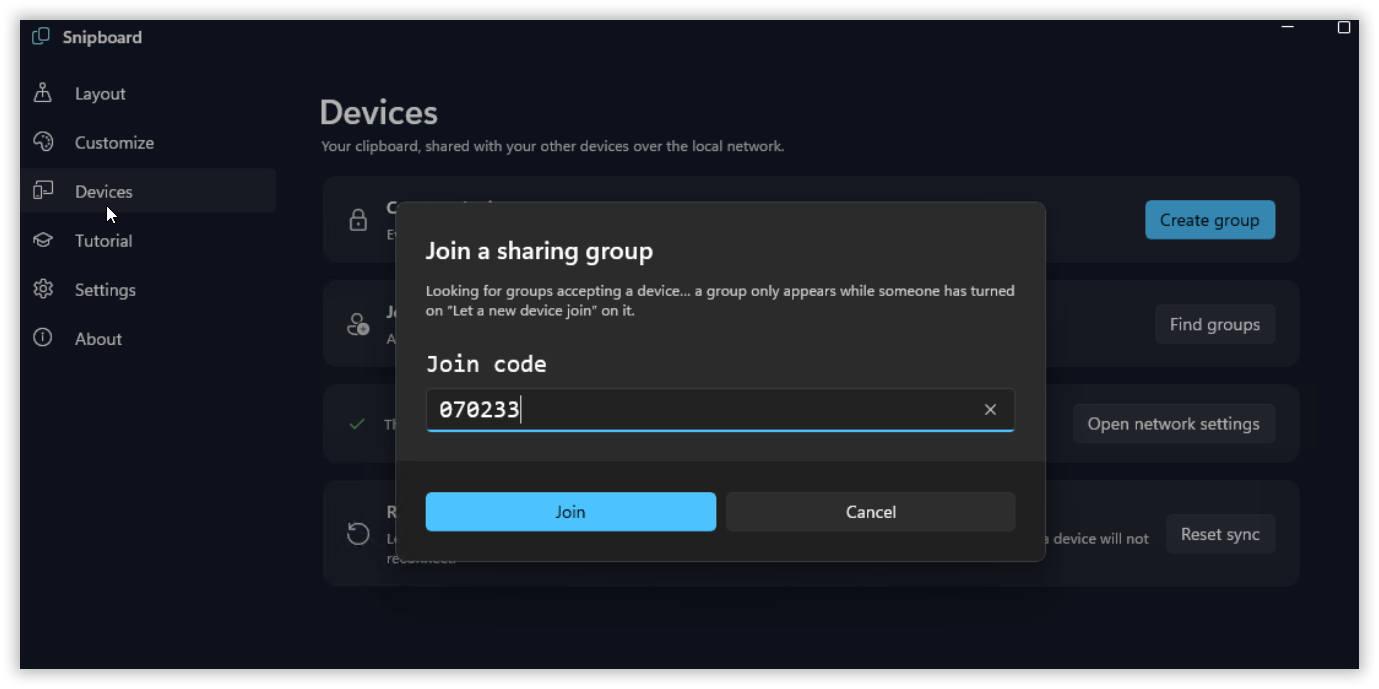
I ask a device to join, go to that device and try to join using correct code, nothing happens and device does not join.
Any ideas?
I ask a device to join, go to that device and try to join using correct code, nothing happens and device does not join.
Any ideas?
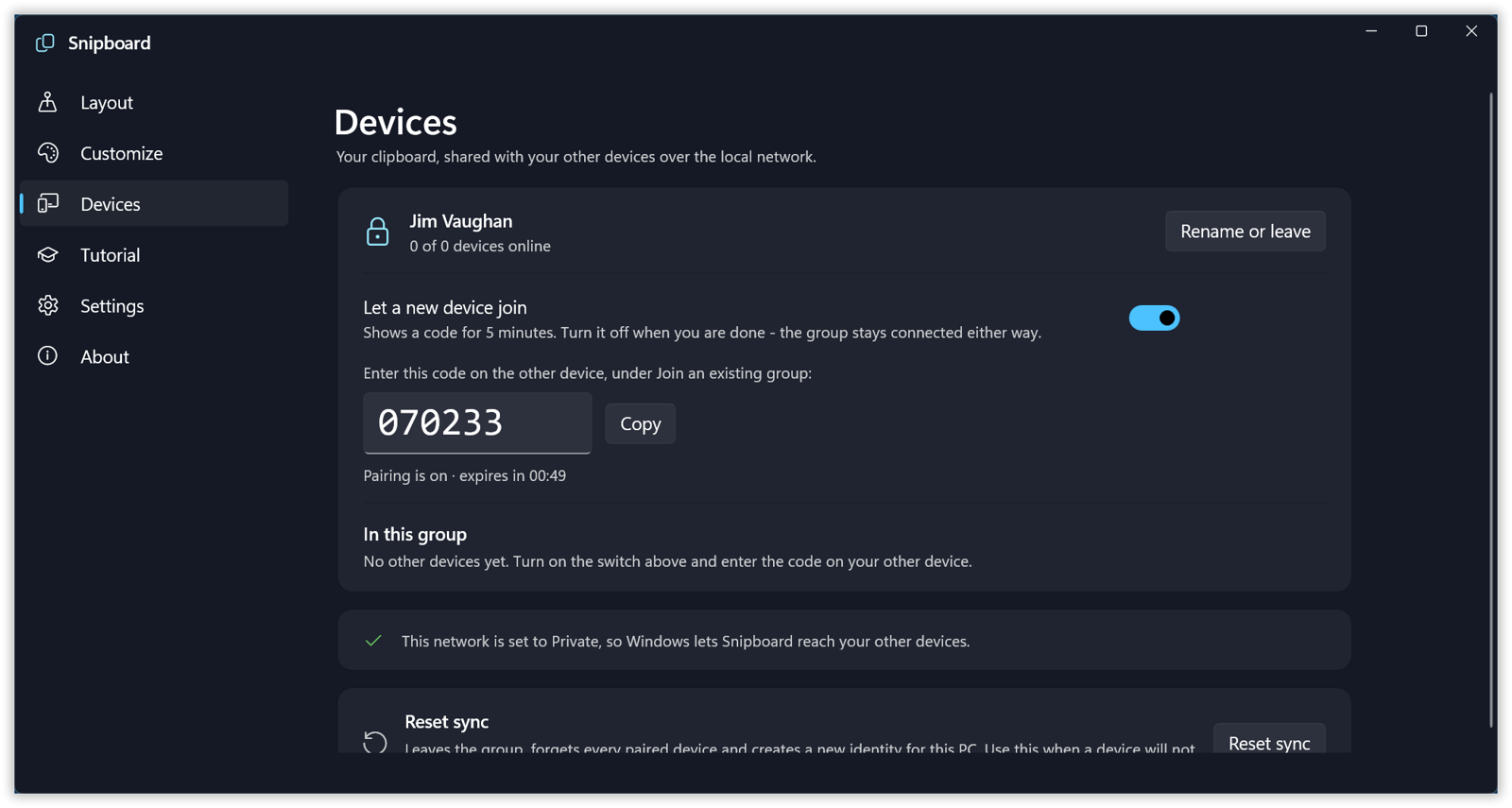
Did you first create a group on a primary device?
1. Create a group
2. Enable "discoverability" option
3. On second device you should see that (if you network is setup correctly LAN only)
4. Click it and should be able to enter the code.
I need to work on the language on that page.
I do that and it does not work. LAN is setup as all computers are on private network. I can rdp into both computers.
Just tried on a different computer and it works, question is what's different about the one that doesn't work.
On the computer that works I get a dialog that pops up, join a sharing group, on the one that doesn't work I get no popup.
On the connection that doesn't work both computers can ping each other..
Welcome Guest! Please take the time to register with us.
Select a reason for giving karma:
You're about to visit an external site:
Sign up here to get the latest news, updates, and special offers delivered directly to your inbox.