
Start11 v2 Release (2.81) Feedback
With the Start11 v2.81 release today, we are creating this thread so that users can report any observed issues.
Thank you for your interest and any time you put into making Start11v2 a better product.
With the Start11 v2.81 release today, we are creating this thread so that users can report any observed issues.
Object Desktop members can get the release from within Object Desktop Manager
Individual purchases (as well as Object Desktop Members) can also be obtained from your account page: https://store.stardock.com/myaccount/products
For guest check-out purchase (no account), from this link: http://www.stardock.com/support/productkeyretrieval
Please include the following for anything found:
Exact Windows version \ build (winver.exe)
Detailed steps to recreate the issue seen
Screenshots and videos are very helpful. Videos can be uploaded to a cloud drive service (GoogleDrive, DropBox, OneDrive, YouTube), with a shared link included in your post. Images can be copied and pasted directly into a post.
If there are specific apps that the app does not work (well) with, please note what apps and their exact versions. If any app is not common, a link to a trial version would be appreciated.
Thank you for your interest and any time you put into making Start11v2 a better product.
I changed it to 100% scale now, and the bug is gone. So it looks like its realted to the 115% custom scale I had set.
I also tried 125% (which is a fixed option in Windows) and the button behaves normally, no bug.

Great, will forwarded your problem/question to Stardock Support Team for their assistance. Please keep an eye on this thread for any updates. We appreciate your feedback and patience. Thank you.
Basj,
Stardock Community Assistant
but, there are times where the server might have some issue which causing issue.
This problem persisted for about a week before I reported it here. I don't think it is a temporal problem. If nobody investigates it, it won't get better.
Strangely, you're the only one reporting it on this feedback thread on Start11 v2.81. Perhaps something in your system is blocking it from downloading it properly.
Thank you,
Basj,
Stardock Community Assistant
I'm in W11 Insider Preview experimental channel and Start11 isn't working at all in recent ver. 26340.9596 quality update, regardless of the version. I had to system restore like 3 times for testing.
Hello,
Sorry to hear you are having issues. But, do know that Stardock does not support its product on system that running Windows Insider/Beta review version.
Thank you,
Basj,
Stardock Community Assistant.
Uninstall and remove settings followed by re-install fixed it.
Thanks. I had the same problem. Your suggestion helped me solve it.
I'm in W11 Insider Preview experimental channel and Start11 isn't working at all in recent ver. 26340.9596 quality update, regardless of the version. I had to system restore like 3 times for testing.
We will see about installing a test box with this build to investigate quickly, but obviously experimental channel builds are by their nature experimental and may have compatibility issues which do not exist by release.
Strangely, you're the only one reporting it on this feedback thread on Start11 v2.81. Perhaps something in your system is blocking it from downloading it properly.
Where can I find a log that would indicate what is failing?
I don't think downloading is the problem. The screenshot shows that all bytes were downloaded. It would be surprising if something on the machine is preventing the app from completing the installation; the only thing installed is SQL Server and its tools. Which apps, in your experience, cause this problem?
Where can I find a log that would indicate what is failing?
Unknown to me, perhaps, Stardock Support could help on it. I have forwarded your problem/question to Stardock Support Team for their assistance. Please keep an eye on this thread for any updates. We appreciate your feedback and patience. Thank you.
Basj,
Stardock Community Assistant
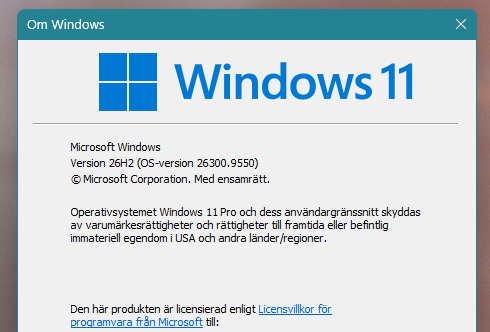
Folders pinned as menus no longer open at all under 2.81. Also no error is thrown. Only some of the apps pinned to the taskbar open from there. Another few open if I context menu and select open. Some don't even bring up a context menu. A couple of icons for pinned items are also gone, both folders and apps. Just started today ( 8 October). No updates or any sort that I can tell. Win11 26300.9550.
I have also already removed, rebooted, reinstalled from ODNT since I sub there's no stand alone download in my account for Start11, and rebooted. This made zero difference.
Folders pinned as menus no longer open at all under 2.81. Also no error is thrown. Only some of the apps pinned to the taskbar open from there. Another few open if I context menu and select open. Some don't even bring up a context menu. A couple of icons for pinned items are also gone, both folders and apps. Just started today ( 8 October). No updates or any sort that I can tell. Win11 26300.9550.
I have also already removed, rebooted, reinstalled from ODNT since I sub there's no stand alone download in my account for Start11, and rebooted. This made zero difference.
Hello,
Sorry to hear you are having issues. Need to know which version of Windows 11 you're on, 25H2 or 26H2?
Thank you,
Basj,
Stardock Community Assistant.
I deleted all of the links and created new ones from the folders and they appear to be back now.
I did state what Windows I was on in my post:
Win11 26300.9550. Which is a 26H2 build.
I am in the release preview channel but it was updated on 30 September, and this issue just showed up today.
I deleted all of the links and created new ones from the folders and they appear to be back now.
I did state what Windows I was on in my post:
Win11 26300.9550. Which is a 26H2 build.
I am in the release preview channel but it was updated on 30 September, and this issue just showed up today.
When I did a search on "Win 11 26300.9550" Both Windows 11 version came up 25H2 and 26H2, so it is unknown to me which on you're on. That's why I asked. Anyway, it is great to hear you get it working again.
Thank you,
Basj,
Stardock Community Assistant
Welcome Guest! Please take the time to register with us.
Select a reason for giving karma:
You're about to visit an external site:
Sign up here to get the latest news, updates, and special offers delivered directly to your inbox.