Abisnabidam Abisnabidam

DeskScapes 2026 Release Feedback Thread

DeskScapes 2026 Release Feedback Thread

Obtaining the product

Object Desktop members can get the release from within Object Desktop Manager 

Individual purchases (as well as Object Desktop Members) can also be obtained from your account page: https://store.stardock.com/myaccount/products

For guest check-out purchase (no account), from this link: http://www.stardock.com/support/productkeyretrieval

Reporting an issue

Please include the following for anything found:

  • Exact Windows version \ build (winver.exe)

  • Detailed steps to recreate the issue seen

  • Screenshots and videos are very helpful.  Videos can be uploaded to a cloud drive service (GoogleDrive, DropBox, OneDrive, YouTube), with a shared link included in your post.  Images can be copied and pasted directly into a post.

  • If there are specific apps that the app does not work (well) with, please note what apps and their exact versions.  If any app is not common, a link to a trial version would be appreciated.

Thank you for your interest and any time you put into making DeskScapes 2026 a better product.


759 views 89 replies | Pinned
Reply #51 Top

Really glad Deskscapes got an update and so far really enjoy it. My only concern is now that Deskscapes installs wallpapers (Dreams and Static) to the Documents folder, it doesn't seem to play nice with OneDrive. My installed wallpaper in DeskScapes shows blank previews and not the actual wallpaper preview.

Reply #52 Top
Quoting basj, reply 3993564

Hello,


Sorry to hear you are having issues. Please try changing these 3 option and see if any one of those solve your issue. Try it and report back.


Thank you,


Basj,


Stardock Community  Assistant.

End of basj's quote

Thanks for the suggestion, Basj. Unfortunately the problem remains the same with all three options. On the other hand, when I revert to Deskscapes 11, it works just fine. It's not making sense to me.

Reply #53 Top
Quoting growe12, reply 3993581

Thanks for the suggestion, Basj. Unfortunately the problem remains the same with all three options.

End of growe12's quote

If you have not yet, please try, uninstall Deskscapes 2026, reboot immediately (important), download latest version available in your account product download page: https://store.stardock.com/myaccount/products. Install it, reboot immediately again. Retest it and report back.

Also, please try Dev suggestion mentioned here in reply#26: 

Quoting Neil, reply 3993457
End of Neil's quote

Thank you,

Basj,

Stardock Community  Assistant

Reply #54 Top
Quoting basj, reply 3993583

If you have not yet, please try, uninstall Deskscapes 2026, reboot immediately (important), download latest version available in your account product download page: https://store.stardock.com/myaccount/products. Install it, reboot immediately again. Retest it and report back.

Also, please try Dev suggestion mentioned here in reply#26: 

Quoting Neil,

reply 3993457

I believe you need to install this update   https://www.microsoft.com/en-US/download/details.aspx?id=35&msockid=1a6387e185a769b933699188848068b7


Thank you,

Basj,

Stardock Community  Assistant

End of basj's quote

Thank you very much, Basj (and Dev). This combination worked, so I now have a functioning Deskscapes 2026!

Reply #55 Top
Quoting growe12, reply 3993615

Thank you very much, Basj (and Dev). This combination worked, so I now have a functioning Deskscapes 2026!

End of growe12's quote

Great, really glad to hear that.

Thank you,

Basj,

Stardock Community  Assistant

Reply #56 Top

Thanks for the DeskScapes 2026 update. The UI feels cleaner and wallpaper transitions appear more responsive on my system. Appreciate the continued development.

Reply #57 Top
Quoting RaghavChauhan, reply 3993618

Thanks for the DeskScapes 2026 update. The UI feels cleaner and wallpaper transitions appear more responsive on my system. Appreciate the continued development.

End of RaghavChauhan's quote

Great, glad you like it.

Thank you,

Basj,

Stardock Community  Assistant

Reply #58 Top

No way to make Deskscapes start up with windows and will not show up in system tray 

Reply #59 Top
Quoting joeshades, reply 3993638

No way to make Deskscapes start up with windows and will not show up in system tray

End of joeshades's quote

DeskScapes automatically starts up at bootup.  There is no manual control needed for that.

Reply #60 Top
Quoting Neil, reply 3993641

Quoting joeshades,

reply 3993638


No way to make Deskscapes start up with windows and will not show up in system tray


DeskScapes automatically starts up at bootup.  There is no manual control needed for that.

End of Neil's quote

Maybe because I am on the free trial but it does not start up with windows and does not show up in system tray and there is no way in taskbar settings to make it show

Reply #61 Top
Quoting joeshades, reply 3993642

Quoting Neil,

reply 3993641


Quoting joeshades,


reply 3993638


No way to make Deskscapes start up with windows and will not show up in system tray


DeskScapes automatically starts up at bootup.  There is no manual control needed for that.


Maybe because I am on the free trial but it does not start up with windows and does not show up in system tray and there is no way in taskbar settings to make it show

End of joeshades's quote

If you apply a wallpaper is it not still applied on bootup?


Reply #62 Top
Quoting Neil, reply 3993643

Quoting joeshades,

reply 3993642


Quoting Neil,


reply 3993641


Quoting joeshades,


reply 3993638


No way to make Deskscapes start up with windows and will not show up in system tray


DeskScapes automatically starts up at bootup.  There is no manual control needed for that.


Maybe because I am on the free trial but it does not start up with windows and does not show up in system tray and there is no way in taskbar settings to make it show


If you apply a wallpaper is it not still applied on bootup?

End of Neil's quote

Whatever wallpaper was there will show up but it does not change until I go into programs and open Deskscapes


Reply #63 Top
Quoting joeshades, reply 3993642

does not show up in system tray

End of joeshades's quote

I've installed DeskScapes 2026 and also for me its icon doesn't show up in system tray but I can access the DeskScapes 2026 main window by clicking on its icon in Start menu, or searching for DeskScapes 2026 in Start menu to find the icon.

To check if DeskScapes 2026 starts correctly at Windows boot you should open Windows Task Manager with Ctrl + Shift + Esc and on "Processes" tab  you should find 2 processes related to DeskScapes 2026:

DeskScapes 11 process points to C:\Program Files (x86)\Stardock\DeskScapes\Deskscapes64.exe

Stardock DeskScapes 11 Service process points to C:\Program Files (x86)\Stardock\DeskScapes\DS11Srv.exe 

Also in "Services" tab, the DeskScapes 11 service should be running


Reply #64 Top

I've enabled the option to show the DeskScapes icon in system tray but it doesn't show up, neither I've found it in Taskbar settings - Other taskbar icons 

But even with this glitch DeskScapes 2026 is working for me: I've created a playlist with 5 static backgrounds and I've applied the playlist, the backgrounds cycled correctly. Then I rebooted the PC and the 5 backgrounds still cycled correctly so the missing DeskScapes 2026 icon in taskbar seems to be not relevant. Anyway I wonder why it doesn't show up in taskbar, neither in taskbar settings.

Reply #65 Top

Quoting Ganosh, reply 3993648
I've enabled the option to show the DeskScapes icon in system tray but it doesn't show up, neither I've found it in Taskbar settings - Other taskbar icons 

But even with this glitch DeskScapes 2026 is working for me: I've created a playlist with 5 static backgrounds and I've applied the playlist, the backgrounds cycled correctly. Then I rebooted the PC and the 5 backgrounds still cycled correctly so the missing DeskScapes 2026 icon in taskbar seems to be not relevant. Anyway I wonder why it doesn't show up in taskbar, neither in taskbar settings.

End of Ganosh's quote

Hello,

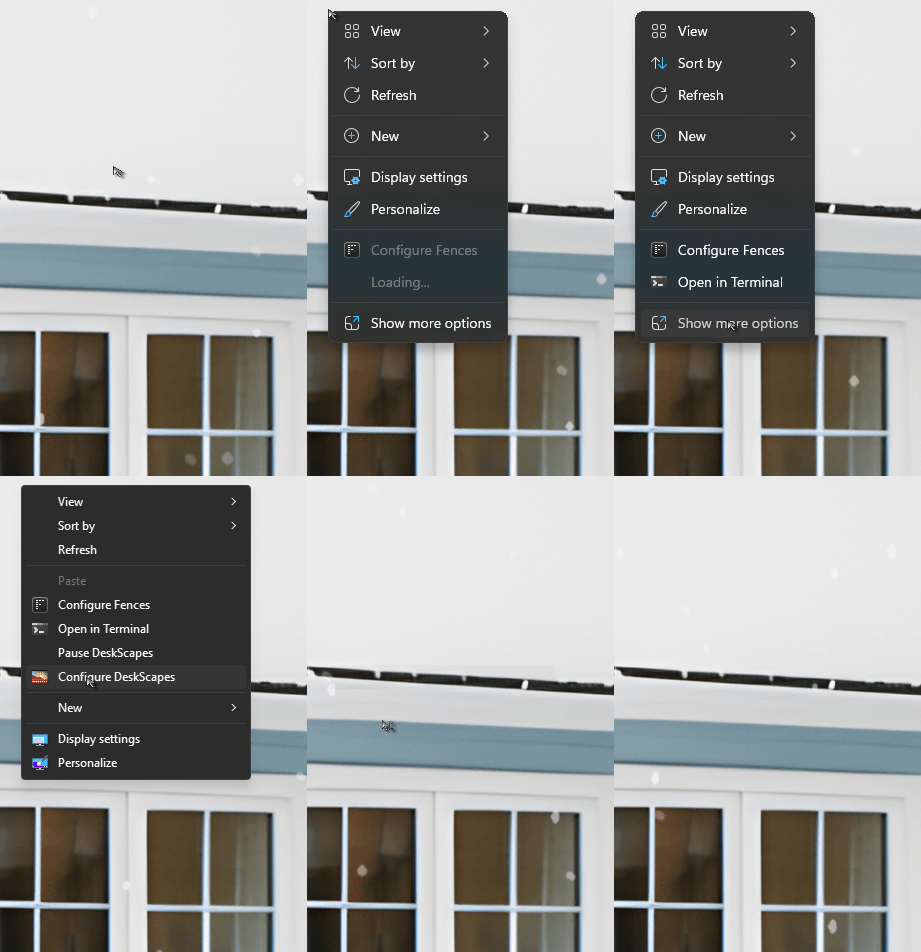
Sorry to hear you are having issues. Have you tried this to open up Deskscapes?

Thank you,

Basj,

Stardock Community  Assistant.


Reply #66 Top
Quoting Ganosh, reply 3993645

Quoting joeshades,

reply 3993642


does not show up in system tray


I've installed DeskScapes 2026 and also for me its icon doesn't show up in system tray but I can access the DeskScapes 2026 main window by clicking on its icon in Start menu, or searching for DeskScapes 2026 in Start menu to find the icon.


To check if DeskScapes 2026 starts correctly at Windows boot you should open Windows Task Manager with Ctrl + Shift + Esc and on "Processes" tab  you should find 2 processes related to DeskScapes 2026:


DeskScapes 11 process points to C:\Program Files (x86)\Stardock\DeskScapes\Deskscapes64.exe


Stardock DeskScapes 11 Service process points to C:\Program Files (x86)\Stardock\DeskScapes\DS11Srv.exe 


Also in "Services" tab, the DeskScapes 11 service should be running

End of Ganosh's quote

Those are running now that I manually opened deskscapes

Reply #67 Top

I really want to like this program, I have deskscapes 11 but uninstalled it because of constant problems, hoping for better with this 

Reply #68 Top

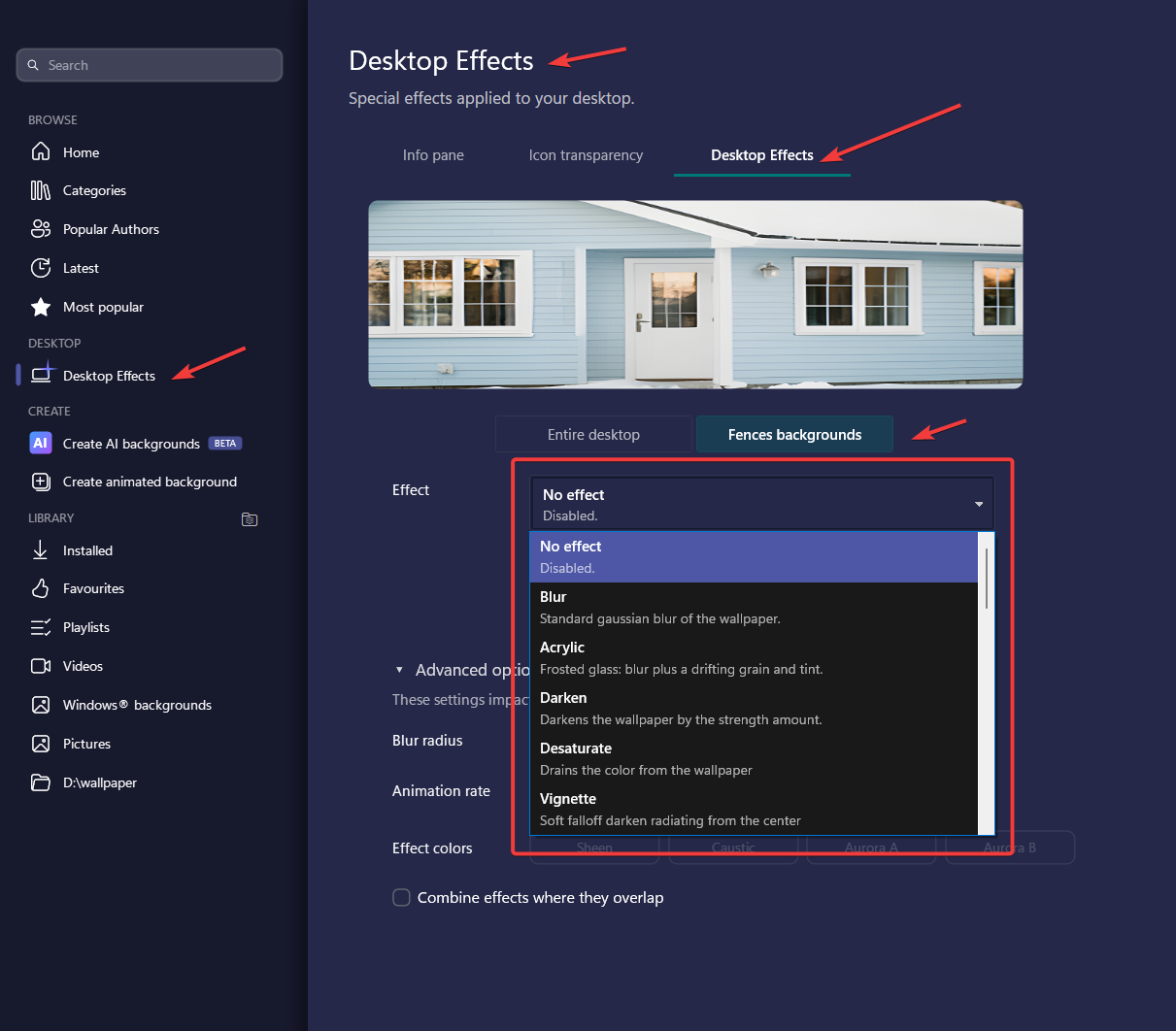
I have Fences 6 (fully updated) running on my system. It blurs the underlying background beneath the Fences panes.

Deskscapes 2026 replicates this blurring on my other monitors - in the place where the Fences panes exist on my main monitor. It also seems to have created some strange interactions with the blurring behind the Fences pains, which is sometimes present, sometimes not.

And a suggestion: it would be great if the clock in the info pane would have a fixed position. As it is, the clock jumps back and forth according to the width of the final digit. 


Reply #69 Top
Quoting richardnau, reply 3993654

I have Fences 6 (fully updated) running on my system. It blurs the underlying background beneath the Fences panes.

Deskscapes 2026 replicates this blurring on my other monitors - in the place where the Fences panes exist on my main monitor. It also seems to have created some strange interactions with the blurring behind the Fences pains, which is sometimes present, sometimes not.

And a suggestion: it would be great if the clock in the info pane would have a fixed position. As it is, the clock jumps back and forth according to the width of the final digit.

End of richardnau's quote

Hello,

Sorry to hear you are having issues. In Deskscapes there is a new feature where you can control how you set Fences backgrounds when Deskscape is running, has you try adjusting it there?

As for the info pane, try using different font, I do notice some font keep its characters width constant, while some not so. Which make the clock shifting while the seconds changing. 

Thank you,

Basj,

Stardock Community  Assistant.

Reply #70 Top
Quoting basj, reply 3993651

Have you tried this to open up Deskscapes?

End of basj's quote

Hello,

I right-click on Desktop but I don't have the context menu "Configures DeskScapes". Anyway that's a minor issue, just like the missing DeskScapes taskbar icon. As wrote in my previous post currently DeskScapes 2026 it's working for me as I can successfully open its main window from the Start menu.

I installed DeskScapes 2026 on Windows 11 Pro 25H2 (Build 26200.8457). I don't know if the missing taskbar icon and context menu issues depends on this OS version. 


Reply #71 Top

Restarted PC and it runs now, but still won't show up in the Sys Tray.

Reply #72 Top
Quoting joeshades, reply 3993652

Those are running now that I manually opened deskscapes

End of joeshades's quote

It seems that something on your system prevents the Stardock DeskScapes 11 Service to auto-start at Windows boot (the name refers to DeskScapes 11 but it's the same for DeskScapes 2026).  There's one more thing you could try if you want:

Press Win + R, type services.msc, and hit Enter. This opens the full Services Manager console, where you can see all background services, their current status (running or stopped), and their startup type.

Search for Stardock Deskscapes 11 service, right-click on it then click on Properties. Under "General" tab the startup type should be set to Automatic. If this is not the case open the drop-down menu, select "Automatic" (not Automatic (delayed startup)), click OK then reboot the PC.

Reply #73 Top
Quoting joeshades, reply 3993659

Restarted PC and it runs now, but still won't show up in the Sys Tray.

End of joeshades's quote

Nice, DeskScapes 2026 icon is missing from sys tray also on my system but DeskScapes 2026 is working fine, even without the taskbar icon.

If you wish, you can test DeskScapes 2026  like I explained in my previous post, reported below. As the taskbar icon is missing you have to configure DeskScapes 2026 settings by opening it from the Start menu, like I did.

"I've created a playlist with 5 static backgrounds and I've applied the playlist, the backgrounds cycled correctly. Then I rebooted the PC and the 5 backgrounds still cycled correctly"

Reply #74 Top
Quoting Ganosh, reply 3993658

Hello,

I right-click on Desktop but I don't have the context menu "Configures DeskScapes".

End of Ganosh's quote

On my system, I need to click on Show more options on the default Windows 11 right click menu to  see the Configures Deskscapes option. Please, refer back to my video above.

Thank you,

Basj,

Stardock Community  Assistant


Reply #75 Top
Quoting basj, reply 3993662

On my system, I need to click on Show more options on the default Windows 11 right click menu to see the Configures Deskscapes option

End of basj's quote

I did it but it's missing anyway.