German Translation

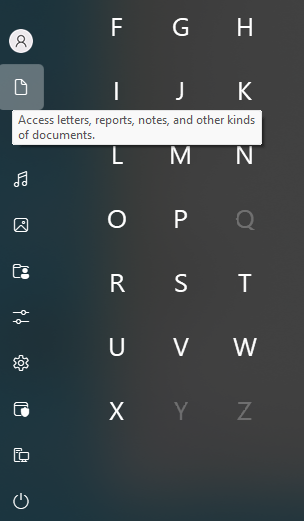
Tooltips are not translated

Hello,

I have to compliment the translation of Start11, which is much better than that of Fences. But, on closer inspection, there are still some awkward phrases in the translation.

Unfortunately, they seem to have forgotten to add the English strings for the shortcuts to the language file. They are probably hard-coded.


P.S. 

The translation does not fit in the line.



2,599 views 29 replies
Reply #1 Top

Hello,
Sorry to hear you are having issues. I have forwarded your problem/question to Stardock Support Team for their assistance. Please keep an eye on this thread for any updates. We appreciate your feedback and patience. Thank you.

Basj,
Stardock Community Assistant

Reply #2 Top

Thank you.

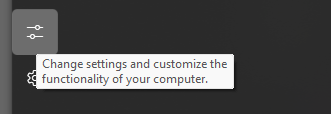
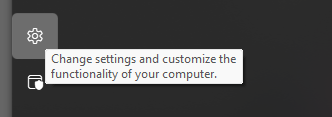
The above problem concerns the tooltips for all links on the left-hand side.

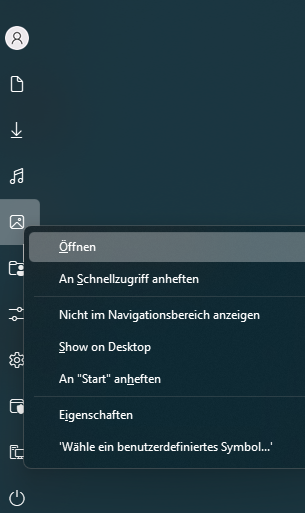
Above the user name, you can see that there is another untranslated line of text in the context menu.


A line was also forgotten to be translated in the context menus of the shortcuts.

Reply #3 Top

Does the “Show on Desktop” option in context menu actually have a function?

Never mind. I misunderstood. This shows how important a good translation is.

I translated "Show on Desktop" as "Auf dem Desktop anzeigen". But in reality, it creates a shortcut on the desktop. 

Reply #4 Top

Quoting thomas-k, reply 3

Does the “Show on Desktop” option in context menu actually have a function?
End of thomas-k's quote

"Show on desktop" creates a copy of the shortcut on the desktop.

Reply #5 Top

Thanks, I've figured that out myself in the meantime. I find the ‘Show on Desktop’ option a bit unclear. The word 'show' suggests it will display something, but actually, it creates a shortcut on the desktop instead

Reply #6 Top

Hello,

I’ve since found out that I can easily edit the German language files. For the missing German translations, I just need to insert the original English phrases there. This works for most of the missing entries.

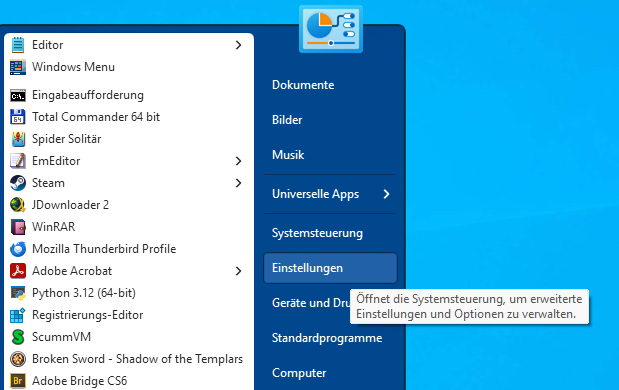
However, for "Control Panel" and "Settings", unfortunately, the identical tooltip was used in both cases. Is it possible to change the tooltip for the Control Panel? For example, it could be the one used in Windows 10: "Opens the Control Panel to manage advanced settings and options."

Control Panel


Settings "Home"

Reply #7 Top

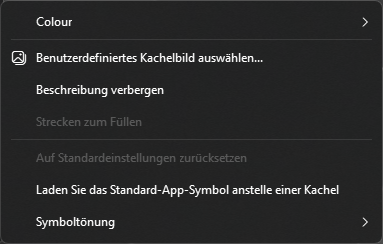
A context menu was forgotten here for the symbols.

"Pick custom tile image..." => "Benutzerdefiniertes Kachelbild auswählen..."


"Colour"

Reply #8 Top

Some buttons are too small

The cancel button is too small, and the quotation marks should be removed.


"Abbrechen"


"Einstellungen"


Furthermore, the translation "Abstract One"="Abstrakt Eins" in this case is poor. It should say something like “Abstraktes Muster” oder "Abstraktes Design" 

And "img100", "img101"... => "Img100", "Img101 ... "Img105".

Reply #9 Top

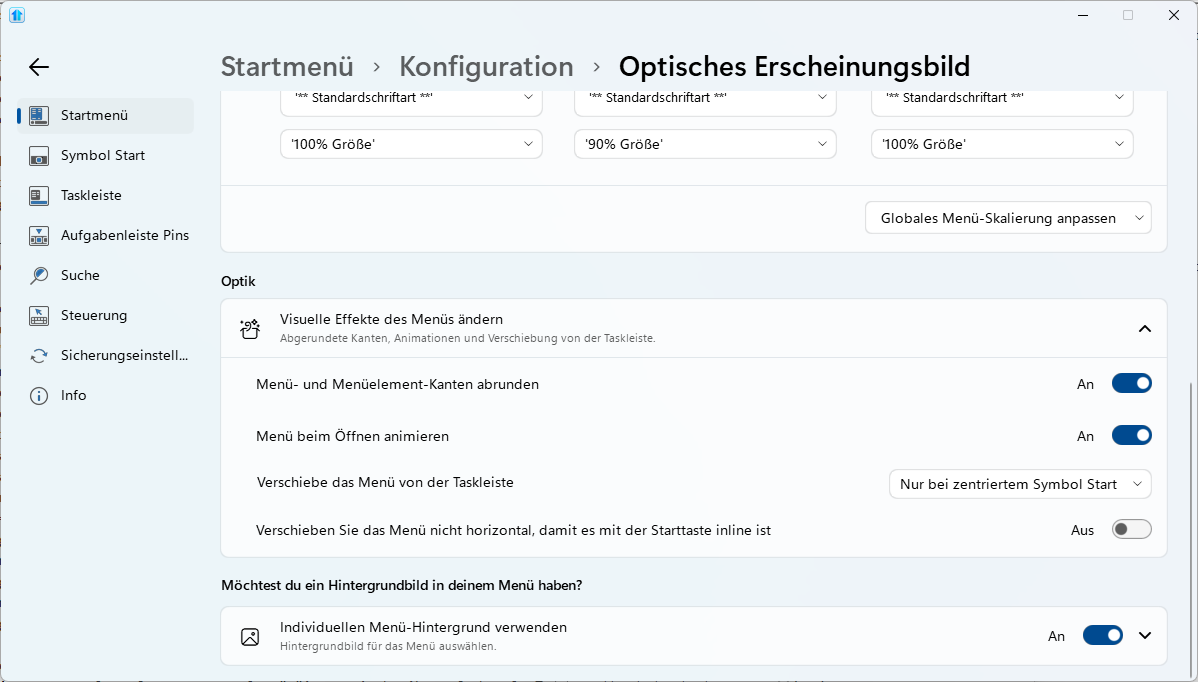
The texts could also be improved a little here.


   - "Menu background transparency level"="Transparenzgrad des Menühintergrunds"
   - "Item font :"="'App-Schriftart:"
   - "Header font :"="Gruppenüberschrift:"
   - "Menu font :"="Menüschriftart:"
   - "Adjust global menu scaling"="Globale Menüskalierung anpassen"

   - "Round the corners of the menu and menu elements"="Ecken von Menü und Menüelementen abrunden"

   - "Offset the menu from the taskbar"="Menü von der Taskleiste versetzen"

   - "Only when centred start button"="Nur bei zentriertem Startbutton"

   - "Do not offset the menu horizontally to ensure it lines up with the start button"="Menü horizontal nicht versetzen, damit es mit der Start-Schaltfläche bündig ist"

The form of address is incorrect. In Windows, the user is not addressed with “you.”

   - "Would you like your menu to have a background image?"="Möchten Sie Ihrem Menü ein Hintergrundbild hinzufügen?"

 Microsoft frequently uses the word "Benutzerdefiniert"  instead of "Individuell" for the English term “custom” in its UIs.

   - "Use a custom menu background"="Benutzerdefinierten Menühintergrund verwenden"

From this perspective, the translation should perhaps be checked for consistency.

Best regards,

Thomas

Reply #10 Top

Hello,
I have forwarded your problem/question again to Stardock Support Team for their assistance. Please keep an eye on this thread for any updates. We appreciate your feedback and patience. Thank you.

Basj,
Stardock Community Assistant

Reply #11 Top

I am now convinced that the translation was done with the help of AI. Today, AI can translate texts well if used correctly.

Automatically translating an entire language file is certainly not a good idea, as you can see from the result. For example, there are some texts that suddenly appear in single quotation marks <'> in the German version. This looks particularly strange in buttons.

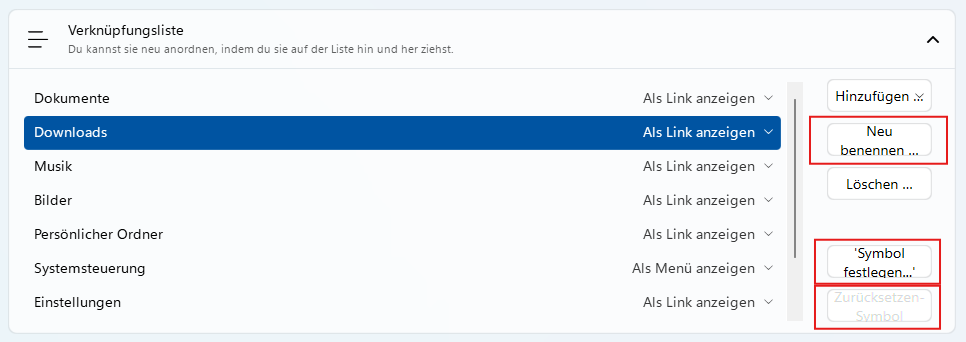
They also forgot to widen the buttons for other languages.

Example:

Buttons

"Rename..."="Neu benennen …" => "Rename..."="Umbenennen..."

"Set icon..."="'Symbol festlegen...'" => "Set icon..."="Symbol festlegen..."

“Reset icon”="Zurücksetzen-Symbol"  => “Reset icon”="Symbol zurücksetzen"

The individual strings should be translated manually using AI, and prompts should be used to explain to the AI that a translation in the style of Windows 8/10/11 is desired, as is customary for the UI, menus, tooltips, or buttons in the corresponding language.

The English and German Windows translations are very different. And often require more space.


Reply #12 Top

Thomas, you have a lot of issues listed here and I am going to ask for your help in resolving them as German is your native lanuage....

In this location:

C:\Program Files (x86)\Stardock\Start11\lang

There is a de.lng file

Open it in notepad or any text editor you use....

You will see that the format is

"English text"="German text'

At the very bottom of the file, add a new line

"Exact English text"="The German translation"

Example

"Item font :"="'App-Schriftart:"

The English text needs to be exactly as shown, it cant be wrong or it wont pick up the German either. 

If that works, we have a Github project for localization that you can help us with if you have the time:

https://github.com/StardockCorp/Stardock-Software-Localization

Let me know.

Sean Drohan
Stardock Product Lifecycle Manager

Reply #13 Top

@sdRohan , that's funny. I discovered days ago that, unlike Fences, you can easily edit the language file. I wish that were possible for Fences, too.

I've already changed a few things for myself. For example, I removed all single quotation marks. But to do that systematically would be a lot of work for me. 

And honestly, my English isn't that good, and even as a native speaker, it's not that easy to translate the text into German in a way that's compliant with Windows. Which means it is also very time-consuming for me.

Oh, and what I found funny was that without reading your post, I searched for the original “de.lng” file and found it on the Github page.

Quoting sdRohan, reply 12

At the very bottom of the file, add a new line

"Exact English text"="The German translation"

Example

"Item font :"="'App-Schriftart:"

End of sdRohan's quote

And since you mention it, the Control Panel and Settings have the same text. That's why these tooltips can't be translated.

See the following post:


https://forums.stardock.com/539622/page/1/#3983576

Reply #14 Top

Quoting thomas-k, reply 13

@sdRohan , that's funny. I discovered days ago that, unlike Fences, you can easily edit the language file. I wish that were possible for Fences, too.
End of thomas-k's quote

So do I...

Quoting thomas-k, reply 13

And since you mention it, the Control Panel and Settings have the same text. That's why these tooltips can't be translated.

See the following post:

https://forums.stardock.com/539622/get;3983576
End of thomas-k's quote

Your link failed.

I just need to know if you added the missing line if it then showed up after you closed and reopened the Start11 UI. 

Sean Drohan
Stardock Product Lifecycle Manager

Reply #16 Top

Hello, while revising the German translation, I came across an error in the “Windows App style.”

In the context menu for recently used documents, “Unpin” is used instead of “Remove from list.”

Reply #17 Top

Why is a bold font used for “Recent documents”? This appears to be an error.

“Recent documents” and “Pinned” should have the same font.

Reply #18 Top

Here is another text that cannot be translated.
The string was added to the language file in version 2.49, but the German text is not being transferred.


; Added to 2.49
"- File Explorer"="– Datei-Explorer"
"Icon size :"="Schaltflächengröße :"
"Button width :"="Schaltflächenbreite :"
"Button height :"="Schaltflächenhöhe :"
"Colour"="Colour"


Reply #19 Top

Quoting thomas-k, reply 18

Here is another text that cannot be translated.
The string was added to the language file in version 2.49, but the German text is not being transferred.


; Added to 2.49
"- File Explorer"="– Datei-Explorer"
"Icon size :"="Schaltflächengröße :"
"Button width :"="Schaltflächenbreite :"
"Button height :"="Schaltflächenhöhe :"
"Colour"="Colour"


End of thomas-k's quote

You say 'cant be' becuase you added them, the "English"="German" value pair to the de.lng file, closed the S11 UI, reopened, and it did not correct?

Sean Drohan
Stardock Product Lifecycle Manager

Reply #20 Top

Correct, see screenshot.

I have revised a lot of texts and know how the translation works.

I have also added many missing English text strings. 

With a few exceptions, this works very well.One exception is the identical text for Control Panel and Windows Settings.

Did you follow the link above? 

There, I described the problem with the tooltip for Control Panel and Windows Settings.

https://forums.stardock.com/539622/page/1/#3983576

Reply #21 Top

Quoting thomas-k, reply 20

Correct, see screenshot.

I have revised a lot of texts and know how the translation works.

I have also added many missing English text strings. 

With a few exceptions, this works very well.One exception is the identical text for Control Panel and Windows Settings.

Did you follow the link above? 

There, I described the problem with the tooltip for Control Panel and Windows Settings.

https://forums.stardock.com/539622/page/1/#3983576
End of thomas-k's quote

The issue is  that MS used to translate something that they may no longer be doing (probably because translations are an incredible pain).  Its unknowable to us when they do this.  We can compensate with the app, make them work, but it takes logging and time. 

Sean Drohan
Stardock Product Lifecycle Manager

Reply #22 Top

Quoting sdRohan, reply 21

The issue is  that MS used to translate something that they may no longer be doing (probably because translations are an incredible pain).  Its unknowable to us when they do this.  We can compensate with the app, make them work, but it takes logging and time. 

Sean Drohan
Stardock Product Lifecycle Manager
End of sdRohan's quote


But isn't Start11 designed precisely so that you can continue to have a start menu, for example, with the old look, the familiar functions, and the usual texts? I thought the tooltips came from you.

In Windows 7 style, an icon for Windows settings would also have to be created in addition to the tooltip text.


Reply #23 Top

Quoting thomas-k, reply 22

But isn't Start11 designed precisely so that you can continue to have a start menu, for example, with the old look, the familiar functions, and the usual texts? I thought the tooltips came from you.

In Windows 7 style, an icon for Windows settings would also have to be created in addition to the tooltip text.
End of thomas-k's quote

If we could forcast what MS will and wont do with Windows in future versions, we would be a fortune 500 company ;)

When we find stuff they change, we do our best to fix it - that will be the case here. 

Sean Drohan
Stardock Product Lifecycle Manager

Reply #24 Top
Quoting sdRohan, reply 23
Quoting thomas-k,

But isn't Start11 designed precisely so that you can continue to have a start menu, for example, with the old look, the familiar functions, and the usual texts? I thought the tooltips came from you.

In Windows 7 style, an icon for Windows settings would also have to be created in addition to the tooltip text.


If we could forcast what MS will and wont do with Windows in future versions, we would be a fortune 500 company ;)

When we find stuff they change, we do our best to fix it - that will be the case here. 

Sean Drohan
Stardock Product Lifecycle Manager

End of sdRohan's quote


Yes and no, the tooltips are definitely from you. I just added the missing English strings to the language file and translated them into German.

I only made a suggestion for the missing tooltip for the Control Panel. 

Namely: “Opens the Control Panel to manage advanced settings and options.”

P.S.

; Missing text strings 01/12/2025
"Change account settings"="Kontoeinstellungen ändern"
"&Show on Desktop"="&Desktopverknüpfung erstellen"
"Pick custom tile image..."="Benutzerdefiniertes Kachelbild auswählen..."
"Access letters, reports, notes, and other kinds of documents."="Zugriff auf Briefe, Berichte, Notizen und andere Dokumententypen."
"Find Internet downloads and links to favorite websites."="Downloads und Links zu bevorzugten Websites aufrufen."
"Play music and other audio files."="Musik und andere Audiodateien wiedergeben."
"View and organize digital pictures."="Digitale Bilder anzeigen und organisieren."
"Open your personal folder."="Persönlichen Ordner öffnen."
; Tooltips for Control Panel and Settings are identical, tooltip for Control Panel is missing
; My suggestion
"Opens the Control Panel to manage advanced settings and options."="Öffnet die Systemsteuerung, um erweiterte Einstellungen und Optionen zu verwalten."
"Change settings and customize the functionality of your computer."="Einstellungen ändern und den Computer anpassen."
"Opens a program, folder, document or web site."="Öffnet ein Programm, einen Ordner, ein Dokument oder eine Webseite."
"See the disk drives and other hardware connected to your computer."="Zeigt Laufwerke und andere mit dem Computer verbundene Hardware an."
"Watch TV programs recorded on your computer."="TV-Sendungen ansehen, die auf Ihrem Computer aufgezeichnet wurden."
"Access libraries and folders shared by other people in your homegroup."="Auf Bibliotheken und Ordner zugreifen, die von anderen Personen in Ihrer Heimnetzgruppe freigegeben wurden."
"Choose default programs for web browsing, e-mail, playing music and other activities."="Standard-Apps für das Web-Browsing, E-Mail, die Musikwiedergabe und andere Aktivitäten auswählen."
"See installed printers and add new ones."="Installierte Drucker anzeigen und neue hinzufügen."
"Music folder"="Musikordner"
"Pictures folder"="Bilderordner"
"Videos folder"="Videosordner"
"Documents folder"="Dokumenteordner"
"Windows-Tools"="Windows-Tools"
"Pin to Start menu"="An Startmenü anheften"
"Open &Task Manager"="&Task-Manager öffnen"
"All Fences"="Alle Fences"

Reply #25 Top

Quoting thomas-k, reply 24

; Missing text strings 01/12/2025
"Change account settings"="Kontoeinstellungen ändern"
"&Show on Desktop"="&Desktopverknüpfung erstellen"
"Pick custom tile image..."="Benutzerdefiniertes Kachelbild auswählen..."
"Access letters, reports, notes, and other kinds of documents."="Zugriff auf Briefe, Berichte, Notizen und andere Dokumententypen."
"Find Internet downloads and links to favorite websites."="Downloads und Links zu bevorzugten Websites aufrufen."
"Play music and other audio files."="Musik und andere Audiodateien wiedergeben."
"View and organize digital pictures."="Digitale Bilder anzeigen und organisieren."
"Open your personal folder."="Persönlichen Ordner öffnen."
; Tooltips for Control Panel and Settings are identical, tooltip for Control Panel is missing
; My suggestion
"Opens the Control Panel to manage advanced settings and options."="Öffnet die Systemsteuerung, um erweiterte Einstellungen und Optionen zu verwalten."
"Change settings and customize the functionality of your computer."="Einstellungen ändern und den Computer anpassen."
"Opens a program, folder, document or web site."="Öffnet ein Programm, einen Ordner, ein Dokument oder eine Webseite."
"See the disk drives and other hardware connected to your computer."="Zeigt Laufwerke und andere mit dem Computer verbundene Hardware an."
"Watch TV programs recorded on your computer."="TV-Sendungen ansehen, die auf Ihrem Computer aufgezeichnet wurden."
"Access libraries and folders shared by other people in your homegroup."="Auf Bibliotheken und Ordner zugreifen, die von anderen Personen in Ihrer Heimnetzgruppe freigegeben wurden."
"Choose default programs for web browsing, e-mail, playing music and other activities."="Standard-Apps für das Web-Browsing, E-Mail, die Musikwiedergabe und andere Aktivitäten auswählen."
"See installed printers and add new ones."="Installierte Drucker anzeigen und neue hinzufügen."
"Music folder"="Musikordner"
"Pictures folder"="Bilderordner"
"Videos folder"="Videosordner"
"Documents folder"="Dokumenteordner"
"Windows-Tools"="Windows-Tools"
"Pin to Start menu"="An Startmenü anheften"
"Open &Task Manager"="&Task-Manager öffnen"
"All Fences"="Alle Fences"
End of thomas-k's quote

We would love to have you contribute here:

https://github.com/StardockCorp/Stardock-Software-Localization

If you have questions about the process, I would be happy to help. 

Sean Drohan
Stardock Product Lifecycle Manager