thomas-k thomas-k

German Translation

German Translation

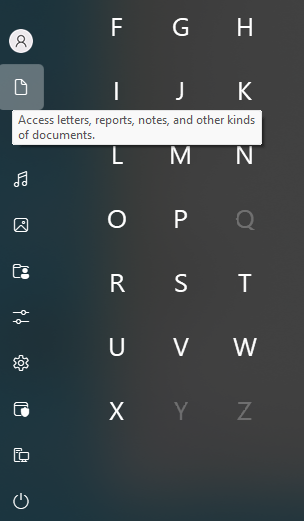
Tooltips are not translated

Hello,

I have to compliment the translation of Start11, which is much better than that of Fences. But, on closer inspection, there are still some awkward phrases in the translation.

Unfortunately, they seem to have forgotten to add the English strings for the shortcuts to the language file. They are probably hard-coded.


P.S. 

The translation does not fit in the line.



2,600 views 29 replies
Reply #26 Top

Hello @Sean Drohan,

the revised language file has been uploaded to GitHub. Since I’m still getting used to the platform, I hope everything is set up correctly.
This update covers the strings within the Start11 v2 menu and its settings. Any further issues I encounter will be addressed in future updates.
To highlight specific layout problems – especially where the German translation is too long for buttons or labels – I’ve added comments directly in the file.
Hopefully, the existing issues with tooltips and the 'Icon size:' label can still be fixed.

Best regards

Thomas


Reply #27 Top

I found out why the translation of “Icon size” doesn't work. There is a space after the colon. The easiest way to fix this error is to do it via “Start11Config.exe.” Then you don't have to correct over 20 language files.

; Added to 2.49
"- File Explorer"="– Datei-Explorer"
"Icon size : "="Symbolgröße :"
"Button width :"="Schaltflächenbreite :"
"Button height :"="Schaltflächenhöhe :"
"Colour"="Hintergrundfarbe"

Reply #28 Top

Quoting thomas-k, reply 27

I found out why the translation of “Icon size” doesn't work. There is a space after the colon. The easiest way to fix this error is to do it via “Start11Config.exe.” Then you don't have to correct over 20 language files.

; Added to 2.49
"- File Explorer"="– Datei-Explorer"
"Icon size : "="Symbolgröße :"
"Button width :"="Schaltflächenbreite :"
"Button height :"="Schaltflächenhöhe :"
"Colour"="Hintergrundfarbe"
End of thomas-k's quote

If you have not, create another pull request in GH, please.  

And thank you very much for your efforts.  Merry Christmas. 

Sean Drohan
Stardock Product Lifecycle Manager

Reply #29 Top

Merry Christmas!
