System tray clock, wifi, sound, battery icons are invisible

same color as the task bar

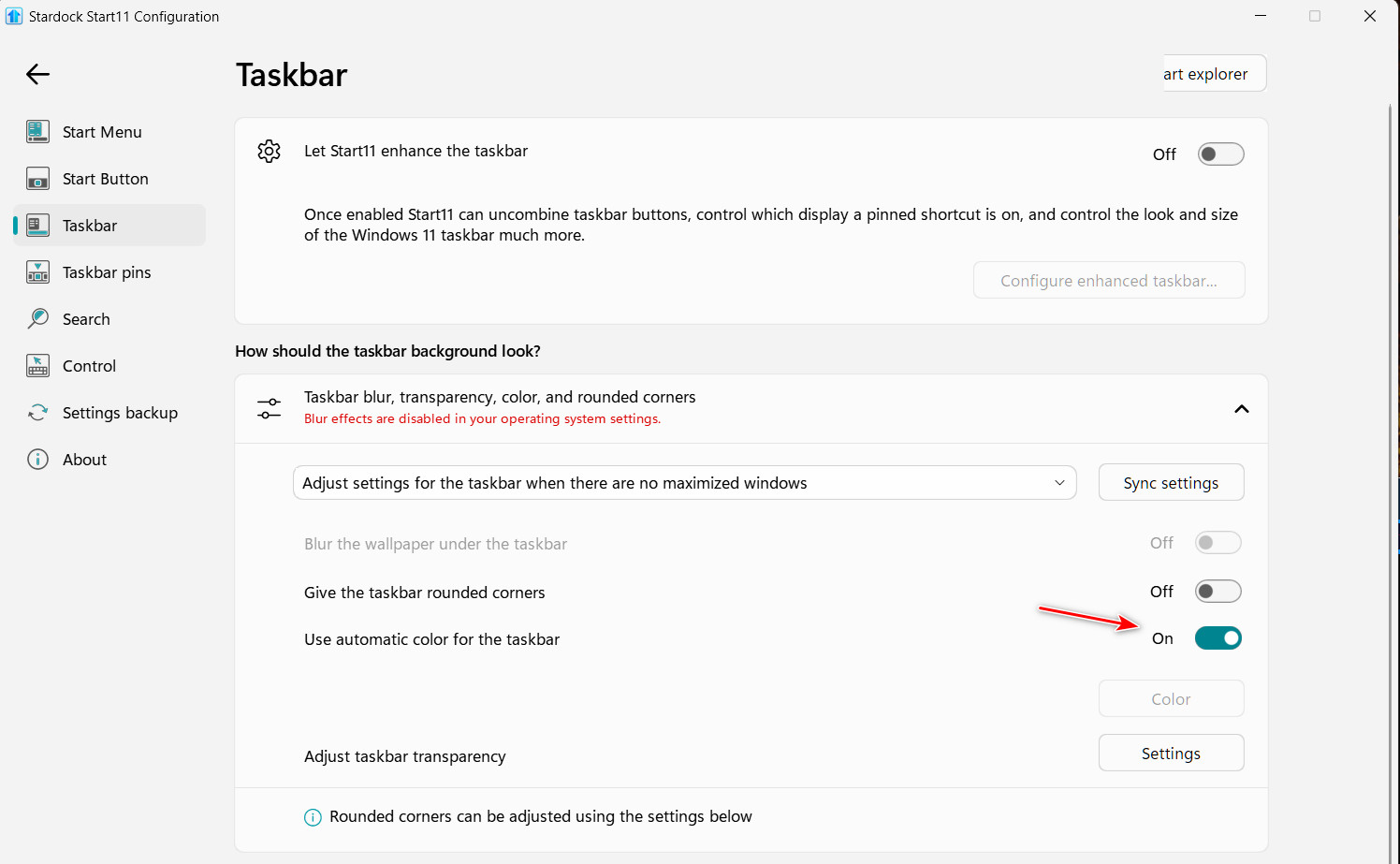
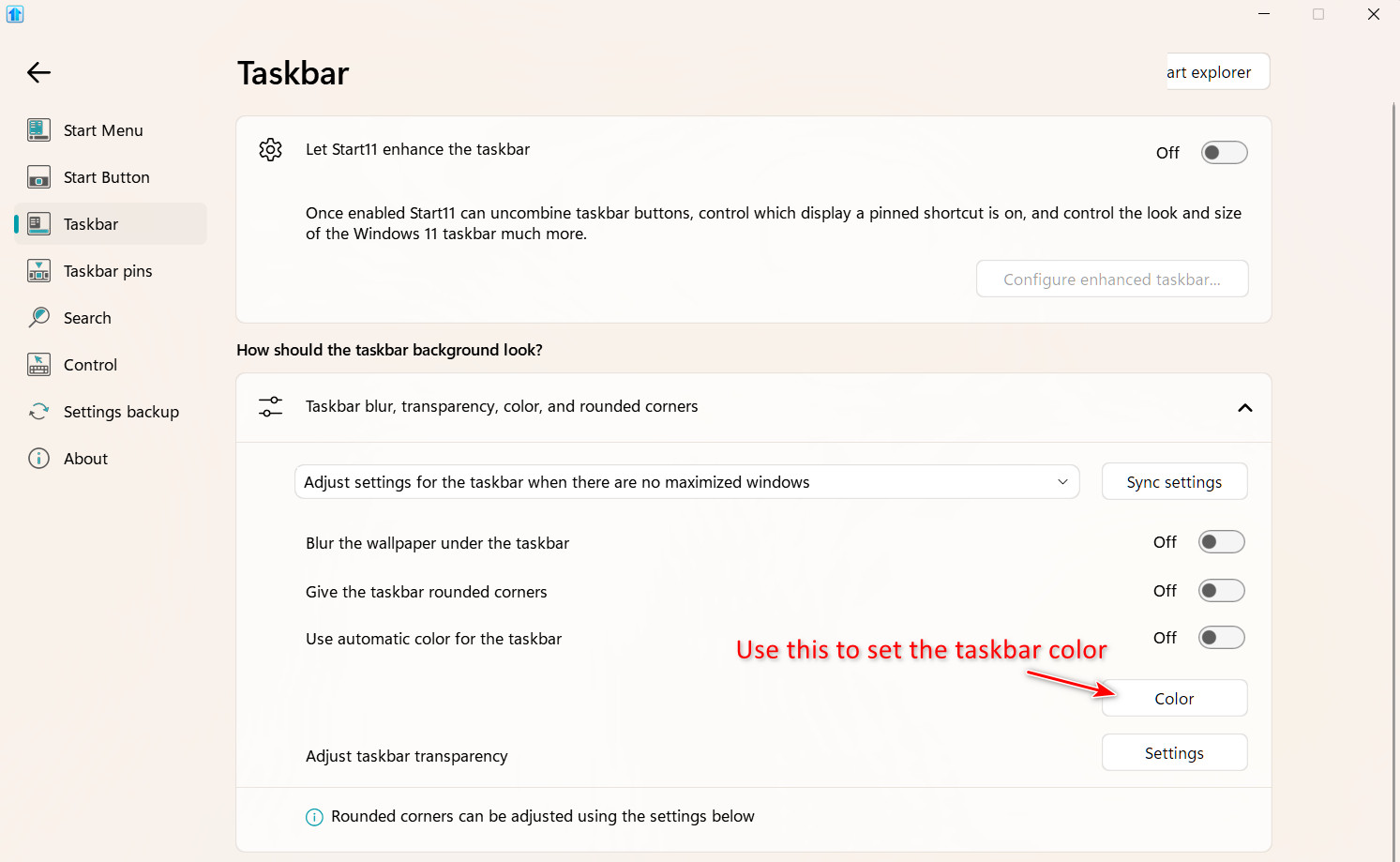
Upgraded to Start V2.0 and I am unable to change the color of my taskbar. It is black and nothing happens when I select a custom color--it stays black. I'd be fine with black except that the system tray icons for the keyboard, wifi, battery, and volume are also in black and thus invisible. Why am I unable to change the taskbar's color or is there a way of rendering the icons in white? 

Thanks,

Russell
3,707 views 12 replies
Reply #1 Top

Hello,
Sorry to hear you are having issues. Those tray icons is control by Windows color theme. Change your Windows color mode to dark to have those icons change to white. Right click on desktop->Personalize->Colors-> Choose your color->Drop down menu select "Dark"

Thanks
Basj,
Stardock Community Assistant.

Reply #2 Top

Thanks, Basj for responding so quickly. I tried the dark color mode and didn't like it. Why isn't Start11 able to change the color of the task? I select an alternative color, reboot Explorer--after the rebooting, the taskbar appears in the new color for a second, then returns to black. It's as if something has overridden Start11's change. 


Thanks,

Russell

Reply #3 Top

I think that is Windows itself is overriding that part. Stardock Windowblinds use to be able to change at least the clock text color in the taskbar tray area, into some other color, but, it is no longer capable to change it on Windows 11.

Thank you,

Basj,
Stardock Community Assistant

Reply #4 Top

Quoting rslheath, reply 2

Thanks, Basj for responding so quickly. I tried the dark color mode and didn't like it. Why isn't Start11 able to change the color of the task? I select an alternative color, reboot Explorer--after the rebooting, the taskbar appears in the new color for a second, then returns to black. It's as if something has overridden Start11's change. 

Thanks,
Russell
End of rslheath's quote

Something else is controlling your taskbar which is loading after Start11v2. Are you running any 3rd party software which controls the taskbar? Explorer Patcher; StartAllBack, Window Blinds?

Reply #5 Top

<<Are you running any 3rd party software which controls the taskbar?>>

No--or not that I am aware of. My setup is pretty generic and other than Start11, I haven't made any modifications to how my computer works. I'm wondering if there are any Windows settings that might be interfering with Start11?


Thanks.

Reply #6 Top

As I mentioned above Windows 11 has move that option to be hard coded and can't be change by others accept itself. The taskbar tray icons and any text like clock can only be white or black and that is it.

Thank you,

Basj,
Stardock Community Assistant

Reply #7 Top

So I discovered that if in the Windows settings, I select 

1) Personalization > Colors > Mode: Custom

2) Default Windows mode: Dark

3) App mode: Light

I can get the icons in the system tray to appear in white--which fixes my problem. 

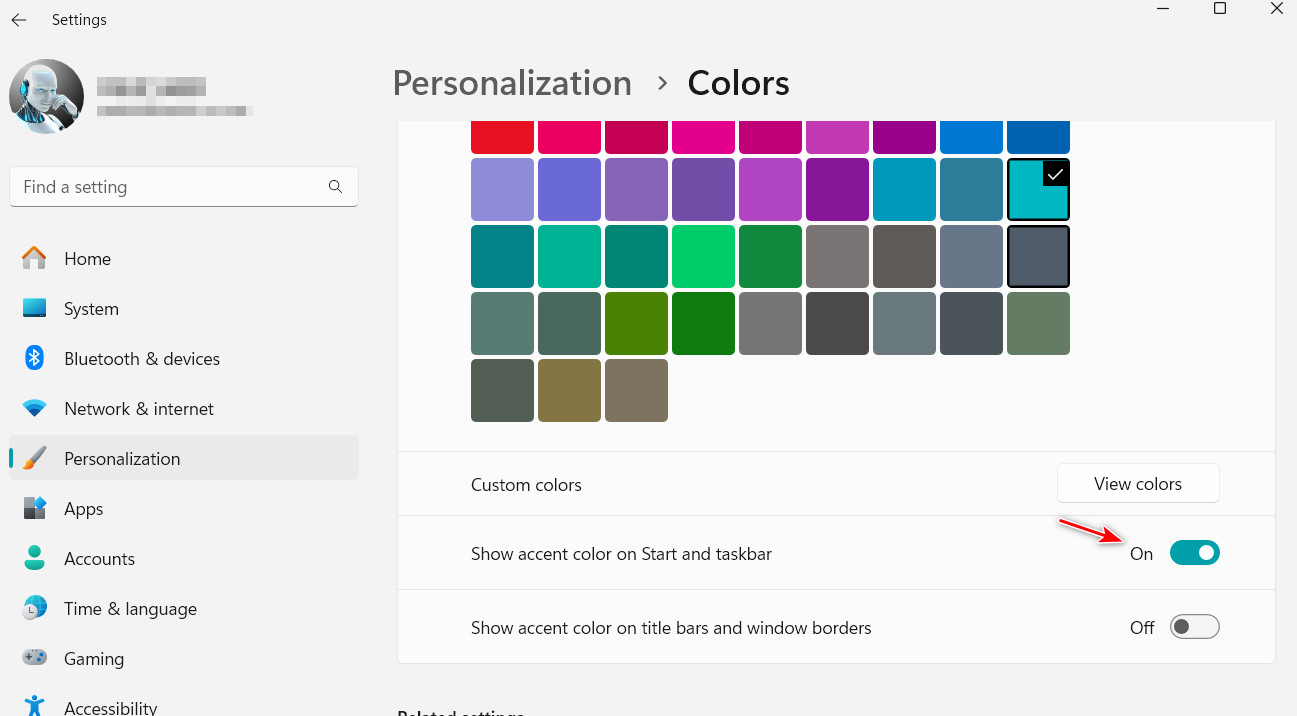
However, if I select an accent color for the taskbar in the Windows settings--the color of the task bar doesn't change. 

When I go back to Start11 and restart the explorer, the taskbar will briefly adopt the accent color I selected in the Windows settings--and then switch back to black. So I'm wondering if there is a conflict between Start11 and Windows on this setting. I could uninstall Start11 to check--but my problem is solved with the white text, so I'm not going to pursue it. 

Thanks to everyone for their help. 

Russell

Reply #8 Top

If you have Start11v2 running, you need to change the taskbar color using the Start11v2 settings, not Windows settings.

Reply #9 Top

That's the problem--changing the Start11 settings for the taskbar doesn't work. Please read from the top of the thread. Thanks

Reply #10 Top

Quoting rslheath, reply 7


However, if I select an accent color for the taskbar in the Windows settings--the color of the task bar doesn't change. 

Russell
End of rslheath's quote

This is why I replied the way I did.

Reply #11 Top

If you want to use the Windows settings to set the taskbar color:

This process will not change your start11v2 menu, but will change the Windows start menu.

Reply #12 Top

Hi Pelaird,

Thanks for your care and the time you put into replying. 

The problem I ran into using the v2 of Start11 is that I was unable to change the color of my taskbar. The taskbar color defaulted to black and because the system tray icons were also in black, I was unable to see them. I was able to work around this by changing the window and app modes in the Windows 11 settings so that the icons were drawn in white and so became visible. 

Two questions remain:

1) Why doesn't the Start11 v2 app change the taskbar color? 

2) The procedure you indicated in your reply also does not change the color of the taskbar. As I noted in an earlier post, when I follow this procedure, and then restart the Explorer, the selected color will flicker in the taskbar once and then the color will return to black. 

In any event--I leave this for the Stardock techies if it points to a possible bug.  Now that I have the tray icons in white--I am happy and will count this thread completed. Thanks again for your help.