Fences 5.04 Release Feedback Thread

With the Fences 5.04 release, we are creating this thread so that users can report any observed issues.  

Obtaining the product

Object Desktop members can get the release from within Object Desktop Manager 

Individual purchases (as well as Object Desktop Members) can also be obtained from your account page: https://store.stardock.com/myaccount/products

For guest check-out purchase (no account), from this link: http://www.stardock.com/support/productkeyretrieval

Reporting an issue

Please include the following for anything found:

  • Exact Windows version \ build (winver.exe)

  • Detailed steps to recreate the issue seen

  • Screenshots and videos are very helpful.  Videos can be uploaded to a cloud drive service (GoogleDrive, DropBox, OneDrive, YouTube), with a shared link included in your post.  Images can be copied and pasted directly into a post.

  • If there are specific apps that the app does not work (well) with, please note what apps and their exact versions.  If any app is not common, a link to a trial version would be appreciated.

Thank you for your interest and any time you put into making Fences 5 a better product.

Sean Drohan
Stardock Support Manager

92,111 views 49 replies
Reply #1 Top

Fences 5.04 Changelog (Released 12/04/2023)

12/04/2023

Released on Stardock.com

12/1/2023

  • Version updated
    Fences.exe config: 5.0.4.1
    Fences UI: 5.04

  • Fixes folder portals for people with "Open Explorer Windows in a Separate Process" Windows option set + "allow navigation" enable

  • Fixes "inter-Fence distance" setting being cut off on Win11 @ DPI 100%

  • Prepped for localization

  • Improved "Load Snapshot" functionality to allow snapshots to be resilient to monitor IDs changes between when the snapshot was saved vs loaded.

11/20/2023

  • Version updated
    Fences.exe config: 5.0.1.2
    Fences UI: 5.01

  • Add option for "Show icon as a running task" as a sub-option to "Add 'Show Fences' icon to my taskbar"

  • Add confirmation dialog before resetting Fence style

  • Fix Fences snapshots picker not showing properly on some Windows 10 installations

  • Fix Fence-spacing up/down control not updating in config

  • Fix issue with Folder Portals navigating into Office documents when "Launch folder windows in a separate process" is enabled in Explorer.

  • Fix the taskbar icon not unpinning from the taskbar during uninstall

  • Fix copy/paste Fence style not picking up per-Fence Chemeleon settings

Reply #2 Top

Known issues

While we appreciate all feedback, please remember that we offer no official support for beta \ preview \ developer channel versions of Windows. If you report issues while in any of those early release channels, you should not expect them to be addressed unless it still exists in a retail version of Windows.

  • tbd
Reply #3 Top

***Reserved***

Reply #4 Top

I installed the Fences 5 upgrade. When I restarted my computer my 2 side monitors will not stay on when I move my cursor over to a monitor with fences on it. I need to uninstall the update until this bug gets fixed. How do I do that. 

Reply #5 Top

Quoting phatracer, reply 4

I installed the Fences 5 upgrade. When I restarted my computer my 2 side monitors will not stay on when I move my cursor over to a monitor with fences on it. I need to uninstall the update until this bug gets fixed. How do I do that. 
End of phatracer's quote

Hello,
Sorry to hear you are having issues. Not really sure on your issue. What do you mean your two side monitors will not stay on? Please elaborate and how do that issue connected to Fences 5?

Thank you.
Basj,
Stardock Community Assistant.

Reply #7 Top

I have been getting frequent crashes, with the BugSplat form which I often submit, although Fences still seems to be operating. It almost always happens when the computer has been unattended for a while. I have uninstalled and reinstalled the program; it doesn't help.

This is a new issue with V5.

Reply #8 Top

我知道这可能不是提供建议的好地方,但请原谅我。

我有一个建议。是否可以添加合并围栏的功能,以便我可以浏览带有多个标签的围栏?谢谢!


I know this is probably not a good place to give advice, but please forgive me.

I have a suggestion. Is it possible to add the ability to merge fences so I can browse fences with multiple tags? Thanks!

+1 Loading…
Reply #9 Top

Quoting VRBest4384, reply 8

我知道这可能不是提供建议的好地方,但请原谅我。

我有一个建议。是否可以添加合并围栏的功能,以便我可以浏览带有多个标签的围栏?谢谢!


I know this is probably not a good place to give advice, but please forgive me.

I have a suggestion. Is it possible to add the ability to merge fences so I can browse fences with multiple tags? Thanks!

End of VRBest4384's quote

Hello,
May I know, what you mean by multiple tags? Elaborate please.

Thank you.
Basj,
Stardock Community Assistant.

Reply #10 Top

Quoting djmsalem, reply 7

I have been getting frequent crashes, with the BugSplat form which I often submit, although Fences still seems to be operating. It almost always happens when the computer has been unattended for a while. I have uninstalled and reinstalled the program; it doesn't help.

This is a new issue with V5.
End of djmsalem's quote

Hello,
Sorry to hear you are having issues. Please try purge and reinstall steps as mention here : [Link]. Just make sure to redownload the latest version from your account page. Reboot after the purge. Reinstall and reboot again after the installation. Retest and report back here.

Thank you,
Basj,
Stardock Community Assistant.

Reply #11 Top

This bug has been present since fences4,

System environment:Windows11-23H2-22631.3007
Hardware environment: Laptop

12th Gen Intel(R) Core(TM) i9-12950HX   64.0 GB

Two external monitors, one 32 inch 4K and one 28 inch 2K, but this problem can also occur without external screens.

After using the shortcut key(Windows + D) to switch to the desktop, clicking on the box created by Fences on the desktop will cause the entire desktop to flash continuously. Only by using the hotkey again to switch to the desktop will there be a chance that it will not flash.

The problem video link is as follows:

https://1drv.ms/v/s!AkTQ56WpwlFckWQu3-q59HMAERpg?e=eRvXgX


Reply #12 Top

Quoting cuisg, reply 11

This bug has been present since fences4,

System environment:Windows11-23H2-22631.3007
Hardware environment: Laptop

12th Gen Intel(R) Core(TM) i9-12950HX   64.0 GB

Two external monitors, one 32 inch 4K and one 28 inch 2K, but this problem can also occur without external screens.

After using the shortcut key(Windows + D) to switch to the desktop, clicking on the box created by Fences on the desktop will cause the entire desktop to flash continuously. Only by using the hotkey again to switch to the desktop will there be a chance that it will not flash.

The problem video link is as follows:

https://1drv.ms/v/s!AkTQ56WpwlFckWQu3-q59HMAERpg?e=eRvXgX

End of cuisg's quote

Hello,
Sorry to hear you are having issues. But I can not reproduce your issue on my system. Review my short video below. The Fences does goes off and on since I turn on Fences Vanish setting to have enable it. With this it will hide itself after preset timing and show itself again if I click on the desktop again to make it active again. But it did not flashing.

Moving forward. According to you, the issue does happen without any external monitor. Need more information on your main monitor? Resolution, Scale factor (100%,150%,200% etc), HDR mode turn on?

Thanks
Basj,
Stardock Community Assistant.

Reply #13 Top

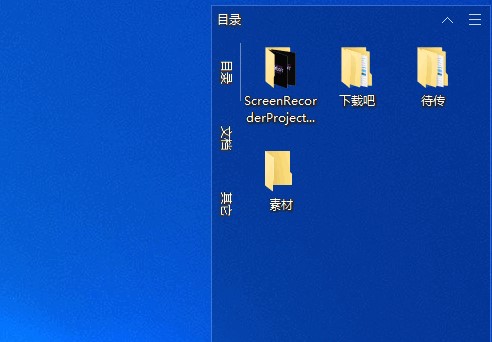
Hello, thank you for your reply. The multiple tags just like what I show in this image. U can browse different categories of content in a fence. I can split or merge them by dragging with the mouse. I haven't noticed such a feature in Fences, maybe I'm not familiar with it.

Reply #14 Top

Quoting VRBestman, reply 13

Hello, thank you for your reply. The multiple tags just like what I show in this image. U can browse different categories of content in a fence. I can split or merge them by dragging with the mouse. I haven't noticed such a feature in Fences, maybe I'm not familiar with it.
End of VRBestman's quote

Oh, those look like tabs. No Fences can not do that, but if you have Start11 v2 you can setup your Start menu to have Fences in it with tabs. Refer screenshot below.

Thank you,

Basj,
Stardock Community Assistant

Reply #15 Top

That's right, it's just tabs. I hope Fences can add such a feature in the future, so that all partitions can be viewed in one area. I hope you can consider it, thank you.

+1 Loading…
Reply #16 Top

Quoting VRBestman, reply 8

我知道这可能不是提供建议的好地方,但请原谅我。

我有一个建议。是否可以添加合并围栏的功能,以便我可以浏览带有多个标签的围栏?谢谢!


I know this is probably not a good place to give advice, but please forgive me.

I have a suggestion. Is it possible to add the ability to merge fences so I can browse fences with multiple tags? Thanks!

End of VRBestman's quote

I very much agree with this suggestion

Reply #17 Top

Quoting VRBestman, reply 15

That's right, it's just tabs. I hope Fences can add such a feature in the future, so that all partitions can be viewed in one area. I hope you can consider it, thank you.
End of VRBestman's quote

Hello,
I have forwarded your request to the Stardock Support Team for their review and recommendations. Please keep an eye on this thread for any updates. We really do appreciate your feedback, Thanks

Basj,
Stardock Community Assistant.

Reply #18 Top

Quoting happyhimitsu, reply 18

Hello. Just purchased an annual subscription of Fences 5 after being a long-time user (since 3). 

So far, so good - or so I thought until using Vivaldi and noticing that my browser bookmarks are no longer properly visible/the bottom of the browser is cutoff by the windows taskbar. 

I thought perhaps this was being caused by the new peek feature, or the chameleon one (or something else), but I've enabled/disabled every Fences feature I could find that I would think might be a part of why that is happening to no avail. 
think this is happening with other programs as well as it appears that way, but it is very hard to judge as Vivaldi is the only program I can think of where  
Never mind, I just tried with a terminal open and it is also obscured by the taskbar when fullscreened. 

No, I haven't installed anything else and this is a fresh install of Fences 5 - if we can't get this figured out I will need to ask for a refund please. 

Looking forwards to your response. Thank you. 
End of happyhimitsu's quote

Hello,
Sorry to hear you are having issues. But, I am not sure why Fences could cause your Vivaldi browser issue. Since, from what I know, Fences don't interfere with any other 3rd party application. Have you tried disabling Fences and see it the issue still there? Refer screenshot below. Un-tick that box.

Thanks
Basj,
Stardock Community Assistant.

Reply #19 Top

I did as you suggested. The batch file would not run in administrator mode (there was no right-click option to do so and it wouldn't run with CTRL-SHIFT-ENTER), but it did run normally. After reinstalling I found that this didn't work.

Then I uninstalled the program again and went through the registry and scrubbed out every reference to "Fences." Then I reinstalled once more. It is still crashing.

Reply #20 Top

Quoting djmsalem, reply 19

I did as you suggested. The batch file would not run in administrator mode (there was no right-click option to do so and it wouldn't run with CTRL-SHIFT-ENTER), but it did run normally. After reinstalling I found that this didn't work.

Then I uninstalled the program again and went through the registry and scrubbed out every reference to "Fences." Then I reinstalled once more. It is still crashing.
End of djmsalem's quote

Something might conflicting with Fences. Please try Cleanboot: https://forums.stardock.com/486084/fences-support-faq#cleanboot

Thank you,

Basj,
Stardock Community Assistant


Reply #21 Top

so here an i ssue I got with Fence 5.0.4.1

Snapshot NOT showing properly (less bad then Fence 5.0 though because now it only involve icon and size of windows)

also, Snapshot are NOT RESTORED properly

here video of theses 3 bugs

https://youtu.be/5nbnsOQqon8


Reply #22 Top

Quoting Sigma3Wolf, reply 21

so here an i ssue I got with Fence 5.0.4.1

Snapshot NOT showing properly (less bad then Fence 5.0 though because now it only involve icon and size of windows)

also, Snapshot are NOT RESTORED properly

here video of theses 3 bugs

https://youtu.be/5nbnsOQqon8
End of Sigma3Wolf's quote

Hello,
Sorry to hear you are having issues. I review your video and look like your portal Fences is not showing up it icons when you save layout snapshot. This I can reproduce on my system. As for those portal Fences not restore to its correct location issue. Have you tried restarting explorer.exe and see if it return to its correct location? As a test please try it and report back.

How to restart explorer: https://geekrumor.com/how-to-restart-windows-explorer-windows-11-2645/

Thanks
Basj,
Stardock Community Assistant.

Reply #23 Top

I didn't turn on the "Fences Vanish" function, and all external displays have a 150x zoom. I didn't turn on HDR, and I couldn't find a stable way to reproduce it. I haven't had this problem again recently.

Reply #24 Top

Windows 11 Pro 23H2 (22631.3085)


4K TV 55" 300% scale (I will not reduce the scale): When I try to unroll the fence the icons remain stuck there and when it is automatically rolled up again, they do not stop being seen as the images show.

This problem is reported from 2022. Now is 2024 and not fixed: https://forums.stardock.com/514437/page/1/#3866874

Reply #25 Top

Quoting javierabadie, reply 24

Windows 11 Pro 23H2 (22631.3085)
4K TV 55" 300% scale (I will not reduce the scale): When I try to unroll the fence the icons remain stuck there and when it is automatically rolled up again, they do not stop being seen as the images show.

This problem is reported from 2022. Now is 2024 and not fixed: https://forums.stardock.com/514437/page/1/#3866874
End of javierabadie's quote

Hello,
Sorry to hear you are having issues. I can not reproduce your issue on my system with 300% scale. Please refer to my post in your own post: https://forums.stardock.com/525987/

Thank you.
Basj,
Stardock Community Assistant.