Start11 v2 features request

Hi.

1) Would it be possible to make the spaces between system tray icons smaller, to make it more compact? I know there is an option to show only chosen icons and the rest in the flyout, but having more compact system tray area would be a great feature.

2) When i apply the rounded corners to the taskbar and add the offsets, so it is more "centered", it's very hard to click the "show desktop" button at the very right of the taskbar. I use "show desktop" feature a lot. Would it be possible to enlarge that button a bit in "rounded corners" mode, so it's easily achievable?

Have a great day everyone.

Paul
2,780 views 6 replies
Reply #1 Top

1) I also vote for this. I think this was done by Microsoft to facilitate touch screens.

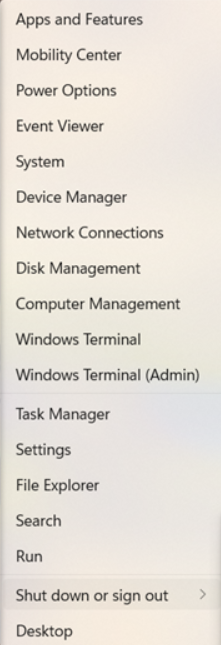
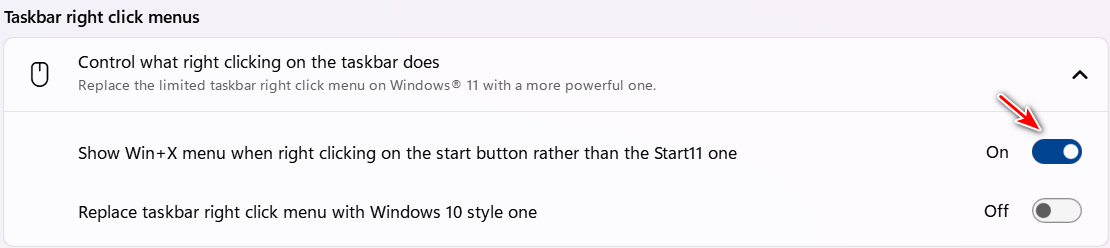
2) If you go to Start11 config>Taskbar>Taskbar right click menus and turn on Show Win+X menu ...

Now when you right click the Stat button, the bottom selection is "Desktop" which will minimize all open windows to the taskbar. This should actually be easier than moving your mouse all the way to the right of the taskbar. You can also use the keyboard shortcut WinKey+M to minimize all open Windows to the taskbar.

pelaird

Reply #2 Top

Thank you, pelaird, for you response. I like how "StartAllBack" keeps the system tray area compact and neat, but I like Start11 and would love to have another software made by Stardock on my PC installed.

As for the "show desktop" thing - I realize there are some "workarounds" to do it. But after so many years of using Windows, I got used to peak the desktop by hovering that tiny "button" at the end of the taskbar (or clicking it once or twice to show/hide the desktop). You know - one click of the mouse button and I'm done. It's just a question of habit. And if it's possible to implement in the program, then I'll be very happy :-)

Regards.

Reply #3 Top

I understand the muscle memory thing. I have a 42" monitor and it's quite a haul over to the right side of the monitor, especially since the Start button is now in the middle.

If you have Microsoft PowerToys, you can use "Keyboard Manager" to remap keys, including to shortcuts, on your keyboard. I remapped one of my keys to the shortcut WinKey+M, so now it's very easy show the Desktop with out leaving the keyboard.

Reply #4 Top

Hello,
I have forwarded your request to the Stardock Support Team for their review and recommendations. Please keep an eye on this thread for any updates. We really do appreciate your feedback, Thanks

Basj,
Stardock Community Assistant.

Reply #6 Top

Love the software so far as I can't stand the standard Windows 11 start menu. Had v1 and recently upgraded to v2. Would it be possible to have the option to change the color of just the top part of the tabs (where the tab names are) on the start menu instead of the entire tabbed space (behind the icons within the tab. My preference would be to have colored tabs but white or grey or black (some sort of greyscale) backgrounds.

Thanks