Question about having all programs fold out across screen

Hi everyone, I wasn't sure if this was the right place to post this.

I have start11 running and I love it, I finally got windows 11 to look like the classic way.
One thing though is, I remember in past windows, and perhaps from openstart I was able to have all programs fold out where instead of all programs only being in the space inside the start menu with a scrollbar, it would instead go from top to bottom of the screen, and have multiple of those like 3 rows across the screen taking up most of the screen.

I feel like this was a pretty common look back in the day. I tried looking in the start menu > configuration > all programs list drop down. Although there are lots of options I don't see one that lets it change like this.

I was just wondering if this option is possible and I am just missing where to turn it on. Or if this isn't really available anymore. No worries if not, just wanted it if it is there.

2,000 views 9 replies
Reply #1 Top

If you're using the Windows 10 Style, go to the "Configure Menu" page in the settings and turn on "Use full screen menu."

Reply #2 Top

Hmm just tried that's not what I was talking about. That makes the whole like metro pinned apps style menu over the entire screen. And all programs is still a very thin column you scroll up and down on.

What I am talking about is if you have windows 7 style, and then click all programs it folds out over the screen. This was definitely start menu functionality from old windows, and even openshell back on windows 10 you could do it this way but open shell doesn't work for me on windows 11.

So instead of a thin column that scrolls up and down, it becomes however many columns it takes to show all the programs, only when you click all programs.

Reply #3 Top

Hello,

I don't think that is possible with Start11.

Thank you.
Basj,
Stardock Community Assistant.

Reply #4 Top

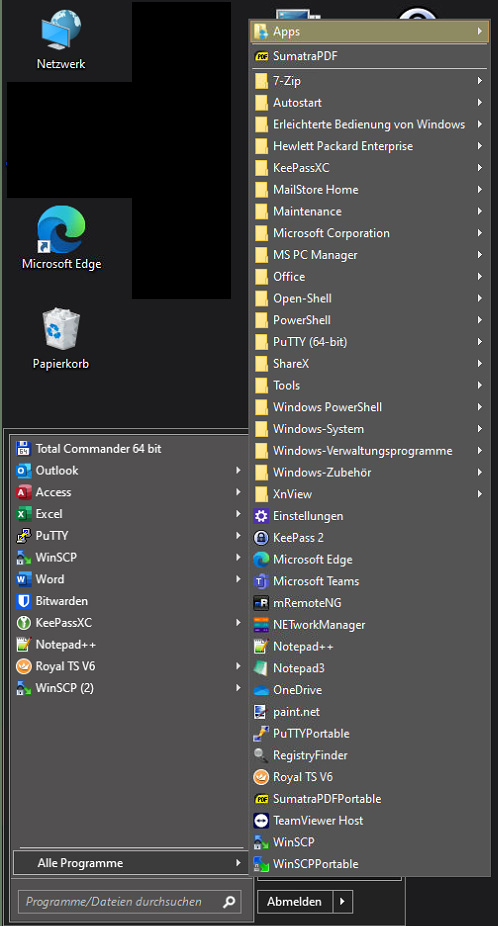
Yes, not possible. ;-) I think, there where some other requests (including me) to have an optional menu instead of the list when clicking 'All Programs'. ('Cascading sub-menu')

Reply #5 Top

Quoting c242, reply 4

I think, there where some other requests (including me) to have an optional menu instead of the list when clicking 'All Programs'.
End of c242's quote

Let's call it Rightclick... ;)

Reply #6 Top

Not so much, more like this (excuse the chaos):

Reply #7 Top

Ahhh cascading sub-menu, that's the wording I was looking for. It looks like you have it in a way that is at least similar. And do you think this might be something they might add down the road?

Reply #8 Top

I have one VM with OpenShell configured like this. Screenshot is from that one.

Reply #9 Top

Yeah open shell on my windows 10 had it that way. I was unable to get openshell working on Windows 11 which is why I went with start11. Which I have liked better in almost every way.