


Odd icon positions on external monitor with different scaling
from  Stardock Forums
Stardock Forums
When I connect an external monitor with a different scaling to my laptop monitor, the Start11-enhanced taskbar shows odd magnifications/positions of some icons (Start and Search) and the notification area, as below. A restart of Explorer fixes this but it doesn't happen with the Windows 11 taskbar.
eg
Note time text cutoff and icons at top 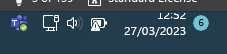
Note Start and Search icons at top 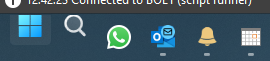
Windows 11 Build 22621.1413 with PowerToys v0.68