Start 11 - Custom icons not showing in taskbar

Without start11 enhancing the taskbar, if I change the default icon of an app, it shows it in the taskbar. When I enable start11, the custom icon is reverted back to it's original icon. So now the taskbar icons are default even when I have set custom ones.

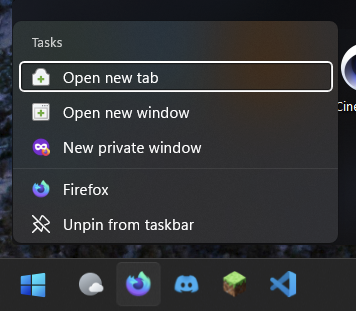
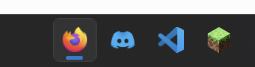
This image shows the normal firefox in taskbar, but it is set as a blue icon

Start11 1.36

Windows 11 22H2 - 22621.1105

4,391 views 6 replies
Reply #1 Top

Hello,
Sorry to hear you are having issues. But, this also happen on system without Start11. I uninstall Start11, reboot and the taskbar icons don't change. Refer to screenshot below. I've change Edge icon to use Riot Client icons. But the taskbar icon still show Edge icons.


Basj,
Stardock Community Assistant.

Reply #2 Top

That's because of the icon cache and the way icons for shortcuts are handled by by Windows. The only way to correct the icon change is to unpin the icon shortcut from the taskbar, change the icon, and pin it back to the tasbar again.

Reply #3 Top

I disabled the taskbar enhancement and rebooted and the custom icons shows up for me. Maybe since I set it a while back the icon cache was refreshed or something

Reply #4 Top

I unpinned the icon.

Opened the file location of the shortcut which was in start menu folder.

Changed the icon to the custom one.

Pinned it back to taskbar, which shows up correctly:

But whenever I open it, it reverts back to normal

This shows the blue icon correctly when start11 taskbar is disabled

Reply #5 Top

Exactly the same problem. Wasl looking everywhere to work out why my custom icons would nigh on immediately revert to original. Cleaned out icon cache and did everything I googled.

Nothing worked.

Then I turned off Start 11 taskbar enhancement. Lo and behold, my custom icons re-appeared.

If start 11 taskbar enhancements don't permit custom icons, not much of an enhancement. Quite the opposite.

Reply #6 Top

Quoting nigeldhill, reply 5

Exactly the same problem. Wasl looking everywhere to work out why my custom icons would nigh on immediately revert to original. Cleaned out icon cache and did everything I googled.

Nothing worked.

Then I turned off Start 11 taskbar enhancement. Lo and behold, my custom icons re-appeared.

If start 11 taskbar enhancements don't permit custom icons, not much of an enhancement. Quite the opposite.
End of nigeldhill's quote

Do you have the software set to show the taskbar as combined or uncombined but with no text?

The difference is important.

When in combined mode there is a single button for all windows in the app, so any custom icons should be in use.  However, when in uncombined mode there is a 1:1 link between windows and taskbar buttons and this means the icon used is the icon used by the window itself, not the app.  This is a key difference and also how Windows has always worked where the app icon is only ever used when combined.

When an app is pinned it has no window, so the icon is always the icon used for the app / shortcut.