problèmes de fenêtres

fenêtres vides

Bonjour,

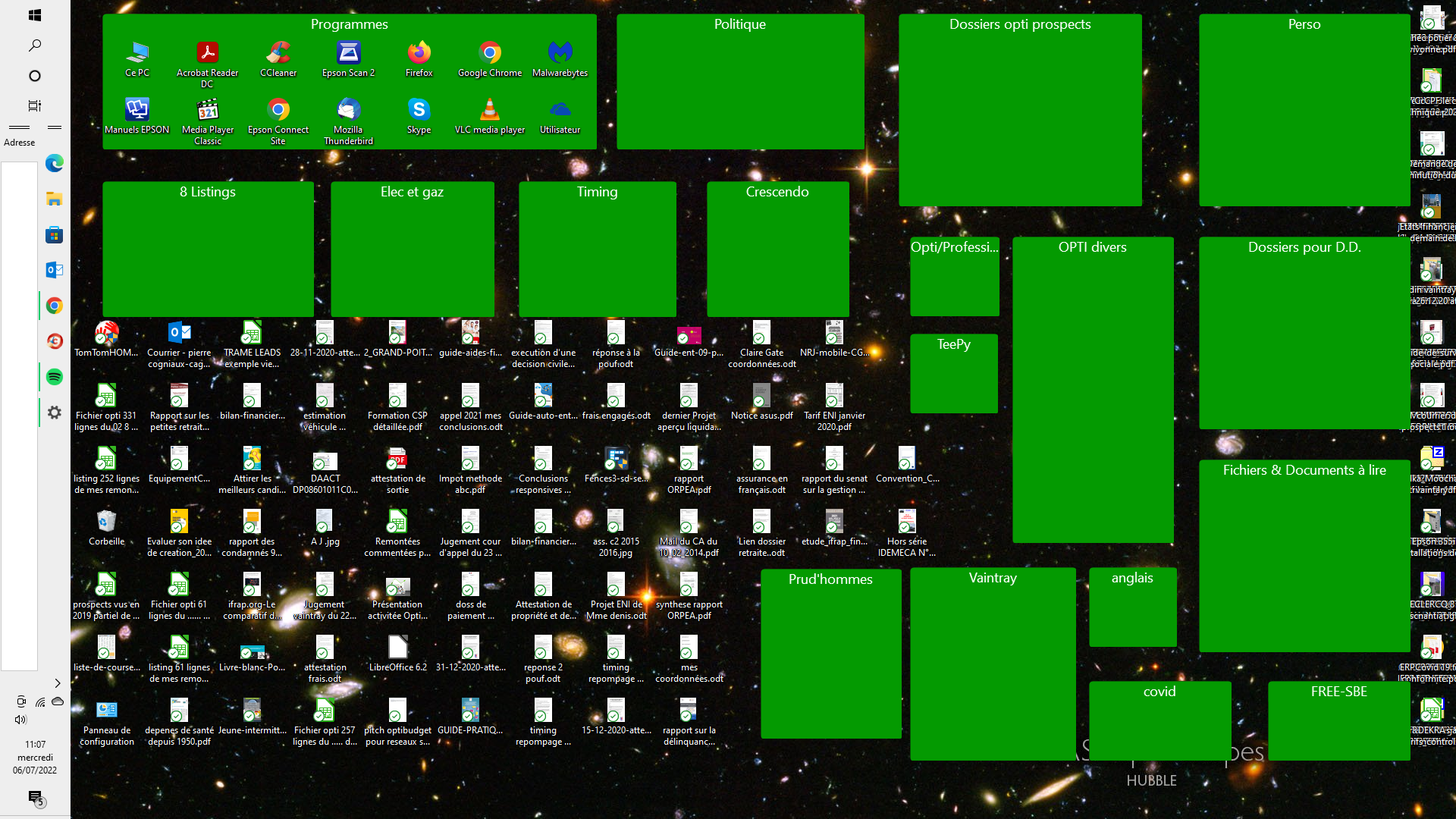
Lors d'un redémarrage de mon ordinateur, toutes les fenêtres ont été vidées et mis en vrac sur le bureau sauf 1 fenêtre.

Veuillez me venir en aide.

Merci


‎Hello‎

‎When restarting my computer, all windows were emptied and put loose on the desktop except 1 window.‎

‎Please help me.‎

‎Thank you‎

16,870 views 28 replies
Reply #1 Top

Hello,
Sorry to hear you are having issues. But, we need more details on your issue.

  1. You're referring to which Startdock Software product?
  2. You on Windows 7,8,10 or 11? And we also need its full version numbers please. Use "Winver.exe" to get those numbers.
  3. Also post a screenshot of your issue will help us understand your issue much better.

Thanks
Basj,
Stardock Community Assistant.

Reply #3 Top

Did you turn on OneDrive desktop sync or anything similar in function? If yes please review this thread : https://forums.stardock.com/501085/get;3785366.

Thank you,

Basj,
Stardock Community Assistant

Reply #4 Top

Alors non le onedrive n'était pas activé.

Fonction similaire ? quelles fonctions ?

J'ai été sur le fil : je ne comprends rien.

Je ne suis pas informaticien.

Du jour au lendemain le fonctionnement de fences a changé sans que je ne demande rien, alors à vous de me dépanner SVP.


‎So no the onedrive was not activated.‎

‎Similar function? what functions?‎

‎I've been on the wire: I don't understand anything.‎

‎I am not a computer scientist.‎

‎Overnight the operation of fences has changed without me asking anything, so it's up to you to help me please.‎

Reply #6 Top

Ce que je comprends c'est que votre logiciel devient incompatible avec microsoft.

Moi je ne demande rien d'autre que le retour à la normal.

Je vous ai déjà dit que je n'étais pas informaticien.

Il faut me parler simplement.

Suis je le seul au monde à avoir ce problème ?


‎What I understand is that your software becomes incompatible with microsoft.‎

‎I am asking for nothing more than a return to normalcy.‎

‎I have already told you that I am not a computer scientist.‎

‎You have to talk to me simply.‎

‎Am I the only one in the world who has this problem?‎

Reply #8 Top

If you read the link and do a little read up. You should understand that Desktop Sync to OneDrive make Windows move your desktop icons from your normal desktop location to OneDrive share folder. This will make your desktop icons gone missing inside your Fences. What you can do is to disable Desktop Sync on OneDrive and move back all those icons manually from your OneDrive folder to you normal Desktop.

Thank you,

Basj,
Stardock Community Assistant

Reply #9 Top

Comme vous avez pu le constater via la capture d'écran, tous les icones sont sur le bureau, mais en vrac et hors des clôtures.

Je ne pense pas que cela vienne de cette activation de onedrive car je vous l'ai dit cette application n'était pas activée.

Vous parlez de déplacement manuel !

Dois-je comprendre qu'il me faut refaire mes clôtures une à une en déplacement tous les icones manuellement et individuellement ?


‎As you could see via the screenshot, all the icons are on the desktop, but in bulk and out of the fences.‎

‎I don't think it comes from this onedrive activation because I told you this app was not activated.‎

‎You're talking about manual movement!‎

‎Do I have to understand that I have to redo my fences one by one on the go all the icons manually and individually?‎

Reply #10 Top

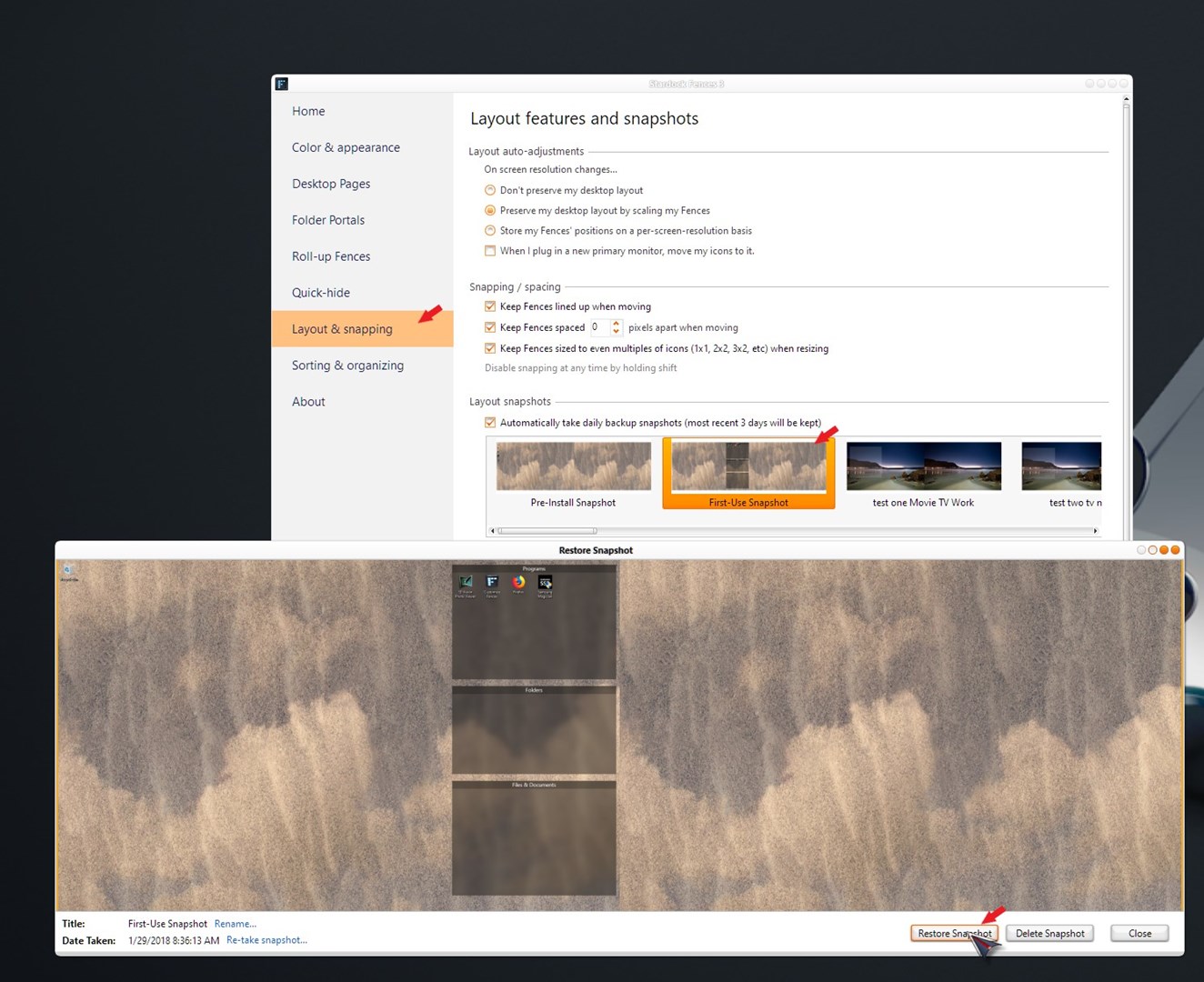
You should first try to restore layout screenshot that automatically been saved. Try all of them. If that don't work, than your next step is doing it manually one at the time. And once you're done. Make sure to save a layout snapshot manually.

Thank you,

Basj,
Stardock Community Assistant

Reply #11 Top

Je ne comprends rien.

 Comment "restaurer la capture d'écran de la mise en page qui a été automatiquement enregistrée" ?

Où la trouver ? Comment la trouver ?

Je vous l'ai dit je suis novice.


‎I do not understand anything.‎

‎ How to "restore the screenshot of the layout that was automatically saved"?‎

‎Where can I find it? How do I find it?‎

‎I told you I am a novice.‎

Reply #12 Top

J'ai trouvé un instantané datant du 25/12/2019 (pas à jour) et plus rien jusqu'au 04/07/2022 (totalement en désordre) !

Comment puis-je retrouver un instantané du 30/6/2022 par exemple ?


‎I do not understand anything.‎

‎ How to "restore the screenshot of the layout that was automatically saved"?‎

‎Where can I find it? How do I find it?‎

‎I told you I am a novice.‎

Reply #13 Top

Hello,

Sorry to hear you are having issues.

 To backup Fences snapshots follow this link https://forums.stardock.com/486084/fences-support-faq#backupsnapshots

So you can follow this Vista/7/8/10: C:\Users\USERNAME\AppData\Roaming\Stardock\Fences\Backups

and see if there are other snapshots to choose from ..

This might work for you ..

Check and see ..


AzDude
Stardock Community Assistant


Bonjour,

Désolé d'apprendre que vous rencontrez des problèmes.

Pour sauvegarder les instantanés de clôtures, suivez ce lien https://forums.stardock.com/486084/fences-support-faq#backupsnapshots
Vous pouvez donc suivre ce Vista/7/8/10 : C:\Users\USERNAME\AppData\Roaming\Stardock\Fences\Backups

et voyez s'il y a d'autres instantanés parmi lesquels choisir ..

Cela pourrait fonctionner pour vous ..

Vérifiez et voyez ..


AzMec
Assistant communautaire Stardock

Reply #14 Top

Quoting Per86, reply 11

I do not understand.

How do I "restore the layout screenshot that was automatically saved"? Where to find it? How to find it?

I told you I'm a newbie.

End of Per86's quote

I am sorry, Here a simple steps guide, hopefully you can follow.

  1. Open up your Fences configuration Windows.
  2. Look on those tabs on the left : Click on "Layout & Snapping".
  3. Look at "layout snapshots" there is a checkbox there "Automatically take daily snapshots(most recent 3 days will be kept)". By default this is turned on. If this is turn on than look at those snapshots below that check box.
  4. Use the horizontal scrollbar, if needed, to scroll to the right until its end.
  5. There should be 3 "Daily Snapshot (xx/7/2022)" there. <- those are 3 layout snapshot which are automatically saved.
  6. Click on one of them.
  7. The "Restore Snapshot" should open.
  8. Click on Restore Snapshot.
  9. Click "Yes" if you wish to save your current layout. If not just click "No".
  10. Your selected saved layout should now be applied.
  11. If you still have missing icons from your desktop.
  12. Try restore other 2 more layout snapshots.
  13. If all fail, than you will need to start relocate all your icons manually one by one.

Try those and report back.

Reply #15 Top

Bonjour,

Merci pour ce pas à pas didactique.

Je l'avais trouvé par extrapolation.

Je n'ai pas d'instantané autre que les dates que je vous ai indiqué et donc sans utilité car incomplet.

La cruelle conclusion est donc de devoir remplir les clôtures une à une en translatant mes icones une par une, est-ce bien ça ?

Par contre, j'ai tenté ces déplacements et ils se font avec une lenteur effroyable : pourquoi ? puis-je modifier cela ?

Merci.


‎Hello‎

‎Thank you for this didactic step by step.‎

‎I had found it by extrapolation.‎

‎I have no snapshot other than the dates I indicated to you and therefore useless because incomplete.‎

‎The cruel conclusion is to have to fill the fences one by one by translating my icons one by one, is that right?‎

‎On the other hand, I have tried these trips and they are done with an appalling slowness: why? can I change this?‎

‎Thank you.‎

Reply #16 Top
Quoting Per86, reply 15
Hello, Thank you for this step by step tutorial.
I had found it by extrapolation.
I have no snapshot other than the dates that I indicated to you and therefore useless because incomplete.
The cruel conclusion is therefore to have to fill the fences one by one by translating my icons one by one, is that right?
On the other hand, I tried these displacements and they are done with an appalling slowness: why? can I change this? Thanks.


End of Per86's quote

If that is the case, than yes, you need to move those icons manually into Fences. Just remember, once all are done, please save a the latest layout snapshot. Give it a proper name. This will be the one you will fall back to if the issue come again.

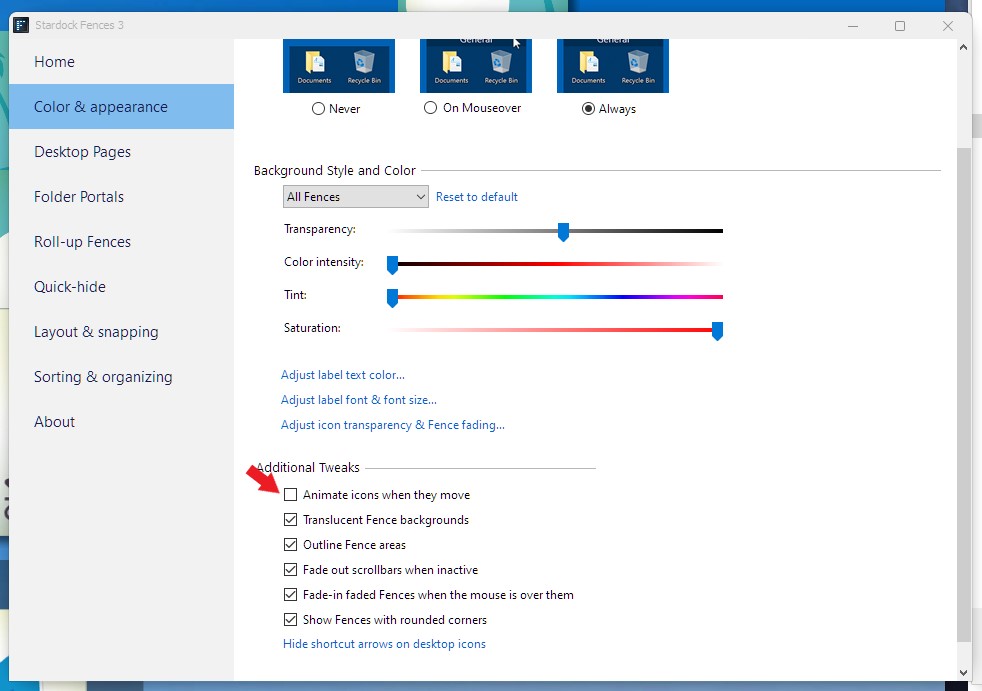
For the slowness try disable animation. Refer to the screenshot below.

Thank you,

Basj,
Stardock Community Assistant

Reply #18 Top

You need to be more clear and specific, what don't work?

Thank you,

Basj,
Stardock Community Assistant

Reply #19 Top

La lenteur de déplacement d'icone pour les mettre dans les clotures est la même avec ou sans activer "animate ..."

Reply #20 Top

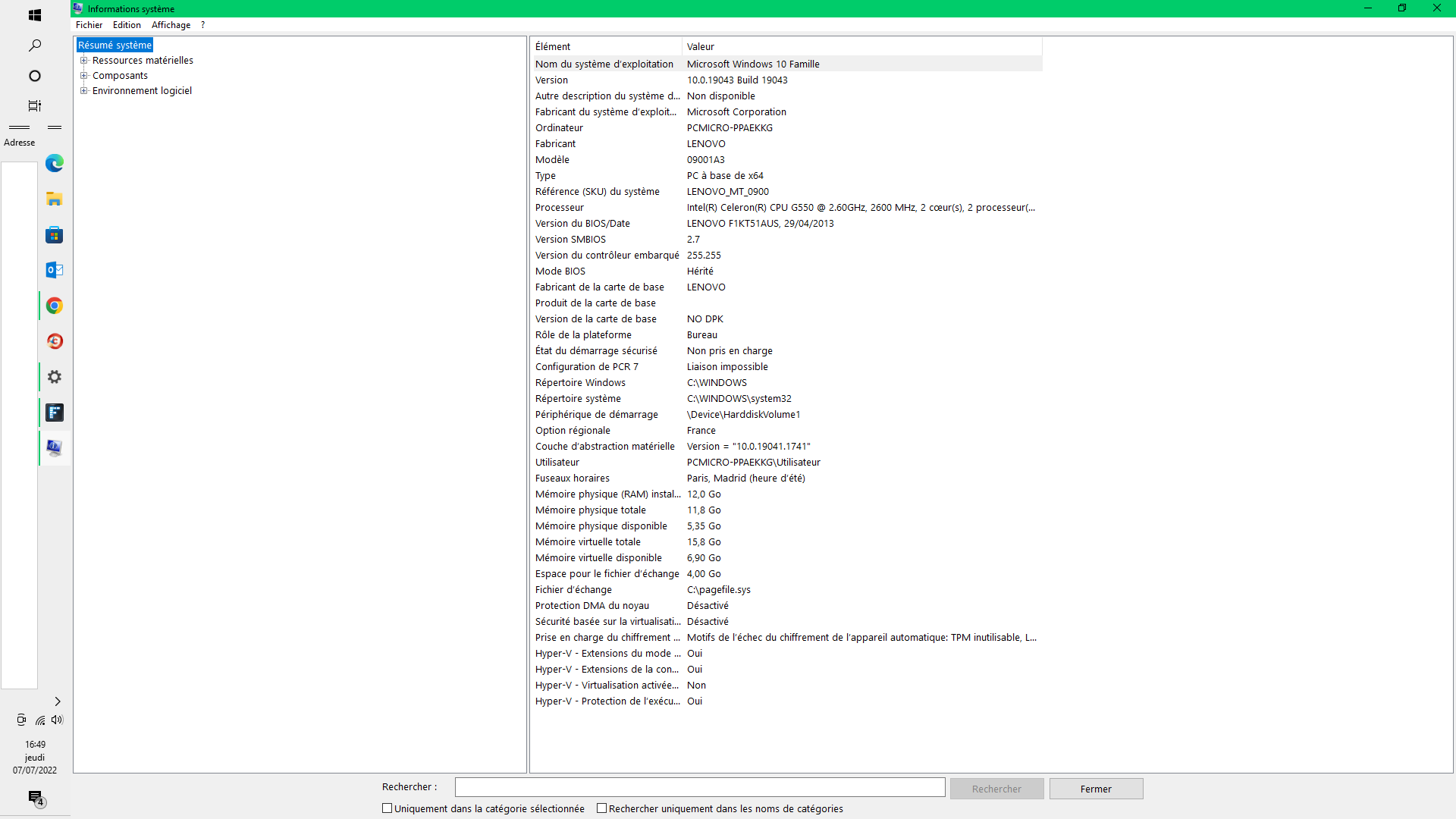
Can you post your pc specification please.

Information such as CPU, GPU and Monitors resolutions etc.

Thank you,

Basj,
Stardock Community Assistant

Reply #24 Top

Looking at your specification. Its from 2013. It might be your specification is not up to spec. But, to be sure, I have forward your problem/question to Stardock Support Team for their assistance. Please keep an eye on this thread for any updates. We appreciate your feedback and patience.

Basj,
Stardock Community Assistant