Start 10 & 11

Activation not possible

Hi everyone. In spite of huge time spent on researching the internet and trying out different 'expert' solutions, I can't get any further.

My problem is that after I updated my Start 10(been using it for 2 years now) to 11, I couldn't activate either one any more.  It doesn't matter what I do, how often I deinstall/reinstall, with or without AV/FW, changes in Windows Security(afterwards reset to standard) or password renewed, I get the same result everytime - '....activation server is not available.....' and that for the last 7 days!!!

Can anyone help?

4,348 views 12 replies
Reply #1 Top

Hello,
Sorry to hear you are having issues. Have you try this guide for deactivate old activation before reactivate it : https://forums.stardock.com/486311/accounts-and-activation-support-faq#deactivateproduct

Note : Do know that you cannot activate Start11 using Start10 activation keys. You will need to purchase a new keys for Start11.

Thanks
Basj,
Stardock Community Assistant.

Reply #2 Top

Hi BASJ.

Thanks for your reply. Actually I don't know if my Start 10 activated is or not. I've got no access to it. It's not installed anyway (nor 11). Naturally I know I cannot activate Start 10 with 11 key.

My situation is I have both 10 & 11 progs AND both keys. I have NOT confused the one with other.:congrat:  

Reply #3 Top

If your issue is only activation. What you should do is check if your activation is not max out. If it already max out you need to deactivate it first, before activating it again. Use those guide I linked above.

If it is not max out, than might be connection issue. You can use the offline activation method. Also listed in those guide I linked above.

Try those and report back.

Thank you,

Basj,
Stardock Community Assistant

Reply #4 Top

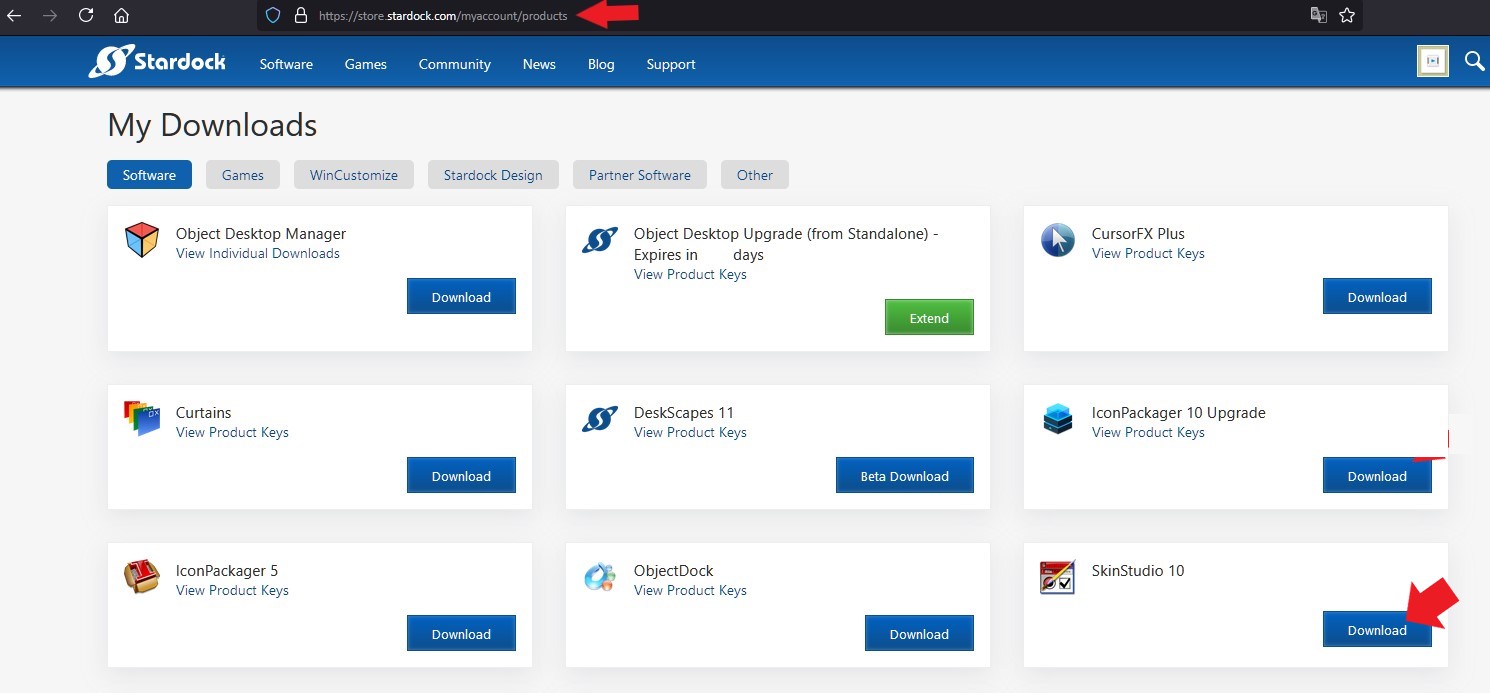
Sorry for being a nerd but i've combed my account from one end to the other and cannot find a '?' anywhere. The page shown on your link doesn't appear by me either.:(  

Reply #5 Top

Can you post a screenshot on what you're seeing on your system. Please cover all the license keys numbers.

BTW you will need to click on "view product key" to see the "?" icons. (Should appear next to your product key numbers.

Thank you,

Basj,
Stardock Community Assistant

Reply #6 Top


Sorry but I cannot find 'view product key' anywhere, so I still don't have the '?'    I'm going slowly mad.XO  


Reply #7 Top

I am sorry, use this link to your account product page : https://store.stardock.com/myaccount/products

It should show something like this. Each product should have "View Product keys". Click those to get the "?" button.

Thank you,

Basj,
Stardock Community Assistant


Reply #8 Top

Okay. Thank you, thank you, thank you :grin:  

So......... The 10 was only activated twice and the 11 once.  I've deactivated them both down to zero. I've reinstalled Start 11 and guess what!!!

"............activation server not available..............."  Back where I started !!!!!!!!!!

Reply #9 Top

Hello,

Sorry to hear you are having issues.

I would say try again the Server down go down from time to time or try a different 

browser to activate , if that doesn't work for you then submit a Ticket to support

for Help with you issue here https://stardock.atlassian.net/servicedesk/customer/portal/4

explain your issue , then wait for a response as tickets are answered in the order received.

Only submit ONE ticket .


AzDude
Stardock Community Assistant

Reply #10 Top

Okay but it's been a week now so I don't think it lies with the server. I have tried with Firefox and Edge - no difference.

Guess i'll have to submit a ticket (sigh).  Getting really peeved now:(  :'(  

Reply #11 Top

What I don't understand is that the 10 had functioned perfectly up to the update to 11. That gave it the death stroke, so that nothing worked after that. X(  

Reply #12 Top

Have you try to use another Computer, just as a test, to see if the issue is with that computer only? If it is working on another PC, than something must be blocking your current PC from reaching the server.

Thank you,

Basj,
Stardock Community Assistant