Fences keeps changing my desktop layout - unasked!

Hi,


I use Fences 4.0.0.3

Fences automatically changes my desktop layout. There were no changes in resolution etc.

If I change my layout back, Fences will change it again after a few seconds.

In the past I had to deinstall fences (with "Purge_Fences.bat") and reinstall it. It's frustrating.

A few Days later everything starts again....

All I want is that fences won't change my desktop layout. I tried everything at the layout adjustment in the settings. What can I do?


Regards

Ka.

15,227 views 16 replies
Reply #1 Top

What happens if you lock Fences?

Are you changing resolution or screen size when this happens?

Paul Scroggins
Associate Technical Support Analyst

Reply #2 Top

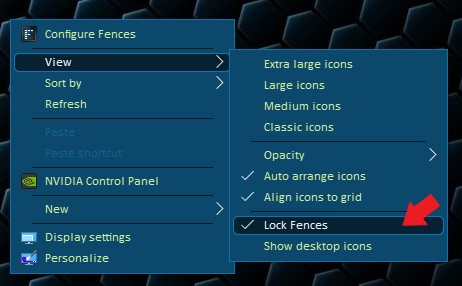
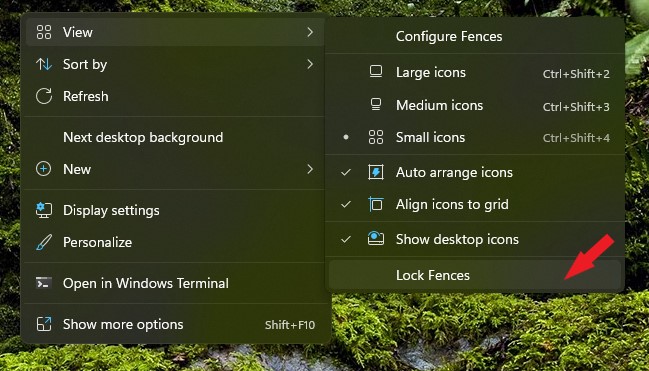
Where can I lock Fences?

There are no changes with resolution or screen size etc.

I can go away from my PC and when I return a few minutes later the layout has changed. Sometimes it lasts only seconds...


Reply #3 Top

Hello,
Sorry to hear you are having issues. Where to lock Fences.

If you on Windows 10.

if you on Windows 11.


Basj,
Stardock Community Assistant.

Reply #4 Top

Lock Fences: I tried, but it won't work...

Reply #5 Top

Please watch this: https://youtu.be/aOm_tEio67A

In the Video I force layout changing. If I don't force it, it will change automatically after a few seconds or minutes...

If I exit or remove Fences my layout won't change anymore.

Reply #6 Top

Hello,

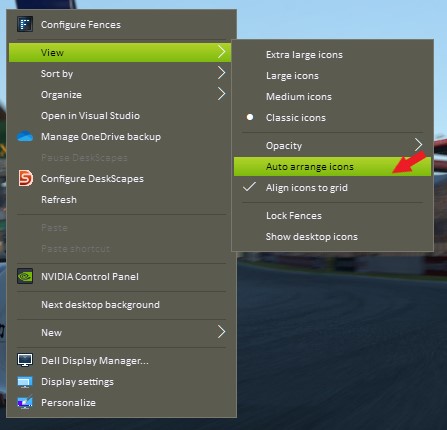
Please try disable desktop "auto arrange icons" and see if that still happen.

Thank you,

Basj,
Stardock Community Assistant

Reply #9 Top

I can try that, but it may last days, weeks or month till the problem starts...


After I used "Purge_Fences.bat" and reinstall sometimes the problem will be back after days, sometimes after weeks and sometimes after month.....

Last year I had a different Computer and the Problem was there too.

Reply #10 Top

Have you always used that "DeskSave" program when these issues were going on?  Can you try Fences without it. I'm not saying that is the problem, but it is always best to look at other applications that do similar things for conflict.

Paul Scroggins
Associate Technical Support Analyst

Reply #11 Top

I use DeskSave since Fences changes my Layout. Not before!

Reply #12 Top

Ok, sounds like clean boot is the way to go. 

See if it functions "clean" and then slowly work your way back to your current setup, that way you can narrow down what may be conflicting with Fences

Paul Scroggins
Associate Technical Support Analyst

Reply #13 Top

Similar issue. I go from laptop configuration to dual monitor configuration via a dell dock. I assume if I take a snapshot in the dual monitor configuration it would should allow me to restore during the same configuration and everything should work. Unfortunately, when I do the restore for some reason it seems to want to try to draw all the fences in the same screen (it looks like hell). Why does the restore not work correctly?

Reply #14 Top

The video where you show lock has no sound and goes through so fast its almost unwatchable.

Where is the function to lock? I cannot find it on my pc with Windows 10

Reply #16 Top
if I rearrange the icons manually they stay.