AniUtil.exe

Where? What? Who?

I have found multiple posts of people begging for this -supposedly included, yet not included- mini-tool for CursorFx. I have not found a post with the actual answer. So hereby once more: Where the sh** can I actually find this thing? (No, it is not in my ...PF/CursorFX/)

PS: Meta-point: Does receiving the same question on the same forum, year after year, truly not motivate you to fix even a miniscule oversight..? Most of the many, many issues I run into with your software, have already been posted multiple times on this forum. Sometimes even with an answer. So why has it not been fixed after 2-10 years? You ask a subscription fee for this. Maybe earn it?

18,727 views 16 replies
Reply #1 Top

You can't get it anymore. You have to create the animations for CursorFX with some other graphics editor. Why it's not included anymore, I don't know, but it could be some copyright issue. The small utility was made by Alberto Riccio who also created DesktopX for Stardock if my memory serves me right.

Reply #2 Top

After seeing this post, I had to chime in here. You can still get it if you use an older version of Cursorfx. I use version 2.16 because the shadows work properly with this version. 

Reply #3 Top

Quoting JanOscar, reply 1

You can't get it anymore. You have to create the animations for CursorFX with some other graphics editor. Why it's not included anymore, I don't know, but it could be some copyright issue. The small utility was made by Alberto Riccio who also created DesktopX for Stardock if my memory serves me right.
End of JanOscar's quote
Quoting JuniorCrooks, reply 2

After seeing this post, I had to chime in here. You can still get it if you use an older version of Cursorfx. I use version 2.16 because the shadows work properly with this version. 
End of JuniorCrooks's quote

Well.. This somewhat strengthens my aforementioned 'PS'. The program I want and is -in my opinion- quite essential for the purposes of CursorFX, has been discontinued. Yet instead of communicating that, their own CursorFX guide claims (to this day) that it's part of the installation, when in truth I can at best make do with a version from 6 years ago.

So glad I paid for a subscription.

*cough*

"- Consumer Fraud:    Deceptive practices that result in financial or other losses for consumers in the course of seemingly legitimate business transactions."

*cough*

 
Reply #4 Top

Well.. This somewhat strengthens my aforementioned 'PS'. The program I want and is -in my opinion- quite essential for the purposes of CursorFX, has been discontinued. Yet instead of communicating that, their own CursorFX guide claims (to this day) that it's part of the installation, when in truth I can at best make do with a version from 6 years ago.

So glad I paid for a subscription.

*cough*

"- Consumer Fraud:    Deceptive practices that result in financial or other losses for consumers in the course of seemingly legitimate business transactions."

*cough*
 
In my opinion, the program from 6 years ago is better than the new version, with version 2.16, you can adjust the shadows, for some reason with the new version you can't, also, it works perfectly fine on Windows 10, it is what I run and will run on my computer until they fix being able to adjust the shadows in the settings.
Is this little AniUtil.exe  as important as you are making it out to be? there have been many cursorfx cursors made without the use of this program, I myself have never made cursors for cursorfx but if I wanted too, I would not need that program to do it, if you are bent on having it because you do feel it is essential, you can still get it by downloading the previous version.
There was no consumer fraud or deceptive practices going on here, there had to be a reason why it was removed in the new version and Stardock not updating the guide is probably just an oversite, things like this happen with every company, not just Stardock, when you have as many irons in the fire as they do, something is bound to get missed once in a while, maybe you don't see it that way, but no one or no company is perfect.

Reply #6 Top

Quoting Vampothika, reply 5
End of Vampothika's quote
I don't know if it matters but that is version 1.3, the version that comes with cursorfx is version 1.5, there was a redesign of the program between versions but the older 1.3 probably still works fine.

Reply #7 Top

Quoting JuniorCrooks, reply 4


In my opinion, the program from 6 years ago is better than the new version, with version 2.16, you can adjust the shadows, for some reason with the new version you can't, also, it works perfectly fine on Windows 10, it is what I run and will run on my computer until they fix being able to adjust the shadows in the settings.
End of JuniorCrooks's quote


If you mean these shadows:
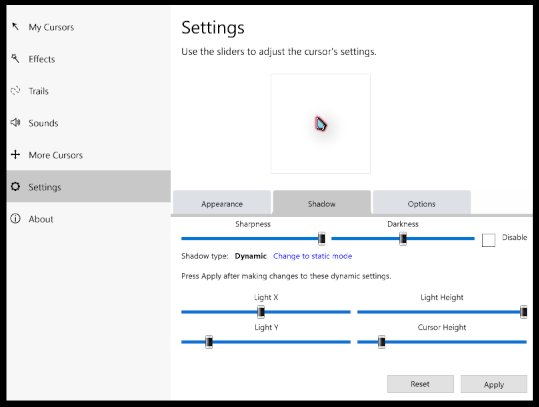
Then they seem quite present in V4.03?

Quoting JuniorCrooks, reply 4

Is this little AniUtil.exe  as important as you are making it out to be? there have been many cursorfx cursors made without the use of this program, I myself have never made cursors for cursorfx but if I wanted too, I would not need that program to do it, if you are bent on having it because you do feel it is essential, you can still get it by downloading the previous version.
End of JuniorCrooks's quote

I feel safe stating that this AniUtil.exe is worth about half the value of CursorFX. I understand you've never made cursors for CursorFX, but the -my- point is that if you wanted to do so, you really couldn't. Even though cursorfx.com slaps you in the face immediately with:

"Customize" - Well, yes. You can add shadows.
"Create your own" - Fiction. You can't actually create your own, you can only import images into boxes. Those boxes are the exact same as those in Control Panel > Mouse > Pointers, and the images
 you'll still have to make with a real program, since you can't actually create anything with CursorFX.

The only thing I couldn't do myself with windows settings alone, was create animated cursors. Since that is now gone - so is any added value to CursorFX over your basic Control Panel.

Quoting JuniorCrooks, reply 4

There was no consumer fraud or deceptive practices going on here, there had to be a reason why it was removed in the new version and Stardock not updating the guide is probably just an oversite, things like this happen with every company, not just Stardock, when you have as many irons in the fire as they do, something is bound to get missed once in a while, maybe you don't see it that way, but no one or no company is perfect.
End of JuniorCrooks's quote

I agree that no company is perfect, and of course oversights take place. Normally, however, said companies would take some, or any action at all when it's pointed out to them. And it has been pointed out a lot. I've only been using Stardocks a few weeks, and every single program I give a chance, I run into something like this. For example, quite similar: "WindowBlinds comes with SkinStudio to make your own theme!" -- No, it doesn't. Had to find that program through this forum as well. Add that to all their guides being outdated for nearly a decade, and all their 'theme-adjustable' settings are based on Windows XP (20 years old OS) and Windows 8 (10 years old OS). All of which is not mentioned beforehand.
Mind you: their "Object Desktop" subscription is sold under the banner of containing "One dozen top Windows customization apps." This includes -for unknown reasons- Start 8, 10 and 11, as well as some old version of Fences on top of the latest version. They fail to mention all those Starts are functionally useless if you already have WindowBlinds. The same applies for Curtains - no need to even install it if you have WindowBlinds. Let's not forget you annual payment grants you a program to: "Quickly free up storage space on PCs and shared-networks," which is something it in no way whatsoever does. The creators of the utility don't even claim it does. It's merely a display and has no other functions.

I do actually believe the entire 'list of things wrong' can easily be classified as consumer fraud. An abundance of promises are made that are simply in no way delivered. Granted, that may have started more out of general neglect than intention, but all the crap I run into has already been posted on their own forum multiple times, spanning multiple years. Their complete inaction in updating anything, and/or adjusting what they're promising, can most definitely lead to fraud with accountability. 

You can't keep promising you deliver a service, and then just simply not do that, even though your clients shove your face in that fact time and time again. Difficult to keep looking at that as an oversight.

Reply #8 Top

I am not going to address all that you wrote except this "Then they seem quite present in V4.03?"

Yes, the settings are present but have you tried using them? The last time I tried, you could make the changes in the settings but they would not apply to the cursor, at least that is what I recall but I could be wrong, I do know that there was a reason why I was not using the new version and I thought that it had to do with something about shadows. I could try updating to see what I am talking about but I am happy with using the older version. 
The other thing I noticed is the version I use is the plus version which I paid for separately, whereas 4.3 is not a plus version, what the differences are I do not know.

It is not my place to talk about the other accusations that you made, I do disagree with them though. I have also been trying to stay out of the forums, I read your post and just wanted to help someone out so that is why I chimed in, apparently, I did a poor job with the help part, another lesson learned.  

Reply #9 Top

I use v4.03 in Windows 10 and the shadows work.

Reply #10 Top

Quoting JanOscar, reply 9

I use v4.03 in Windows 10 and the shadows work.
End of JanOscar's quote


After uninstalling and installing 4.03, I remember what the issue is(at least what I experience) the cursors will not show in screenshots, I just tried this to verify and when I take a screenshot with version 4.03, you cannot see the cursor in the screenshot, with my paid version the cursors show in the screenshots. I remember at the time when I discovered this that I was posting a lot of screenshots on the site and I had to use version 2.16 so the cursors would show in my shots.
You can try it and see if you have the same results but I am attaching a screenshot, the cursor is on the Agenda cursor and you can see that it is highlighted but my mouse cursor is not seen in the shot.

Reply #11 Top

Here is the same shot using 2.16, notice that you can see the mouse cursor in the shot. 

Reply #12 Top

I mentioned that in the release thread and got the answer that it was as intended from Sean, I think.

Reply #13 Top

Quoting JanOscar, reply 12

I mentioned that in the release thread and got the answer that it was as intended from Sean, I think.
End of JanOscar's quote

Intended? that is weird, why would anyone not want a cursor to be seen in a screenshot, especially Stardock who should want one of their products to be displayed as much as possible? 

Reply #14 Top

Quoting JuniorCrooks, reply 8

I could try updating to see what I am talking about but I am happy with using the older version. 
The other thing I noticed is the version I use is the plus version which I paid for separately, whereas 4.3 is not a plus version, what the differences are I do not know.
End of JuniorCrooks's quote

I actually downgraded to 2.16 to see :p Other than the colour-change in the UI, and the issue with the screenshots, they seem virtually identical (But of course: new version number, so pay please).

Alsooo: it was "as intended" to not be able to show off their show-off-customizations? Come on. This shouts: "All future bugs and broken features are hereby to be regarded 'as planned', therefore we change nothing. We will be at the beach sipping Mai Tais and double-handed-clubbing baby seals. Ta."

Quoting JuniorCrooks, reply 8

It is not my place to talk about the other accusations that you made, I do disagree with them though.
End of JuniorCrooks's quote

Just as much your place as it is mine. We bought their lies products, I have opinions about them, and I don't live in '1984'.

Quoting JuniorCrooks, reply 8

I read your post and just wanted to help someone out so that is why I chimed in, apparently, I did a poor job with the help part, another lesson learned. 
End of JuniorCrooks's quote

You did help; you answered my question fully. It's just that it's an (/one of many) excruciatingly frustrating answer. I apologize sincerely if my frustration appeared directed at you, this was not my intention. All my frustrations are with Stardocks; I loathe con-artists. You are to blame for nothing, you were only helpful. Albeit belated: thank you ;)

Reply #15 Top


I have found multiple posts of people begging for this -supposedly included, yet not included- mini-tool for CursorFx. I have not found a post with the actual answer. So hereby once more: Where the sh** can I actually find this thing? (No, it is not in my ...PF/CursorFX/)

PS: Meta-point: Does receiving the same question on the same forum, year after year, truly not motivate you to fix even a miniscule oversight..? Most of the many, many issues I run into with your software, have already been posted multiple times on this forum. Sometimes even with an answer. So why has it not been fixed after 2-10 years? You ask a subscription fee for this. Maybe earn it?
End of quote

There is another little utility called "animstrip" out there in the wild that is better than "AniUtil." I'm not sure where you can find it, but it is a good little utility. If you want to design icons or cursors, you could try "icofx," which is available from https://icofx.ro/index.html It's not free, but is reasonably priced. I have built several cursor sets successfully with this app.

Reply #16 Top

Quoting pelaird, reply 15

There is another little utility called "animstrip" out there in the wild that is better than "AniUtil." I'm not sure where you can find it, but it is a good little utility.
End of pelaird's quote


"Animstrip" for Png strips » Forum Post by neone6 (wincustomize.com)