
Sluggish

Slow

Hello,

I've been having some really bad experience with fences lately, it makes my desktop very slow. I have fences 3 and in the past year I have been having hover over, clicking and dragging have a delay. Everything goes back to normal when I uninstall it. I wonder whether something like that has been fixed in fences 4. I just upgraded to Windows 11 to see if it changed anything but unfortunately it didn't. I have a ultra wide monitor 5120x1440 if that makes any difference.

15,228 views 24 replies
Reply #1 Top

Hello,
Sorry to hear you are having issues. Would like to know if your system have dual GPU system? One integrated and One Standalone GPU? And if so, try to configure Fences is handle by your Standalone GPU. Something like discussed here : https://forums.stardock.com/490929/page/1/#3747145. If you are using something similar with those people, you can try out their solutions.

Thanks
Basj,
Stardock Community Assistant.

Reply #3 Top

Please try purge and reinstall steps as mentioned here: [link]. Just make sure to redownload the latest version from your account. Reboot after the purged. Reinstall, and Reboot again after the installation. Retest it. Report back here.

Thank you,

Basj,
Stardock Community Assistant

Reply #4 Top

I had tried purging before and it didn't work and trying it now did throw some errors saying it didnt find anything to uninstall

Reply #5 Top

Need to know.

  1. Windows 10 or 11? And the version of that Windows. You can use Winver.exe for full version numbers.
  2. Fences version you have installed.

Thank you,

Basj,
Stardock Community Assistant

Reply #8 Top

OK so, the result was the same more or less. I can see the slowness in two ways, clicking and dragging to create the selection area. That's sluggier on my main account but in both, the more icons I select the slower it gets. 

The second way is selecting an icon and dragging just that, that's super slow in both accounts. The moment I uninstall fences, everything goes back to super responsive. 


My guess is that either something unoptimised is taking place code side since I guess it's not expected that one user has 10 fences with 3 monitors and 1 being ultra wide. I'm only using fences on the ultra wide one by the way. But fences have been part of the way I work for years and it's very frustrating to have it go so slow sometimes that it's unusable. 

Reply #9 Top

Can you post a video showing us what you're seeing, that will help us understand your issue better.

Thank you,

Basj,
Stardock Community Assistant

Reply #10 Top

The video here is recorded at 240 fps so any sluggishness is not a problem with the video rather it shows the problems: 

http://server.terahard.org:5042/f/ad90368afb6d494d95c8/?dl=1

  1. Notice the moving of the shortcut in and out of the fence ( 00:07-00:12 )
  2. Notice the hovering of the item is slow to show the highlight ( 00:03 although no pointer to clearly see it )
  3. Notice the selection inside of the fence lags a bit ( 00:14-00:16 )
  4. Notice the selection outside of the fence ( 00:20 - 00:22 )


Reply #12 Top

Sorry I overlooked your previous post. I tried to download that mp4 but I get error and cannot download it. Can you post it on youtube and send in the link please.

Thank you,

Basj,
Stardock Community Assistant

Reply #14 Top

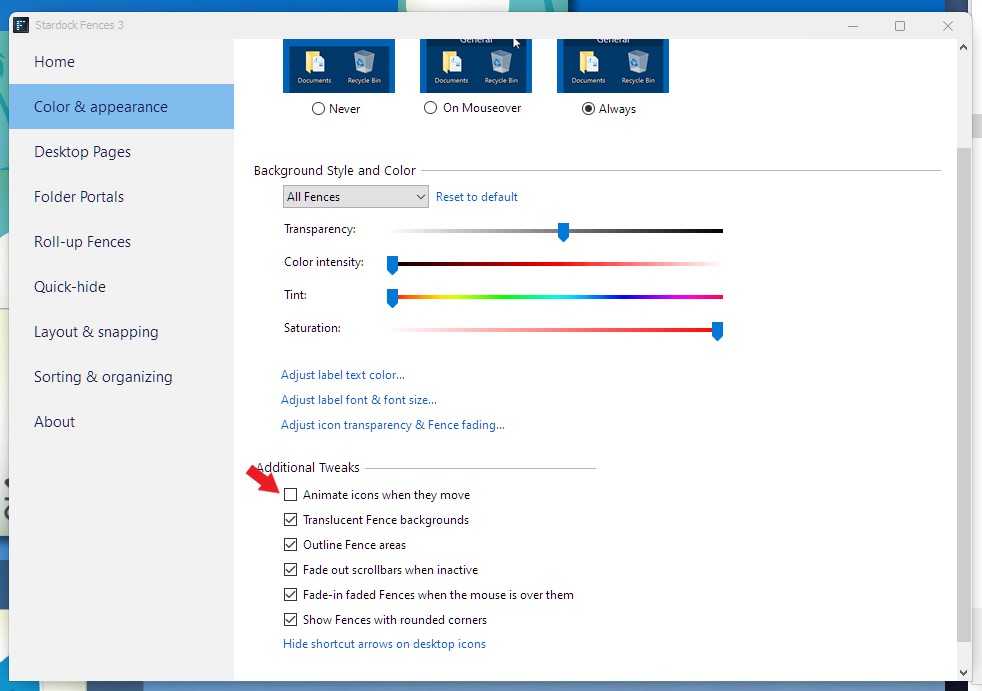
Looking at the video I don't see much lagging. Except the moving of icons. Have you tried disable the animate icons when they move.

Thank you,

Basj,
Stardock Community Assistant

Reply #15 Top

I mean I'm outlining the problems in detail, they are pretty visible in the video. Unfortunately no I disabled it, I think it's kinda better but not ok no

Reply #16 Top

Hello,
I have forward your problem/question to Stardock Support Team for their assistance. Please keep an eye on this thread for any updates. We appreciate your feedback and patience.

Basj,
Stardock Community Assistant

Reply #17 Top

I was informed to ask you to try something.

  1. First save your current layout to get back to. Create a layout Snapshot and give it a proper name.
  2. Do the Automatic layout. Under Layout & Snapping tab -> Click "Perform automatic Layout". This will make reset all Fences to just 3 normal Fences. Under this, please test and see if its still Sluggish.

Try those first and report back.

Thank you,

Basj,
Stardock Community Assistant


Reply #19 Top

I believe you said you have tried Fences 4 before yes? And it the same sluggish issue for you?

Thank you,

Basj,
Stardock Community Assistant

Reply #21 Top

Do the 30 days trial and see if it working for you.

Thank you,

Basj,
Stardock Community Assistant

Reply #22 Top

hmm it looks much better! It still has a bit of a lag but I think it's much less now. Does that point to the problem at all?

Reply #23 Top

@basj does that mean I m required to purchase the new fences in order for your bugs to get fixed? Shouldn't the software work properly as is in the current version?

Reply #24 Top

I believe so, since Fences 4 was design to work better with Windows 11. And since it work well on your system with Windows 11. I also believe that graphics cards also will come up with better driver to work with Windows 11. Hence it should work better overall.

Thank you,

Basj,
Stardock Community Assistant