Fences

folder and docs icons can not be dragged

Following installation of Fences these were created but the folders and docs icons on the screen were locked and could not be moved between the fences.  When trying to drag them a circle with a line through it appeared indicating it can not be moved.  This is on a work laptop on which I have admin rights.

16,367 views 24 replies
Reply #1 Top

Make sure your fences are not locked.

Reply #2 Top

I have tried moving the icons with and without the 'Locked Fences' ticked and neither allows me to move the icons.

Reply #3 Top

Hello,

Sorry to hear you are having issues.

You may have to check with iT dept. there may be some

Av or Other Security software preventing some functions .

Unless you have the right to disable it and then try to move icons.


AzDude
Stardock Community Assistant

Reply #4 Top

The fences with the icons within them move, but the individual icons can not be moved.  I have spoken with our IT department previously and they can see no reason for it.  If I uninstall Fences they can be moved again.  I have received a laptop refresh and was hoping that it would now work but the problem remains.  I have admin rights so if there is anything I can try I would welcome suggestions.

Reply #5 Top

Hello,

A Couple things to know .

1 - How to back up Fences Layout and to Restore them if needed https://forums.stardock.com/486084/fences-support-faq#snapshots

2 - Would you do this PURGE: https://forums.stardock.com/486084/fences-support-faq#reinstalling

Reboot and ReInstall the latest version from your account here https://store.stardock.com/myaccount/products/

Reboot , test and report back if that works for your issue .

AzDude
Stardock Community Assistant

Reply #6 Top

I have done the purge and re booted.  Fences has been removed.  I can now move the icons on the screen.

I have followed the link:  https://store.stardock.com/myaccount/products/ but the my downloads says no registrations found? 

The responce I got when ordering this last year was: STARDOCK200803-4688-72643 and I have a License Key as well.

Not sure what I should do now.  Its very frustration.  I have bought the software over a year ago and it has never worked correctly.

Reply #7 Top

That order is associated with a different email than the account you are using here. You would need to use that email for your product.

You can also merge them together using this tool: https://www.stardock.com/accounts/registrations/


Reply #8 Top

Thanks I have done as you say.  Fortunately I got an auto forward from my old email address.  The company was taken over and hence the email change.  This capability will end soon.  I have clicked on the lines in each of the mails received but this just takes me back to the https://www.stardock.com/accounts/registrations/ page.  I have followed this instruction twice now.

Reply #9 Top

Hello,
Sorry to hear you are having issues. Please raise a support ticket using this link https://stardock.atlassian.net/servicedesk/customer/portal/4 . Include all your purchase details in there and Support will help you from there.

Thanks
Basj,
Stardock Community Assistant.

Reply #10 Top

Basj

I followed the link you supplied but am unsure from the page it returns where to raise a ticket.  I tried logging into the the new page but the login details didn't work.  these are the same details which I use to login in to the Stardock site.  I cant see why you would have different login details for the support part of your site. 


Regards

Andy

Reply #11 Top

Actually, you do not need to log in to raise a support ticket, just send in all relevant information in the ticket and support will help your from there.

Thank you.

Basj,

Stardock Community Assistant.

Reply #12 Top

Thanks, I have tried to raise a ticket although there is no mention of 'ticket' in the process but I assume this the same thing.  I have tried to relate it back to this Chat session but I don't believe this has a reference so I just quoted the start of the Chat:

folder and docs icons can not be dragged

September 1, 2021 7:27:27 AM from Stardock ForumsStardock Forums


Regards

Andy

Reply #13 Top

Did you note down the Ticket number when you send it in?

Thank you.

Basj,

Stardock Community Assistant.

Reply #14 Top

It didn't give me a number, i don't think.  The link yo provided earlier just takes to a page with many other options.  Can you send me a link to actual ticket raising page please.

Also, I have revived a notification from our IT system that your automated mails informing me that this chat has been update, are going to my old email address.  The auto forward will cease at the end of this month.  Not sure why they are going to my old address, the details are correct on the My Profile element of your site.

Please ensure your system is updated to mail any correspondence to: Please don't post email addresses on the forums

NOT Please don't post email addresses on the forums

Regards

Andy

Reply #15 Top

Hello Again,

I am sorry, there is no specific link for Ticket numbers only. You will need to go through the step, like everyone else did, by selecting your issue in there and fill up/uploads the require information. And I believe, you will get the ticket numbers to your report at the end of it.

Thank you.

Basj,

Stardock Community Assistant.

Reply #16 Top

I have reviewed my email correspondence from yourselves and there was an email responding to me trying to submit a ticket.  It clearly didn't work however and the email text is below:

—-—-—-—

Reply above this line.

no-reply@stardock.com added you as a participant.


Hello no-reply@stardock.com,

At this time, no ticket was created. Please review the information below to address any issue you have and how to place a ticket if it does not help you resolve it.

The most common question we receive is how to get your products or keys. Please use the following link below to get them:

http://www.stardock.com/support/productkeyretrieval

Be sure to try all the email addresses you know you have or could have used, especially ones you may use for PayPal or other payment services.

For other common questions about any Stardock product, please see the FAQs below:

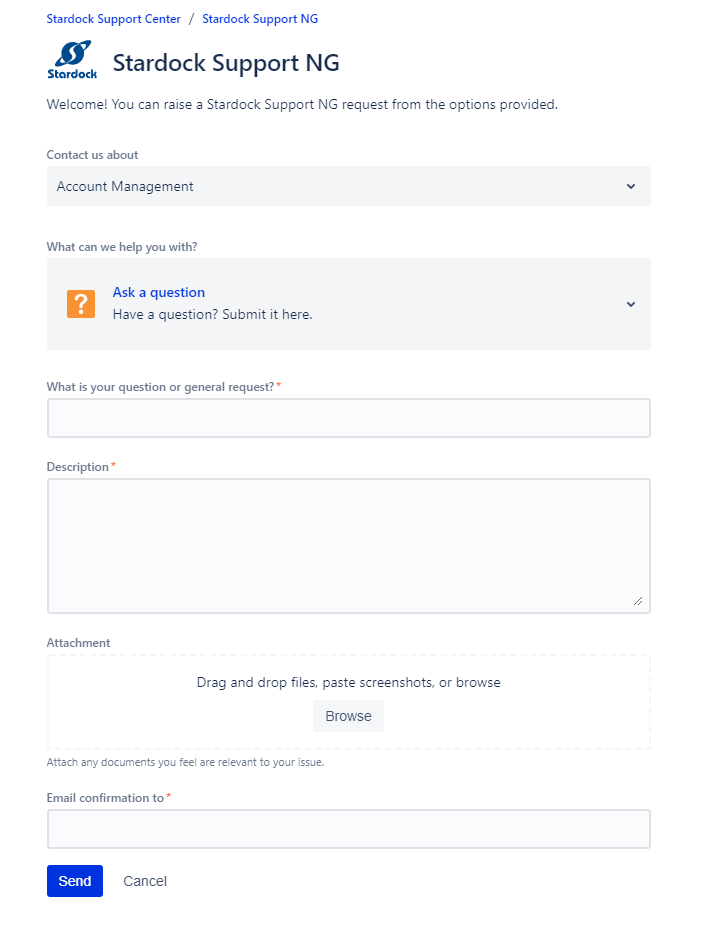
I submitted the 'request' (no where does it mention Ticket) on the Account Management form as this includes 'ask a question'.  Is this where I am supposed to raise a ticket? 


Reply #17 Top

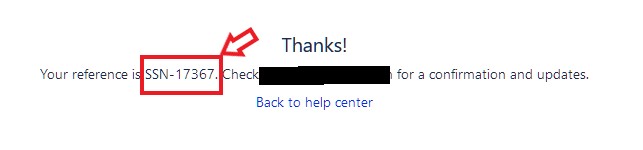
I believe you got to fill up your question and attached any relevant information, click the Blue "Send" button than only will you get the ticket numbers. Something like the screenshot below.

Thank you.

Basj,

Stardock Community Assistant.

Reply #18 Top

Thanks. I have just done it again and noted the reference No., below.

Your reference is SSN-17370

Reply #19 Top

Where and how do you track these reference numbers?


Regards

Andy 

Reply #20 Top

Wait for Support to help you. You can get back here if there is nothing in a few days. Meanwhile I have forward that Ticket numbers to Support for their review.

Thank you.

Basj,

Stardock Community Assistant.

Reply #21 Top

Well I raised a ticket and have received an email responce:


Sorry to hear you are having trouble.

You should have only been told to raise a ticket if you are wanting a refund. If that is the case, please let me know.

If not, that you want to continue support, it must be done in the forums. Reply with a link to the thread you created and it will continue there.

Cheers,
Sean Drohan
Stardock Support Manager

Please advise what I should do next.

Reply #22 Top

Hello,

Not, sure what you write in your report over there. Anyway, Just to be clear, you have tried the link https://www.stardock.com/accounts/registrations/ to change your email account yes? That don't work?

Anyway, I have forward your problem/question to Stardock Support Team again for their assistance. Please keep an eye on this thread for any updates. We appreciate your feedback and patience.

Basj,

Stardock Community Assistant

Reply #23 Top

I have been though the process again and have recorded each step in a PowerPoint which I can send or attach if you advise how I can do this.


Regards

Andy

Reply #24 Top

Hello,

Usage issues are handled in the forums.  For obvious reasons, account issues are handled via tickets.  You were directed to the latter when you detailed account-related items.  Your usage issue would still be handled here.

Account Issue

The license is under your @alstomgroup.com address.  If that is NOT correct, use this form:

https://stardock.atlassian.net/servicedesk/customer/portal/4/group/14/create/10142

Usage Issue

I see no recent activations under the email address you have the license under (right or wrong as it may be currently).  That you cannot move stuff very well could be because you have not activated it.

If the email address is correct, go here:

C:\ProgramData\Stardock\Fences3 (note that is ProgramData, not Program Files)

If you have a License.sig there, delete it and then try to bring up the Fences UI:

It should prompt you to activate:

Do so.  If successful (again, if the current credentials are correct), try moving stuff on the desktop with the lock off.

Sean Drohan
Stardock Support Manager