new computer setup
from  Stardock Forums
Stardock Forums
I was not able to transfer to my new computer how do I do this? thanks


 Stardock Forums
I was not able to transfer to my new computer how do I do this? thanks
Stardock Forums
Top
Hello,
Sorry to hear you are having issues. Need to know more on your issue. What are you not able to do in the Transfer? Can not install it over in the new computer or can not activate on the new computer?
If its the activate issue. You might need to deactivate those from your old computer before you can activate on the new one. Please follow this guide to deactivate old activation : https://forums.stardock.com/486311/accounts-and-activation-support-faq#deactivateproduct
Try those and report back.
Thanks
Basj,
Stardock Community Assistant.
Stardock Forums
Top
Hello,
Links for your account page and downloads - sign in
1 - https://store.stardock.com/myaccount/products/
2 - https://forums.stardock.com/484254/getting-your-products-and-keys
Deactivate from old PC https://forums.stardock.com/486311/accounts-and-activation-support-faq#deactivateproduct
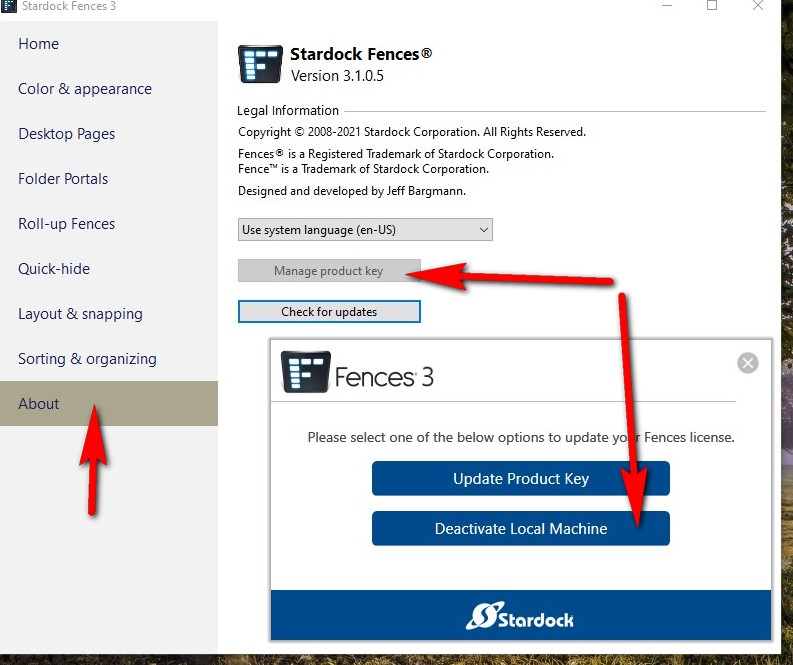
also you can deactivate from old machine on each app- see below
Deactivate off old PC before installing on new PC ...
AzDude
Stardock Community Assistant
 Stardock Forums
Top
Stardock Forums
Top
I have a question regarding this. What if you forget to deactivate one of the programs before doing a new install and the old one being wiped away and you can't go back and deactivate it ??
Stardock Forums
Top
Yes, you should be able to deactivate it. But, if your activation are already full, you won't be able to activate a new one in the first place.
Use the link given above to deactivate it.
Thank you,
Basj,
Stardock Community Assistant
Welcome Guest! Please take the time to register with us.