Windows 7


On the primary computer (Windows 10), everything work correctly.


On two other secondary computers (windows 7), the installation seems to be ok but after that it is impossible to start the application. I get the icon in the Windows down right bar, but when I try to display the application nothing open exept a explorer html link iof you website. Do you know this bug? Do you have installation file version for Windows 7?

 

4,761 views 8 replies
Reply #1 Top

Hello,

I have forwarded your report to the Stardock support team for their review and recommendations.

Please keep an eye on this thread for any updates.

We really do appreciate your feedback, thanks.

Reply #2 Top

Hello,

Sorry to hear you are having issues.

Need a little more info , please.

Version of Windows 10 ( full numbered version - use winver.exe for that )

Version of Multiplicity ?

Also we would like a screen capture video posted here showing your issue 

Thanks

AzDude
Stardock Community Assistant

Reply #3 Top

Hello I use version 3.57 Build 00103.kvm on all computer.

Primary computer is on windows 10. but secondary (wich doesn't work) is windows 7 Professionel Service pack 1.

It is not easy for me to capture video (i am on a vessel boat with limited internet access). But herer is the problem:

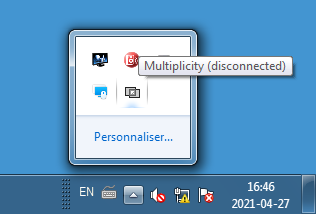
The Step 1: After installation I restart the PC. Multiplicity appear in the windows bar:

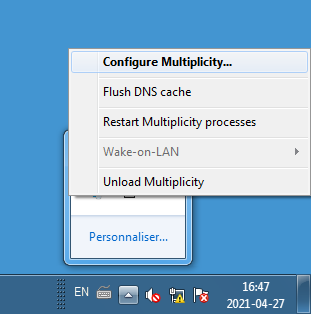
Step 2: I can open the icon and click on Configure Multiplicity:

Step 3: I wait ~10seconds and Multiplicity gui do not appear but internet explorer open with this url:

Then nothing hapen...

Thank you for your assistance.

Regards

Simon


Reply #4 Top


but after that it is impossible to start the application. I get the icon in the Windows down right bar, but when I try to display the application nothing open exept a explorer html link iof you website.
End of quote

If its taking you to our website, you need to do windows update on those PCs... The root certificates are out of date is why.

Sean Drohan
Stardock Support Manager


Reply #5 Top

Hello

I can not install update on these computers. There is no internet access on its. And these computers are done for scientific acquisition in a close intranet network and I do not want take risk to modify these systems.

Do you have an older version of multiplicity which could work?

Simon

Reply #6 Top

Quoting SimonMorisset, reply 5

Hello

I can not install update on these computers. There is no internet access on its. And these computers are done for scientific acquisition in a close intranet network and I do not want take risk to modify these systems.

Do you have an older version of multiplicity which could work?

Simon
End of SimonMorisset's quote

No, the PCs would need an update, not just for our app(s), but any that you try to install I would suspect.

Sean Drohan
Stardock Support Manager

Reply #7 Top

I checked on the windows history and it installed update last time in 26 may 2020 (KB976932). It is not so old. Do you mean that windows 7 is not anymore supported by yours apps?

Simon

Reply #8 Top

Quoting SimonMorisset, reply 7

I checked on the windows history and it installed update last time in 26 may 2020 (KB976932). It is not so old. Do you mean that windows 7 is not anymore supported by yours apps?

Simon
End of SimonMorisset's quote

No, that is not the case.  If an installer \ application start ever goes to our download page when complete \ opened, it is always because the root certificates on the PC are dated. 

It is possible to do it manually:

http://woshub.com/updating-trusted-root-certificates-in-windows-10/

Sean Drohan
Stardock Support Manager