Please Stardock help!!!

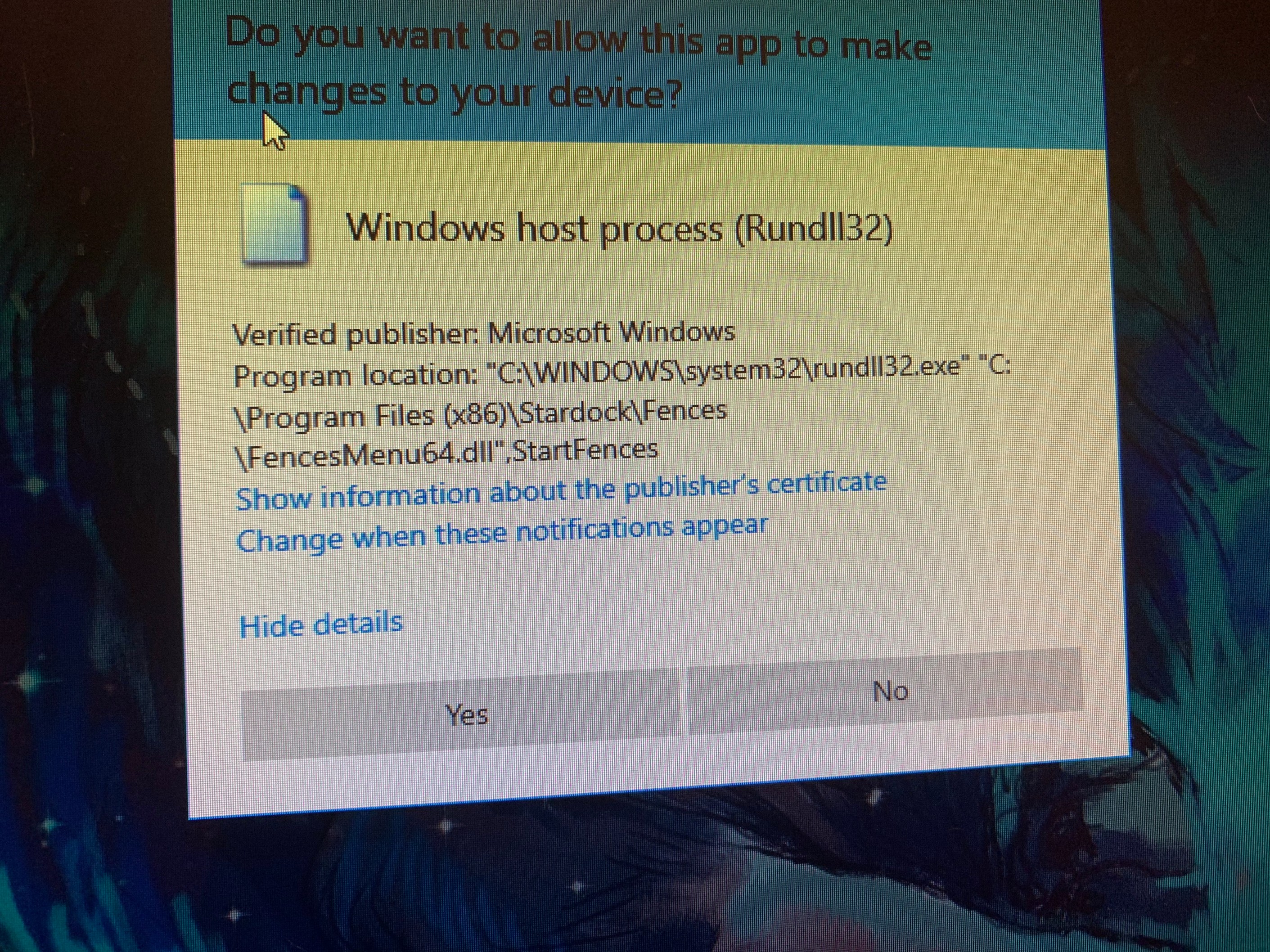
Fences 2 x run32dll

I know you have threads on the forum but they are not helping. I tried everything in those threads nothing worked.

 All was working perfectly until I updated a Nvidia driver. After that I got the 2 x run32dll pop up after a reboot. As I said nothing worked from the forum or anywhere for that matter so I decided to reinstall windows. Again everything worked well, until today when I updated the Nvidia driver again and again the 2 x run32dll came back. Next time I update the driver I will uninstall Fences, install back after. But until then I don't want to reinstall Windows again. I'll probably lose my mind if i do it again. So please help! Someone from Stardock contact me. Please!

10,079 views 21 replies
Reply #1 Top

Hello,

Would you do this PURGE: https://forums.stardock.com/486084/fences-support-faq#reinstalling

Reboot and ReInstall the latest version from your account https://store.stardock.com/myaccount/products/

Reboot , test and report back, please.


AzDude
Stardock Community Assistant

Reply #2 Top

I had already done that as i wrote in my first post, but i did it again just to be sure. I purged, reinstalled, and I didn't have to reboot to get the run 32 dll. I did reboot anyway and it's still there the 2 x run32 dll. What next?

Reply #3 Top

You did the purge after the Nvidia Diver updates ?

Reply #5 Top

If your running Windows 10 updated then you'll need 

to upgrade Fences 2 to ( buy ) Fences 3 https://www.stardock.com/products/fences/

that should fix your issue .If you have Object Desktop check there also for upgrade .

https://store.stardock.com/myaccount/products/

Fences 3 is an upgrade not an update ...


Reply #6 Top

I have the last version of Fences 3.09. This could go a lot faster if there was a way to answer all your questions faster

Reply #7 Top

Hello,

I have forwarded your report to the Stardock support team for their review and recommendations.

Please keep an eye on this thread for any updates.

We really do appreciate your feedback, thanks.

Reply #8 Top

Hello,
Sorry to hear you are having issues. Need to know.

  1. Windows version, please use Winver.exe for full Windows version numbers.
  2. Nvidia driver version.
  3. Display/Monitor setup, resolutions, scaling, connection type etc
  4. Do you installed Nvidia extra components such as Nvidia User experience?
  5. Any other information or observation which might help us understand your issue better.

Thanks
Basj,
Stardock Community Assistant.

Reply #9 Top

Hello,

1. Windows 10 Pro, 20H2,19042.867

2. Nvidia driver 461.92 current, 461.72 previous

3. 2 display set up.

   Main is Asus VG275Q

      1920 x 1080

      75 hz

      Diplayport conection

   Secondary is Philips Smart tv 43PUS8545/12

      1882 x 1058

      60 hz

      Hdmi conection

4. The Nvidia User Experience was already installed. Until I updated there was no problem. The update was for driver, hdmi sound and something else ( maybe physX) I can't remember, but not for user experience

5. I didn't do a clean driver install neither the first time, nor the second.

After windows reinstall, I installed Fences after The Nvidia driver and there was no problem


Hope you find something. Thanks

Reply #10 Top

Hello,

Could you try just remove the Nvidia Driver all including the User Experience. Than reboot. Reinstall only the Nvidia driver and see if it help.

If you need a guide, here is one : https://www.nvidia.com/en-us/geforce/forums/game-ready-drivers/13/56901/correct-way-to-uninstall-and-reinstall-geforce-dri/

Thank you,

Basj,
Stardock Community Assistant

Reply #12 Top

Quoting rareskyfive, reply 11

I am facing same issue after my uninstall please someone help me with it.
End of rareskyfive's quote

Hello,
Sorry to hear you are having issues. But, neet more details on your issue.

Need to know.

  1. Windows version, please use Winver.exe for full Windows version numbers.
  2. Nvidia driver version.
  3. Display/Monitor setup, resolutions, scaling, connection type etc
  4. Do you installed Nvidia extra components such as Nvidia User experience?
  5. Any other information or observation which might help us understand your issue better.

Basj,
Stardock Community Assistant.

Reply #13 Top


After that I got the 2 x run32dll pop up after a reboot.
End of quote

  • What does that look like, post a screenshot please?
  • Also, when it happens, is it dismissable and you can continue without issue after you do?
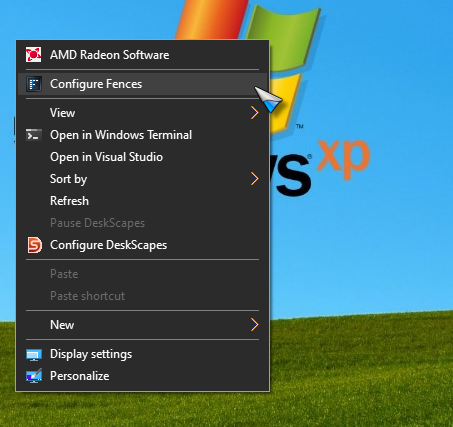
  • If after you update the Nvidia driver, is there a new right-click context menu?  For example, Fences has a right-click context menu:
  • Do you have folder portal Fences on your desktop, and if so - and remove them - does this still happen?

Sean Drohan
Stardock Support Manager

Reply #14 Top

Hello,

I uninstalled the Nvidia driver with the app from guru 3d. After reboot it still gave me de run32dll. So i purged Fences. Reboot. Installed Nvidia driver without Nvidia experience. Reboot. Installed Fences and at the end of the instalation the run32dll reapered. Rebooted anyway. Run32dll still there. What next?

Reply #16 Top

1. It is dismissible. after I click yes I can do whatever on my pc

2. There is no new context menu

3, The run32dll appears whether I have a folder portal or not on desktop  

Reply #17 Top

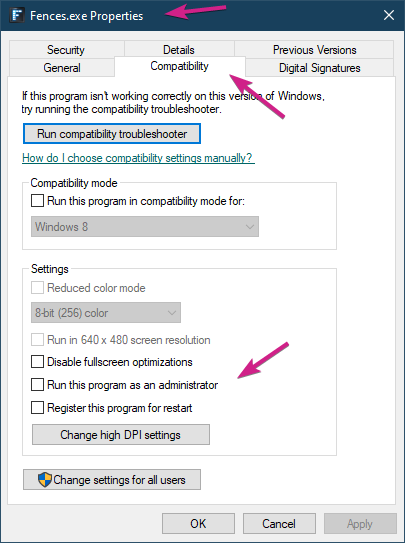
Are you running Fences as Admin?

If so, dont.

Sean Drohan
Stardock Support Manager

Reply #20 Top

I have seen that thread. I was hoping you could help me. It's been an issue for a few people for a while now. An update. Anything. I'm not trying to annoy or troll. I really enjoy Fences. But I hate having a pop up every time I boot. So... is this everything you could and I have to reinstall Windows to lose the run32dll pop up or you guys have more things to try?

Reply #21 Top

Quoting Andrei_Negoita, reply 20

or you guys have more things to try?
End of Andrei_Negoita's quote

We really dont I am afraid.

Sean Drohan
Stardock Support Manager