Fences Crash - January 01, 2021 (Steam)

Stardock Fences Windows Explorer did not close properly crash

Greetings Technical Staff,

I would like to report an issue that I've been experiencing for months, starting from the month of September last year up until now. I've purchased "Stardock Fences" from Steam and have been using it until then but, when the month of September came I've been having issues about this Fences crashing stating that windows explorer or something along those lines failed to be closed properly. I ran my own troubleshooting when the crashes appeared and have been referencing it from other previous cases that are almost identical or the same as mine but, nothing seems to resolve my issue. Below are the things that I've done to troubleshoot Fences.

  • CMD (Admin) "sfc /scannow" command
  • CMD (Admin) "DISM /Online /Cleanup-image /RestoreHealth" and "DISM /Online /Cleanup-Image /Scanhealth" command.
  • Complete Stardock Fences Purge using provided CMD Fences Purge from Stardock Fences Support Staff from previous Fences windows explorer crash cases.
  • Complete Uninstall & Reinstall of Stardock Fences via Steam.
  • Complete Steam uninstallation and reinstallation.
  • Checked if I have Websenses / Forcepoint, nothing.

These are the list that I've done to troubleshoot Fences and nothing resolve it. I'm also using Wallpaper Engine and Translucent TB, turned both of them disabled before, the same crash thing occurred. Below are additional screenshot and video proof of my issue, I hope you guys can assist me in finding a way to resolve my issue.


https://prnt.sc/we13g0

https://youtu.be/cNLLozYCzSg


My Current System -

Edition: Windows 10 Pro Education

Version: 20H2

OS build: 19042.685

Experience: Windows Feature Experience Pack 120.2212.551.0
 

5,323 views 6 replies
Reply #1 Top

Hello,
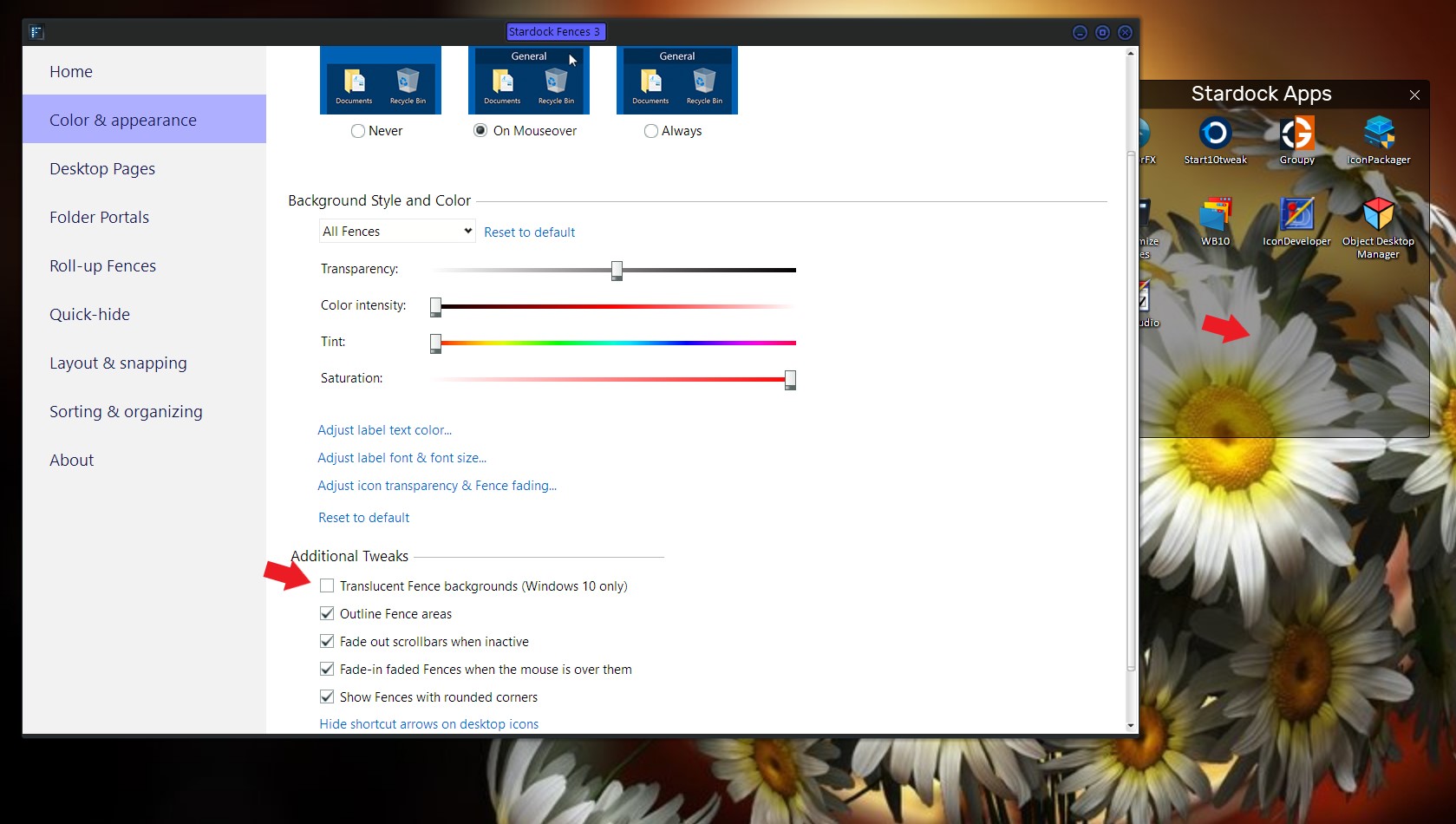
Sorry to hear you are having issues. Please try Disable/un-tick "Translucent fence backgrounds" and report back. I remember some reports on Wallpaper Engine not compatible with Fences. And just disable it might not help the issue. But, for the first step just disable the Translucent Fence background and see if it help.


Basj,
Stardock Community Assistant.

Reply #2 Top

I have disabled "Translucent Fence backgrounds" on my Fences and uninstalled Wallpaper Engine but, before enabling Fences again I proceeded to restart my PC, after that the outcome is still the same.


http://prnt.sc/we29az

Reply #4 Top

Update,

  • I have created a "local user account in Windows 10" and turned it into an admin account using the guide that was provided on the link provided by Staff, unfortunately, the same crash occurred when I attempted to enable fences.
  • Once that failed, I proceeded on to "Clean Booting" via Msconfig - Settings as follows

General: Selective Startup (Load System Services Checked, Load Startup Menu UnChecked)

Boot: UnChanged

Services: All Microsoft Related Services are enabled, All User Installed Services are Disabled excluding Fences.

Startup: Everything is Disabled excluding Fences.

Tools: UnChanged

Once everything was set up on Msconfig I moved on to click apply then okay to restart my PC. Once restarted, during the system startup All Services are stopped. On the other hand, Stardock Fences 3 was the only one enabled to allow to startup with the system but the result is still the same, Fences still crashed stating "windows explorer didn't close properly".

This is very unfortunate but, no matter. I like the program or software you guys developed and will continue using it even though I'm experiencing this kind of issue. I have plenty of time to resolve it and I'm also willing to wait for Fences 4 to come out on steam, or update Fences 3 to Fences 4

Anyhow, I wait for further instructions.


Reply #5 Top

Hello,

Please review this thread and a solution, might work on your system too : https://forums.stardock.com/494392/get;3780664

Thank you,

Basj,
Stardock Community Assistant

Reply #6 Top

The Issue has been resolved,

Settings > Update & Recovery >Recovery > Reset this PC > Get Started. > Keep my Files.

Resetting my PC fixed my Issue, but I'm worried that the symptoms might reappear again. If so, I don't want to keep on resetting my PC because of fear that my PC might get damage upon countless resets just to get Fences up and running. Don't take this the wrong way. I like the software you guys developed and I enjoyed it, no regrets there, but I fear that my Machine might get damage. If the symptoms ever reappear I will just uninstall it to save me the trouble, I hope you guys understand.