sdRohan sdRohan

Multiplicity 3.5 issue report thread

Multiplicity 3.5 issue report thread

With the release of Multiplicity 3.5, we are creating this thread so that users can report any observed issues.  

Obtaining Multiplicity 3.5:

Object Desktop members can get the beta from within Object Desktop Manager.

Individual purchases (as well as Object Desktop Members) can also be obtained from your account page:

https://store.stardock.com/myaccount/products

For guest check-out purchase (no account), from this link:

http://www.stardock.com/support/productkeyretrieval

Note: Please remember that this version needs to be installed on the Primary as well as all Secondary PCs in your group.

Reporting an issue:

Please include the following for anything found:

  • Exact Windows version \ build (winver.exe)
  • Detailed steps to recreate the issue seen
  • Screenshots and videos are very helpful.  Videos can be uploaded to a cloud drive services (GoogleDrive, DropBox, OneDrive, YouTube) and links included in your post.  Images can be directly added.
  • If there are specific apps that the app does not work (well) with, please note what apps and their exact versions.  If any app is not common, a link to a trial version would be appreciated.

Thank you,
Sean Drohan
Stardock Support Manager

53,824 views 60 replies
Reply #51 Top

Quoting patrickvelte, reply 50

Hi,

any update on this matter?

Thanks

Patrick
End of patrickvelte's quote

Have you run the purge on each box, rebooted, and installed MP 3.5 thereafter?

https://forums.stardock.com/486104/multiplicity-support-faq#reinstalling

Sean Drohan
Stardock Support Manager
Reply #52 Top

it seems like every day multiplicty crashes repeatedly for 20 mins or so, and then starts working again.

multipl2.exe will crash anytime I start, event viewer showing this

Code: xml
  1. Fault bucket 1807496649831460970, type 1 Event Name: APPCRASH Response: Not available Cab Id: 0 Problem signature: P1: Multipl2.exe P2: 3.0.0.0 P3: 52af40db P4: StackHash_5234 P5: 10.0.18362.1049 P6: 37fd3042 P7: c0000374 P8: PCH_E3_FROM_ntdll+0x000723DC P9: P10:

Code: xml
  1. Faulting application name: Multipl2.exe, version: 3.0.0.0, time stamp: 0x52af40db Faulting module name: ntdll.dll, version: 10.0.18362.1049, time stamp: 0x37fd3042 Exception code: 0xc0000374 Fault offset: 0x000dfa1d Faulting process id: 0x80a4 Faulting application start time: 0x01d698f3bfdad675 Faulting application path: C:\Program Files (x86)\Stardock\Multiplicity\Multipl2.exe Faulting module path: C:\WINDOWS\SYSTEM32\ntdll.dll Report Id: 2e095c8e-14ae-474b-a9c6-48cd8c6d788f Faulting package full name: Faulting package-relative application ID:


then suddenly after a while if I start it again it will stop crashing.


Reply #53 Top

Quoting Metal0gic, reply 52

it seems like every day multiplicty crashes repeatedly for 20 mins or so, and then starts working again.

multipl2.exe will crash anytime I start, event viewer showing this

Code: xml

  1. Fault bucket 1807496649831460970, type 1 Event Name: APPCRASH Response: Not available Cab Id: 0 Problem signature: P1: Multipl2.exe P2: 3.0.0.0 P3: 52af40db P4: StackHash_5234 P5: 10.0.18362.1049 P6: 37fd3042 P7: c0000374 P8: PCH_E3_FROM_ntdll+0x000723DC P9: P10:
Code: xml
  1. Faulting application name: Multipl2.exe, version: 3.0.0.0, time stamp: 0x52af40db Faulting module name: ntdll.dll, version: 10.0.18362.1049, time stamp: 0x37fd3042 Exception code: 0xc0000374 Fault offset: 0x000dfa1d Faulting process id: 0x80a4 Faulting application start time: 0x01d698f3bfdad675 Faulting application path: C:\Program Files (x86)\Stardock\Multiplicity\Multipl2.exe Faulting module path: C:\WINDOWS\SYSTEM32\ntdll.dll Report Id: 2e095c8e-14ae-474b-a9c6-48cd8c6d788f Faulting package full name: Faulting package-relative application ID:


then suddenly after a while if I start it again it will stop crashing.
 

End of Metal0gic's quote

This is good information, and thank you for it, but is there ANY possibility to get you to follow these directions to get an actual dump file:

https://forums.stardock.com/501231/get;3788076

If you can, please respond in that thread as that is where the issue is being discussed.

Sean Drohan
Stardock Support Manager
Reply #54 Top

Quoting sdRohan, reply 51


Quoting patrickvelte,

Hi,

any update on this matter?

Thanks

Patrick


Have you run the purge on each box, rebooted, and installed MP 3.5 thereafter?

https://forums.stardock.com/486104/multiplicity-support-faq#reinstalling

Sean Drohan
Stardock Support Manager

End of sdRohan's quote


Hi Sean,

I removed MP 3.5 on each box, rebooted, executed the purge script, rebooted again, did a clean reinstall of MP 3.5 - and again - immediately had mouse issues.

I again removed it, executed the purge script, and installed an older version that I still had around: MP 3.44 Build 00090.

MP 3.44 works fine like a charm. No mouse issues. Everything working smooth as expected.

So from my point of view, MP 3.44 works perfectly and MP 3.5 doesn't work at all.

I will stay with MP 3.44 for now and have disabled the check for updates.

But there's a problem in 3.5 for sure.

Thanks

Patrick

Reply #55 Top
Quoting patrickvelte, reply 54
Quoting sdRohan,

Quoting patrickvelte,
Hi,

any update on this matter?

Thanks

Patrick
 
Have you run the purge on each box, rebooted, and installed MP 3.5 thereafter?

https://forums.stardock.com/486104/multiplicity-support-faq#reinstalling

Sean Drohan
Stardock Support Manager

Hi Sean,

I removed MP 3.5 on each box, rebooted, executed the purge script, rebooted again, did a clean reinstall of MP 3.5 - and again - immediately had mouse issues.

I again removed it, executed the purge script, and installed an older version that I still had around: MP 3.44 Build 00090.

MP 3.44 works fine like a charm. No mouse issues. Everything working smooth as expected.

So from my point of view, MP 3.44 works perfectly and MP 3.5 doesn't work at all.

I will stay with MP 3.44 for now and have disabled the check for updates.

But there's a problem in 3.5 for sure.

Thanks

Patrick

End of patrickvelte's quote

What is the mouse brand exactly? If you have another mouse brand and try it, do you see the same issue?

If you do a clean boot on both boxes, do you still see the issue?

https://forums.stardock.com/486104/multiplicity-support-faq#cleanboot

Sean Drohan
Stardock Support Manager

Reply #56 Top

Hi support team,

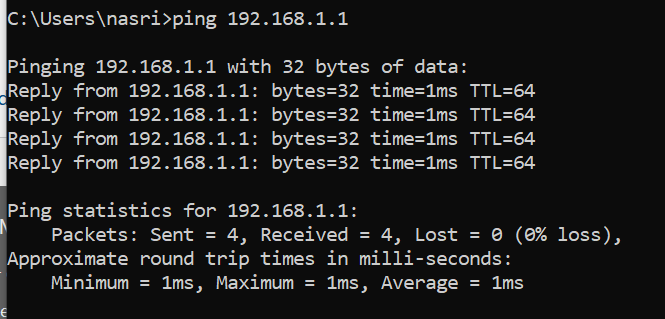
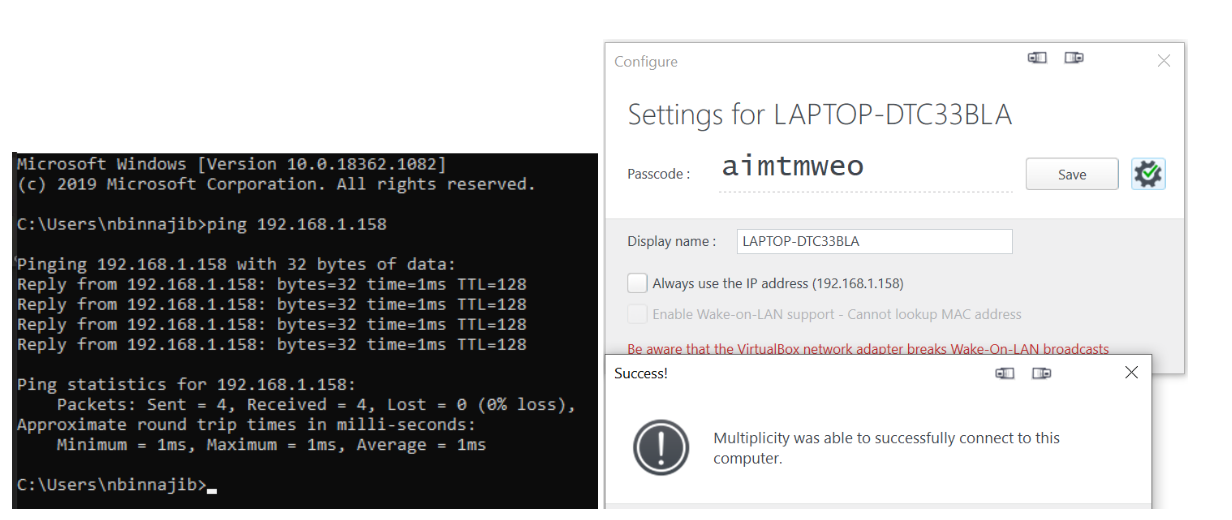
I have MP v3.5 build 00096.km on both laptop and troubleshooting to get the seamless to move from primary to secondary. I check that the ports are open and I can ping from both laptop. Also, MP indicates that it can connect. However, the mouse still cannot get from primary laptop to the other. Any advice?

Screenshots below for reference - this is from secondary laptop:


Results from the primary laptop:

Reply #57 Top

Hello,

Sorry to hear you are having trouble.

Quoting nbinnajib, reply 56

Hi support team,

I have MP v3.5 build 00096.km on both laptop and troubleshooting to get the seamless to move from primary to secondary. I check that the ports are open and I can ping from both laptop. Also, MP indicates that it can connect. However, the mouse still cannot get from primary laptop to the other. Any advice?

End of nbinnajib's quote

Connections issues are not unique to this version thread, they are generic in nature.  If you still have an issue after reviewing this thread:

https://forums.stardock.com/486104/multiplicity-support-faq#connectionissues

Please create a new one here:

https://forums.stardock.com/forum/267

Sean Drohan
Stardock Support Manager

Reply #58 Top

Quoting sdRohan, reply 55


Quoting patrickvelte,


Quoting sdRohan,


Quoting patrickvelte,


Hi,

any update on this matter?

Thanks

Patrick


Have you run the purge on each box, rebooted, and installed MP 3.5 thereafter?

https://forums.stardock.com/486104/multiplicity-support-faq#reinstalling

Sean Drohan
Stardock Support Manager

Hi Sean,

I removed MP 3.5 on each box, rebooted, executed the purge script, rebooted again, did a clean reinstall of MP 3.5 - and again - immediately had mouse issues.

I again removed it, executed the purge script, and installed an older version that I still had around: MP 3.44 Build 00090.

MP 3.44 works fine like a charm. No mouse issues. Everything working smooth as expected.

So from my point of view, MP 3.44 works perfectly and MP 3.5 doesn't work at all.

I will stay with MP 3.44 for now and have disabled the check for updates.

But there's a problem in 3.5 for sure.

Thanks

Patrick


What is the mouse brand exactly? If you have another mouse brand and try it, do you see the same issue?

If you do a clean boot on both boxes, do you still see the issue?

https://forums.stardock.com/486104/multiplicity-support-faq#cleanboot

Sean Drohan
Stardock Support Manager

End of sdRohan's quote


Hi Sean,


I have a Logitech G900. The issue occurs with an older Logitech mouse as well. No matter if wired or wireless.

I have switched back to MP 3.44 now since 3-4 weeks and if simply works perfect as expected.

For now I stay with MP 3.44 and hope you get the issues with MP 3.5 resolved.

Thanks

Best regards

Patrick


Reply #59 Top

Hi - This isn't about a  "seamless" mode issue.   Just an observation related to KVM mode.

I've been using 3.5 straight KVM mode on 7 machines  ( 1 primary, 6 secondaries ) with no issues apart of some minor mouse visuals.

I got around to updating the machines to  Windows 10, 20H2 (Build 19042.630) this past week.  All was well until I cycled power. After the updates were done.

Now none of the secondary machines seems to see the primary keyboard and mouse activity.  Not even Ctrl-Alt-Delete from primary.

Now, I can verify that the connection is working but the keyboard and mouse have no effect on the secondary machines and I don't know how to troubleshoot this beyond trying the various recommendations related to firewalls, portfix, purge, reinstall etc.  Windows event log not showing anything related to Multiplicity.

I went back to version 3.44 and they're all back and working flawlessly.

Just posting to see if anyone has a similar experience with the 20H2 Win10 update.

Alain

Reply #60 Top

Quoting BigAl123, reply 59

Now none of the secondary machines seems to see the primary keyboard and mouse activity.  Not even Ctrl-Alt-Delete from primary.
End of BigAl123's quote

Its a firewall issue and not unique to the version.  Please see:

Multiplicity Support FAQ » Forum Post by Island Dog (stardock.com)

If you still have issues, please create a new thread.

Sean Drohan
Stardock Support Manager