Icons Not Staying in Fences

I am having a problem with icons, specifically documents, not staying in the fence.  They keep digging out!  I put them back, and they dig out again.

Has anybody else experienced this?  I have tried enabling and disabling Quick-hide, but that doesn't work.

I am using Fences 3.

Thank you for any help you can give me.

32,016 views 34 replies
Reply #1 Top

Hello,

Sorry to hear you are having issues.

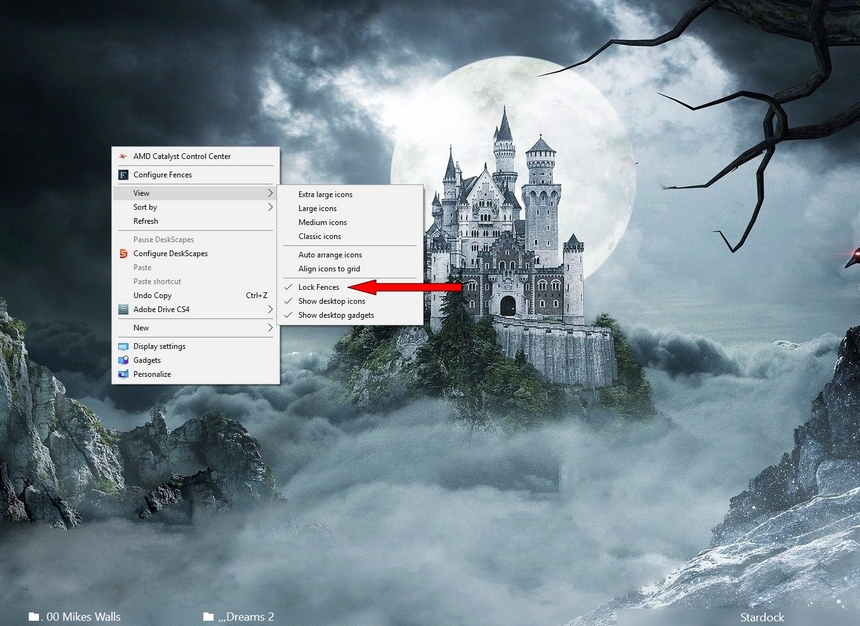
You need to lock your fences see below check lock fences 


AzDude
Stardock Community Assistant

Reply #2 Top

We have the same problem with 2 of our users.  If you click on one icon, they all go all over the place - and  not in the fence.  It just started happening about 2 weeks ago.  I've removed the software, purged the software, reinstalled, remade the fences, tried all kinds of settings. I put in a support case and was informed that support cases aren't really handled by support - that it has to got thru this forum.  Any suggestions? Sounds like it would have to be from some kind of update since we've been using Fences for years.

Reply #3 Top

Quoting dmpumphrey, reply 2

We have the same problem with 2 of our users.  If you click on one icon, they all go all over the place - and  not in the fence.  It just started happening about 2 weeks ago.  I've removed the software, purged the software, reinstalled, remade the fences, tried all kinds of settings. I put in a support case and was informed that support cases aren't really handled by support - that it has to got thru this forum.  Any suggestions? Sounds like it would have to be from some kind of update since we've been using Fences for years.
End of dmpumphrey's quote

Hello,

Sorry to hear you are having issues. Need to know more information.

1) Windows version, please use Winver.exe for full version numbers.

2) Fences version.

3) What is different in the system between two weeks ago and before that. New updates? New graphics drivers? New Anti virus or Security software updates? etc etc

Thanks

Basj,

Stardock Community Assistant.

Reply #4 Top

I have full access to one of the problem pc's right now because the user is on vacation this week.  

This one is Windows 10 Version 1909, build 18363.900.

Fences version is 3.0.9.11 and it was up to date before I purged it.

June 25th is when this user reported the issue. He still has Fences installed but if I move an icon, they all go crazy. He only recreated 2 new fences.  There aren't any program updates that I see right before the issue started other than an update to Chrome.  He's on 83.0.4103.116.

There was a Windows update that was installed on the 25th but I did that in hopes of fixing the issue - and it did not.  Prior to that no windows updates since 6/10.

The graphics is Intel HD Graphics 630 with driver date 4/11/2020, version 26.20.100.8142.

Restoring from a saved snapshot does not work either.


I will see if the other user will let me connect and gather info. If there is something I can try on the one where the user is off, that would be easy - just let me know.  It does show some Dell driver updates available so I'm going to try that and will advise.

Thank you.

Reply #5 Top

Quoting dmpumphrey, reply 4

if I move an icon, they all go crazy.
End of dmpumphrey's quote

Need to know more about this. Please post a video on this so we can understand the issue better.

Thank you.

Basj,

Stardock Community Assistant.

Reply #6 Top

I can do that but how do I  post it? It's MP4.  I see where to upload a Youtube video but not a regular video.. Thanks!

Reply #7 Top

You can upload it to Youtube or any File sharing site and post the link here.

Thank you.

Basj,

Stardock Community Assistant.

Reply #9 Top

So this is interesting.  On the other pc that is having this issue, I just restored a snapshot from 2018 and now the icons are staying in the fences and aren't moving all over when he moves one. I installed version 3.09 first to see if that would make a difference instead of the newest one but it did not. So I tried the 2018 snapshot since the others didn't work and it did. 

Reply #10 Top

Hello,

I have forward your problem/question to Stardock Support Team for their assistance. Please keep an eye on this thread for any updates. We appreciate your feedback and patience.

Basj,

Stardock Community Assistant

Reply #12 Top

Hello,

For the OP,

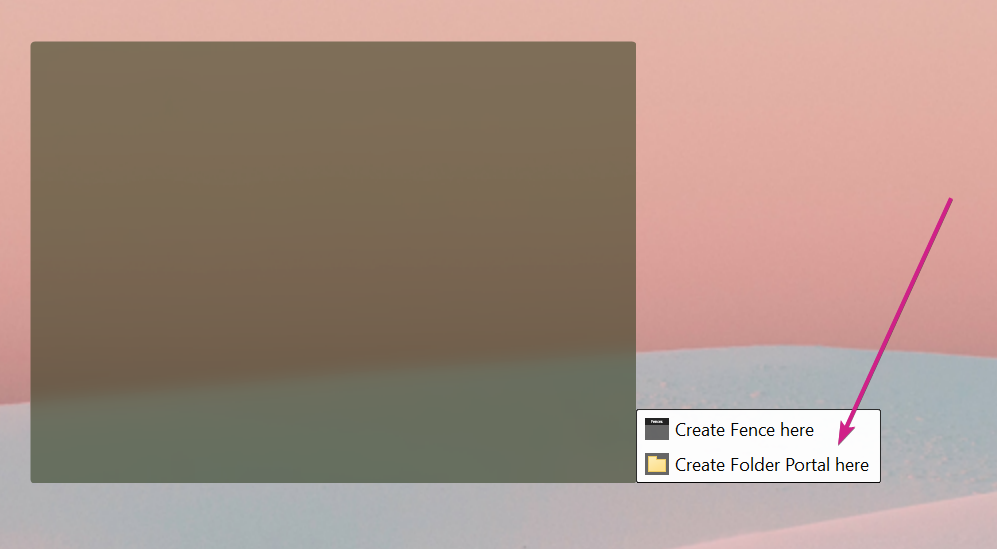
Office documents create temp files that can be problematic for Fences once the original document is saved (using the temp file that was outside the fence).  To get around this, put these file somewhere other than the desktop (my docs for example) and create a Folder portal to them instead:

dmpumphrey,

  • 'Reset' saved settings and set the 'Store' option:
  • Create a new snapshot with things where you want them.
  • Perform an 'automatic layout':
  • Restore the snapshot

Sean Drohan
Stardock Support Manager


Reply #13 Top

I must be missing something.  I followed your steps - I created a folder in documents called Fences.  What is that for? There is nothing in it.  Is each fence a separate folder and unique name? When you said to restore the snapshot, did you mean his original one? That still moves the icons all over the place.  

Thanks.

Reply #14 Top

Quoting dmpumphrey, reply 13

I must be missing something.  I followed your steps - I created a folder in documents called Fences.  What is that for? There is nothing in it.  Is each fence a separate folder and unique name? When you said to restore the snapshot, did you mean his original one? That still moves the icons all over the place.  

Thanks.
End of dmpumphrey's quote

Those were for the OP, wtittle. Yours should be the "Reset' saved settings and set the 'Store' option:" part

Thank you.

Basj,

Stardock Community Assistant.

Reply #17 Top

All the following have occurred with "lock" on.

1) Created a shortcut outside of Fences, moved it to "New Items" fence.  This created multiple duplicate icons, but in fact when clicked, they went to previously created URLs, not to the target of the shortcut at all, e.g. "Picasa".

2) Many untouched icon movements "randomly" occur with the result that the icon moves to a different Fence.  Wish I could to to Desktop and cause lost icon to go to "New Items".  Wrong place, but easier to fix than hunt or recreate.


FENCES WILL NEVER BE DEBUGGED, EVEN FOR THE SIMPLE USER.  RANDOM MOVEMENT OF ICONS TO OTHER FENCES, WITH FENCES LOCKED DRIVES ME NUTS.  HAVE A LOT OF EFFORT INVESTED OR I WOULD LOOK FOR DIFFERENT PRODUCT.  I NEED TO THIN MY DESKTOP OUT AND DO JUST THAT.  IT'S NOT UNDER CONTROL.  MUST BE A BETTER WAY.

rao/Pentwater/MI/US

========================


Reply #19 Top

Believe that I did per directions.  Told that Fences install was complete.  Screen shows totally dismantled items/icons from my just prior Fences.  Do not see how to improve path, as message said OK.  Did a second reboot, no change.  Loss of prior Fences and content would be major loss.


Help, please. 

Reply #20 Top

Hello,
Sorry to hear you are having issues. Need more information on your system.

1) Windows version. Please use Winver.exe for full Windows version numbers.

2) Fences installed versions.

3) Screenshots or Video capture of the issues so we can understand your issue better.

Thanks.


Basj,
Stardock Community Assistant.

Reply #21 Top

After apparently successful re-install resulting in all of my now"unFenced" icons  and labels scattered uniformly all over the screen, how can I re-coup and have the re-install re-construct my fences?

Reply #22 Top

If you have a saved fences layout snapshot. It should be untouched by purge and reinstall steps. You can simply do a layout snapshot restore. That should restore all your previous fences setup. If that don't work. Than you will need to build it back manually and save a new layout snapshot. And do snapshot backups for future use. Please use Snapshot backups by using these guide : https://forums.stardock.com/486084/fences-support-faq#backupsnapshots

Thank you,

Basj,
Stardock Community Assistant

Reply #23 Top

"How high is the water, Momma?"  "Three feet deep and fallin', son".  "That's good, Momma."    (from a song, sort of.) 

Thank you, Basj.  All is well.

Question: The Restore screens  appear for the past few days, then infrequently (a dozen?) back to 2013.  What is the algorithm for Restore images?


Reply #24 Top

You can click daily or whenever you want to make another snapshot .

Just click Take Snapshot ...

It auto saves snapshots also don't know the algorithm .

Reply #25 Top

Do I understand correctly from this post that any document files (.doc, .xls, etc) that exist in a fence on the desktop, and which create the temp file when opened (also on the desktop but not in the fence), will then move outside of the fence to the location that the temp file was created when they are closed and saved, and that the only way to fix this is to not have the actual document in the fence but rather a shortcut to the document in there?  This is the problem I am having, but I'd hope there was a better solution to this than that.  Can you confirm if I am understanding this correctly?  I have not had this problem in the past, but now with Windows 10 x 64 bit and the newest version of Fences I am having it.  


Thanks