icons disappearing

I paid for 2 installations of Fences. Both are on Windows 10. One works great, but when other installation is activated, Recycle Bin and other default icons disappear.

It doesn't matter if icons are inside a fence or not. I've stretched fences to see if icons are hidden there (as I know this can happen), but icons are not in any of the fences. Any suggestions? 
12,207 views 15 replies
Reply #1 Top

Hello,
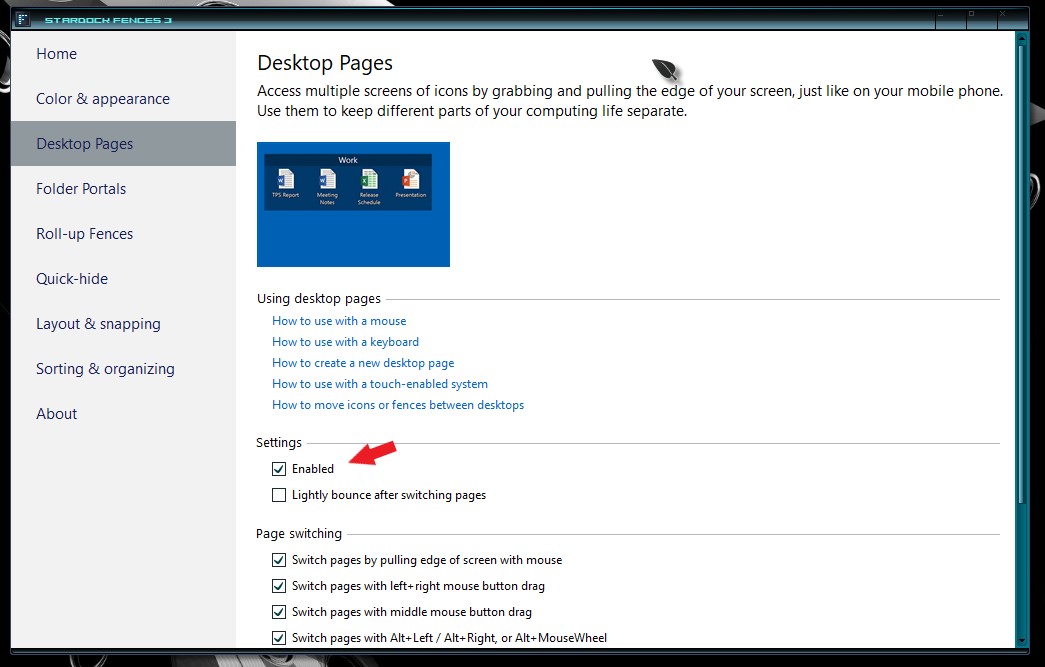
Sorry to hear you are having issues. You missing icons most probably move to your other Desktop page. You can disable this function or you can learn how to use it. Please refer to the screenshot below for reference.

Please let us know if you still need our assistance.

Thanks

Basj,
Stardock Community Assistant.

Reply #2 Top

Thanks for reply.

Desktop Pages is one of the first things I checked, so I don't think that's the issue. With Desktop Pages disabled, the icon are still missing. And when I enable Desktop Pages, and create/move over to the new Desktop, the icons aren't there (Recycle Bin, etc). Also, in regular windows Desktop Icon Settings, I have icons enabled  (Recycle Bin, My Computer, etc).

Any other suggestions? 

Reply #3 Top

Will the missing icons reappear when you disable Fences?


If yes, please try the purge and reinstall steps as mentioned here : https://forums.stardock.com/486084/fences-support-faq#reinstalling

Just make sure to re-download the latest version from your account. Reboot after the purge. Reinstall using the latest version you just downloaded. Reboot after the installation. Retest and report back.

Thanks

Basj,
Stardock Community Assistant.

Reply #4 Top

I have the same issue, and it has happened on two different computers, so this is getting a little bit aggravating.  For example, my Itunes icon is replaced by a purple Riddler Question Mark, and I have to jump through hoops every week, because that is not the only one.  I have two to five drop the icons and they will not restore unless I go out on the web and grab the correct icon, however, I now have a nice library but the point is that this should not be happening at ALL!  I have a new computer with Windows 10 (as the last one) and it does the same thing.  I would expect this from freeware, but not something that I paid for.....

Sincerely,

Tony C.


Reply #5 Top

Quoting jacrews, reply 4

I have the same issue, and it has happened on two different computers, so this is getting a little bit aggravating.  For example, my Itunes icon is replaced by a purple Riddler Question Mark, and I have to jump through hoops every week, because that is not the only one.  I have two to five drop the icons and they will not restore unless I go out on the web and grab the correct icon, however, I now have a nice library but the point is that this should not be happening at ALL!  I have a new computer with Windows 10 (as the last one) and it does the same thing.  I would expect this from freeware, but not something that I paid for.....

Sincerely,

Tony C.

 
End of jacrews's quote

Hello,
Sorry to hear you are having issues. But, did not see such report from other on this issue. Need more information on your system.

  1. Windows version, please use Windows Winver.exe to get full Windows version numbers.
  2. Fences version.
  3. More details on your system.

Thanks
Basj,
Stardock Community Assistant.

Reply #6 Top

20H2 (OS Build 19042.1288)

2.20.0.862

Device name    DESKTOP-7E393A0
Processor    AMD Ryzen 5 4600G with Radeon Graphics   3.70 GHz
Installed RAM    12.0 GB (11.4 GB usable)
Product ID    00325-96787-17290-AAOEM
System type    64-bit operating system, x64-based processor
Pen and touch    No pen or touch input is available for this display

Just to point out, it has done this on two separate windows computers, an older model (three years) and a new one (6 months).  I do not have the settings/info for the older model, but it also ran on Windows 10.

Reply #7 Top

I am specifically interested to know, how did you come about thinking that Fences is changing your icons? Does those icons go back to the correct icons when you disable Fences?

Thank you,

Basj,
Stardock Community Assistant

Reply #8 Top

I didn't say that it did, though I realize that this is where the thread on disappearing icons took me on a search.  Another icon has changed to a Question Mark again since we last chatted.  Not sure why it is doing that nor am I actually sure that fences is or is not the cause.  My settings page is nothing like your screen shot and doesn't show a fences menu at all, so I have a problem outside of fences, not due to them.

Reply #9 Top

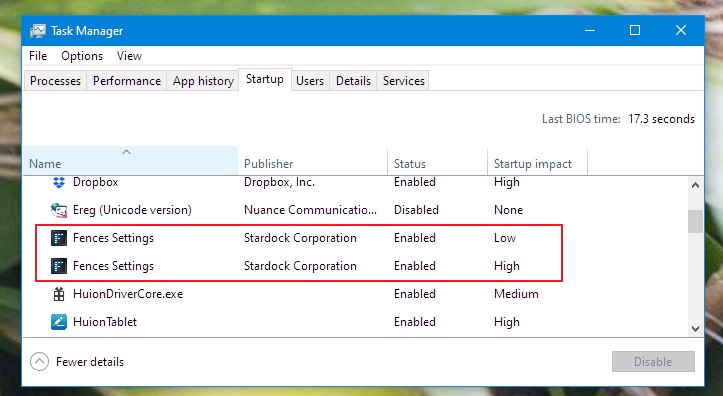
Okay, just to confirm, if you right click on your desktop, any empty area on desktop, does menu item "Configure Fences" appear at the top of that right click menu? If not, go to TaskManager, right click on taskbar and select TaskManager -> Click on "Startup" tab -> see if "Fences Settings" listed twice in that list. If it is, check both of it is Enable on Status column. If not please enable both. Reboot and retest. Report back.

Thank you,

Basj,
Stardock Community Assistant


Reply #10 Top

Checked on Task Master, it only shows Star Dock and no fences for startup, impact not measured.

Reply #11 Top

Please try the purge and reinstall steps as mentioned here : https://forums.stardock.com/486084/fences-support-faq#reinstalling

Just make sure to re-download the latest version from your account. Reboot after the purge. Reinstall using the latest version you just downloaded. Reboot after the installation. Retest and report back.

Thanks

Basj,
Stardock Community Assistant.

Reply #13 Top

On my clean Win 11 install, somehow one particularly large fence disappeared. Disabling Desktop Pages and then rebooting did not bring them back.

They show in File Manager in the desktop folder.

Double clicking on the desktop made no difference.


Was able to restore a snapshot.


Reply #14 Top

Quoting lenraphael, reply 13

On my clean Win 11 install, somehow one particularly large fence disappeared. Disabling Desktop Pages and then rebooting did not bring them back.
They show in File Manager in the desktop folder.
Double clicking on the desktop made no difference.
Was able to restore a snapshot.
End of lenraphael's quote

Hello,
Sorry to hear you are having issues. Is the Fences still missing?

Thanks
Basj,
Stardock Community Assistant.

Reply #15 Top

restoring the snapshot restored the missing fence with it's icons.