Hibernate disappeared from Shutdown options

Dear Sirs,

when I click on the "Shutdown" button to turn off my pc I non longer see the "Hibernate" ("Ibernazione") option which instead still appears in the native Windows 10 menu.

(see picture below)
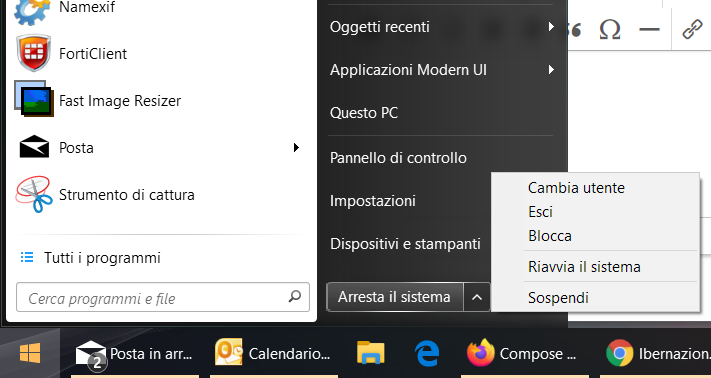


How could I fix this problem?

I already checked the control panel and the option is active.

Thank you very much.


Giacomo Guarrera

4,017 views 9 replies
Reply #1 Top

I solved the problem by following the steps below that I found in a previous post, sorry for the duplicate.


Quoting basj, reply 3

Please do the purge and reinstall steps mention here : https://forums.stardock.com/486022/start10-support-faq#reinstalling

Re-download the latest version again from your account.  Also make sure to reboot after the purge, reinstall, recommended to install in default directory, reboot again after the installation finish. Report back here.

Should also refer to this thread for reference. https://forums.stardock.com/497834


Thank you,

Basj
Stardock Community Assistant.
End of basj's quote

Reply #2 Top

Hello,
Sorry to hear you are having issues. Yes, please try those steps and report back if it does not work for you.

Thanks

Basj,
Stardock Community Assistant.

Reply #3 Top

I have the same problem, but the purge and reinstall steps did not work for me. I am on the lastest version of Windows 10 Pro. Are there any other ways to solve this?

Reply #4 Top

Quoting m_podt, reply 3

I have the same problem, but the purge and reinstall steps did not work for me. I am on the lastest version of Windows 10 Pro. Are there any other ways to solve this?
End of m_podt's quote

Need to know more.

1) Windows 10 full version numbers. Please use Winver.exe for full version numbers.

2) Start10 version.

Thank you,

Basj
Stardock Community Assistant.

Reply #6 Top

Maybe this thread will help you : https://forums.stardock.com/497834

Let us know if you still need our assistance.

Thank you,

Basj
Stardock Community Assistant.

Reply #7 Top

Quoting basj, reply 6

Maybe this thread will help you : https://forums.stardock.com/497834

Let us know if you still need our assistance.

Thank you,

Basj
Stardock Community Assistant.
End of basj's quote

Unfortunately, it doesn't. I already uninstalled, purged, reinstalled the lastest version (as described in the thread) and it doesn't solve the issue. I have Start10 on two computers with exactly the same version of Windows. On one computer it works, on another computer it does not work.

Is there any other way to solve this? Is there something broken in the registry or is there somewhere a wrong file? What is actually the reason why the hibernate option does not appear?

Oh and just to mention: yes hibernate is enabled in the computer. Via the standard menu the computer goes into hibernate.

 
Reply #8 Top

Hello,
I have forwarded your questions/problems to the Stardock Support team for their assistance. Please keep an eye on this thread for any updates. We appreciate your feedback and patience.

Thank You,
Basj
Stardock Community Assistant.

Reply #9 Top

Quoting basj, reply 8

Hello,
I have forwarded your questions/problems to the Stardock Support team for their assistance. Please keep an eye on this thread for any updates. We appreciate your feedback and patience.

Thank You,
Basj
Stardock Community Assistant.
End of basj's quote

Many thanks. Maybe good to mention: on the computer with the problem I use two screens. On the one without problems I use just one screen.

Edit: I tested using one screen and one taskbar. Also then hibernate does not appear in Start10.

Edit 2: I just installed the new beta version. Using that one, the hibernate option is back.