Is Fences discontinued?

It has been almost a year since the last time we received ANY support on Fences in the form of an update or fix etc. The problem is that Fences is not without its issues. While the developers are well aware of them (this forum is full of reported issues) there seems to be no response whatsoever in order to fix them. All we get is the classic, clean-wipe Fences and reinstall, if that does not work we will look into it (which never happens). Have we payed in order to be disregarded?

9,017 views 12 replies
Reply #1 Top

Hello,
Sorry to hear you are having issues. Would like to know what issue you are facing with Fences that still not resolved?

Thank you.

Basj,
Stardock Community Assistant.

Reply #2 Top

I will redirect you to the specific post where the issue was first brought up and NOTHING was done about it.


Here is the link.

https://forums.stardock.com/485057/page/1/#3702681

Reply #3 Top

Quoting panos_ned, reply 2

Here is the link.
End of panos_ned's quote

That link is to a thread whose Op's problem was resolved.

Therefore I'd suggest yours actually wasn't the same issue or it, too would have been resolved.

And to answer your question, no, Fences has not been discontinued, but what you'll need is to post a thread [such as this one] requesting support for the issue you are experiencing [that wasn't the one in that link - sinc resolved]...;)

Reply #4 Top

Can you not see the last message being that they will forward it to support? I was the one who had requested that and I had received that answer. From that day on, there has been no further answer whatsoever. So please before trying to be ironic towards a customer think twice because good reputation is gained through much difficulty, but bad reputation is so easy to attain.  ;)

Reply #5 Top

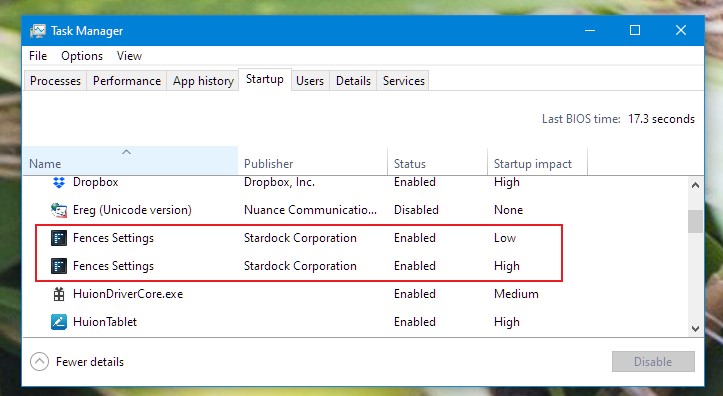
I'm sorry, so you still have start up issue since Feb 2018 until now, even on Fences current latest version of V3.09.11? If so, would like to suggest the cleanboot steps and see if there is conflict with other apps in your system which making Fences don't start. And also post a screenshot of your Taskmanager Startup tabs on Fences.

Clean boot steps : https://forums.stardock.com/486084/fences-support-faq#cleanboot

and Task manager startup Screenshot example on Fences.


Thank you,

Basj
Stardock Community Assistant.


Reply #6 Top

Panos,

I have not seen this issue in some time and has always been solved with the solution that basj illustrated.

That said, I have updated the FAQ with this known solution:

https://forums.stardock.com/486084/fences-support-faq#FencesStartUP

Do let us know if it solves your issue.

Also, please resist these in an initial post:

there seems to be no response whatsoever in order to fix them.
End of quote

Have we payed in order to be disregarded
End of quote

One need only look at the forums today to see how active we (support, community managers, dedicated users, and developers) are and how much we care about exceeding client satisfaction.

That said, thanks for the feedback and patronage, Panos.

Sean Drohan
Stardock Support Manager

Reply #7 Top

My initial post was such because I had raised that issue in one of my own threads further back in the past. Then there was this ironic answer by one of your reps so it wouldn't lead me to better reactions. Anyway, the situation is that I have purged many times again and again and it was never fixed. I am at work now and cannot perform any further actions, however if needed I will provide a video of what happens when I turn on my PC so that you can see that even though I have purged and reinstalled Fences I still get the same results. Back in the past in my first thread where I had raised this issue, I had been asked to do the same thing but to no avail again. After that, as you can see in the discussion that I have linked in my answer, I informed the rep that I had already purged 3 times. Even if there has been a solution that works and I am in the wrong here, I was told that they would forward it to support. Thus, one would expect an answer later on regarding the resolution of the specific issue. However, it has been well over 11 months now since that day and there has been no such official mail. Furthermore, I do believe that as an end-user, I am by no means obliged to access forums daily in order to check up on potential solutions to a problem that I have already reported twice.

Reply #8 Top

Quoting panos_ned, reply 7

I am by no means obliged to access forums daily in order to check up on potential solutions to a problem that I have already reported twice.
End of panos_ned's quote

No one expects you to, however, if there is an issue that you believe has failed to be addressed in a timely manner, post to the original thread asking for an update.  As you can see, there is not shortage of SD people that would / will respond.

Again, we are eager to see if the posted solution helps you - please let us know. 

Sean Drohan
Stardock Support Manager

Reply #9 Top

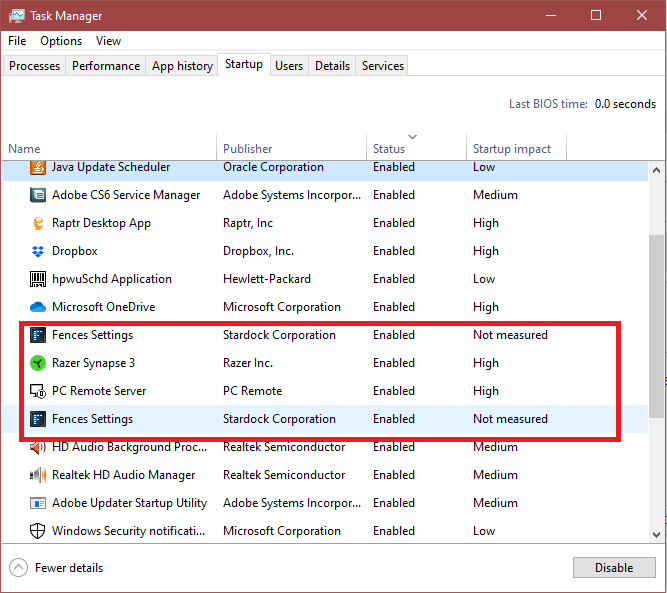
As you can see in the video link I am attaching below, even though I have followed every possible solution that people have given me up to now, the problem persists (All of my Desktop items are hidden on startup by Fences until I press a right click on the Desktop). I have further attached a screenshot with the startup items displayed.

Video Link: https://mega.nz/#!E94y0aAJ!BD6ZXGV1R_Ey4LWjXb05rzuhEJG-_T1jNQ0d4ZbZqzI

Reply #10 Top

Hello,

Looking at your list there is one application that loaded which might or might not causing some problem with your system. Please refer to this link : https://www.2-spyware.com/remove-hpwuschd-application.html

Thank you,

Basj
Stardock Community Assistant.

Reply #11 Top

No I have a Hewlett Packard printer and that app is for that printer. Also, I have scanned my device for viruses and adware many times. There is nothing there.

Reply #12 Top

Have you tried the cleanboot I suggested in my reply#5?

Thank you,

Basj
Stardock Community Assistant.