Fences delayed (50 seconds) Win8.1 desktop icon after reboot

The problem is with Fences2 and Fences3.
Win8.1, 1TB SSD, i7-2.66, MacBook Pro17, ESET 6.6 virus scanner,
After starting the laptop or rebooting, I log in using my login account.
Then I enter my password and the screen turns light blue (no blue screen!)
Now it takes more than 50 seconds until the desktop with the Ikon's is displayed.
If you uninstall Fences and restart, then the desktop is displayed after entering the password after about 2 seconds and you can use the laptop immediately.
Have already Purge_Fances.bat and reinstalled. Unfortunately without success.
Can you cause Fences to start delaying? After the desktop is already set up?

Have many icons on my desktop, is there a limit?

That was not in the early days of Fences 1.x 2.x.
That's why I bought Fences3, but I'm disappointed that the start takes so long.

Regards Heinz
 

8,796 views 9 replies
Reply #1 Top

Hello,

I have forwarded your problem to Stardock Support team for their assistance. Please keep an eye on this thread for any updates. We appreciate your feedback and patience.


Basj

Stardock Community Assistant.

Reply #2 Top

Hello,

Sorry to hear you are having trouble.

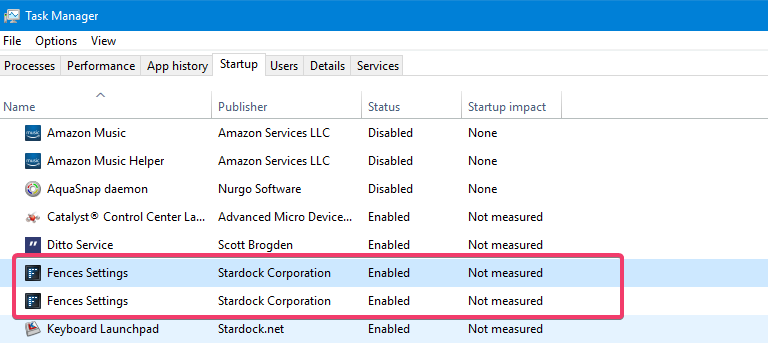
First, ensure you have both Fences items enabled at startup:

If it persists, try a clean boot to see if times improve:

https://forums.stardock.com/486084/fences-support-faq#cleanboot

----------------
Sean Drohan
Stardock Customer Service Manager

Reply #3 Top
Hello,
Sorry, in the previous entry was probably the first screenshot an error occurred.


   Both Fences items are enabled with "high" at startup impact

A clean boot brought no success with a second user.

Also disable with "msconfig" the services except Microsoft did not succeed.
Only the ESET could not be deactivated!

With the second user, there was only 30% of the icon on the desktop and the display of the icon was in proportion to a third of the time.
Once you disable Fences, the desktop will start in 1 second!
There are about 90 icons on my desktop
 
Regards Heinz
It struck me: When the 1st user is terminated and the second user is logged in, it goes quickly and as before. Now again 2. User log off and 1. User login then the desktop starts in 2 seconds.
 
Regards Heinz
Reply #4 Top

Hello Fences support
can you help me with this problem?
Is there a solution or do I need to uninstall Fences?
Displaying the desktop icons when starting Windows with Fences is unacceptable for more than 50 seconds.
Regards Heinz

Reply #5 Top

Hello,

I have forwarded your problem to Stardock Support team for their assistance. Please keep an eye on this thread for any updates. We appreciate your feedback and patience.


Basj

Stardock Community Assistant.

Reply #6 Top

Quoting Heinz4321, reply 3

It struck me: When the 1st user is terminated and the second user is logged in, it goes quickly and as before.
End of Heinz4321's quote

So you are saying that when the first Windows account is not logged in, and you start under the second WIndows account, with Fences enabled, the machine boot time is quick - is that accurate?

----------------
Sean Drohan
Stardock Customer Service Manager

Reply #7 Top

Again to the info.
The laptop is off and turned on, the desktop is just blue, now it takes over 50 seconds for the desktop icons to become all visible.
I finish 1st user and log off 1st user now.


2nd user is logged in (with 23 icons), now the desktop icons are visible after 12 seconds .
Laptop was not turned off


Now again, log off 2nd user and log in 1st user (with 90 icons), now the desktop with 90 icons is displayed after 15 seconds.
Laptop was not turned off


The display of the desktop icons only needed after a cold start of the laptop for so long.

After a cold start, no matter if 2nd user is logged in with a few icons (45 seconds) or 1st user with a lot of icons (50 seconds).


I have deactivated Fences now.

Laptop is off.  -> Cold start -> Now the desktop starts with the icons after about 3 seconds!

But! the Ikon are initially white, so without image content. Only after about 50 seconds, all icons are visible with the content! It seems as if the little pictures in the icons cause this time delay with fences. 
Is there a command in Windows to make the icons faster? Defrag cache?

Regards Heinz

Reply #8 Top

Hello,

For any cold start, Fence will add some delay in rendering the desktop but it is generally not that prominent.  Things that could impact that are:

  • The PC stats (memory, CPU, etc)
  • Quantity of icons
  • Folder portals and their need to connected to their locations - especially if they are network locations.

That said, I will pass on your observations to the developers. 

----------------
Sean Drohan
Stardock Customer Service Manager

Reply #9 Top

Hi, here my PC Hardware configuration


SSD Harddisk 1TB