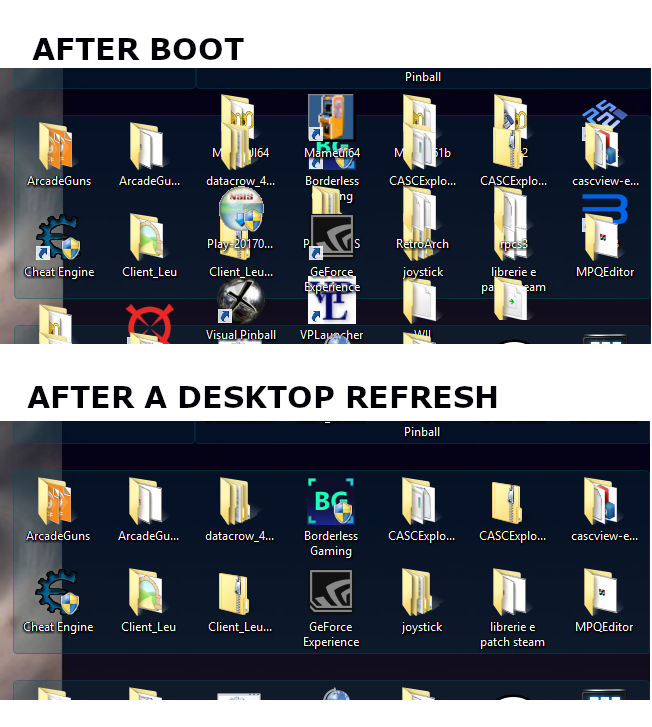
Missing refresh at the boot ?

Hi, at the boot I can see outside the fences all the icons that should be hidden inside them, the icons aren't really on the desktop because I can't click them, but the only way to clean the desktop is to open/close a window (of a random program), or move every sigle fence that has the issue.

Is there a way to solve that ? It gives no usability issues, but it's ugly to see when I turn on the PC :(

I use Windows 8.1 (and by the way, the blur works here too)

Thanks

9,185 views 10 replies
Reply #2 Top

Hi, the purge batch didn't worked for me, it seems to work only if the application is installed in "program files", but that wasn't my case...

So i used GeekUninstaller to remove the app and all the associated registry entries and folders... I only kept the "backups" folder with the snapshots.

After that I rebooted, downloaded the last installer and installed it in "program files" this time (just to be sure if there were issues with a custom install folder), put the bakups folder back and recalled the last snapshot... after that I rebooted again...

...but still the same refresh issue at the boot... :(

Reply #3 Top

Try the elevated sfc /scannow command to see if there is some bad Windows files.

Basj,

Stardock Community Assistant.

Reply #5 Top

Hmm. Can I have a video grab or at least a screen capture of the problem.

Thank you,

Basj,

Stardock Community Assistant

Reply #7 Top

Since you already installed in program files. Purge and reinstall should work now. Can you try that now. and If it still not working after that please try the Clean boot step to see if there is conflicting apps. https://forums.stardock.com/486084/fences-support-faq#cleanboot

Try that and please report back.

Thank you,


Basj,

Stardock Community Assistant

Reply #8 Top

Purge/reinstalling changed nothing.

With a new account I was able to reproduce the issue only after adding A LOT of icons/folders and fences (actually I have 116 entries in 8 fences).

With my main account I tried msconfig disabling every services and startup apps except for fences, and this changed something, there was still some garbage here and there, but visibly less than before.

The last thing I tried was to uninstall the antivirus (Avast), and after a reboot (normal with full services ad all) I saw even less garbage, just 2 pieces of icons between fences.

But seems still needed a refresh

Reply #9 Top

Ok..

I have forwarded your problem to Stardock Support team for their assistance. Please keep an eye on this thread for any updates. We appreciate your feedback and patience.


Basj

Stardock Community Assistant.