snapshot of fences failed

HI,

I recently installed Fences 3 on a new windows 10 pc.  All seems to be working fine except that it is not capturing a snapshot of the desktop automatically and when I click on Take Snapshot it says  "Saving of Snapshot failed"  and "XML saving failed"

How can I fix this to enable snapshots of my fences to restore when I need to?

Russty

13,936 views 11 replies
Reply #2 Top

Thanks for the reply.  I followed the instructions and reinstalled fences 3 but it still won't take snapshots, either automatically or manually.

I have checked the old PC (windows 7) with fences 2 on it is doing the same.  In fact it hasn't automatically saved a snapshot since Feb 2017.  

So I now have 2 pc's with different OS versions and different fences versions and neither will keep a snapshot.

🤔


Reply #3 Top

OK, I just got a friend to install a trial of fences on his Windows 10 pc, and it worked without any problems. 

So now the question is why on my 2 pc's does it not?   Are there any known programs/apps that could cause this problem with fences??

Russty.

Reply #4 Top

Maybe there is something which is common on both pcs, that causing it.

Reply #5 Top

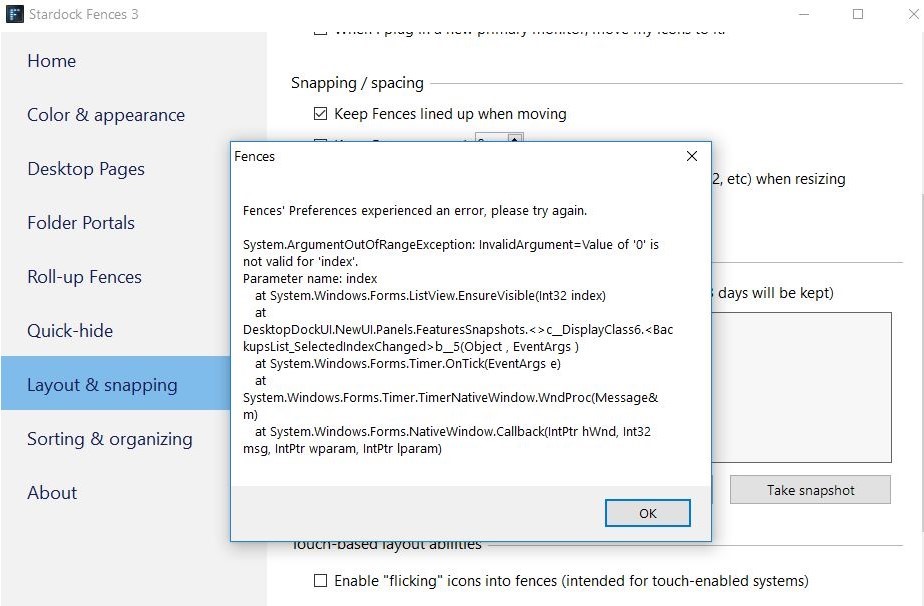
I have tried again to take a snapshot of fences and this time I got an error as seen in the attachment. 

Can anyone suggest what all this means and if it may point to what is causing the problem?

Thanks.

Snapshot error


Reply #8 Top

By the way, I am the same person as balenogs16, didn't realise I already had that account, that one auto logged-in when I used another device. 

Reply #9 Top

Quoting russtyofoz, reply 8

By the way, I am the same person as balenogs16, didn't realise I already had that account, that one auto logged-in when I used another device. 
End of russtyofoz's quote

Ok.. Thanks for clearing that out :thumbsup: . I think you need to iron out the problem. Try the Cleanboot steps : https://forums.stardock.com/486084/fences-support-faq#cleanboot

let us know the result.

Reply #10 Top

No luck with that :thumbsdown:   something else I have noticed is that both the pc's with the problem are Acer pc's, whereas on Dell and HP computers it works fine.  So maybe something in the Acer software is preventing the snapshot from being saved??  So perhaps it can't be solved unless that error message can be deciphered.

Will just have to hope I don't need to restore my layout one day.

Thanks anyway.  :)  

Reply #11 Top

Try (re)installing the latest .NET frameworks

3.5 onward, if they will not let you for the earlier ones, just skip them:
https://docs.microsoft.com/en-us/dotnet/framework/install/on-windows-10

If that fails, try a clean boot:
https://forums.stardock.com/486084/fences-support-faq#cleanboot