JcRabbit JcRabbit

Winstep Nexus Dock v16.2 Released!

Winstep Nexus Dock v16.2 Released!

~


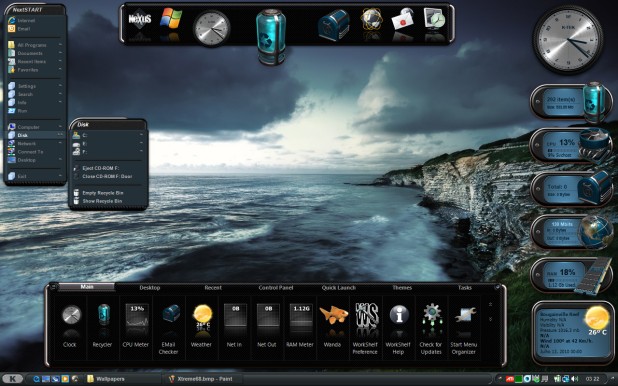
Windows 10 Ready The Winstep Nexus dock is a FREE dock for Windows. Every feature you’d expect from a dock, including widgets, mouse-over effects, skins, drag-and-drop, and many others not available in most other docks, such as live icon reflections, in-dock system tray, blur-behind effects, and much more. Completely customizable, with thousands of different backgrounds freely available online, Nexus is fully compatible with skins for all 3rd party docks.

Supported Languages: Bulgarian, Catalan, Chinese (Traditional), Chinese (Simplified), Croatian, Czech, Dutch, English, Farsi (Persian), Finnish, French, German, Hungarian, Indonesian, Italian, Japanese, Korean, Norwegian, Polish, Portuguese, Portuguese (Brasil), Russian, Serbian, Slovak, Spanish, Swedish.

Nexus runs on the 32 and 64 bit versions of Windows 2000, XP, 2003, Vista, 7, 8.x and Windows 10.

v16.2 is another monster release, with hundreds of changes and additions. Focus was again on adding even more functionality - but this time with a ton of new eye-candy thrown in for good measure.

What's New? Highlighted Features:


    • New Battery Monitor module (Nexus Ultimate/Winstep Xtreme only).


      Monitors your battery or UPS power status, provides useful information regarding the type and condition of your battery, logs power events, provides voice and sound notifications regarding battery status and can run 3rd party applications, execute internal commands (such as Hibernate or Sleep), or issue screen and audio warnings whenever the battery level reaches specified thresholds.

    • New clock module associated alarms to display pop-up reminders, wake you up with music or run programs at specific times, once or periodically.


Please note that the free version of Nexus supports a single alarm, while Nexus Ultimate supports an unlimited number of alarms.


    • 10 new amazing mouse-over, launch and attention effects (Nexus Ultimate/Winstep Xtreme only)

      Shake, Fade In, Fire, Energize, Swirl, Ion Storm, Ignite, Bubbles, Plasma and Wormhole.
      Flash and Jump are no longer restricted as attention and launch effects and can now also be used as mouse-over, launch and attention effects.


Please note that the new Shake and Fade In effects are also available in the free version of Nexus.


    • New Effects Panel to help you visualize, select and quickly configure all your mouse-over, launch and attention effects.


    • Improved the smoothness of docks when changing their size or moving to a new position. Inserting items into a dock is now much smoother too.
    • Added new 'fade-out the old/fade-in the new' effect to when the user changes an icon or a document thumbnail is rendered.
    • Nexus just keeps getting faster!

      The Aero Glass automatic background blur function is now about 8 times faster and uses 4 times less memory than before, with no visible loss of quality (Windows Vista/7 only plus 8/10 with AeroGlass installed).

      Enable double caching of icons in the Performance Settings dialog of Nexus to increase the rendering speed of a magnifying dock by up to 40%, at the cost of very little extra memory usage. A must-enable feature for users of systems with weaker CPUs who wish to enjoy the benefits of a magnifying dock combined with other effects.


    • New settings added to the Performance Settings dialog to allow better user control of the quality of the effects vs. speed vs. memory usage.


    • New 'CD Control' and 'Lookup IP Address' internal commands.
      The CD Control internal command allows you to know at a glance what type of media is currently inserted into a CD-ROM drive, and opens/closes the CD tray when clicked on. If you have more than one drive installed in your system you can select which drive the command applies to via the Item Properties dialog.

      The Lookup IP Address internal command returns the system's public IP address plus the user's current location and latitude/longitude coordinates, using Geo IP location technology.

    • Windows can now be minimized to the dock if the dock is configured to show currently running applications.
    • Icons of running applications on the left side of the dock now also display the number of open instances.
    • The Weather module now uses the sunrise and sunset times provided by the weather feed - when available - to decide whether to display a Sun or a Moon icon.
    • Weather information is now immediately updated after returning from Sleep or Hibernation.
    • Automatic retrieval of the user's location by the Weather module when running for the first time has been vastly improved.


  • Left clicking a dock control icon now opens Nexus Preferences. Please note that there is a short delay while the dock makes sure the user is not trying to double-click the icon instead (which would hide/collapse the dock).
  • Reorganized the User Interface so related options are now usually grouped together, even though that meant repeating some settings throughout the UI.
  • Improved existing support for high-DPI systems. The size of dock icon labels now also reflect current DPI settings.
  • Improved User Interface integration with Windows 10 when running under this version of Windows.
  • The Winstep Update Manager can now hide specific updates so the user is not notified again until an even newer version comes along.
  • ... many other performance and stability improvements!


More Information:

Winstep Web Site:
http://www.winstep.net

More information about Winstep Xtreme:
http://www.winstep.net/xtreme.asp

More information about the Winstep Nexus dock/Nexus Ultimate:
http://www.winstep.net/nexus.asp


93,257 views 50 replies
Reply #26 Top

Quoting RedneckDude, reply 25

Maybe me can get the urge again...
End of RedneckDude's quote

Anything but that...PLEASE! ;)

Reply #27 Top

X|

Reply #28 Top

I are here too...too.

Reply #29 Top

Quoting JcRabbit, reply 24

Did Mindy stop doing them
End of JcRabbit's quote

I use to talk to Mindy everyday. However not for a couple months. She sent me an email in Jan when I made Master. It was only a few words long and typed very poor. Made mention this was the best she could type but had to find a way to congratulate me. So I can only assume she had a medical problem of some kind. She loved skinning.

I'm not one to ask people about their situations. I figure if they want to tell me they will but not my business. I will send her an email right now telling her she is missed here and see if I receive a reply.

Reply #30 Top

Saddens me to read that, Dave. Hope all's well with her, but it doesn't sound reassuring.

Reply #31 Top

Please let us know what you found out, Dave.

Unfortunately I haven't paid much attention to the skinning aspect of Winstep applications in the last couple of years, in part because I was aware someone was holding the torch (mainly WebGizmos and Mindy) and in part because I really needed to focus on the functional aspects first.

A couple of years ago I was able to commission a few themes from professional skinners (which gave us themes such as Darktech, Evolve, etc...). The plan was to release one professionally made skin per month (which I was paying for out of my own pocket) to keep things going and to try and raise the quality of the currently available skins. Then life happened and I had to put that on hold - I'm still sitting on a couple of themes that were never released.

With the Winstep Theme Builder about to come out, things are going to change for the better. It will be a lot easier to make new skins for Winstep once it becomes available and is fully functional. Furthermore, the major internal re-organization I made to the Winstep modules code will also allow me to greatly extend the skinning possibilities for each of the currently available modules.

Reply #32 Top

Quoting JcRabbit, reply 31

Please let us know what you found out, Dave.
End of JcRabbit's quote

I did send an email and will post here if I receive an answer. I do know she really enjoyed making Winstep Themes and just didn't give it up because she was tired of it. I was teaching her Photoshop and she was really interested in it. So there is something else going on. Hopefully Mindy or if she isn't able someone else is checking her email and let me know.

The Themes everyone makes from WindowBlind skins are great don't get me wrong. However maybe with a new Theme Builder some skins will be made from scratch like WB skins.

Reply #33 Top

Quoting DaveBax, reply 32
The Themes everyone makes from WindowBlind skins are great don't get me wrong. However maybe with a new Theme Builder some skins will be made from scratch like WB skins.
End of DaveBax's quote

My main peeve with most of the current themes is that they all seem to follow the same formula: rectangular everything. Rectangular 'boxes' for desktop modules, rectangular Shelf. It gives everything a 'bulky' always-the-same look, and there is no need for that since everything is free-skinnable.

Something else that *really* gets to me has to do with the frames around the icons in the Shelf: when used properly (i.e. by using colors that actually blend with the Shelf background), they add to the theme by providing what should be a subtle 3D grid separating each icon in the Shelf - much better than a solid slab of background color with nothing in-between the icons. Instead most skinners simply give those lines solid contrasting colors, which makes the whole thing look horrible.

Apologies for the rant. :)

Reply #34 Top

Quoting JcRabbit, reply 31

- I'm still sitting on a couple of themes that were never released.
End of JcRabbit's quote

Gimmie, or the Giz gets it!!!!!!   }:)

Reply #35 Top

Zooom... :waaaa:

Reply #36 Top

Quoting RedneckDude, reply 34
Gimmie, or the Giz gets it!!!!!!   }:)
End of RedneckDude's quote

lol! Poor Gizmoid. :grin:

I will release them eventually, once I have the time to put them together. I also have a couple of Winstep themes based on Hyperdesk's DarkMatter theme, made by Javier, which Jesh gave me authorization to release with Winstep Xtreme itself. Not sure if I that means I can upload them to WC as well, will have to ask him first.

Reply #37 Top

I like those. Converted a few to WindowBlinds.


Reply #38 Top

Quoting DaveBax, reply 32
I did send an email and will post here if I receive an answer. I do know she really enjoyed making Winstep Themes and just didn't give it up because she was tired of it. I was teaching her Photoshop and she was really interested in it. So there is something else going on. Hopefully Mindy or if she isn't able someone else is checking her email and let me know.
End of DaveBax's quote

I take it you haven't heard back from Mindy yet?

Send me a PM with her email address, please. I assume she is a Winstep Xtreme registered user, so I might be able to find more info about her from her original purchase - but I need her email address to locate it.

Reply #39 Top

Quoting JcRabbit, reply 38

I take it you haven't heard back from Mindy yet?
End of JcRabbit's quote

No Jorge I haven't. sent a second email a week ago. Would guess from what I know things aren't good. Don't think I'm going to send anymore. Was hoping if I didn't hear from her maybe a family member would tell me something. Don't worry if I do ever hear anything I will let you know.

Reply #40 Top

Quoting JcRabbit, reply 33


Quoting DaveBax,
The Themes everyone makes from WindowBlind skins are great don't get me wrong. However maybe with a new Theme Builder some skins will be made from scratch like WB skins.


My main peeve with most of the current themes is that they all seem to follow the same formula: rectangular everything. Rectangular 'boxes' for desktop modules, rectangular Shelf. It gives everything a 'bulky' always-the-same look, and there is no need for that since everything is free-skinnable.

Something else that *really* gets to me has to do with the frames around the icons in the Shelf: when used properly (i.e. by using colors that actually blend with the Shelf background), they add to the theme by providing what should be a subtle 3D grid separating each icon in the Shelf - much better than a solid slab of background color with nothing in-between the icons. Instead most skinners simply give those lines solid contrasting colors, which makes the whole thing look horrible.

Apologies for the rant. :)

End of JcRabbit's quote


So what are your favorite themes currently?

Reply #41 Top

Quoting GregII, reply 40
So what are your favorite themes currently?
End of GregII's quote

Not so much favorite but themes that caught my eye because they are different. For instance:


Unfortunately I have to go to DeviantArt to see themes like this.

What I am mostly complaining about is lack of diversity. And these are different.

One of my all time favorites, because it shows imagination and, in part, what can be accomplished if you use what is unique to Winstep applications (he uses dock overlays, vertical menu title bars, transparency, and is extremely original), is Burt Porter's Paint On Glass. This is an oldie but goody:


But my favorite is, without a doubt, Tiggz KTEK4D theme:

Reply #42 Top

I'll have to agree with you there.  My only concern with it is that the Weather module text sometimes runs past it.

Reply #43 Top

Quoting GregII, reply 42
I'll have to agree with you there.  My only concern with it is that the Weather module text sometimes runs past it.
End of GregII's quote

There is a setting for the skinner to use that prevents it from doing so.

Reply #44 Top

Easy fix! 

Reply #45 Top

The skinner isn't available.

Reply #46 Top

I would say I could fix it for you, but I'm sure there are a few.  How many you got?

All ya gotta do is open the ini file, with notepad, and adjust the margins.

Reply #47 Top

If he's not used to editing Winstep theme configuration files it's best for him to wait for the Winstep Theme Builder to be released.

Anyway, since the K-TEK4D theme is actually one of the themes that ships with Winstep, I might fix it myself. :)

Reply #48 Top

That'd be cool.  Thanks.

Reply #49 Top

I hadn't noticed any glitches with K-Tek....now I gotta go look.


Reply #50 Top

It really isn't nothing big... sometimes the current weather description is too long and that enables the 'scrolling ticker' mode so the text fits and you are able to read it all.

When that happens a little bit of the text might overlap the icon - might not even be Tiggz oversight, I might have tinkered with the scrolling routine AFTER he made the theme and caused this.