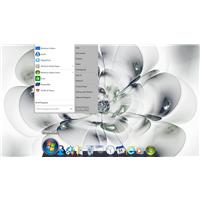
Start8 menu disappears off the top of the screen

Hi


I am running:

Windows 8.1

Object Dock 2.1

Start8 1.30.1

ModernMix 1.12


I have a Start8 start menu icon in a single dock at the bottom of the screen. When I click on the start8 dock icon the window is so high up that the top third disappears off the top of the screen.

I have been unable to move the Start8 Window with the mouse or cursor keys. I have tried deleting the object dock icon and then adding it back but the Start8 Window is in the same place off the top of the screen.


Any ideas  how I can get the Start8 window back to normal?


5,528 views 7 replies
Reply #1 Top

Hope this helps

First try (you may have already) move mouse over the start bar, click left and hold while moving the mouse up and to the left.

When the start bar snaps to the left side of your screen release the mouse button.

Right click on the Configure the Start Button. Follow your instincts.


Second try using the right mouse button and select something in your right context menu that sound right, all right context menus are different. Therefore I could not tell what select.


Third try changing the screen sesolution in windows personalization (control panel) button.

OR

try changing the screen resolution by right clicking on an open area of your desktop.


Last sugg: I don't have win 8.1 as it is incompatible with my firewall SW.

 Move mouse to bottom of yur screen as it is now and right click on an open area to the left of the cloct/task area and select the "Properties" link at the bottom of the context box, then either [TAB: Taskbar] check box "Use small taskbar buttons" or [TAB: Jump Lists] change the "Number of recent items to display in Jump Lists to something less that 12 in the box to the right. OR [TAB: Toolbars] clear all selections EXCEPT the DESKTOP toolbar. Then click "OK" And see if any of these help.


Reply #2 Top

Hi


Many thanks for the tips. I tried them but alas I am still stuck with the Start8 Window disappearing of the top of the screen.

I think part of the issue is that it is not a normal window and has no title bar. As such things like Alt+Space then M to move do not work. I cannot move the Start8 window at all: click and hold does not work for some reason. The right mouse click just gives you one option to configure Start8. I tried using small icons but all this did was make the window smaller but still disappearing off the top of the screen.

I have logged a support request with Stardock, maybe there is some configuration file somewhere that has the window position in it. I looked but cannot find any ini file or registry key.


Reply #3 Top

Where does the window appear when you click on the taskbar start button rather than ObjectDock?

Reply #4 Top

Hi

If I click on the taskbar start button the start8 menu appears as expected just above the start button. 


If I click on the Object dock icon I get the issue with it disappearing of the top of the screen.


Reply #5 Top

Could you post a screenshot of the problem as it would probably help considerably.

Reply #6 Top

Hi

I have a screen shot, not sure how top upload to the forums. I did manage to set it as as my profile screen desktop image. Is that visible?


Reply #7 Top

I think this should work: