Atomic Alarm Clock 6

alarm clock and skinnable tray clock

http://drive-software.com/atomicalarmclock.html

Your Windows system tray clock does its job, right? But that’s all it does, really, and you’ve spent years looking at the same, old boring interface.

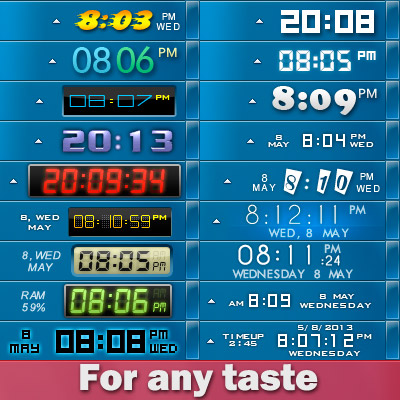
When you launch the application, your default Windows clock will be replaced. If you are not satisfied with the looks of your new clock, you can select a different skin, on its main settings panel.

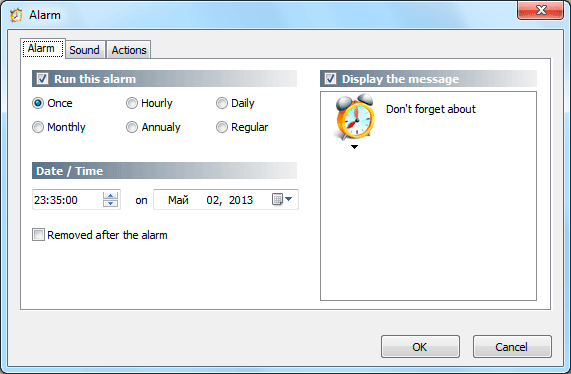
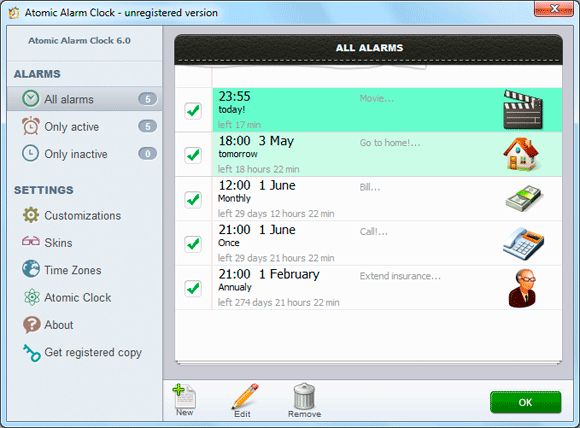
The utility also allows you to set up alarms and can also schedule various actions to be performed at the user defined time, such as wakeup, rebooting, shutting down or hibernating the computer. Atomic Alarm Clock enables you to set up alarms to occur once, hourly, daily, weekly, monthly or even annually, with a wide array of actions to be performed.

All in all, Atomic Alarm Clock is a nice tool and it's one of the apps to be installed on every machine out there.


Home page:  http://drive-software.com/atomicalarmclock.html

Download:    http://drive-software.com/download/ataclock.exe

I lowered the price from $29.95 to $4.99 for WC users :)  Order page.


p.s.I am the author of this program, I will be glad to hear your suggestions and recommendations.



211,387 views 64 replies
Reply #1 Top

yeah but its a bit heavy on the price weight for what it can do dont you think...? 29,95USD for a clock is a bit ruff
Besides the price it is not even windows8 ready 

Reply #2 Top

$30.00  8(|

I would go for a million users at $5 rather than a hundred at $30.

Reply #3 Top

I will be glad to hear your suggestions and recommendations.
End of quote

1: Change the License:Free to License:60 day trial

2: Have an actually free version with limited functions

3: Enable it to run as or with a screensaver or animated wallpaper

4: Get rid of all the sucker links on your website

Reply #4 Top

Quoting myfist0, reply 2
I would go for a million users at $5 rather than a hundred at $30.
End of myfist0's quote

I think myfist0 has it right...;)

Reply #5 Top

 if you think that product is overpriced, please write me at Drive.Soft.mail@gmail.com for get 50% discount :)

program have long trial period: 60 days )


Reply #6 Top

SD has always encouraged people to bring customization software to the attention of the WC community. 

Nice work, Falkon7, but I too find the pricing a bit steep. A suggestion? I wonder if it has the ability to accept the fonts and colors of the skin currently being used on the computer?

Reply #7 Top

Unfortunately the current version does not accept the fonts and color skins.

The program has been completely rewritten recently, this will be done in future versions)


Reply #8 Top

Quoting Falkon7, reply 5

 if you think that product is overpriced, please write me on Drive.Soft.mail@gmail.com for get 50% discount

program have long trial period: 60 days ) 
End of Falkon7's quote


EVEN with the 50% discount it is expansive... i think your idea is great and posting this into a  skinning and customization webpage is a good start but this looks like a school project...

you should listen and take the advice from myfist0 - you make more that way

Make it windows8 ready and post it to the app store..

Reply #9 Top

Quoting DrJBHL, reply 6
Not really, Wiz. SD has always encouraged people to bring customization software to the attention of the WC community
End of DrJBHL's quote
Edited my earlier reply. I trust the author but found the site to be a bit misleading at first glance.

Nice clocks but see my suggestions in reply #3

Reply #10 Top

No problem, for the experiment and for WC users, i lowered the price to $4.99 :)

Order page.

+1 Loading…
Reply #11 Top

Quoting Wizard1956, reply 9
Edited my earlier reply.
End of Wizard1956's quote

Edited mine to reflect your changes.

Reply #12 Top

Quoting Falkon7, reply 10
No problem, for the experiment and for WC users, i lowered the price to $4.99
End of Falkon7's quote

Sweet, starting the trial now.  :thumbsup:   k1

Reply #13 Top

Nicely done and well designed! I purchased it at the $4.99 price and it is well worth it. If you keep it at the $4.99  price you should do well. :thumbsup:

Reply #14 Top

 Wizard1956

1: Change the License:Free to License:60 day trial

Sorry, I do not quite understand what you mean)


2: Have an actually free version with limited functions

I'll do it, now I have the old free version, but don't work on 64 bit OS.

Here: http://freedesktopsoft.com/freedesktopclock.html 


3: Enable it to run as or with a screensaver or animated wallpaper

Not sure that this is necessary


4: Get rid of all the sucker links on your website

You are right, the site looks awful, I plan to completely redo it.

Thanks for feedback )


+1 Loading…
Reply #15 Top

to myfist0 and LightStar

Thanks for using my software :)


Reply #16 Top

Quoting Falkon7, reply 14
1: Change the License:Free to License:60 day trial

Sorry, I do not quite understand what you mean)
End of Falkon7's quote
  My mistake, sorry, that info is actually part of one of the advert links on your website.

See image:https://dl.dropboxusercontent.com/u/13477579/misleading%20link.JPG

While I understand the need to support a website, I detest those advert links that try to mislead people into clicking them thinking they lead somewhere else. In this case, the one in the image and its information appear to be connected to your software. I see now that this is not the case.

I applaud your decision to make the software much more affordable and think it will result in more sales for your rather nice clocks.

Best of luck to you. :thumbsup:

EDIT: I just installed your free version on my 32 bit XP rig. I am very happy with the results. Well done and in my opinion, well worth the price to upgrade to the 64 bit version. 5* 5*

Reply #17 Top

Quoting Wizard1956, reply 16

See image:https://dl.dropboxusercontent.com/u/13477579/misleading%20link.JPG


I applaud your decision to make the software much more affordable and think it will result in more sales for your rather nice clocks.

Best of luck to you.
End of Wizard1956's quote

Thanks for the link. it's not my ad, I'll try to ban it.

Thank you for feedback )


Reply #18 Top

I'll be picking it up as well. 

As for the price? "You have chose wisely." ;)

When is the key sent?

Reply #19 Top

Quoting DrJBHL, reply 18

I'll be picking it up as well. 

As for the price? "You have chose wisely."

When is the key sent?
End of DrJBHL's quote

Usually the key to be sent immediately. Please, let me know your e-mail, I'll send you the key manually.


Reply #20 Top

The key comes to your email shortly after purchase Doc. :)


Lol, guess we posted almost together Falkon7.

Reply #21 Top

Falkon7 question please. If one wishes to turn it off and use the windows clock and time for whatever reason, can that be done? Or do you have to uninstall the clock.?

Reply #22 Top

Falkon7 I see I posted above without looking very well. See from your screen shot you have "Enable Clock" So I guess if I want to not use it for a time for whatever reason I can just uncheck it.

Reply #23 Top

Exactly , if you want use reminders without clock.

or you can uncheck item "Run Atomic Alarm Clock on Windows startup" and close program.


Reply #24 Top

Thank you.

Reply #25 Top

Quoting Falkon7, reply 19


Quoting DrJBHL, reply 18
I'll be picking it up as well. 

As for the price? "You have chose wisely."

When is the key sent?

Usually the key to be sent immediately. Please, let me know your e-mail, I'll send you the key manually.


End of Falkon7's quote

Hasn't appeared yet, so I pm'd you just now.

Edit:

Received. Thanks.

A suggestion: Allow the calendar to be customizable as to where weekend days appear (lt, rt, or as it is now), and customizable arrows to change the months. Also, customizable colors for the circle around the dates and different colored "events" as to importance/type.

Just some thoughts.

Bug:

On a few of the skins, the time appears as 06:20 PM. You should have a 12 hr (with AM/PM) and a 24 hr choice. However, the time should show as 6:20 PM or 18:20 hrs. Never 0630 PM, as this just causes confusion. :)