Falkon7 Falkon7

Atomic Alarm Clock 6

Atomic Alarm Clock 6

alarm clock and skinnable tray clock

http://drive-software.com/atomicalarmclock.html

Your Windows system tray clock does its job, right? But that’s all it does, really, and you’ve spent years looking at the same, old boring interface.

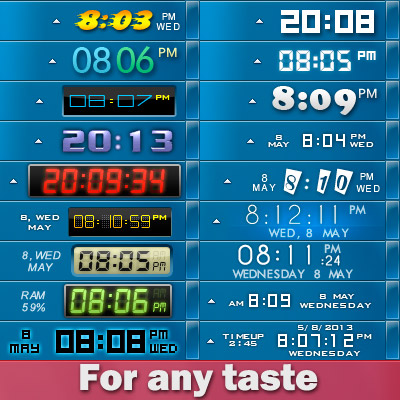
When you launch the application, your default Windows clock will be replaced. If you are not satisfied with the looks of your new clock, you can select a different skin, on its main settings panel.

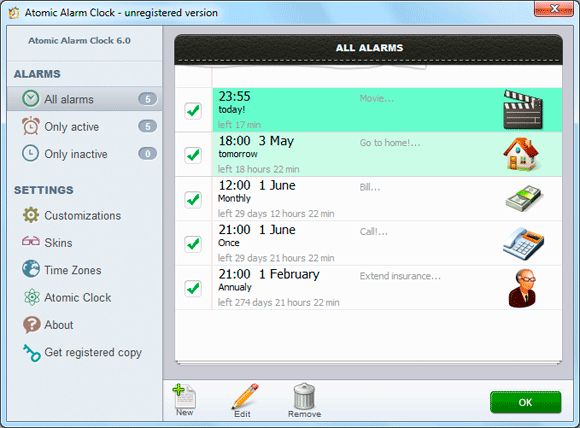
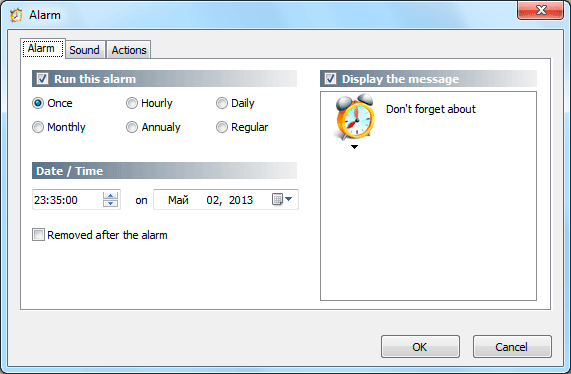
The utility also allows you to set up alarms and can also schedule various actions to be performed at the user defined time, such as wakeup, rebooting, shutting down or hibernating the computer. Atomic Alarm Clock enables you to set up alarms to occur once, hourly, daily, weekly, monthly or even annually, with a wide array of actions to be performed.

All in all, Atomic Alarm Clock is a nice tool and it's one of the apps to be installed on every machine out there.


Home page:  http://drive-software.com/atomicalarmclock.html

Download:    http://drive-software.com/download/ataclock.exe

I lowered the price from $29.95 to $4.99 for WC users :)  Order page.


p.s.I am the author of this program, I will be glad to hear your suggestions and recommendations.



211,391 views 64 replies
Reply #26 Top

DrJBHL

the location of the weekend depends on the regional settings of Windows,  you can change this through the control panel, then need to restart the program.

In future versions I plan to make a selection of events on the calendar.

bug: You mean the leading zero? it's not a bug, it's made for design, but you can change it, every skin have settings.ini file, open folder with skin and open settings.ini, find parametr leadingzero=1 and change value to leadingzero=0 

Thanks )


Reply #27 Top

Quoting Falkon7, reply 26
but you can change it, every skin have settings.ini file, open folder with skin and open settings.ini, find parametr leadingzero=1 and change value to leadingzero=0 
End of Falkon7's quote

Unfortunately, it denies permission to save the changed value. 

Reply #28 Top

Please, run Notepad from Start menu with Administrator privileges (right click "Run as Administrator"), then open settings.ini through File > Open

Let me know result )


+1 Loading…
Reply #29 Top

Got mine. I likey. Thanks   :thumbsup:

Reply #30 Top

Quoting Falkon7, reply 28

Please, run Notepad from Start menu with Administrator privileges (right click "Run as Administrator"), then open settings.ini through File > Open

Let me know result )


End of Falkon7's quote

Tried as Admin. Again denied permission.

Reply #31 Top

Did you unload Atomic Alarm Clock first Doc? It might be it's not letting you save because the file is open.

Reply #32 Top

It is not necessary.

DrJBHL, if you want, i can make for you new setup file, for fix it. )


Reply #33 Top

Question. to get the trial version. I looked at the order page and there doesn't seem to be link for that.

Never mind. Wrong link. :blush:

Reply #35 Top

I'd appreciate it, Falkon. That would be kind of you.

Reply #36 Top

Quoting DrJBHL, reply 35

I'd appreciate it, Falkon. That would be kind of you.
End of DrJBHL's quote

I sent you a private message )


Reply #37 Top

Lookin' good so far. Methinks you got a winner here.

Reply #39 Top

 Just dropped into this thread again - congratulations to your decision to drop the price to 4,99USD  B)
 

Reply #40 Top

 Thanks :)

Atomic Alarm Clock 6.11 has been released today.

What's new?
  - New settings for skins, transparent background and background color.


Reply #42 Top

One thing at a time. I ain't finished playing with the last one yet. XD

Reply #43 Top

Atomic Alarm Clock 6.12 has been released today.

Download


What's new?

- New 10 skins for clock
- New 2 skins for calendar
- Fix critical bugs
- and some minor changes


New skins:

Reply #44 Top

<3  my transparent small2 calender, and all the other goodies.  Thank-you Falkon7.   

Reply #46 Top

How did I miss this thread?


Reply #47 Top

Quoting DrJBHL, reply 27

Quoting Falkon7, reply 26but you can change it, every skin have settings.ini file, open folder with skin and open settings.ini, find parametr leadingzero=1 and change value to leadingzero=0 

Unfortunately, it denies permission to save the changed value. 
End of DrJBHL's quote

Doc, I did this, and it worked.


First, I right clicked the ini file and chose properties/security, and gave myself all the permissions it would allow me.


Open notepad as admin, browse to the ini file, new19, change the setting, and it saved. Do it with the app closed.


BTW, Win8 Pro Media Center.

Reply #48 Top

Solved a week ago, Jim in pm.

Thanks anyway. ;)


*edit:

Jim...I should have mentioned the problem had been solved. Thank you for going to the trouble of writing.  :thumbsup: