Transparent Taskbar and Starpanel in Vista Home PREMIUM Not working either

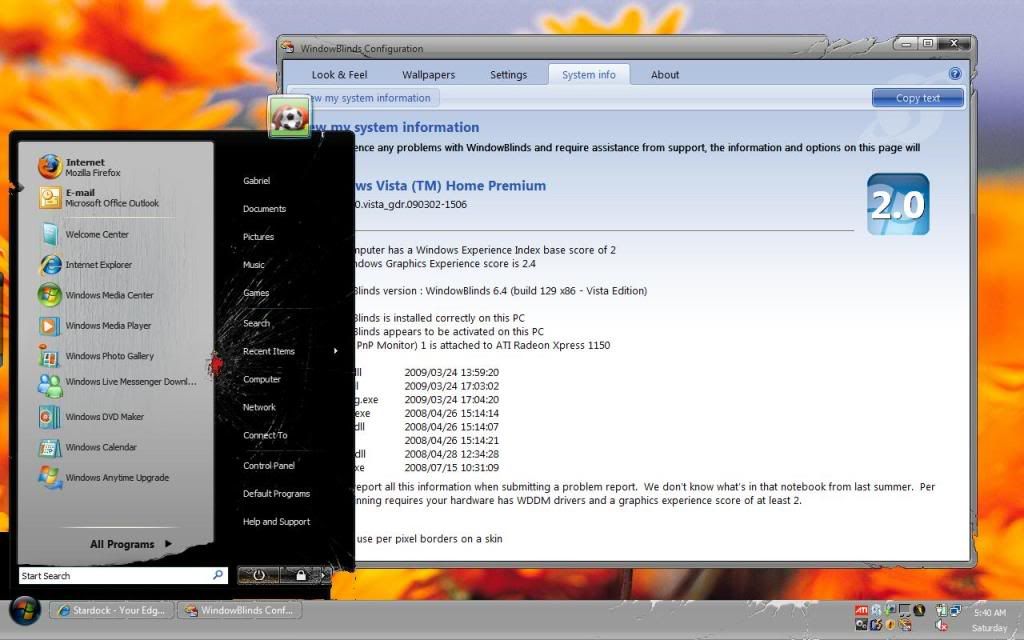
Well, I upgraded to Vista Premium because I was told that it would allow for WB transparency on the Taskbars and Startpanels. But it looks exactly the same ( No transparency ). I'm not sure what went wrong. I've tried applying a number of different styles and I'm getting the same lousy results (NO Transparency). I was told that non perpixel skins may be the reason. But how do I know whether a style was created with perpixel skins so that I can apply that one? And suppose I want to use a certain style, but change the Taskbar skin to a perpixel skin....How do I do so? Additionally, I was told that Aero on Vista needs to be turned on..... How do I do that, (I've looked all thru my Control Panel and cant find it. This whole Vista thing is just too damn tedious! Please help!

Btw: Here is my WB system info for those of you that may want it to diagnose my problem:

Your computer has a Windows Experience Index base score of 2
Your Windows Graphics Experience score is 2.4

WindowBlinds version : WindowBlinds 6.4 (build 129 x86 - Vista Edition)

WindowBlinds is installed correctly on this PC
WindowBlinds appears to be activated on this PC
(Generic PnP Monitor) 1 is attached to ATI Radeon Xpress 1150

Wblind.dll      2009/03/24 13:59:20
Wbsrv.dll      2009/03/24 17:03:02
Wbconfig.exe      2009/03/24 17:04:20
Wbload.exe      2008/04/26 15:14:14
Wbhelp.dll      2008/04/26 15:14:07
Tray.dll           2008/04/26 15:14:21
Wbload.dll           2008/04/28 12:34:28
Screen.exe      2008/07/15 10:31:09


5,809 views 5 replies
Reply #1 Top

Notice also that although the Edges of the explorer windows and a small spot in the middle of the startpanel ARE transperent, When I open WB and set them to be more transparent, it doesnt make them any more transparent. And there's STILL that white edge around the taskbar and the Black box under the bottom left side of the startpanel. The only thing that happened is that the taskbar got lighter, but not transarent. Here's a screenshot:

PLEASE HELP!

Reply #2 Top

First make sure all the drivers you reinstalled are up to date. Then rerun your Windows Experience Score. Try Running Vista with WB's unloaded and see if Aero is running. I sent you a PM.

Reply #3 Top

Just run windows update once and when its completed, right click "Computer" to open the properties page, click on " Windows Experience Index", now just below the score, click on "Update my score" or on "Refresh my score" if available. This may increase your Windows Experience Index Score.


    "Additionally, I was told that Aero on Vista needs to be turned on..... How do I do that, (I've looked all thru my Control Panel and cant find it."


For turning on Aero on Vista, simply right click on your desktop, click on Personalization, you can also access this through the Control Panel, now click on Windows Color and Appearance and select the checkbox- "Enable transparency".  I hope this would certainly help you.  


Reply #4 Top

Just run windows update once and when its completed, right click "Computer" to open the properties page, click on " Windows Experience Index", now just below the score, click on "Update my score" or on "Refresh my score" if available. This may increase your Windows Experience Index Score.


Like i said in one of the other few posts you have put up.

Reply #5 Top

Like i said in one of the other few posts you have put up.
And  I said the same in my PM's. Thanks for adding your vast experience into the mix,guys. Your help is appreciated.k6

I don't think he had even run Windows update at the time of this post and hasn't answered my last PM. I hope he gets it sorted out. Home Basic was not a pretty thing to put up with so I can't blame him for wanting to upgrade.